Bluetooth® Audio
Play audio from your compatible phone when it is paired to Bluetooth® HandsFreeLink ® (see ). Visit (US) to check phone compatibility. Canada customers can phone (855) 490-7351 for any HandsFreeLink® related inquiry.
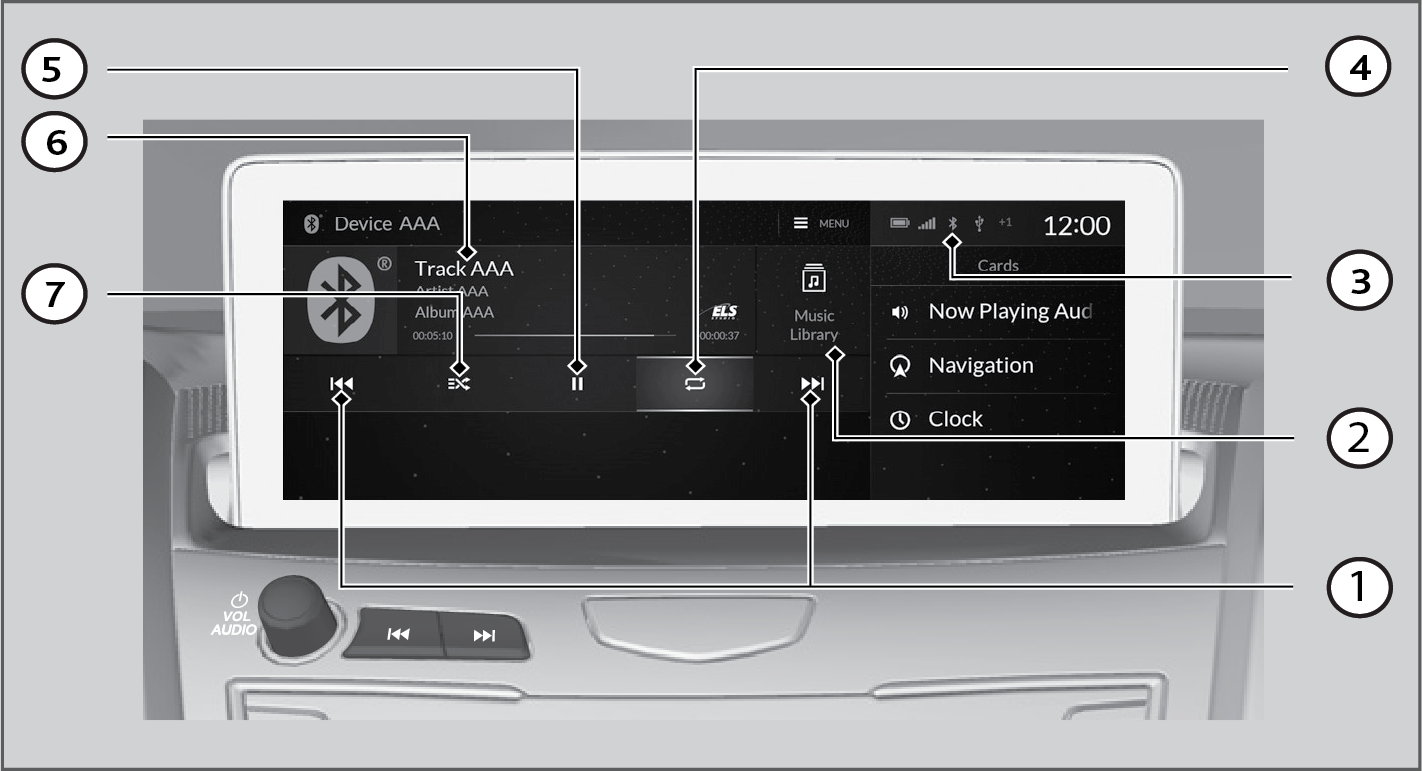
- Track Icons - Select to change tracks. Select and hold to move rapidly within a track.
- Music Library - Select to display the music search screen.
- Bluetooth® Indicator - Appears when your phone is connected to HFL.
- Repeat Icon - Select to repeat the current file.
- Play/Pause Icon
- Current Track Information - Select to display the play list screen.
- Random Icon - Select to play all files in the current folder in random order.
■Searching for Music
- Select Music Library.

- Select a search category (e.g., Albums).
- Select an item.
Note:
- Make sure the volume on your phone is properly adjusted.
- You may need to enable additional settings on your phone for playback.
- The resume/pause function and remote audio controls are not supported on all phones.
Download Manual