Dual-Zone Automatic Air-Conditioning
Air-conditioning information is displayed on the display.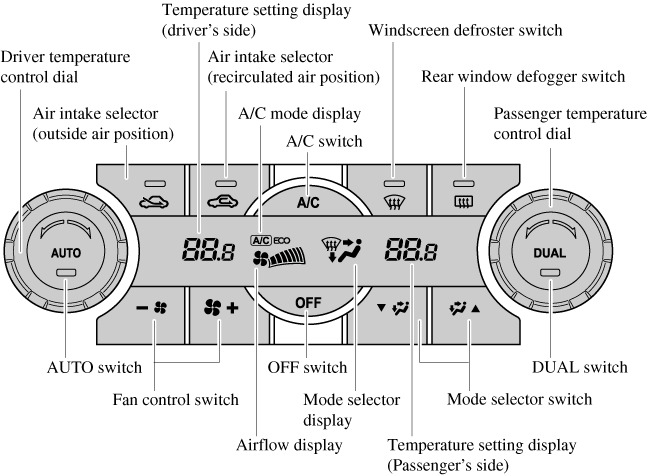
Control Switches
AUTO switch By pressing the AUTO switch the following functions will be automatically controlled in accordance with the selected set temperature:
OFF switch Pressing the OFF switch shuts off the air-conditioning system. Temperature control dial This dial controls temperature. Turn it clockwise for hot and anticlockwise for cold.
Fan control switch The fan has seven speeds. The selected speed will be displayed. Mode selector switch The desired airflow mode can be selected.
A/C switch Pressing the A/C switch while the AUTO switch is turned on will turn off the air-conditioning (cooling/dehumidifying functions). The air-conditioning can be turned on and off by pressing the A/C switch while the fan control switch is on. Changes as follows each time the A/C switch is pressed. A/C→A/C ECO→Stop
Air intake selector Outside or recirculated air positions can be selected. Press the switch to select outside/recirculated air positions. Recirculated air position ( ) Outside air is shut off. Use this position when going through tunnels, driving in congested traffic (high engine exhaust areas) or when quick cooling is desired. Outside air position (
 ) Outside air is allowed to enter the cabin. Use this mode for ventilation or windscreen defrosting.
DUAL switch Use the DUAL switch to change the mode between the individual operation (driver and passenger) and interconnection (simultaneous) modes. Individual operation mode (indicator light illuminated) The set temperature can be controlled individually for the driver and front passenger. Interconnection mode (indicator light turned off) The set temperature for the driver and front passenger is controlled simultaneously. Windscreen defroster switch Press the switch to defrost the windscreen and front door windows. Rear window defogger switch Press the rear window defogger switch to defrost the rear window.
- Airflow temperature
- Amount of airflow
- Selection of airflow mode
- Outside/Recirculated air selection
- Air conditioner operation
- A/C or A/C ECO selection
AUTO switch indicator light
- When on, it indicates auto operation, and the system will function automatically.
- If any of the following switches are operated while in auto control, the AUTO switch indicator turns off.
- Mode selector switch
- Fan control switch
- Windscreen defroster switch The functions for switches other than those operated continue to operate in auto control.
- When the DUAL switch is off: Turn the driver temperature control dial to control the temperature throughout the entire cabin.
- When the DUAL switch is on: Turn the driver or front passenger temperature control dial to independently control the temperature on each side of the cabin.
- The air-conditioning system changes to the individual operation mode (DUAL switch indicator light illuminated) by turning the front passenger temperature control dial even when the DUAL switch is off, which allows individual control of the set temperature for the driver and front passenger.
- With the airflow mode set to the
 position and the temperature control dial set at a medium temperature, heated air is directed to the feet and air at a comparably lower temperature will flow through the central, left and right vents.
 - To set the air vent to
 , press the windscreen defroster switch.
 - In the position, the outside air position is automatically selected.
- The air-conditioning operates when the A/C switch is pressed even if the fan is off.
- The A/C ECO function is designed to economize use of the air-conditioning system. “A/C ECO” is displayed to indicate that the air-conditioning system is operating at optimum control.
- The air conditioner may not function when the outside temperature approaches 0 °C (32 °F).
) Outside air is shut off. Use this position when going through tunnels, driving in congested traffic (high engine exhaust areas) or when quick cooling is desired. Outside air position () Outside air is allowed to enter the cabin. Use this mode for ventilation or windscreen defrosting.
Do not use the position in cold or rainy weather: Using the position in cold or rainy weather is dangerous as it will cause the windows to fog up. Your vision will be hampered, which could lead to a serious accident.
position in cold or rainy weather: Using the position in cold or rainy weather is dangerous as it will cause the windows to fog up. Your vision will be hampered, which could lead to a serious accident.Operation of Automatic Air-conditioning
- Press the AUTO switch. Selection of the airflow mode, air intake selector and amount of airflow will be automatically controlled.
- Use the temperature control dial to select a desired temperature. Press the DUAL switch or turn the front passenger temperature control dial to control the set temperature individually for the driver and front passenger.
- Setting the temperature to maximum hot or cold will not provide the desired temperature at a faster rate.
- When selecting heat, the system will restrict airflow until it has warmed to prevent cold air from blowing out of the vents.
Windscreen Defrosting and Defogging
Press the windscreen defroster switch. In this position, the outside air position is automatically selected, and the air conditioner automatically turns on. The air conditioner will directly dehumidify the air to the front windscreen and side windows. Airflow amount will be increased.
Set the temperature control to the hot or warm position when defogging ( position): Using the position with the temperature control set to the cold position is dangerous as it will cause the outside of the windscreen to fog up. Your vision will be hampered, which could lead to a serious accident.
position): Using the position with the temperature control set to the cold position is dangerous as it will cause the outside of the windscreen to fog up. Your vision will be hampered, which could lead to a serious accident.Use the temperature control dial to increase the air flow temperature and defog the windscreen more quickly.
Sunlight/Temperature Sensor
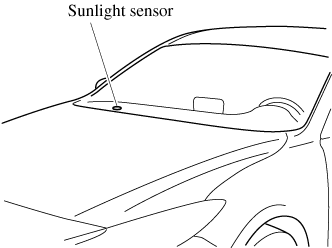
Sunlight sensor Do not place objects on the sunlight sensor. Otherwise, the interior temperature may not adjust correctly.
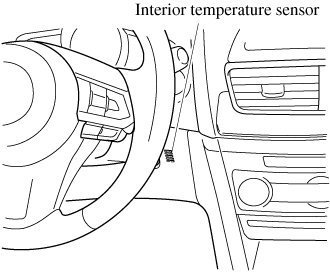
Interior temperature sensor Do not cover the interior temperature sensor. Otherwise, the interior temperature may not adjust correctly.
Download Manual