Adjustable Speed Limiter (Some Models)
The adjustable speed limiter is a function to prevent the vehicle from being driven at a vehicle speed faster than a set speed. The vehicle speed is controlled to kept it below the set speed even if the accelerator pedal is depressed. The adjustable speed limiter can be set between 30 km/h (20 mph) and 200 km/h (125 mph). The vehicle speed may exceed the set speed when the vehicle is driven on a down slope, however, the system notifies the driver by flashing the display and operating a warning sound.
The system consists of the adjustable speed limiter display and the speed limiter switch on the steering wheel. 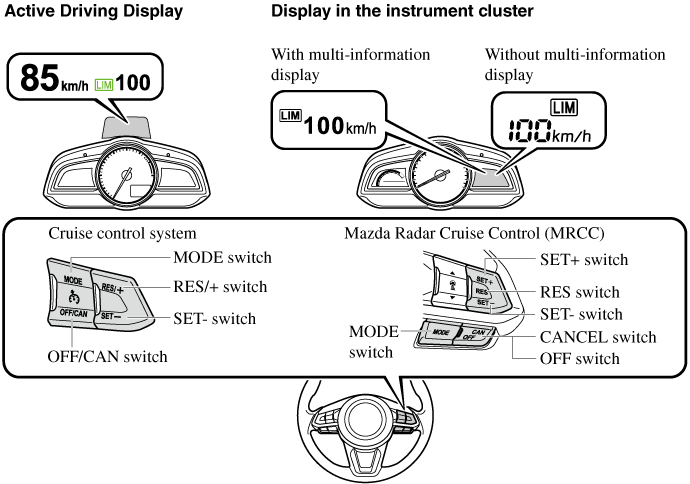
Always turn off the system when changing drivers: If the driver is changed and the new driver is unaware of the adjustable speed limiter function, the vehicle may not accelerate when the driver depresses the accelerator pedal, leading to an accident.
Adjustable Speed Limiter Display
The setting status of the adjustable speed limiter is displayed in the active driving display (Type A instrument cluster*1) or the display in the instrument cluster (Type B instrument cluster*1).
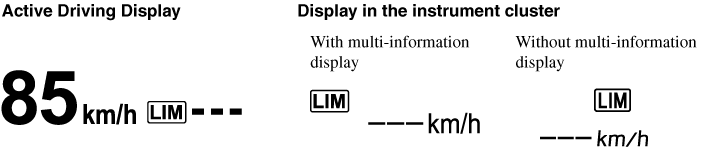 Setting display With cruise control Displays when the SET
 switch is operated and the speed is set. With Mazda Rader Cruise Control (MRCC) Displays when the SET or SET
 switch is operated and the speed is set.
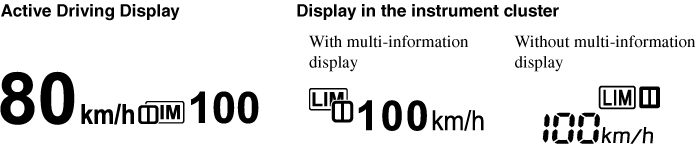
 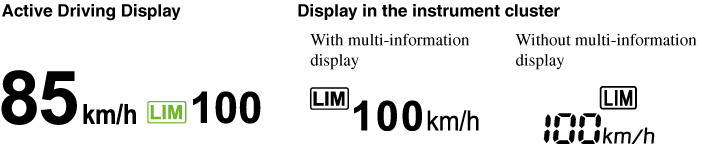 Cancel display Displays when any of the following operations is done and the system is temporarily cancelled.
- To determine which instrument cluster is equipped on your Mazda.
Setting display With cruise control Displays when the SET switch is operated and the speed is set. With Mazda Rader Cruise Control (MRCC) Displays when the SET or SET switch is operated and the speed is set. Cancel display Displays when any of the following operations is done and the system is temporarily cancelled.
- OFF/CAN switch is operated
- Accelerator pedal is strongly depressed
Adjustable Speed Limiter Main Indicator Light (Amber)/Adjustable Speed Limiter Set Indicator Light (Green)

The indicator light has two colours. Adjustable speed limiter main indicator light (amber) The indicator light illuminates amber when the MODE switch is pressed and the adjustable speed limiter is activated. Adjustable speed limiter set indicator light (green) The indicator light illuminates green when a speed has been set.
Speed Limiter Warning Beep
If the vehicle speed exceeds the set speed by about 3 km/h (2 mph) or more, a warning sound operates continuously and the adjustable speed limiter display flashes at the same time. The warning sound operates and the display flashes until the vehicle speed decreases to the set speed or less. Verify the safety of the surrounding area and adjust the vehicle speed by applying the brakes. Additionally, keep a safer distance from the vehicles behind you. 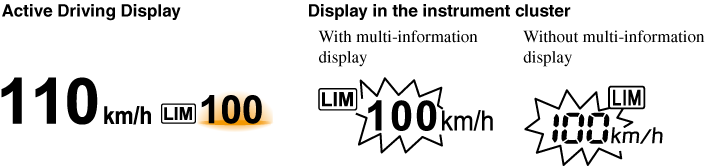
(With cruise control) If the set speed is set lower than the current vehicle speed by pressing the SET or RES/ switch, the warning beep is not activated for about 30 seconds even if the vehicle speed is faster than the newly set speed by 3 km/h (2 mph). Be careful not to drive over the set speed. (With Mazda Radar Cruise Control (MRCC)) If the set speed is set lower than the current vehicle speed by pressing the SET or RES switch, the warning beep is not activated for about 30 seconds even if the vehicle speed is faster than the newly set speed by 3 km/h (2 mph). Be careful not to drive over the set speed.
or RES/ switch, the warning beep is not activated for about 30 seconds even if the vehicle speed is faster than the newly set speed by 3 km/h (2 mph). Be careful not to drive over the set speed. (With Mazda Radar Cruise Control (MRCC)) If the set speed is set lower than the current vehicle speed by pressing the SET or RES switch, the warning beep is not activated for about 30 seconds even if the vehicle speed is faster than the newly set speed by 3 km/h (2 mph). Be careful not to drive over the set speed.When the system is temporarily cancelled by depressing the accelerator pedal fully, the adjustable speed limiter display shows the cancel display. If the vehicle speed exceeds the set speed by about 3 km/h (2 mph) or more while the cancel display is displayed, the set speed display flashes but the warning sound is not operated.
Activation/Deactivation
When the ignition is switched off, the system status before it was turned off is maintained. For example, if the ignition is switched off while the adjustable speed limiter is operating, the system will be operable when the ignition is switched ON the next time.
When the cruise control or Mazda Radar Cruise Control (MRCC) system becomes operable after pressing the MODE switch, press the mode switch again to switch to the adjustable speed limiter.
When the MODE switch is pressed while the adjustable speed limiter is operating, the system switches to the cruise control or Mazda Radar Cruise Control (MRCC) system.
Setting the System
Always verify the safety of the surrounding area when setting the adjustable speed limiter: If the speed is set lower than the current vehicle speed, the vehicle speed is decreased to the set speed. Verify the safety of the surrounding area and keep a safer distance between vehicles ahead and behind you.
- Press the MODE switch to turn the system on.
- (With cruise control) Press the SET to set the speed. When the current vehicle speed is 30 km/h (20 mph) or more, the speed is set to the current vehicle speed. When the current vehicle speed is less than 30 km/h (20 mph), the speed is set to 30 km/h (20 mph). (With Mazda Radar Cruise Control (MRCC)) Press the SET or SET to set the speed. When the current vehicle speed is 30 km/h (20 mph) or more, the speed is set to the current vehicle speed. When the current vehicle speed is less than 30 km/h (20 mph), the speed is set to 30 km/h (20 mph).
- (With cruise control) To increase the set speed, press the RES switch continuously. The set speed can be adjusted in 10 km/h (5 mph) increments. The set speed can also be adjusted in about 1 km/h (1 mph) increments by pressing the RES switch momentary. For example, the set speed increases about 4 km/h (4 mph) by pressing the RES switch 4 times. (With Mazda Radar Cruise Control (MRCC)) To increase the set speed, press the SET switch continuously. The set speed can be adjusted in 10 km/h (5 mph) increments. The set speed can also be adjusted in about 1 km/h (1 mph) increments by pressing the SET switch momentary. For example, the set speed increases about 4 km/h (4 mph) by pressing the SET switch 4 times.
- To decrease the set speed, press the SET switch continuously. The set speed can be adjusted in 10 km/h (5 mph) decrements. The set speed can also be adjusted in about 1 km/h (1 mph) increments by pressing the SET switch momentary. For example, the set speed decreases about 4 km/h (4 mph) by pressing the SET switch 4 times.
- With cruise control When the vehicle set speed is displayed in the instrument cluster, press the RES/ switch to set the displayed vehicle speed. With Mazda Radar Cruise Control (MRCC) When the vehicle set speed is displayed in the instrument cluster, press the RES switch to set the displayed vehicle speed.
- The system is temporarily cancelled when the vehicle is accelerated by depressing the accelerator pedal strongly, however, it resumes when the vehicle speed decreases to the set speed or less.
- The vehicle speed may exceed the set speed on a down slope.
Temporarily Cancelling the System
The system is temporarily cancelled (stand-by status) when any of the following operations is done while the adjustable speed limiter is displayed.
switch to resume the operation at the previous set speed. The adjustable speed limiter display remains displayed. With Mazda Radar Cruise Control (MRCC) Press the RES switch to resume the operation at the previous set speed. The adjustable speed limiter display remains displayed.
- OFF/CAN switch is pressed
- Accelerator pedal is strongly depressed
switch to resume the operation at the previous set speed. The adjustable speed limiter display remains displayed. With Mazda Radar Cruise Control (MRCC) Press the RES switch to resume the operation at the previous set speed. The adjustable speed limiter display remains displayed.
- (With cruise control) The set speed can be set by pressing the SET switch while the system is in stand-by status. (With Mazda Radar Cruise Control (MRCC)) The set speed can be set by pressing the SET or SET switch while the system is in stand-by status.
- The adjustable speed limiter is not cancelled by depressing the brake pedal.
Download Manual