Doors and Locks
You can use the power door lock control or the remote control to lock and unlock your doors. This is also true for the tailgate if your vehicle comes with power tailgate lock. See Tailgate Lock (page 68).
Note: Always take your keys and lock all doors when leaving your vehicle.
Note: Do not use the door latch assembly to attach any accessory, such as handles or steps, as this can cause damage to your vehicle.
The power door lock control is on the driver and front passenger door panels.
E196954
Press the button to unlock the driver door.
Press the button again within three seconds to unlock all doors. The direction indicators will flash.
With the ignition off, press and hold both the lock and unlock buttons on the remote control for three seconds to change between driver door or all door unlock mode. The direction indicators will flash twice to indicate a change to the unlocking mode. Driver door mode only unlocks the driver door when you press the unlock button once. All door mode unlocks all doors when you press the unlock button once. The unlocking mode applies to the remote control and Intelligent Access Key.
Press the button to lock all doors. The direction indicators will flash.
Press the button again within three seconds to confirm that all the doors are closed. The doors will lock again, the horn will sound and the direction indicators will
flash if all the doors are closed.
An LED on the power door lock control illuminates when you lock the door.
The power door lock switch no longer operates after 20 seconds. You must unlock your vehicle with the remote control, or switch the ignition on to restore function to these switches.
Turn the top of the key toward the front of your vehicle once to lock all doors. Turn the top of the key toward the rear of your vehicle once to unlock the driver door only.
If the central locking function does not operate, lock the doors individually using the key in the position shown.
63
Pull the interior door handle twice to unlock and open a rear door. The first pull unlocks the door and the second pull opens the door.
Activating Intelligent Access (If Equipped)
You can unlock and lock the vehicle without taking the keys out of your pocket or purse when your passive key is within
3 ft (1 m) of your vehicle. Passive entry uses a sensor on the back of the front door handle for unlocking and a separate sensor on the face of each door handle for locking.
The system does not function if:
• The vehicle battery has no charge.
• The key battery has no charge.
• The key frequencies have jammed.
Note: The system is available on the front doors only.
Note: The system may not function if the key is close to metal objects or electronic devices, for example keys or a cell phone.
Note: If the system does not function, use the key blade to lock and unlock your vehicle. See Remote Control (page 51).
Note: The system also unlocks and locks the luggage compartment.
E248555
With your passive key within 3 ft (1 m) of your vehicle, touch the unlock sensor on the back of the door handle for a brief period and then pull on the door handle to unlock, being careful not to touch the lock sensor at the same time, or to pull the door handle too quickly. The system requires a brief delay to authenticate your passive key.
64
E248556
With your passive key within 3 ft (1 m) of your vehicle, touch the outer door handle lock sensor for approximately one second to lock, being careful not to touch the unlock sensor on the back of the door handle at the same time. After locking, you can immediately pull on the door handle to confirm locking occurred without inadvertently unlocking.
Note: Do not use the outside door handle as an anchor-point for the cargo strap.
This helps to prevent you from locking yourself out of your vehicle if the key is still in the ignition.
When you open one of the front doors and lock your vehicle with the power door lock control, all the doors will lock then unlock and the horn will sound twice if the key is still in the ignition.
You can still lock your vehicle with the key in the ignition by:
If both front doors are closed, you can lock your vehicle by any method, regardless of whether the key is in the ignition or not.
Mislock (If Equipped)
The horn sounds twice and the direction indicators do not flash:
You can switch this feature on or off in the information display. See General Information (page 96).
Autolock (If Equipped)
Autolock locks all the doors when:
Autolock repeats when:
You can enable or disable the autolock feature in the information display or an authorized dealer can do it for you. See General Information (page 96).
65
Autounlock unlocks all the doors when:
• The ignition is on, all the doors are closed, and your vehicle has been moving at a speed greater than 4 mph (7 km/h).
• Your vehicle comes to a stop and you switch the ignition off or to the accessory position.
• You open the driver door within 10 minutes of switching the ignition off or to accessory.
Note: The doors do not autounlock if you electronically lock your vehicle after you switch the ignition off and before you open the driver door.
You can enable or disable the autounlock feature in the information display or an authorized dealer can do it for you. See General Information (page 96).
KEYLESS ENTRY (IF EQUIPPED)
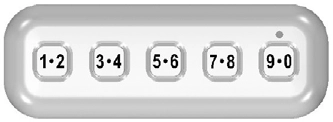
The keypad is near the driver window and illuminates when you press a button.
Note: If you enter your entry code too fast on the keypad, the unlock function may not work. Re-enter your entry code more slowly.
E313716
You can use the keypad to:
• Lock or unlock the doors and liftgate.
• Program and erase user codes.
• Arm and disarm the anti-theft alarm.
You can operate the keypad with the factory-set five-digit entry code. The code is on the owner’s wallet card in the glove box. You can also create one of your own five-digit personal entry codes.
To create your own personal entry code:
The doors lock, then unlock to confirm that programming was successful.
• Do not set a code that uses five of the same number.
• Do not use five numbers in sequential order.
• The factory-set code works even if you set your own personal code.
The personal code erases and only the factory-set five-digit code works.
The keypad goes into an anti-scan mode if you enter the wrong code seven times, 35 consecutive button presses. This mode disables the keypad for one minute and the keypad lamp flashes.
The anti-scan feature turns off after one minute of keypad inactivity.
66
Enter the factory-set five-digit code or your personal code. You must press each number within five seconds of each other. The interior lamps illuminate.
Note: All doors unlock if you disable the two-stage unlocking feature. See General Information (page 96).
Enter the factory-set code or your personal code, then press the 3·4 control within five seconds.
Press and hold 7·8 and 9·0 at the same time with the driver door closed. You do not need to enter the keypad code first.
Enter the factory-set code or your personal code, then press the 5·6 control within five seconds.
67
Download Manual