Programmable memory buttons
General information
The iDrive functions can be stored on the programmable memory buttons and called up directly, e.g., radio stations, navigation destinations, phone numbers and menu entries.
Settings are stored for the profile currently in use.
Without navigation system and telephone Only radio stations can be stored on the buttons, refer to user's manual for Navigation, Entertainment, Communication.
Saving a function
1. Highlight the function via the iDrive.
2.  Press and hold the desired button, until a signal sounds.
Running a function
 Press button.
The function will work immediately.
This means, e.g., that the number is dialed when a phone number is selected.
Displaying the button assignment
Touch buttons with bare fingers. Do not wear gloves or use objects.
The key assignment is displayed at top edge of screen.
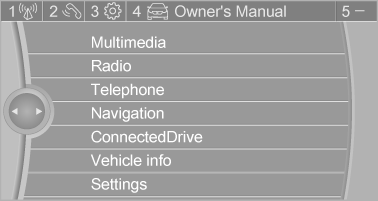
Deleting the button assignments
1. Press buttons 1 and 8 simultaneously for approx. five seconds.
2. "OK"
Deleting personal in the vehicle
The concept
Depending on the usage, the vehicle saves personal data, such as stored radio stations.
These personal data can be permanently deleted through iDrive.
General information
Depending on the equipment package, the following data can be deleted:
- Personal Profile settings.
- Stored radio stations.
- Stored Favorites buttons.
- Travel and computer information.
- Music collection.
- Navigation, e.g. stored destinations.
- Phone book.
- Online data, e.g. Favorites, cookies.
- Voice notes.
- Login accounts.
- RemoteApp smartphone tethering.
Altogether, the deletion of the data can take up to 30 minutes.
Functional requirement
Data can only be deleted while stationary.
Deleting data
Heed and follow the instructions on the Control Display.
1. Switch on the ignition.
2. "Settings" 3. Open "Options".
4. "Delete personal data" 5. "Continue" 6. "OK"
Download Manual