Interior features
Cup holder
WARNING - Hot liquids
- • Do not place uncovered cups of hot liquid in the cup holder while the vehicle is in motion. If the hot liquid spills, you may burn yourself. Such a burn to the driver could lead to loss of control of the vehicle.
- • To reduce the risk of personal injury in the event of sudden stop or collision, do not place uncovered or unsecured bottles, glasses, cans, etc., in the cup holder while the vehicle is in motion.
WARNING
Keep cans or bottles out of direct sun light and do not put them in a vehicle that is heated up. It may explode.
CAUTION
When cleaning spilled liquids, do not dry the cup holder at high temperatures. This may damage the chrome part of the cup holder.
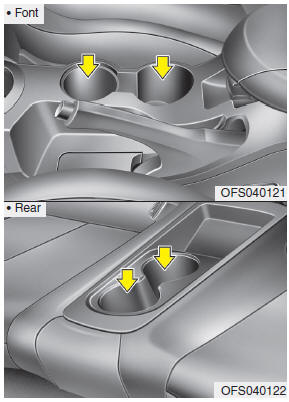
Cups or small beverage cans may be placed in the cup holders.
Sunvisor
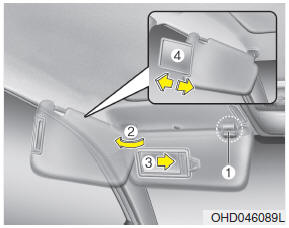
Use the sunvisor to shield direct light through the front or side windows.
To use a sunvisor, pull it downward. To use a sunvisor for a side window, pull it downward, unsnap it from the bracket (1) and swing it to the side (2).
To use the vanity mirror, pull down the visor and open the mirror cover (3).
The ticket holder (4) is provided to hold tickets such as tollgate ticket.
CAUTION
- • Always have the switch in the off position when the vanity mirror lamp is not in use. If the sunvisor is closed without the lamp off, it may discharge the battery or damage the sunvisor.
- • Always use the sunvisor extension, after swing the sunvisor to the side.
WARNING
For your safety, do not obstruct your vision when using the sunvisor.
Power outlet
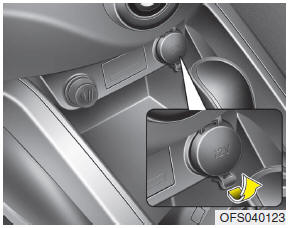
The power outlet is designed to provide power for mobile telephones or other devices designed to operate with vehicle electrical systems. The devices should draw less than 10 amps with the engine running.
CAUTION
- • Use the power outlet only when the engine is running and remove the accessory plug after use. Using the accessory plug for prolonged periods of time with the engine off could cause the battery to discharge.
- • Only use 12V electric accessories which are less than 10A in electric capacity.
- • Adjust the air-conditioner or heater to the lowest operating level when using the power outlet.
- • Close the cover when not in use.
- • Some electronic devices can cause electronic interference when plugged into a vehicle’s power outlet. These devices may cause excessive audio static and malfunctions in other electronic systems or devices used in your vehicle.
WARNING
Do not put a finger or a foreign element (pin, etc.) into a power outlet and do not touch with a wet hand. You may get an electric shock.
Clock
WARNING
Do not adjust the clock while driving. You may lose your steering control and cause severe personal injury or accidents.
Type A
This allows you to set the time format and the clock.
• Time format: Change the time format between the “12h” and “24h”.
• Setting the clock
- Press ▲ or ▼ on the left side of the clock to set the hour.
- Press ▲ or ▼ on the right side of the clock to set the minute.
- If you set the [Time format] to [12h], set the [am] or [pm].
Type B
This allows you to set the time format and the summer time.
• Time format: Change the time format between the “12h” and “24h”.
• Summer time: Set the summer time between the “On” and “Off”. The unit sets the clock automatically by detecting the summer time whether it is the summer time season or not. Even though the summer time is set to "On", the unit sets the clock to normal time (not +1 hour) when it's not summer time season.
Shopping bag holder
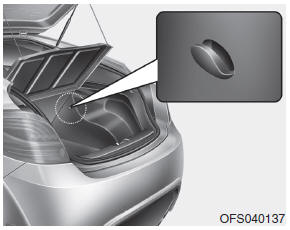
CAUTION
- Do not hang a bag weighing more than 3 kg (7 lbs.). It may cause damage to the shopping bag holder.
- Do not hang the frail objects when you drive rough road, the objects may be damaged.
Clothes hanger
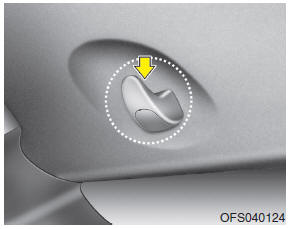
CAUTION
Do not hang heavy clothes, since those may damage the hook.
Floor mat anchor(s)
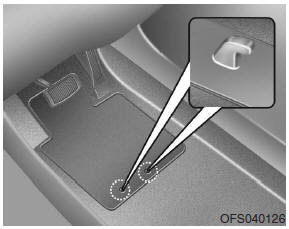
When using a floor mat on the front floor carpet, make sure it attaches to the floor mat anchor(s) in your vehicle. This keeps the floor mat from sliding forward.
WARNING
The floor mat must be properly anchored so that it will not interfere with the operation of the accelerator pedal. Any interference with the accelerator pedal could cause the accelerator pedal to be unable to return to the idle position. A pedal that cannot return to the idle position could lead to an accident which may result in severe personal injury or death.
WARNING
The following must be observed when installing ANY floor mat to the vehicle, so that it will not interfere with the pedal.
• Ensure that the floor mats are securely attached to the vehicle’s floor mat anchor(s) before driving the vehicle.
• Do not use ANY floor mat that cannot be firmly attached to the vehicle’s floor mat anchors.
• Do not stack floor mats on top of one another (e.g. all-weather rubber mat on top of a carpeted floor mat). Only a single floor mat should be installed in each position.
IMPORTANT – Your vehicle was manufactured with driver’s side floor mat anchors that are designed to securely hold the floor mat in place. To avoid any interference with pedal operation, HYUNDAI recommends that only the HYUNDAI floor mat designed for use in your vehicle be installed.
Aux, USB and iPod® port
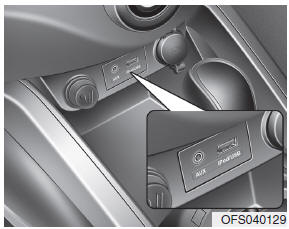
If your vehicle has an aux and/or USB(universal serial bus) port or iPod port, you can use an aux port to connect audio devices and a USB port to plug in a USB, or use the HYUNDAI accessory ipod cable the plugs into both ports to connect an ipod.
✽ NOTICE
When using a portable audio device connected to the power outlet, noise may occur during playback. If this happens, use the power source of the portable audio device.
❈ iPod® is a trademark of Apple Inc.
Navigation system
The navigation system ascertains the present position of your vehicle by using information from satellites and guides you to the place you assign as the destination.
Detailed information for the navigation system is described in a seperate manual.
Bluetooth hands-free
You can use the phone wirelessly by using the Bluetooth.
Detailed information for the Bluetooth hands-free is described in the “Audio section” in this chapter or in the manual supplied separately.
Download Manual