Climate Control System
The automatic climate control system maintains the interior temperature you select. The system also selects the proper mix of heated or cooled air that raises or lowers the interior temperature to your preference as quickly as possible.
Use the system when the engine is running.
Models without SYNC button
Models with SYNC button
 (on/off) button to cancel.
uuClimate Control SystemuUsing Automatic Climate Control
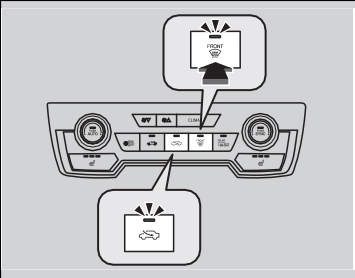
Press the (recirculation) or (fresh air) button to switch the mode depending on environmental conditions.
Recirculation mode (indicator on): Recirculates air from the vehicle's interior through the system.
Fresh air mode (indicator on): Maintains outside ventilation. Keep the system in fresh air mode in normal situations.
Defrosting the Windshield and Windows
Pressing the  (windshield defroster) button turns the air conditioning system on and automatically switches the system to fresh air mode.
Press the  button again to turn off, the system returns to the previous settings.
Continued 227
uuClimate Control SystemuUsing Automatic Climate Control
228
uuClimate Control SystemuSynchronization Mode *
You can set the temperature synchronously for the driver's side and the passenger's side in synchronization mode.
u The system switches to synchronization mode.
Press the SYNC button to return to dual mode.
* Not available on all models
uuClimate Control SystemuAutomatic Climate Control Sensors
The automatic climate control system is equipped with sensors. Do not cover or spill any liquid on them.
Download Manual