Performance and Maintenance
The Traction Control System (TCS) limits wheel spin. The system is on when the vehicle is started.
The StabiliTrak/Electronic Stability Control (ESC) system assists with directional control of the vehicle in difficult driving conditions. The system is on when the vehicle is started.
 on the center stack.
i illuminates in the instrument cluster.
 . i in the instrument cluster will turn off.
 on the center stack until i
and  illuminate in the instrument cluster.
 . i and
  turn off in the instrument cluster.
StabiliTrak/ESC will automatically turn on if the vehicle exceeds
56 km/h (35 mph) in normal mode. TCS will remain off until  is pressed or until the ignition is turned off and then back on.
See Traction Control/Electronic Stability Control 0 199.
i and illuminate in the instrument cluster.
 . i and
  in the instrument cluster will turn off.
 on the center stack, until i
and  illuminate in the instrument cluster.
 . i and
  turn off in the instrument cluster.
StabiliTrak/ESC will automatically turn on if the vehicle exceeds
56 km/h (35 mph) in normal mode. TCS will remain off until  is pressed or until the ignition is turned off and then back on.
See Traction Control/Electronic Stability Control 0 199.
This vehicle may have a Tire Pressure Monitor System (TPMS).
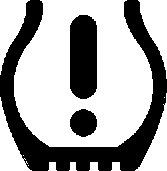
The low tire pressure warning light alerts to a significant loss in pressure of one of the vehicle's tires. If the warning light comes on, stop as soon as possible and inflate the tires to the recommended pressure shown on the Tire and Loading Information label. See Vehicle Load Limits 0 168. The warning light will remain on until the tire pressure is corrected.
The low tire pressure warning light may come on in cool weather when the vehicle is first started, and then turn off as the vehicle is driven. This may be an early indicator that the tire pressures are getting low and the tires need to be inflated to the proper pressure.
The TPMS does not replace normal monthly tire maintenance. Maintain the correct tire pressures.
See Tire Pressure Monitor System
0 286.
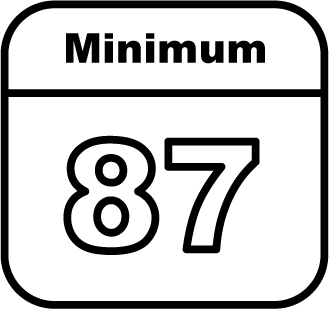
Regular Unleaded Fuel
Use only Regular 87 octane — (R+M)/2 — or higher unleaded gasoline in your vehicle. TOP TIER Detergent Gasoline is recommended. Do not use gasoline with an octane rating lower as it will result in reduced performance and lower fuel economy. See Recommended Fuel 0 216.
For diesel vehicles, do not use gasoline. See “Fuel for Diesel Engines” in the Duramax diesel supplement.
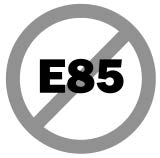
No E85 or FlexFuel
Gasoline-ethanol fuel blends greater than E15 (15% ethanol by volume), such as E85, cannot be used in this vehicle.
The engine oil life system calculates engine oil life based on vehicle use and, on most vehicles, displays a Driver Information Center (DIC) message when it is necessary to change the engine oil and filter. The oil life system should be reset to 100% only following an oil change.
Resetting the Oil Life System
To reset the engine oil life system:
The oil life system can also be reset as follows:
See Engine Oil Life System 0 248.
Driving habits can affect fuel mileage. Here are some driving tips to get the best fuel economy possible:
U.S.: 1-800-243-8872
TTY Users (U.S. Only):
1-888-889-2438
Canada: 1-800-268-6800
New Chevrolet owners are automatically enrolled in the Roadside Assistance Program.
See Roadside Assistance Program
Download Manual