Vehicle Features
Radio(s)
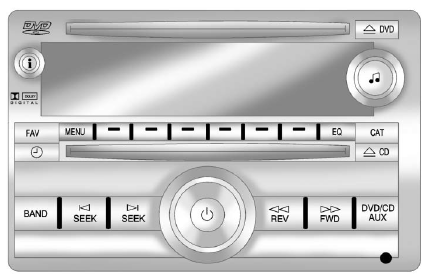
Radio with CD, DVD, and USB Port
 : Press to turn the system on and off. Turn to increase or decrease the volume.
BAND: Press to choose between FM, AM, or XM™, if equipped.
 : Select radio stations.
 Seek or scan stations.
 : Change the display between the radio station frequency and the time, if equipped. While the ignition is off, press
  to display the time.
For more information about these and other radio features, see Operation .
For vehicles with a Rear Seat Entertainment (RSE) System and Rear Seat Audio (RSA) System, see Rear Seat Entertainment (RSE) System and Rear Seat Audio (RSA) System for more information.
Storing a Favorite Station
► maximum of 36 stations can be stored as favorites using the six softkeys located below the radio station frequency tabs and by using the radio FAV button. Press FAV to go through up to six pages of favorites, each having six favorite stations available per page.
Each page of favorites can contain any combination of AM, FM, or XM stations.
See AM-FM Radio .
Setting the Clock
To set the time and date for the radio with CD, DVD, and USB Port:
1. Turn the ignition key to ACC/ACCESSORY or ON/RUN, then press  to turn the radio on.
2. Press  to display HR, MIN, MM, DD, YYYY (hour, minute, month, day, and year).
3. Press the pushbutton located under any one of the labels to be changed.
4. To increase or decrease the time or date, turn  clockwise or counterclockwise.
For detailed instructions on setting the clock for the vehicle's specific audio system, see Clock .
Satellite Radio
Vehicles with an XM™ satellite radio tuner and a valid XM satellite radio subscription can receive XM programming.
XM Satellite Radio Service
XM is a satellite radio service based in the 48 contiguous United States and 10 Canadian provinces. XM satellite radio has a wide variety of programming and commercial-free music, coast to coast, and in digital-quality sound. A fee is required to receive the XM service.
For more information refer to:
► www.xmradio.com or call
1-800-929-2100 (U.S.).
► www.xmradio.ca or call
1-877-438-9677 (Canada).
For more information, see Satellite Radio .
Portable Audio Devices
This vehicle may have an auxiliary input located on the radio faceplate and a USB port located in the instrument panel storage area.
External devices such as iPods™, laptop computers, MP3 players, CD changers, USB storage devices, etc. can be connected to the auxiliary port using a 3.5mm (1/8 in) input jack or the USB port depending on the audio system.
See Auxiliary Devices .
Bluetooth®
The Bluetooth system allows users with a Bluetooth-enabled cell phone to make and receive hands-free calls using the vehicle audio system, microphone, and controls.
The Bluetooth-enabled cell phone must be paired with the in-vehicle Bluetooth system before it can be used in the vehicle. Not all phones will support all functions.
See Bluetooth .
Steering Wheel Controls
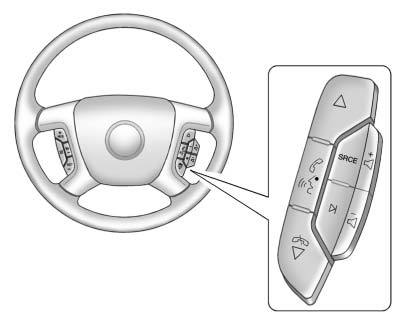
Vehicles with audio steering wheel controls could differ depending on the vehicle's options. Some audio controls can be adjusted at the steering wheel.
 Press to select preset or favorite radio stations, select tracks on a CD/DVD, or select tracks and navigate folders on an iPod® or USB device.
 Press to silence the vehicle speakers only. Press again to turn the sound on.
For vehicles with Bluetooth or OnStar® systems, press and hold for longer than two seconds to interact with those systems.
See Bluetooth and OnStar Overview for more information.
 Press to reject an incoming call, or end a current call.
SRCE: Press to switch between the radio, CD, and for equipped vehicles, DVD, front auxiliary, and rear auxiliary.
For vehicles with the navigation system, press and hold this button for longer than one second to initiate voice recognition.
See “Voice Recognition” in the navigation manual for more information.
 Press to go to the next radio station while in AM, FM, or XM™.
Press to go to the next track or chapter while sourced to the CD or DVD slot.
Press to select a track or a folder when navigating folders on an iPod or USB device.
 Press to increase or to decrease the volume.
See Steering Wheel Controls for more information.
Cruise Control
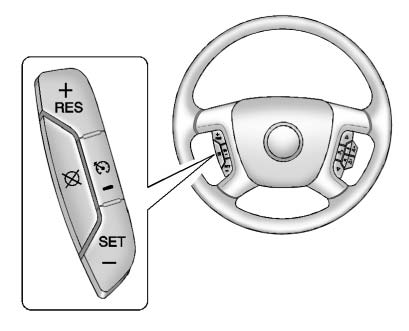
 Press to turn cruise control on and off. The indicator comes on when cruise control is on.
RES: Press briefly to make the vehicle resume to a previously set speed, or press and hold to accelerate.
SET– : Press to set the speed and activate cruise control or to make the vehicle decelerate.
 : Press to disengage cruise control without erasing the set speed from memory.
See Cruise Control .
Navigation System
If the vehicle has a navigation system, there is a separate navigation system manual that includes information on the radio, audio players, and navigation system.
The navigation system provides detailed maps of most major freeways and roads. After a destination has been set, the system provides turn-by-turn instructions for reaching the destination. In addition, the system can help locate a variety of points of interest (POIs), such as banks, airports, restaurants, and more.
See the navigation system manual for more information.
Ultrasonic Parking Assist
If available, Ultrasonic Rear Parking Assist (URPA) uses sensors on the rear bumper to detect objects while parking the vehicle. It operates at speeds less than 8 km/h (5 mph).
URPA uses audible beeps to provide distance and system information.
Keep the sensors on the vehicle's rear bumper clean to ensure proper operation.
See Ultrasonic Parking Assist for more information.
Storage Compartments
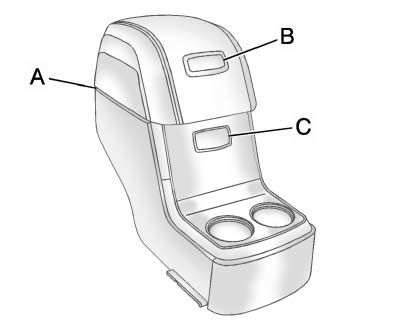
For vehicles with a second row center console, press the buttons (B) or (C) to access storage areas.
Lift up on (A) for additional storage area.
See Floor Console Storage .
Power Outlets
The vehicle has 12-volt accessory power outlets which can be used to plug in electrical equipment, such as a cell phone or MP3 player.
The power outlets are located:
► On the instrument panel below the climate controls.
► Inside the center floor console.
► At the rear of the center floor console.
► In the rear cargo area.
To use the outlets, remove the cover.
See Power Outlets .
Sunroof
The ignition must be in ON/RUN or ACC/ACCESSORY to operate the sunroof and power sunshade.
See Retained Accessory Power (RAP) .
The vehicle may have a sunroof over the front seats and a rear sunroof over the second row seats.
The rear sunroof does not open.
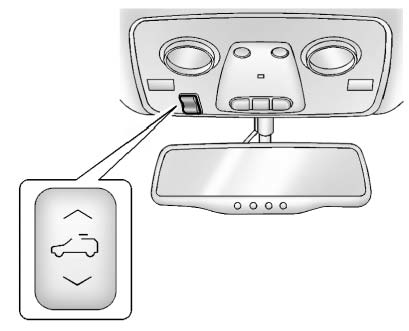
The switch to operate the front sunroof is on the headliner above the rearview mirror.
Vent: Press the front or rear of the switch to vent or close the sunroof.
Express-open/Express-close:
From the closed position, press and release the rear or front of the switch to express-open or express-close the sunroof.
Manual Sunshade
The front sunshade must be opened and closed manually.
To open the sunshade, press the button on the sunshade handle to release it and guide it back.
To close the sunshade, pull the sunshade forward until it latches.
For more information see Sunroof .
Download Manual