Additional Storage Features
Cargo Cover
For vehicles with a cargo cover, it can be used to cover items in the rear of the vehicle. To install the cover, place the loops on each corner of the cover on the four hooks in the rear of the vehicle.
The cover should be stored securely when not in use.
Cargo Tie-Downs
Four cargo tie-downs are located in the rear compartment of the vehicle.
The tie-downs can be used to secure small loads.
Cargo Management System
This vehicle has a cargo management system located in the rear.
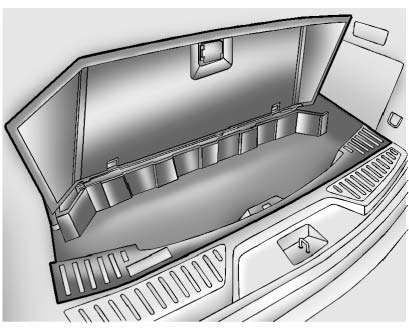
To remove the cargo management cover:
1. Open the cover. It remains open when lifted.
2. Pull the cover up making sure to unhook the hinges at the rear of the cover.
An improperly latched and closed cargo cover, or cargo cover left in the open position, could be thrown about the vehicle during a crash or sudden maneuver.
Someone could be injured.
Be sure to return the cover to the closed position and latch before driving. If the cover is removed, always store it outside of the vehicle. When it is replaced, always be sure that it is securely reattached.
3. Remove the cover from the vehicle and store outside of the vehicle.
Convenience Net
For vehicles with a convenience net in the rear, use it to store small loads as far forward as possible.
The net should not be used to store heavy loads.
Download Manual