Using the driving support systems
P. 274
P. 238
P. 289
P. 294
P. 310
4-5. Using the driving support systems
251
Radar sensor Front camera
252 4-5. Using the driving support systems
WARNING
Observe the following precautions.
Otherwise, the front camera may not operate properly, possibly leading to an accident resulting in death or serious injury.
A: From the top of the windshield to approximately 0.4 in. (1 cm) below the bottom of the front camera
B: Approximately 7.9 in. (20 cm) (Approximately 4.0 in. [10 cm] to the right and left from the center of the front camera)
After replacing the windshield, the front camera must be recalibrated. Con- tact your Toyota dealer for details.
When cleaning the inside of the windshield, do not allow glass cleaner to contact the lens of the front camera. Also, do not touch the lens.
If the lens is dirty or damaged, contact your Toyota dealer.
4-5. Using the driving support systems
253
254 4-5. Using the driving support systems
For vehicles sold in the U.S.A.
4-5. Using the driving support systems
For vehicles sold in Canada
255
256 4-5. Using the driving support systems
A system may be temporarily unavailable or there may be a malfunction in the system.
If the message does not disappear, contact your Toyota dealer.
|
Situation |
Action |
|
When the area around a camera is covered with dirt, moisture (fogged up, covered with condensation, ice, etc.), or other foreign matter |
Using the wiper and A/C function, remove the dirt and other attached matter. ( P. 393, 399, 407) |
|
When the temperature around the front camera is outside of the opera- tional range, such as when the vehi- cle is in the sun or in an extremely cold environment |
If the front camera is hot, such as after the vehicle had been parked in the sun, use the air conditioning sys- tem to decrease the temperature around the front camera. If a sunshade was used when the vehicle was parked, depending on its type, the sunlight reflected from the surface of the sunshade may cause the temperature of the front camera to become excessively high. |
|
If the front camera is cold, such after the vehicle is parked in an extremely cold environment, use the air condi- tioning system to increase the tem- perature around the front camera. |
|
|
The area in front of the front camera is obstructed, such as when the hood is open or a sticker is attached to the part of the windshield in front of the front camera. |
Close the hood, remove the sticker, etc. to clear the obstruction. |
|
When “Pre-Collision System Unavailable See Owner's Manual” is displayed |
Check whether there is attached materials on the radar sensor and radar sensor cover, and if there is, remove it. |
4-5. Using the driving support systems
257
If the message does not disappear, contact your Toyota dealer.
258 4-5. Using the driving support systems
When the system determines that the possibility of a frontal collision is high, a buzzer will sound and a warning message will be displayed on the multi- information display to urge the driver to take evasive action.
When the system determines that the possibility of a frontal colli- sion is high, the system applies greater braking force in relation to how strongly the brake pedal is depressed.
4-5. Using the driving support systems
259
If the system determines that the possibility of a frontal collision is high and that there is sufficient space for the vehicle to be steered into within its lane, and the driver has begun evasive maneuver or steering, emergency steering assist will assist the steering move- ments to help enhance the vehicle stability and for lane departure prevention.
During operation, the indicator will illuminate in green.
If the system determines that there is a high possibility of a collision in the following situations, it will assist with Pre-collision warning and, if necessary Pre-collision braking.
Depending on the configuration of the intersection, it may not be possible to support.
260 4-5. Using the driving support systems
4-5. Using the driving support systems
261
WARNING
262 4-5. Using the driving support systems
4-5. Using the driving support systems
263
Vehicles without a smart key system: The system is automatically enabled each time the engine switch is turned to the “ON” position.
Vehicles with a smart key system: The system is automatically enabled each time the engine switch is turned to IGNITION ON mode.
264 4-5. Using the driving support systems
The warning timing setting is retained when the engine switch is turned off. However, if the pre-collision system is disabled and re-enabled, the operation timing will return to the default setting (middle).
If late is selected, emergency steering assist would not operate in case of an emergency.
Early Middle
This is the default setting.
4-5. Using the driving support systems
265
The pre-collision system is enabled and the system determines that the pos- sibility of a frontal collision with a detected object is high.
The system may not operate in the following situations:
The operation speeds and operation cancellation for each function is listed below.
|
Detectable objects |
Vehicle speed |
Relative speed between your vehicle and object |
|
Preceding and stopped vehicles |
Approx. 7 to 110 mph (10 to 180 km/h) |
Approx. 7 to 110 mph (10 to 180 km/h) |
|
Oncoming vehi- cles |
Approx. 7 to 110 mph (10 to 180 km/h) |
Approx. 13 to 110 mph (20 to 180 km/h) |
|
Bicyclists and pedestrians |
Approx. 7 to 50 mph (10 to 80 km/h) |
Approx. 7 to 50 mph (10 to 80 km/h) |
While the pre-collision warning function is operating, if the steering wheel is operated heavily or suddenly, the pre-collision warning may be cancelled.
|
Detectable objects |
Vehicle speed |
Relative speed between your vehicle and object |
|
Preceding and stopped vehicles |
Approx. 20 to 110 mph (30 to 180 km/h) |
Approx. 20 to 110 mph (30 to 180 km/h) |
|
Bicyclists and pedestrians |
Approx. 20 to 50 mph (30 to 80 km/h) |
Approx. 20 to 50 mph (30 to 80 km/h) |
266 4-5. Using the driving support systems
|
Detectable objects |
Vehicle speed |
Relative speed between your vehicle and object |
|
Preceding and stopped vehicles |
Approx. 7 to 110 mph (10 to 180 km/h) |
Approx. 7 to 110 mph (10 to 180 km/h) |
|
Oncoming vehi- cles |
Approx. 7 to 110 mph (10 to 180 km/h) |
Approx. 13 to 110 mph (20 to 180 km/h) |
|
Bicyclists and pedestrians |
Approx. 7 to 50 mph (10 to 80 km/h) |
Approx. 7 to 50 mph (10 to 80 km/h) |
If either of the following occur while the pre-collision braking function is operating, it will be canceled:
When the turn signal lights are flashing, emergency steering assist will not operate in case of an emergency.
|
Detectable objects |
Vehicle speed |
Relative speed between your vehicle and object |
|
Preceding and stopped vehicles, bicyclists and pedestrians |
Approx. 25 to 50 mph (40 to 80 km/h) |
Approx. 25 to 50 mph (40 to 80 km/h) |
If any of the following occur while the emergency steering assist function is operating, it will be canceled:
4-5. Using the driving support systems
267
When the turn signal lights are not flashing, support for turning left or right at an intersection which targets oncoming vehicles does not work.
|
Detectable objects |
Vehicle speed |
Oncoming vehi- cle speed |
Relative speed between your vehicle and object |
|
Oncoming vehicles |
Approx. 7 to 15 mph (10 to 25 km/h) |
Approx. 20 to 35 mph (30 to 55 km/h) |
Approx. 25 to 50 mph (40 to 80 km/h) |
|
Pedestrians |
Approx. 7 to 15 mph (10 to 25 km/h) |
- |
Approx. 7 to 15 mph (10 to 25 km/h) |
When the turn signal lights are not flashing, support for turning left or right at an intersection which targets oncoming vehicles does not work.
|
Detectable objects |
Vehicle speed |
Oncoming vehi- cle speed |
Relative speed between your vehicle and object |
|
Oncoming vehicles |
Approx. 10 to 15 mph (15 to 25 km/h) |
Approx. 20 to 28 mph (30 to 45 km/h) |
Approx. 28 to 43 mph (45 to 70 km/h) |
|
Pedestrians |
Approx. 7 to 15 mph (10 to 25 km/h) |
- |
Approx. 7 to 15 mph (10 to 25 km/h) |
The system detects objects based on their size, profile, motion, etc. However, an object may not be detected depending on the surrounding brightness and the motion, posture, and angle of the detected object, preventing the system from operating properly. ( P. 270)
The illustration shows an image of detect- able objects.
268 4-5. Using the driving support systems
4-5. Using the driving support systems
269
270 4-5. Using the driving support systems
4-5. Using the driving support systems
271
272 4-5. Using the driving support systems
4-5. Using the driving support systems
273
274 4-5. Using the driving support systems
help avoid deviation from the lane or course*. Also, while the dynamic
radar cruise control with full-speed range or dynamic radar cruise con- trol is operating, this system will operate the steering wheel to main- tain the vehicle’s lane position.
The LTA system recognizes white (yellow) lane lines or a course* using the front camera. Addition-
ally, it detects preceding vehicles using the front camera and radar.
*: Boundary between asphalt and the side of the road, such as grass, soil, or a curb
4-5. Using the driving support systems
275
276 4-5. Using the driving support systems
4-5. Using the driving support systems
277
WARNING
278 4-5. Using the driving support systems
4-5. Using the driving support systems
279
Functions included in LTA system
When the warning buzzer sounds, check the area around your vehicle and carefully oper- ate the steering wheel to move the vehicle back to the center of the lane.
Vehicle with BSM: When the system determines that the vehicle might depart from its lane and that the possibility of a collision with an overtaking vehi- cle in the adjacent lane is high, the lane departure alert will operate even if the turn signals are operating.
*: Boundary between asphalt and the side of the road, such as grass, soil, or a curb
280 4-5. Using the driving support systems
Vehicle with BSM: When the system determines that the vehicle might depart from its lane and that the possibility of a collision with an overtaking vehi- cle in the adjacent lane is high, the steering assist function will operate even if the turn signals are operating.
*: Boundary between asphalt and the side of the road, such as grass, soil, or a curb
4-5. Using the driving support systems
281
When dynamic radar cruise con- trol with full-speed range or dynamic radar cruise control is not operating, the lane centering function does not operate.
In situations where the white (yellow) lane lines are difficult to see or are not visible, such as when in a traffic jam, this func- tion will operate to help follow a preceding vehicle by monitoring the position of the preceding vehicle.
282 4-5. Using the driving support systems
The LTA indicator illuminates and a message is displayed on the multi-information display.
The lane centering function will change between ON/OFF each time the switch is pressed.
The current setting will be displayed on the multi-information display.
The LTA indicator light turns off when the LTA is turned OFF. Press the switch again to turn the system on.
When the LTA system is turned on or off, operation of the LTA system continues in the same condition the next time the engine is started.
4-5. Using the driving support systems
283
LTA indicator
The illumination condition of the indicator informs the driver of the system operation status.
Illuminated in white:
LTA system is operating.
Illuminated in green:
Steering wheel assistance of the steering assist function or lane centering function is operating.
Flashing in yellow:
Lane departure alert function is operating.
Displayed when the multi-information display is switched to the driving assist system information display.
Indicates that steering wheel assistance of the steering assist func- tion or lane centering function is operating.
Both outer sides of the lane are displayed: Indicates that steering wheel assist of the lane centering function is operating.
One outer side of the lane is displayed: Indicates that steering wheel assist of the steering assist function is operating.
Both outer sides of the lane are flashing: Alerts the driver that their input is necessary to stay in the center of the lane (lane centering function).
284 4-5. Using the driving support systems
Displayed when the multi-information display is switched to the driving assist system information display.
Inside of displayed lines is white
Inside of displayed lines is black

 Indicates that the system is recog- nizing white (yellow) lines or a course*. When the vehicle departs from its lane, the white line displayed on the side the vehicle departs from flashes yel- low.
Indicates that the system is not able to recognize white (yellow) lines or a course* or is temporar-
ily canceled.
*: Boundary between asphalt and the side of the road, such as grass, soil, or a curb
Displayed when the multi-information display is switched to the driving assist system information display.
Indicates that steering assist of the lane centering function is operating by monitoring the position of a preceding vehicle.
When the follow-up cruising display is displayed, if the preceding vehi- cle moves, your vehicle may move in the same way. Always pay careful attention to your surroundings and operate the steering wheel as neces- sary to correct the path of the vehicle and ensure safety.
4-5. Using the driving support systems
285
This function operates when all of the following conditions are met.
operate only for the recognized side.)
*1: The function operates even if the vehicle speed is less than approxi- mately 32 mph (50 km/h) when the lane centering function is operating.
*2: Boundary between asphalt and the side of the road, such as grass, soil, or a curb
This function operates when all of the following conditions are met in addi- tion to the operation conditions for the lane departure alert function.
This function operates when all of the following conditions are met.
 (7-inch display) of the multi-information display is set to “On”. ( P. 96, 109)
This function operates when all of the following conditions are met.
 (7-inch display) of the multi-information display is set to “ON”. ( P. 96, 109)
286 4-5. Using the driving support systems
*: Boundary between asphalt and the side of the road, such as grass, soil, or a curb
4-5. Using the driving support systems
In the following situations, a warning mes- sage urging the driver to hold the steering wheel and the symbol shown in the illus- tration are displayed on the multi-informa- tion display to warn the driver. The warning stops when the system deter- mines that the driver holds the steering wheel. Always keep your hands on the steering wheel when using this system, regardless of warnings.
287
If the driver continues to keep their hands off of the steering wheel, the buzzer sounds, the driver is warned and the function is temporarily canceled. This warning also operates in the same way when the driver continuously operates the steering wheel only a small amount.
Depending on the vehicle condition and road conditions, the warning may not operate. Also, if the system determines that the vehicle is driving around a curve, warnings will occur earlier than during straight-lane driving.
If the driver continues to keep their hands off of the steering wheel and the steering wheel assist is operating, the buzzer sounds and the driver is warned. Each time the buzzer sounds, the continuing time of the buzzer becomes longer.
When the system determines that the vehicle is swaying while the vehicle sway warning function is operating, a buzzer sounds and a warning message urging the driver to rest and the symbol shown in the illustration are simultaneously dis- played on the multi-information display.
Depending on the vehicle and road conditions, the warning may not operate.
288 4-5. Using the driving support systems
If the following warning message is displayed on the multi-information display and the LTA indicator illuminates in orange, follow the appropriate trouble- shooting procedure. Also, if a different warning message is displayed, follow the instructions displayed on the screen.
The system may not be operating properly. Have the vehicle inspected by your Toyota dealer.
The system is temporarily canceled due to a malfunction in a sensor other than the front camera. Turn the LTA system off, wait for a little while, and then turn the LTA system back on.
The function cannot be used as the vehicle speed exceeds the LTA operation range. Drive slower.
Function settings can be changed. ( P. 101, 115)
4-5. Using the driving support systems
289
cific road signs using the front camera and/or navigation system (when speed limit information is available) to provide information to the driver via the display.
If the system judges that the vehicle is being driven over the speed limit, performing prohibited actions, etc. according to the recognized road signs, it notifies the driver through a visual notification and notifi-
cation buzzer*.
*: This setting needs to be customized.
*1: If equipped
290 4-5. Using the driving support systems
If signs other than speed limit signs are recognized, they will be dis- played in an overlapping stack under the current speed limit sign.
4-5. Using the driving support systems
291
A non-official or a recently introduced traffic sign may not be recognized.
|
Type |
Multi-information display |
|
Speed limit |
|
|
Do Not Enter |
|
|
Stop |
|
|
Yield |
|


292 4-5. Using the driving support systems
Depending on the situation, a notification function may not operate properly.
Vehicles with 4.2-inch multi-information display
1 Press / of the meter control switches, select .
2 Press / of the meter control switches, select .
 3 Press of the meter control switch.
Each time  is pressed, the function changes on/off.
Vehicles with 7-inch multi-information display
1 Press / of the meter control switches, select .
2 Press / of the meter control switches, select .
3 Press  of the meter control switch.
 Each time is pressed, the function changes on/off.
In the following situations, a displayed speed limit sign and/or do not enter sign will stop being displayed automatically:
In the following situations, stop and yield signs will stop being displayed auto- matically:
4-5. Using the driving support systems
293
In the following situations, RSA does not operate normally and may not rec- ognize signs, display the incorrect sign, etc. However, this does not indicate a malfunction.
If the engine switch was last turned off while a speed limit sign was displayed on the multi-information display, the same sign displays again when the engine switch is turned to ON.
The system may be malfunctioning. Have the vehicle inspected by your Toy- ota dealer.
Some functions can be customized. ( P. 101, 115)
294 4-5. Using the driving support systems
Use the dynamic radar cruise control with full-speed range on free- ways and highways.
Multi-information display Set speed
Indicators
Vehicle-to-vehicle distance switch
“+ RES” switch
Cruise control main switch Cancel switch
“- SET” switch
*1: If equipped
4-5. Using the driving support systems
295
296 4-5. Using the driving support systems
4-5. Using the driving support systems
297
298 4-5. Using the driving support systems
When driving on downhill slopes, the vehicle-to-vehicle distance may become shorter.
The vehicle travels at the speed set by the driver.
When a preceding vehicle driving slower than the set speed appears
When a vehicle is detected running ahead of you, the system automatically decelerates your vehicle. When a greater reduction in vehicle speed is necessary, the system applies the brakes (the stop lights will come on at this time). The system will respond to changes in the speed of the vehicle ahead in order to maintain the vehicle-to-vehicle distance set by the driver. Approach warning warns you when the system cannot decelerate suffi- ciently to prevent your vehicle from closing in on the vehicle ahead.
When the vehicle ahead of you stops, your vehicle will also stop (vehicle is stopped by system control). After the vehicle ahead starts off, pressing the “+ RES” switch or depressing the accelerator pedal (start-off operation) will resume follow-up cruising. If the start-off operation is not performed, sys- tem control continues to keep your vehicle stopped.
4-5. Using the driving support systems
299
When the turn signal lever is operated and your vehicle moves to an over- taking lane while driving at 50 mph (80 km/h) or more, the vehicle will accelerate to help to overtake a passing vehicle.
The system’s identification of what is an overtaking lane may be deter- mined solely based on the location of the steering wheel in the vehicle (left side driver position versus right side driver position.) If the vehicle is driven to a region where the overtaking lane is on a different side from where the vehicle is normally driven, the vehicle may accelerate when the turn signal lever is operated in the opposite direction to the overtaking lane (e.g., if the driver normally operates the vehicle in a region where the overtaking lane is to the right but then drives to a region where the overtaking lane is to the left, the vehicle may accelerate when the right turn signal is activated).
When there are no longer any preceding vehicles driving slower than the set speed
The system accelerates until the set speed is reached. The system then returns to constant speed cruising.
Dynamic radar cruise control indi- cator will come on and a message will be displayed on the multi-infor- mation display.
Press the switch again to deacti- vate the cruise control.
If the cruise control main switch is pressed and held for 1.5 seconds or more, the system turns on in constant speed control mode. ( P. 305)
Cruise control “SET” indicator will come on.
The vehicle speed at the moment the switch is released becomes the set speed.
300 4-5. Using the driving support systems
To change the set speed, press the “+ RES” or “- SET” switch until the desired set speed is displayed.
Increases the speed
(Except when the vehicle has been stopped by system control in vehi- cle-to-vehicle distance control mode)
Fine adjustment: Press the switch.
Large adjustment: Press and hold the switch to change the speed, and release when the desired speed is reached.
For U.S. mainland and Hawaii
Fine adjustment: By 1 mph (1.6 km/h)*1 or 1 km/h (0.6 mph)*2 each time the switch is pressed
Large adjustment: Increases or decreases in 1 mph (1.6 km/h)*1 or 1 km/h (0.6 mph)*2 increments for as long as the switch is held
For Canada, Guam, A.Samoa and Puerto Rico
Fine adjustment: By 1 mph (1.6 km/h)*1 or 1 km/h (0.6mph)*2 each time the switch is pressed
Large adjustment: Increases or decreases in 5 mph (8 km/h)*1 or 5 km/h (3.1 mph)*2 increments for as long as the switch is held
Fine adjustment: By 1 mph (1.6 km/h)*1 or 1 km/h (0.6 mph)*2 each time the switch is pressed
Large adjustment: The speed will continue to change while the switch is held.
*1: When the set speed is shown in “MPH”
*2: When the set speed is shown in “km/h”
4-5. Using the driving support systems
301
Press the “- SET” switch
Pressing the switch changes the vehicle-to-vehicle distance as fol- lows:
Long Medium Short
If a vehicle is running ahead of you, the preceding vehicle mark will also be displayed.
|
Distance options |
Vehicle-to-vehicle distance |
|
Long |
Approximately 160 ft. (50 m) |
|
Medium |
Approximately 130 ft. (40 m) |
|
Short |
Approximately 100 ft. (30 m) |
302 4-5. Using the driving support systems
starts off, press the “+ RES” 
 switch.
Your vehicle will also resume fol- low-up cruising if the accelerator pedal is depressed after the vehi- cle ahead of you starts off.
cels the speed control.
The speed control is also canceled when the brake pedal is depressed.
(When the vehicle has been stopped by system control, depressing the brake pedal does not cancel the setting.)
4-5. Using the driving support systems
303
a vehicle ahead, and sufficient automatic deceleration via the cruise control is not possible, the display will flash and the buzzer will sound to alert the driver. An example of this would be if another driver cuts in front of you while you are following a vehicle. Depress the brake pedal to ensure an appropriate vehicle-to- vehicle distance.
In the following instances, warnings may not occur even when the vehicle-to-vehicle distance is small.
While driving in vehicle-to-vehicle distance control mode, this function will reduce the vehicle speed, if it is determined to be necessary.
When the steering wheel begins to be turned, the vehicle speed will begin being reduced. When the steering wheel is returned to the center position, the vehicle speed reduction will end.
Depending on the situation, the vehicle speed will then return to the vehicle-to-vehicle distance control mode set speed.
In situations where vehicle-to-vehicle distance control needs to operate, such as when a preceding vehicle cuts in front of your vehicle, the curve speed reduction function will be canceled.
304 4-5. Using the driving support systems
When the vehicle speed reduc- tion ends, the display will disap- pear.
Press  /
/  of the meter control switches, select .

 Press / of the meter control switches, select “Curve Spd. Reduction”.
Press  of the meter control switch.
Each time  is pressed, the function changes on/off.
Vehicles with 7-inch multi-information display

 Press / of the meter control switches, select
  .
.
Press  /
/  of the meter control switches, select “Curve Spd. Reduction”.
Press  of the meter control switch.
 Each time is pressed, the function changes on/off.
4-5. Using the driving support systems
305
With the cruise control off, press and hold the cruise con- trol main switch for 1.5 seconds or more.
Immediately after the switch is pressed, the dynamic radar cruise control indicator will come on. Afterwards, it switches to the cruise control indicator.
Switching to constant speed control mode is only possible when operating the switch with the cruise control off.
Cruise control “SET” indicator will come on.
The vehicle speed at the moment the switch is released becomes the set speed.
Adjusting the speed setting: P. 300
Canceling and resuming the speed setting: P. 302
306 4-5. Using the driving support systems
(However, when the vehicle speed is set while driving at below approxi- mately 20 mph [30 km/h], the set speed will be set to approximately 20 mph [30 km/h].)
The vehicle can accelerate by operating the accelerator pedal. After acceler- ating, the set speed resumes. However, during vehicle-to-vehicle distance control mode, the vehicle speed may decrease below the set speed in order to maintain the distance to the preceding vehicle.
If vehicle-to-vehicle distance control mode is automatically canceled for any reasons other than the above, there may be a malfunction in the system. Contact your Toyota dealer.
4-5. Using the driving support systems
307
Constant speed control mode is automatically canceled in the following situa- tions:
If constant speed control mode is automatically canceled for any reasons other than the above, there may be a malfunction in the system. Contact your Toyota dealer.
A brake operation sound may be heard and the brake pedal response may change, but these are not malfunctions.
Warning messages and buzzers are used to indicate a system malfunction or to inform the driver of the need for caution while driving. If a warning message is shown on the multi-information display, read the message and follow the instructions. ( P. 256, 548)
308 4-5. Using the driving support systems
In the case of the following and depending on the conditions, operate the brake pedal when deceleration of the system is insufficient or operate the accelerator pedal when acceleration is required.
As the sensor may not be able to correctly detect these types of vehicles, the approach warning ( P. 303) may not be activated.
4-5. Using the driving support systems
309
In the case of the following conditions, operate the brake pedal (or accelera- tor pedal, depending on the situation) as necessary.
As the sensor may not be able to correctly detect vehicles ahead, the system may not operate properly.
In situations such as the following, the curve speed reduction function may not operate properly:
310 4-5. Using the driving support systems
Use the dynamic radar cruise control on freeways and highways.
Multi-information display Set speed
Indicators
Vehicle-to-vehicle distance switch
“+ RES” switch
Cruise control main switch Cancel switch
“- SET” switch
*1: If equipped
4-5. Using the driving support systems
311
312 4-5. Using the driving support systems
4-5. Using the driving support systems
313
314 4-5. Using the driving support systems
When driving on downhill slopes, the vehicle-to-vehicle distance may become shorter.
The vehicle travels at the speed set by the driver.
4-5. Using the driving support systems
315
When a vehicle is detected running ahead of you, the system automatically decelerates your vehicle. When a greater reduction in vehicle speed is necessary, the system applies the brakes (the stop lights will come on at this time). The system will respond to changes in the speed of the vehicle ahead in order to maintain the vehicle-to-vehicle distance set by the driver. Approach warning warns you when the system cannot decelerate suffi- ciently to prevent your vehicle from closing in on the vehicle ahead.
When the turn signal lever is operated and your vehicle moves to an over- taking lane while driving at 50 mph (80 km/h) or more, the vehicle will accelerate to help to overtake a passing vehicle.
The system’s identification of what is an overtaking lane may be deter- mined solely based on the location of the steering wheel in the vehicle (left side driver position versus right side driver position.) If the vehicle is driven to a region where the overtaking lane is on a different side from where the vehicle is normally driven, the vehicle may accelerate when the turn signal lever is operated in the opposite direction to the overtaking lane (e.g., if the driver normally operates the vehicle in a region where the overtaking lane is to the right but then drives to a region where the overtaking lane is to the left, the vehicle may accelerate when the right turn signal is activated).
When there are no longer any preceding vehicles driving slower than the set speed
The system accelerates until the set speed is reached. The system then returns to constant speed cruising.
316 4-5. Using the driving support systems
Dynamic radar cruise control indi- cator will come on and a message will be displayed on the multi-infor- mation display.
Press the switch again to deacti- vate the cruise control.
If the cruise control main switch is pressed and held for 1.5 seconds or more, the system turns on in constant speed control mode. ( P. 321)
Cruise control “SET” indicator will come on.
The vehicle speed at the moment the switch is released becomes the set speed.
4-5. Using the driving support systems
317
To change the set speed, press the “+ RES” or “- SET” switch until the desired set speed is displayed.
Increases the speed Decreases the speed
Fine adjustment: Press the switch.
Large adjustment: Press and hold the switch to change the speed, and release when the desired speed is reached.
For U.S. mainland and Hawaii
Fine adjustment: By 1 mph (1.6 km/h)*1 or 1 km/h (0.6 mph)*2 each time the switch is pressed
Large adjustment: Increases or decreases in 1 mph (1.6 km/h)*1 or 1 km/h (0.6 mph)*2 increments for as long as the switch is held
For Canada, Guam, A.Samoa and Pueruto Rico
Fine adjustment: By 1 mph (1.6 km/h)*1 or 1 km/h (0.6 mph)*2 each time the switch is pressed
Large adjustment: Increases or decreases in 5 mph (8 km/h)*1 or 5 km/h (3.1 mph)*2 increments for as long as the switch is held
Fine adjustment: By 1 mph (1.6 km/h)*1 or 1 km/h (0.6 mph)*2 each time the switch is pressed
Large adjustment: The speed will continue to change while the switch is held.
*1: When the set speed is shown in “MPH”
*2: When the set speed is shown in “km/h”
Accelerate with accelerator pedal operation to the desired vehicle speed
Press the “- SET” switch
318 4-5. Using the driving support systems
Long Medium Short
If a vehicle is running ahead of you, the preceding vehicle mark will also be displayed.
|
Distance options |
Vehicle-to-vehicle distance |
|
Long |
Approximately 160 ft. (50 m) |
|
Medium |
Approximately 130 ft. (40 m) |
|
Short |
Approximately 100 ft. (30 m) |
4-5. Using the driving support systems
319
cels the speed control.
The speed control is also canceled when the brake pedal is depressed.
However, cruise control does not resume when the vehicle speed is approximately 16 mph (25 km/h) or less.
In the following instances, warnings may not occur even when the vehicle-to-vehicle distance is small.
320 4-5. Using the driving support systems
When the steering wheel begins to be turned, the vehicle speed will begin being reduced. When the steering wheel is returned to the center position, the vehicle speed reduction will end.
Depending on the situation, the vehicle speed will then return to the vehicle-to-vehicle distance control mode set speed.
In situations where vehicle-to-vehicle distance control needs to operate, such as when a preceding vehicle cuts in front of your vehicle, the curve speed reduction function will be canceled.
Displayed when the vehicle speed is being reduced.
When the vehicle speed reduc- tion ends, the display will disap- pear.
Press  /
/  of the meter control switches, select .

 Press / of the meter control switches, select “Curve Spd. Reduction”.
Press  of the meter control switch.
 Each time is pressed, the function changes on/off.
4-5. Using the driving support systems


 Press / of the meter control switches, select .
321
Press  of the meter control switch.
Each time  is pressed, the function changes on/off.
When constant speed control mode is selected, your vehicle will main- tain a set speed without controlling the vehicle-to-vehicle distance. Select this mode only when vehicle-to-vehicle distance control mode does not function correctly due to a dirty radar, etc.
With the cruise control off, press and hold the cruise con- trol main switch for 1.5 seconds or more.
Immediately after the switch is pressed, the dynamic radar cruise control indicator will come on. Afterwards, it switches to the cruise control indicator.
Switching to constant speed control mode is only possible when operating the switch with the cruise control off.
Cruise control “SET” indicator will come on.
The vehicle speed at the moment the switch is released becomes the set speed.
Adjusting the speed setting: P. 317
Canceling and resuming the speed setting: P. 319
322 4-5. Using the driving support systems
The vehicle can accelerate by operating the accelerator pedal. After acceler- ating, the set speed resumes. However, during vehicle-to-vehicle distance control mode, the vehicle speed may decrease below the set speed in order to maintain the distance to the preceding vehicle.
If vehicle-to-vehicle distance control mode is automatically canceled for any reasons other than the above, there may be a malfunction in the system. Contact your Toyota dealer.
4-5. Using the driving support systems
323
Constant speed control mode is automatically canceled in the following situa- tions:
If constant speed control mode is automatically canceled for any reasons other than the above, there may be a malfunction in the system. Contact your Toyota dealer.
A brake operation sound may be heard and the brake pedal response may change, but these are not malfunctions.
324 4-5. Using the driving support systems
In the case of the following and depending on the conditions, operate the brake pedal when deceleration of the system is insufficient or operate the accelerator pedal when acceleration is required.
As the sensor may not be able to correctly detect these types of vehicles, the approach warning ( P. 319) may not be activated.
4-5. Using the driving support systems
325
In the case of the following conditions, operate the brake pedal (or accelera- tor pedal, depending on the situation) as necessary.
As the sensor may not be able to correctly detect vehicles ahead, the system may not operate properly.
In situations such as the following, the curve speed reduction function may not operate properly:
326 4-5. Using the driving support systems
Generates an increased level of braking force after the brake pedal is depressed when the system detects a panic stop situation
Helps the driver to control skidding when swerving suddenly or turning on slippery road surfaces.
Provides cooperative control of the ABS, TRAC, VSC and EPS. Helps to maintain directional stability when swerving on slippery road surfaces by controlling steering performance.
When the airbag sensor detects a collision and the system oper- ates, the brakes and stop lights are automatically controlled to reduce the vehicle speed and help reduce the possibility of further damage due to a secondary collision
Helps to maintain drive power and prevent the drive wheels from spinning when starting the vehicle or accelerating on slippery roads
Helps to prevent the vehicle from sliding to the outer side by per- forming inner wheel brake control when attempting to accelerate while turning
4-5. Using the driving support systems
327
Employs an electric motor to reduce the amount of effort needed to turn the steering wheel
P. 334
Automatically switches from front-wheel drive to all-wheel drive (AWD) according to the driving conditions, helping to ensure reli- able handling and stability. Examples of conditions where the sys- tem will switch to AWD are when cornering, going uphill, starting off or accelerating, and when the road surface is slippery due to snow, rain, etc.
The slip indicator light will flash while the TRAC/VSC systems are operating.
328 4-5. Using the driving support systems
reduce power from the engine to the wheels. Pressing  to turn the system off may make it easier for you to rock the vehicle in order to free it.
To turn the TRAC system off,
quickly press and release  .
.
“Traction Control Turned Off” will be shown on the multi-information display.
Press  again to turn the sys- tem back on.
4-5. Using the driving support systems
329
To turn the TRAC and VSC systems off, press and hold  for more than 3 seconds while the vehicle is stopped.
The VSC OFF indicator light will come on and the “Traction Control Turned Off” will be shown on the multi-information display*.
Press  again to turn the systems back on.
*: On vehicles with pre-collision system, pre-collision brake assist and pre- collision braking will also be disabled. The pre-collision system warning light will come on and the message will be shown on the multi-information display. ( P. 273)
ing that TRAC has been disabled even if  has not been pressed
TRAC is temporary deactivated. If the information continues to show, contact your Toyota dealer.
When the following four conditions are met, the hill-start assist control will operate:
The hill-start assist control will turn off in any of the following situations:
330 4-5. Using the driving support systems
When the Active Cornering Assist is operated, operation sounds and vibra- tions may be generated from the brake system, but this is not a malfunction.
When the steering wheel is operated, a motor sound (whirring sound) may be heard. This does not indicate a malfunction.
After turning the TRAC and VSC systems off, the systems will be automati- cally re-enabled in the following situations:
If both the TRAC and VSC systems are turned off, automatic re-enabling will not occur when vehicle speed increases.
The system operates when the following occurs.
The system operates when the SRS airbag sensor detects a collision while the vehicle is in motion.
However, the system does not operate in any of the following situations.
4-5. Using the driving support systems
331
The Secondary Collision Brake is automatically canceled in the following situ- ations:
The effectiveness of the EPS system is reduced to prevent the system from overheating when there is frequent steering input over an extended period of time. The steering wheel may feel heavy as a result.
Should this occur, refrain from excessive steering input or stop the vehicle and turn the engine off. The EPS system should return to normal within 10 minutes.
Perform the following actions.
|
Message |
Details/Actions |
|
“AWD System Overheated Switching to 2WD Mode” |
AWD system is overheating. Perform the following actions. Reduce the vehicle speed until the mes- sage disappears.
Stop the vehicle in a safe place and let the engine idle.
Once the display message on the multi- information display turns off, there is no problem continuing to drive. If the message does not disappear, have your vehicle checked by your Toyota dealer immediately. |
|
“AWD System Overheated 2WD Mode Engaged” |
The vehicle switched from all-wheel drive (AWD) to front wheel drive due to overheat- ing. Perform the following actions. Reduce the vehicle speed until the mes- sage disappears.
Stop the vehicle in a safe place and let the engine idle.
Once the display message on the multi- information display turns off, the AWD sys- tem returns to normal. If the message does not disappear, have your vehicle checked by your Toyota dealer immediately. |
|
“AWD System Malfunction 2WD Mode Engaged Visit Your Dealer” |
A malfunction occurred in the AWD system. Have your vehicle checked by your Toyota dealer immediately. |
332 4-5. Using the driving support systems
4-5. Using the driving support systems
333
334 4-5. Using the driving support systems
Turning the BSM function on/off. ( P. 335)
When a vehicle is detected in a blind spot of the outside rear view mirrors or approaching rapidly from behind into a blind spot, the out- side rear view mirror indicator on the detected side will illuminate. If the turn signal lever is operated toward the detected side, the out- side rear view mirror indicator flashes.
When the BSM function is turned on, the indicator illuminates.
*1: If equipped
4-5. Using the driving support systems
335


 Press
Press  /
/  of the meter control switches, select . Press / of the meter control switches, select . Press
  of the meter control switch.
Each time  is pressed, the function changes on/off.
Vehicles with 7-inch multi-information display


 Press / of the meter control switches, select . Press
  /
/  of the meter control switches, select . Press
  of the meter control switch.
Each time  is pressed, the function changes on/off.
The brightness of the indicators on the outside rear view mirrors can be changed on (4.2-inch display) or  (7-inch display) ( P. 104,
117) of the multi-information display.
When under strong sunlight, the outside rear view mirror indicator may be dif- ficult to see.
Ice, snow, mud, etc., may be attached to the rear bumper around the sensors. ( P. 338)
The system should return to normal operation after removing the ice, snow, mud, etc. from the rear bumper.
Additionally, the sensors may not operate normally when driving in extremely hot or cold environments.
336 4-5. Using the driving support systems
If a system malfunction is detected due to any of the following reasons, a warning message will be displayed:
For vehicles sold in the U.S.A.
4-5. Using the driving support systems
For vehicles sold in Canada
337
338 4-5. Using the driving support systems
4-5. Using the driving support systems
339
Vehicles that are traveling in areas that are not visible using the out- side rear view mirrors (the blind spots)
Vehicles that are approaching rapidly from behind in areas that are not visible using the outside rear view mirrors (the blind spots)
The areas that vehicles can be detected in are outlined below.
The range of the detection area extends to:
Approximately 1.6 ft. (0.5 m) to 11.5 ft. (3.5 m) from either side of the vehicle
The area between the side of the vehicle and 1.6 ft. (0.5 m) from the side of the vehicle cannot be detected
340 4-5. Using the driving support systems
The greater the difference in speed between your vehicle and the detected
vehicle is, the farther away the vehicle will be detected, causing the out- side rear view mirror indicator to illuminate or flash
The BSM function is not designed to detect the following types of vehicles and/or objects:
*: Depending on the conditions, detection of a vehicle and/or object may occur.
4-5. Using the driving support systems
341
342 4-5. Using the driving support systems
Front center sensors Rear corner sensors Rear center sensors
Press / of the meter control switches, select  . Press
  /
/  of the meter control switches, select
  .
.

 Press
Press  of the meter control switch.
When the intuitive parking assist function is disabled, the intuitive parking assist OFF indicator ( P. 89) illuminates.
To re-enable the system, select  on the multi-information display, select and turn it on.
If the system is disabled, it will remain off even if the engine switch is turned to IGNITION ON mode after the engine switch has been turned off.
*1: If equipped
4-5. Using the driving support systems
343
Front corner sensor operation Front center sensor operation Rear corner sensor operation Rear center sensor operation
Select to mute the buzzer sounds.
The buzzer can be temporarily muted by pressing  of the meter con- trol switches while an object detection display is shown on the multi-infor- mation display.
Mute will be automatically cancelled in the following situations.
344 4-5. Using the driving support systems
|
Display |
Approximate distance to object |
||
|
Front and rear center sensor |
Front and rear corner sensor |
||
|
Far |
Front center sensor: 3.3 ft. (100 cm) to 2.0 ft. (60 cm) Rear center sensor: 4.9 ft. (150 cm) to 2.0 ft. (60 cm) |
- |
|
|
2.0 ft. (60 cm) to 1.5 ft. (45 cm) |
2.0 ft. (60 cm) to 1.5 ft. (45 cm) |
||
|
1.5 ft. (45 cm) to 1.0 ft. (30 cm) |
1.5 ft. (45 cm) to 1.0 ft. (30 cm) |
||
|
1.0 ft. (30 cm) to 0.5 ft. (15 cm) |
1.0 ft. (30 cm) to 0.5 ft. (15 cm) |
||
|
Near |
Less than 0.5 ft. (15 cm) |
Less than 0.5 ft. (15 cm) |
4-5. Using the driving support systems
345
After a buzzer begins sounding, if the distance between the vehi- cle and the detected object does not become shorter, the buzzer will be muted automatically.
(However, if the distance between the vehicle and object is 1.0 ft. (30 cm) or less, this function will not operate.)
Approximately 3.3 ft. (100 cm)
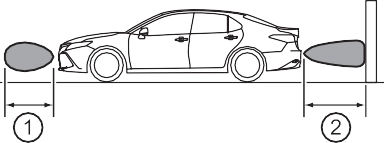 Approximately 4.9 ft. (150 cm)
Approximately 2.0 ft. (60 cm)
The diagram shows the detection range of the sensors. Note that the sensors cannot detect objects that are extremely close to the vehicle.
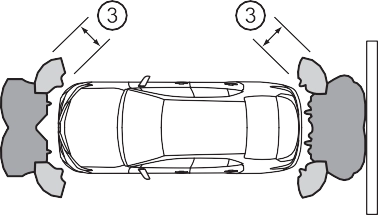 The range of the sensors may change depending on the shape of the object, etc.
346 4-5. Using the driving support systems
When an object is detected while the Toyota parking assist monitor or pan- oramic view monitor, and head-up display are in use, the warning indicator will appear in the audio system screen even if the display setting has been set to off.
A sensor may be dirty or covered with snow or ice. In such cases, if it is removed from the sensor, the system should return to normal.
Also, due to the sensor being frozen at low temperatures, a malfunction dis- play may appear or an object may not be detected. If the sensor thaws out, the system should return to normal.
4-5. Using the driving support systems
347

Water may be continuously flowing over the sensor surface, such as in a heavy rain. When the system determines that it is normal, the system will return to normal.
For vehicles sold in the U.S.A.

For vehicles sold in Canada

348 4-5. Using the driving support systems
4-5. Using the driving support systems
349
350 4-5. Using the driving support systems
Turning the RCTA function on/off. ( P. 351)
When a vehicle approaching from the right or left rear of the vehicle is detected, the outside rear view mirror indicators flash.
When the RCTA function is turned on, the indicator illuminates.
If a vehicle approaching from the right or left at the rear of the vehicle is detected, the RCTA icon ( P. 352) for the detected side will be displayed. This illustration shows an example of a vehicle approaching from both sides of the vehicle.
RCTA buzzer
When a vehicle approaching from the right or left rear of the vehicle is detected, a buzzer sounds from behind the rear seat.
*1: If equipped
4-5. Using the driving support systems
351

 Press
Press  /
/  of the meter control switches, select . Press / of the meter control switches, select . Press
  of the meter control switch.
Each time  is pressed, the function changes on/off.
Vehicles with 7-inch multi-information display


 Press / of the meter control switches, select . Press
  /
/  of the meter control switches, select . Press
  of the meter control switch.
Each time is pressed, the function changes on/off.
The volume of the RCTA buzzer can be changed on (4.2-inch dis-
play) or  (7-inch display) ( P. 104, 117) of the multi-information display.
When under strong sunlight, the outside rear view mirror indicator may be dif- ficult to see.
RCTA function may be difficult to hear over loud noises such as high audio volume.
The buzzer can be temporarily muted by pressing  of the meter control switches while an object detection display is shown on the multi-information display.
Ice, snow, mud, etc., may be attached to the rear bumper around the sensors. ( P. 338)
The system should return to normal operation after removing the ice, snow, mud, etc. from the rear bumper.
Additionally, the sensors may not operate normally when driving in extremely hot or cold environments.
P. 338
352 4-5. Using the driving support systems
When a vehicle approaching from the right or left at the rear of the vehicle is detected, the following will be displayed on the audio sys- tem screen.
|
Toyota parking assist monitor |
Panoramic view monitor |
Content |
|
|
|
A vehicle is approaching from the left or right at the rear of the vehicle |
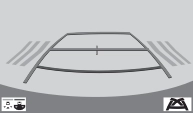
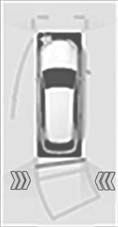
4-5. Using the driving support systems
353
354 4-5. Using the driving support systems
To give the driver a more consistent time to react, the buzzer can alert for faster vehicles from farther away.
Example:
|
Approaching vehicle |
Speed |
1 Approximate alert distance |
|
Fast |
18 mph (28 km/h) |
65 ft. (20 m) |
|
Slow |
5 mph (8 km/h) |
18 ft. (5.5 m) |
Vehicles with a smart key system: The engine switch is in IGNITION ON mode.
4-5. Using the driving support systems
355
The RCTA function is not designed to detect the following types of vehicles and/or objects:
*: Depending on the conditions, detection of a vehicle and/or object may occur.
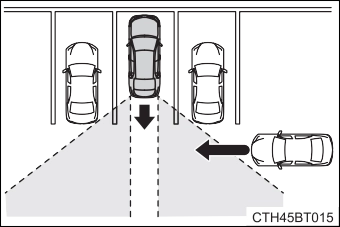 Vehicles that the sensors cannot detect because of obstacles
356 4-5. Using the driving support systems
4-5. Using the driving support systems
357
Pedestrian detection icon
Displayed automatically when a pedestrian is detected.
When the RCD function is disabled, the RCD OFF icon illuminates.

 Press / of the meter control switches, select .
Press  of the meter control switch.
When the RCD function is disabled, the RCD OFF indicator ( P.
89) illuminates.
*1: If equipped

358 4-5. Using the driving support systems

 Press
Press  /
/  of the meter control switches, select . Press
  of the meter control switch.
When the RCD function is disabled, the RCD OFF indicator ( P.
89) illuminates.
If the rear camera detection func- tion detects a pedestrian in the detection area, the buzzer and icon will operate as shown in the following table:
|
Area |
Buzzer |
Icon |
|
1 |
Sounds repeatedly |
Blinks 3 times and then stays on |
|
2 |
When the vehicle is stationary: Sounds 3 times When the vehicle is backing up: Sounds repeatedly |
|
|
3 |
When it is determined that a pedestrian will enter area 1 within a few seconds: Sounds repeatedly |
When it is determined that a pedestrian will enter area 1 within a few seconds: Blinks 3 times and then stays on |


 The rear camera detection function is operational when the following condi- tions are met:
4-5. Using the driving support systems
359
The buzzer volume can be adjusted with the RCTA buzzer volume on the multi-information display. ( P. 104, 117)
The buzzer can be temporarily muted by pressing  of the meter control switches while an object detection display is shown on the multi-information display.
A rear camera lens may be dirty or covered with snow or ice. In such cases, if it is removed from the rear camera lens, the system should return to normal. (It may be necessary to drive the vehicle for some time before the system returns to normal.)
360 4-5. Using the driving support systems
4-5. Using the driving support systems
361
Rear radar sensors are used to detect approaching vehicles in the detection area behind the vehicle when backing up. ( P. 377)
*1: If equipped
362 4-5. Using the driving support systems
Front center sensors Rear corner sensors Rear center sensors
The Parking Support Brake can be enabled/disabled on the multi- information display. All of the Parking Support Brake functions (static objects and rear-crossing vehicles) are enabled/disabled simultane- ously.
Use the meter control switches to enable/disable the parking support brake. ( P. 101, 115)

 Press / of the meter control switches, select
  . Press
  /
/  of the meter control switches, select
  .
.
Press  of the meter control switch.
Select the “Yes” and push  .
.
When the Parking Support Brake is disabled, the PKSB OFF indicator illu- minates.
To re-enable the system when it was disabled, select  on the multi-infor- mation display, select
  and then “On”. If disabled using this method, the system will not be re-enabled by turning the engine switch off and then to
IGNITION ON mode.
4-5. Using the driving support systems
363
Depending on the situation, engine output restriction control will operate to either limit acceleration or restrict output as much as possible.
|
Control |
Situation |
Multi-information display |
PKSB OFF Indicator |
Buzzer |
|
Engine output restriction con- trol is operating (acceleration restriction) |
Acceleration greater than a certain amount is not possible. |
“Object Detected Acceleration Reduced” |
Not illu- minated |
No beep |
|
Engine output restriction con- trol is operating (output restricted as much as pos- sible) |
Stronger-than- normal brake operation is nec- essary. |
“Brake!” |
Not illu- minated |
Short beep |
|
Brake control is operating |
Emergency brak- ing is necessary. |
|||
|
Vehicle stopped by system opera- tion (When accelera- tor is stepped on) |
The vehicle has been stopped by brake control operation. |
“Switch to Brake” |
Illumi- nated |
Short beep |
|
Vehicle stopped by system opera- tion (When accelera- tor is not stepped on) |
The vehicle has been stopped by brake control operation. |
“Brake” |
Illumi- nated |
Short beep |
364 4-5. Using the driving support systems
Additionally, if the accelerator pedal continues to be depressed, the brakes will be applied automatically to reduce the vehicle speed. (Brake control: See B below.)
4-5. Using the driving support systems
365
5 Start of control
High possibility of a collision
Extremely high possibility of a collision
366 4-5. Using the driving support systems
If the vehicle is stopped due to operation of the Parking Support Brake func- tion, the Parking Support Brake system will be disabled and the PKSB OFF indicator will illuminate.
To re-enable the Parking Support Brake system when it is disabled due to operation of the Parking Support Brake function, either enable the system again ( P. 362), or turn the engine switch off and then back to IGNITION ON mode.
Additionally, if the object becomes no longer in the traveling direction of the vehicle or if the traveling direction of the vehicle changes (such as changing from moving forward to backing up, or from backing up to moving forward), the system will be re-enabled automatically.
4-5. Using the driving support systems
367
368 4-5. Using the driving support systems
*1: If equipped
4-5. Using the driving support systems
369
wrong shift position being selected
370 4-5. Using the driving support systems
The function will stop operating if any of the following conditions are met:
Therefore, even if the intuitive parking assist detects an object and provides a warning, the Parking Support Brake function may not start operating.
4-5. Using the driving support systems
P. 366
371
The sensors may not be able to detect certain objects, such as the following.
(People may also not be detected depending on the type of clothing they are wearing.)
When the shift lever is in N
Regardless of whether the intuitive parking assist system is enabled or not ( P. 342), if the Parking Support Brake system is enabled ( P. 362), the front or rear sensors detect an object and brake control is performed, the intu- itive parking assist buzzer will sound to notify the driver of the approximate distance to the object.
372 4-5. Using the driving support systems
In some situations such as the following, the Parking Support Brake function may operate even though there is no possibility of a collision.
4-5. Using the driving support systems
373
Even in the event that the Parking Support Brake function operates unneces- sarily, such as at a railroad crossing, brake control will be canceled after approximately 2 seconds, allowing you to proceed forward and leave the area, Brake control can also be canceled by depressing the brake pedal. Depressing the accelerator pedal again will allow you to proceed forward and leave the area.
In some situations such as the following, this function may not operate prop- erly.
374 4-5. Using the driving support systems
4-5. Using the driving support systems
375
376 4-5. Using the driving support systems
4-5. Using the driving support systems
377
The system will operate in situations such as the following if an object is detected in the traveling direction of the vehicle.
*1: If equipped
378 4-5. Using the driving support systems
The function will operate when the PKSB OFF indicator is not illuminated or flashing ( P. 362, 366) and all of the following conditions are met:
The function will stop operating if any of the following conditions are met:
The detection area of the Parking Support Brake function (rear-crossing vehi- cles) differs from the detection area of the RCTA function ( P. 350).
Therefore, even if the RCTA function detects a vehicle and provides an alert, the Parking Support Brake function (rear-crossing vehicles) may not start operating.
4-5. Using the driving support systems
379
IGNITION ON mode. When the function is disabled, the PKSB OFF indicator will illuminate. ( P. 89)
If there is no longer a vehicle approaching from the right or left at the rear of the vehicle when backing up, or if the traveling direction of the vehicle changes (such as changing from backing up to moving forward), the system will be re-enabled automatically. When the function is re-enabled, the PKSB OFF indicator will turn off.
The Parking Support Brake function (rear-crossing vehicles) is not designed to detect the following types of vehicles and/or objects:
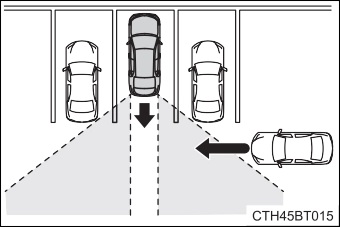 Vehicles that the sensors cannot detect due to obstructions
*: Depending on the conditions, detection of a vehicle and/or object may occur.
If the Parking Support Brake is enabled and brake control is performed, a buzzer will sound to notify the driver.
380 4-5. Using the driving support systems
In some situations such as the following, the Parking Support Brake function (rear-crossing vehicles) may operate even though there is no possibility of a collision.
4-5. Using the driving support systems
381
In some situations such as the following, this function may not operate prop- erly.
*: Depending on conditions, detection of a vehicle and/or object may occur.
382 4-5. Using the driving support systems
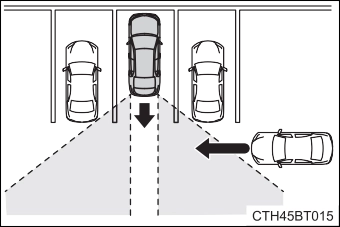 Vehicles that the sensors cannot detect due to obstructions
P. 338
4-5. Using the driving support systems
383
384 4-5. Using the driving support systems
Use for normal driving.
While in Eco drive mode or sport mode, press the switch to change the driving mode to normal mode.
Use Eco drive mode to help achieve low fuel consumption during trips that involve frequent accelerating.
When the “ECO” switch is pressed, the “ECO MODE” indicator comes on in the instrument cluster.
Use sport mode when increased acceleration response and precise handling is desired, for example, when driving on mountain roads.
When the “SPORT” switch is pressed, the “SPORT” indicator comes on in the instrument cluster.
*1: If equipped
4-5. Using the driving support systems
385
Eco drive mode controls the heating/cooling operations and fan speed of the air conditioning system to enhance fuel efficiency ( P. 397, 404). To improve air conditioning performance, adjust the fan speed or turn off Eco drive mode.
Sport mode is automatically deactivated if the engine switch is turned off after driving in sport mode.
Download Manual