Operating the lights and wipers
233
For U.S.A.
 The headlights, day- time running lights ( P.
235) and all the lights listed below turn on and off automatically. (Vehicles without a smart key system:
When the engine switch is in the “ON” position)
(Vehicles with a smart key system: When the engine switch is in IGNITION ON mode)
 The side marker, parking, tail, license plate, instrument panel lights, and daytime running lights ( P. 235) turn on.
 The headlights and all the lights listed above (except day- time running lights) turn on.
 The daytime running lights turn off.
234 4-3. Operating the lights and wipers
 The headlights, day- time running lights ( P.
235) and all the lights listed below turn on and off automatically. (Vehicles without a smart key system:
When the engine switch is in the “ON” position)
(Vehicles with a smart key system: When the engine switch is in IGNITION ON mode)
 The side marker, parking, tail, license plate, instrument panel lights, and daytime running lights ( P. 235) turn on.
 The headlights and all the lights listed above (except day- time running lights) turn on.
With the headlights on, push the lever away from you to turn on the high beams.
Pull the lever toward you to the center position to turn the high beams off.
You can flash the high beams with the headlights on or off.
4-3. Operating the lights and wipers
235
The daytime running lights illuminate using the same lights as the headlights and illuminate darker than the headlights.
Type B:
The daytime running lights illuminate using the same lights as the parking lights and illuminate brighter than the parking lights.

 The headlight switch is in the or * position
*: When the surroundings are bright
The daytime running lights remain on after they illuminate, even if the parking
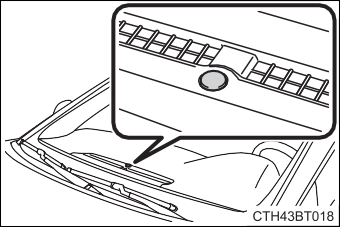 The sensor may not function properly if an object is placed on the sensor, or anything that blocks the sensor is affixed to the windshield.
Doing so interferes with the sensor detecting the level of ambient light and may cause the automatic headlight sys- tem to malfunction.
236 4-3. Operating the lights and wipers
Vehicles without a smart key system
door is opened and closed. (The lights turn off immediately if  on the key is pressed twice after all the doors are closed.)
To turn the lights on again, turn the engine switch to “ON” position, or turn the light switch off once and then back to  or
or  .
.
If any of the doors or trunk lid is kept open, the lights automatically turn off after 20 minutes.
Vehicles with a smart key system
on the key is pressed twice after all the doors are closed.)
To turn the lights on again, turn the engine switch to IGNITION ON mode, or turn the light switch off once and then back to  or
or  .
.
If any of the doors or trunk lid is kept open, the lights automatically turn off after 20 minutes.
 Light reminder buzzer (except when the light switch is in )
Vehicles without a smart key system:
A buzzer sounds when the engine switch is turned to the “LOCK” or “ACC” position and the driver's door is opened with the key removed from the engine switch while the lights are turned on.
Vehicles with a smart key system:
A buzzer sounds when the engine switch is turned off or turned to ACCES- SORY mode and the driver's door is opened while the lights are turned on.
4-3. Operating the lights and wipers
237
 When driving during daytime with the headlight switch turned to , if the windshield wipers are used, the headlights will turn on automatically after several seconds to help enhance the visibility of your vehicle.
In the following conditions, the remaining lights will go off automatically after 20 minutes in order to prevent the vehicle battery from being discharged:
The engine switch is in the “ACC” or “LOCK” position. Vehicles with a smart key system:
The engine switch is in ACCESSORY mode or turned off. This function will be canceled in any of the following situations:
When the engine switch is turned to the “ON” position. Vehicles with a smart key system:
When the engine switch is turned to IGNITION ON mode.
Some functions can be customized. ( P. 616)
238 4-3. Operating the lights and wipers
Press the Automatic High Beam switch.
When the headlight switch lever is in the low beam position, the AHB system will be enabled and the AHB indicator will illuminate.
4-3. Operating the lights and wipers
239
The Automatic High Beam indi- cator will turn off and the high beam indicator will turn on.
Pull the lever to its original posi- tion to activate the Automatic High Beam system again.
The Automatic High Beam indi- cator will turn off.
Press the switch to activate the Automatic High Beam system again.
The high beams are on while the lever is pulled toward you. However, after the lever is returned to its original position, the low beams remain on for a certain amount of time. After- wards, the Automatic High Beam will be activated again.
It is recommended to switch to the low beams when the high beam may cause problems or distress to other drivers or pedestrians nearby.
240 4-3. Operating the lights and wipers
4-3. Operating the lights and wipers
241
The sensitivity of the sensor can be temporarily lowered.
Turn the engine switch off while the following conditions are met.
 The headlight switch is in the
  or position.
Turn the engine switch to the “ON” position (vehicles without a smart key system) or IGNITION ON mode (vehicles with a smart key system).
Within 60 seconds after , repeat pushing the headlight switch lever to the high beam position then pulling it to the original position quickly 10 times, then leave the lever in the original position.
242 4-3. Operating the lights and wipers
 *1 or *2
The intermittent wind- shield wiper operates more frequently as vehi- cle speed becomes higher.
 *1 or *2
*1 or *2
 *1 or *2
*1: For U.S.A.
*2: For Canada
Increases the intermittent wind- shield wiper frequency
Decreases the intermittent windshield wiper frequency
4-3. Operating the lights and wipers
Pulling the lever operates the wip- ers and washer.
Wipers will automatically operate a couple of times after the washer squirts.
(After operating several times, the wipers operate once more time after a short delay to prevent drip- ping. However, the dripping pre- vention does not operate while the vehicle is moving.)
243
Vehicles without a smart key system:
The engine switch is in the “ON” position.
Vehicles with a smart key system:
The engine switch is in IGNITION ON mode.
Check that the washer nozzles are not blocked if there is washer fluid in the windshield washer fluid reservoir.
If the windshield wipers are operating when the engine is stopped, the wind- shield wipers will operate in high speed operation. After the vehicle is stopped, operation will return to normal when the engine switch is turned to “ON” position (vehicles without a smart key system) or IGNITION ON mode (vehicles with a smart key system), or operation will stop when the driver’s door is opened.
244 4-3. Operating the lights and wipers
Within approximately 45 sec- onds of turning the engine switch off, move the wiper lever to the *1 or *2
position and hold it for approxi- mately 2 seconds or more.
The wipers will move to the ser- vice position.
*1: For U.S.A.
*2: For Canada
4-3. Operating the lights and wipers
245
With the windshield wipers placed on the windshield, turn the engine switch to “ON” position (vehicles without a smart key system) or IGNITION ON mode (vehicles with a smart key system) and then move the wiper lever to an oper- ating position. When the wiper switch is turned off, the windshield wipers will stop at the retracted position.
Download Manual