Installing front license plate
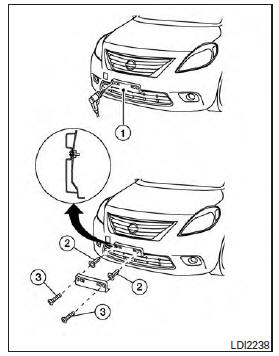
Use the following steps to mount the front license plate: Before mounting the license plate, confirm that the following parts are enclosed in the plastic bag:
- License plate bracket
- License plate bracket screws x 2
- Screw grommets x 2
1. Hold the license plate bracket 1 and make a shallow hole in the bumper fascia using a 0.39 in (10 mm) drill. To avoid damaging the area behind the fascia, apply only light pressure to the drill.
2. Insert the grommets 2 into the holes in the bumper fascia.
3. Insert a small flat-bladed screwdriver into the grommet hole to turn the threaded part of the grommet 90.
4. Mount the license plate bracket using the two longer screws 3 .
Download Manual