Headlight and turn signal switch
Headlight control switch
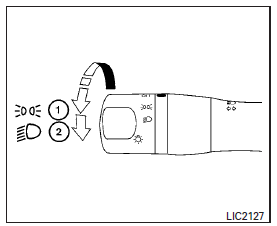
Type A (if so equipped)
Lighting
- Rotate the switch to the
 position, and the front parking, tail, license plate, and instrument panel lights will come on.
 - Rotate the switch to the
 position, and the headlights will come on and all the other lights remain on.
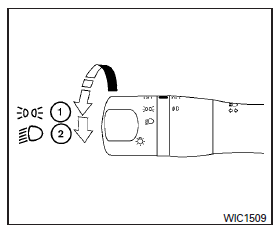
Type B (if so equipped)
CAUTION
Use the headlights with the engine running to avoid discharging the vehicle battery.
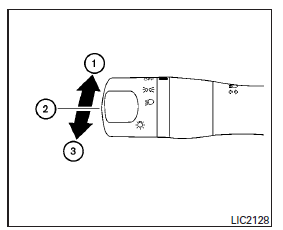
Headlight beam select
- To select the high beam function, push the lever forward. The high beam lights come on and the
 light illuminates.
 - Pull the lever back to select the low beam.
- Pulling and releasing the lever flashes the headlight high beams on and off.
Battery saver system
If the ignition switch is placed in the OFF position while the headlight switch is in the  or
or  position, the headlights will turn off after a period of time.
CAUTION
Even though the battery saver feature automatically turns off the headlights after a period of time, you should turn the headlight switch to the OFF position when the engine is not running to avoid discharging the vehicle battery.
Instrument brightness control
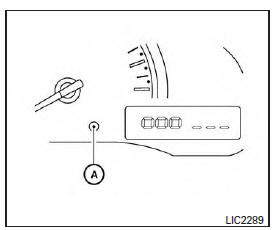
Type A (if so equipped)
The instrument brightness control operates when the headlight control switch is in the  or
or  position.
Type A: Turn the control A to adjust the brightness of instrument panel lights when driving at night.
Type B: Press the control A to adjust the brightness of instrument panel lights when driving at night.
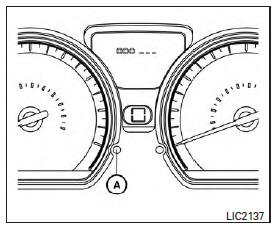
Type B (if so equipped)
Turn signal switch
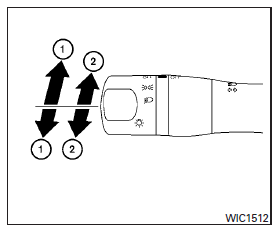
Turn signal
- Move the lever up or down to signal the turning direction. When the turn is completed, the turn signal cancels automatically.
Lane change signal
- Move the lever up or down until the turn signal begins to flash, but the lever does not latch, to signal a lane change. Hold the lever until the lane change is completed.
Move the lever up or down until the turn signal begins to flash, but the lever does not latch, and release the lever. The turn signal will automatically flash three times.
Choose the appropriate method to signal a lane change based on road and traffic conditions.
Fog light switch (if so equipped)
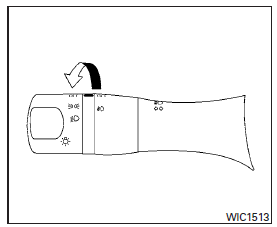
To turn the fog lights on, turn the headlight switch to the  position, then turn the fog light switch to the
  position.
To turn the fog lights off, turn the fog light switch to the OFF position.
The headlights must be on and the low beams selected for the fog lights to operate. The fog lights automatically turn off when the high beam headlights are selected.
Download Manual