Seats
Seats are a part of the Occupant Restraint system of the vehicle.
Warning:
-
It is dangerous to ride in a cargo area, inside or outside of a vehicle. In a collision, people riding in these areas are more likely to be seriously injured or killed.
-
Do not allow people to ride in any area of your vehicle that is not equipped with seats and seat belts. In a collision, people riding in these areas are more likely to be seriously injured or killed.
-
Be sure everyone in your vehicle is in a seat and using a seat belt properly.
MANUAL ADJUSTMENT (REAR SEATS)
Warning:
Do not place luggage or cargo higher than the top of the seatback. This could impair visibility or become a dangerous projectile in a sudden stop or collision.
Note:
You may experience deformation in the seat cushion from the seat belt buckles if the seats are left folded for an extended period of time. This is normal and by simply unfolding the seats to the open position, over time the seat cushion will return to its normal shape.
SECOND ROW BENCH SEAT — IF EQUIPPED
SECOND ROW BENCH SEAT FORWARD/REARWARD ADJUSTMENT
Lift up on the adjusting bar located at the front of the seat near the floor and release it when the seat is at the desired position. Then, using body pressure, move forward and rearward on the seat to be sure that the seat adjusters have latched.
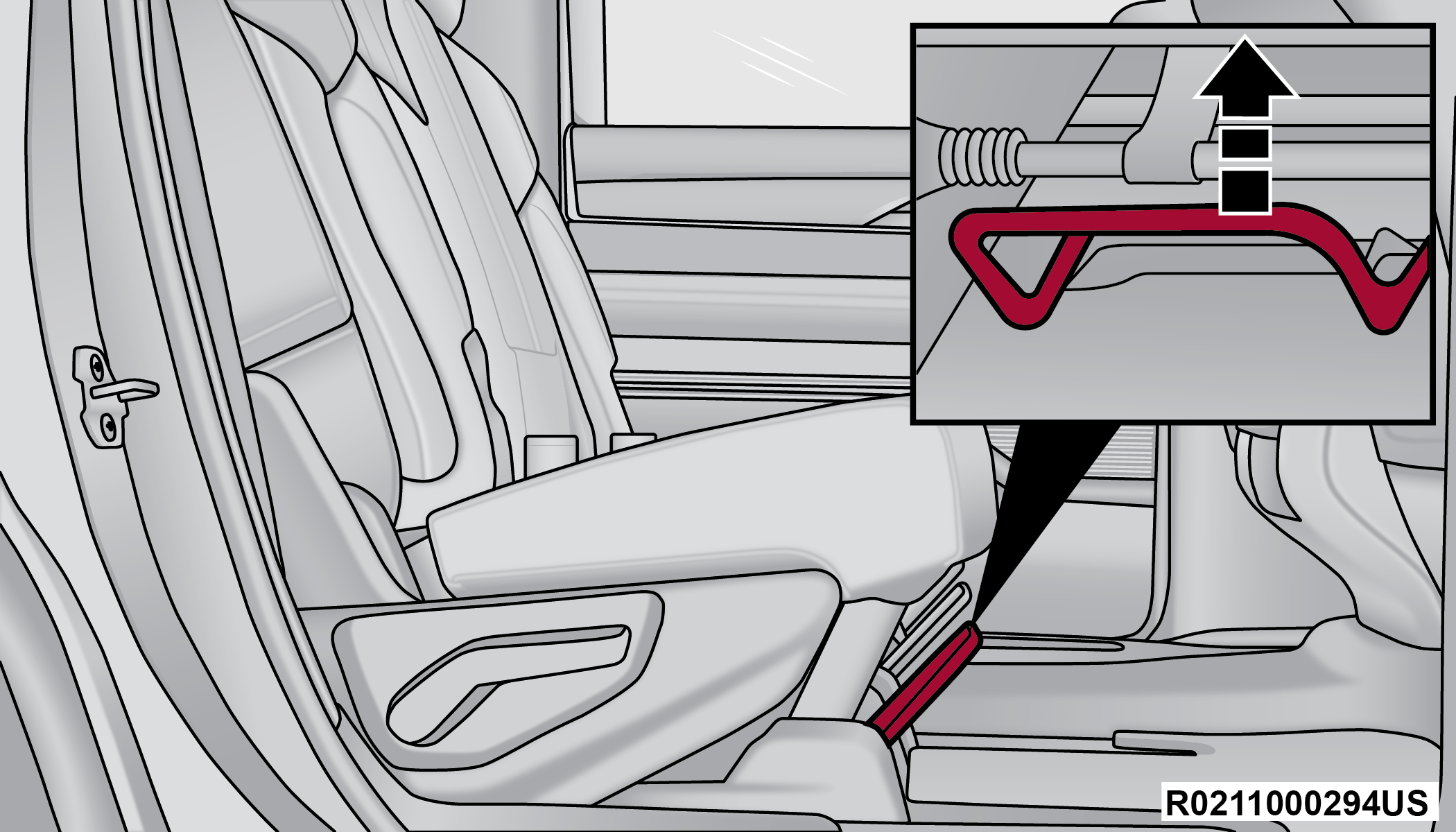
Rear Seat Adjustment Bar
SECOND ROW BENCH SEAT RECLINE ADJUSTMENT
To recline, lean forward slightly and lift the lever located on the outboard side of the seat. Then, push the seat rearward to the desired position and release the lever. To return the seatback to its normal position, lean forward and lift the lever. To ensure the seatback is latched, use body pressure to lean forward and rearward.
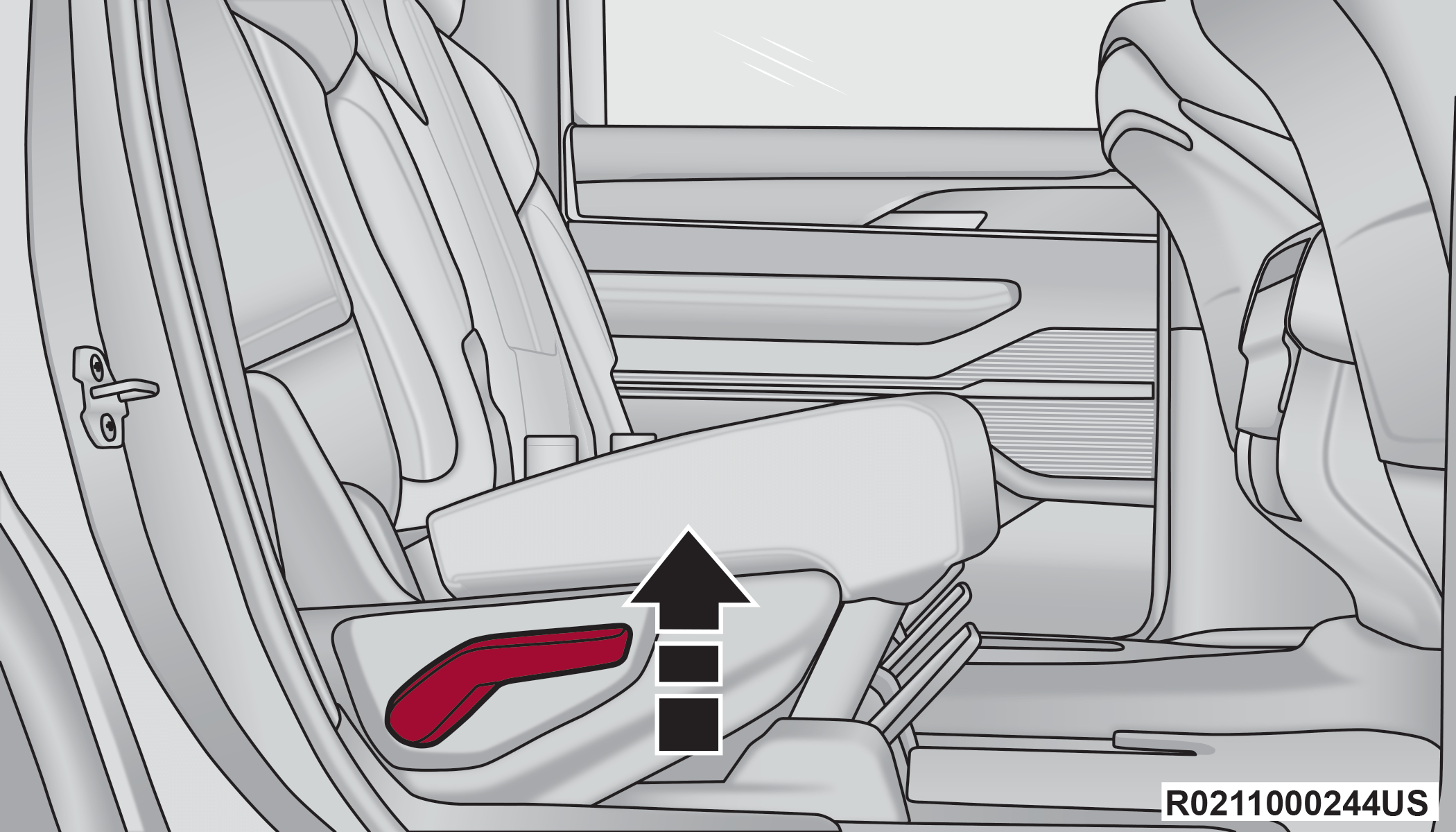
Rear Seat Recline Lever
To recline the center seat, pull the recline strap located on the seatback, and move forward or backward as desired. Release the strap when the desired seat position has been reached.
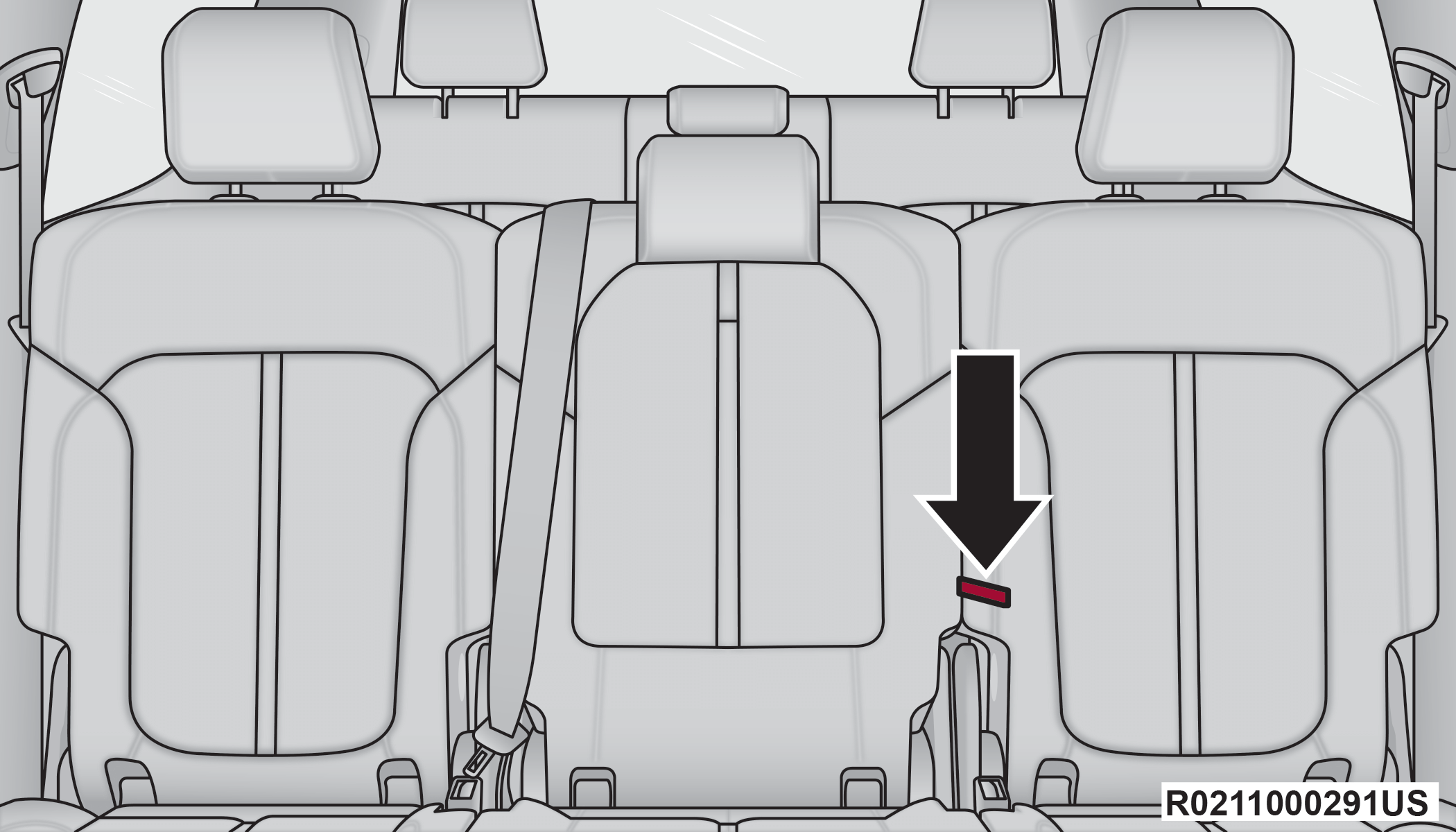
Center Seat Recline Strap
Warning:
Do not ride with the seatback reclined so that the shoulder belt is no longer resting against your chest. In a collision you could slide under the seat belt, which could result in serious injury or death.
SECOND ROW BENCH FOLD FLAT SEAT
To provide additional storage area, each rear seat can be folded flat. This allows for extended cargo space and still maintains some rear seating room.
Note:
Prior to folding the rear seat, it may be necessary to position the front seat to its mid-track position especially if the seat is equipped with Rear Seat Entertainment. Also, be sure that the front seats are fully upright and positioned forward. This will allow the rear seat to fold down easily.
To lower the seatback, pull upward on the recline lever located on the outboard side of the seat, and let the seatback fold forward automatically.
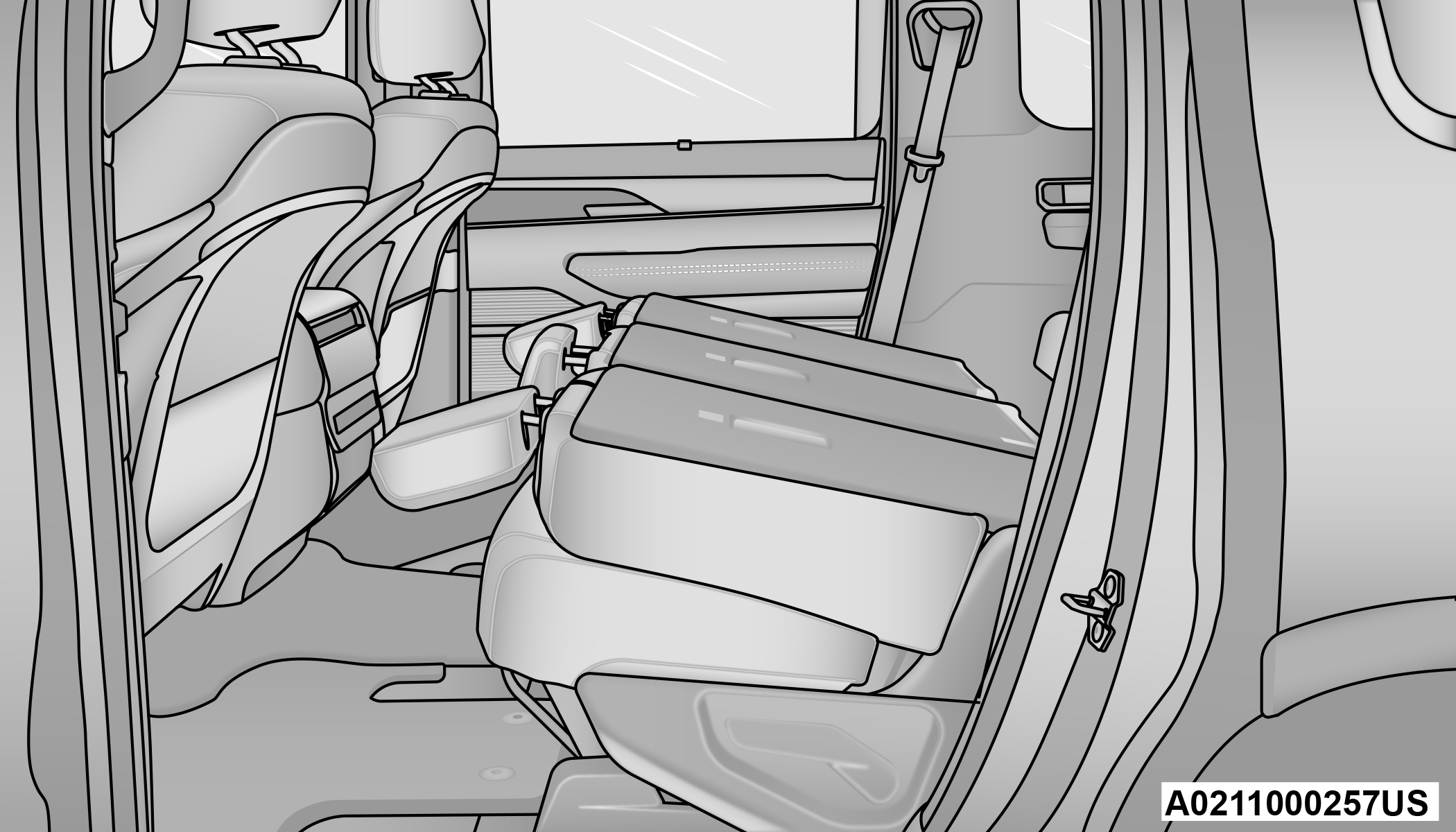
Second Row Bench Seat Folded Flat
To lower the center seatback, pull the recline strap, located on the left side of the seatback, and let the seatback fold forward automatically.
Center Seat Recline Strap
To raise the seatback, fold the seatback up into its original position and lock it into place.
Warning:
Be certain that the seatback is securely locked into position. If the seatback is not securely locked into position the seat will not provide the proper stability for child seats and/or passengers. An improperly latched seat could cause serious injury.
SECOND ROW BENCH SEAT EASY ACCESS FOR THIRD ROW
The second row bench seats can slide forward to allow passengers to easily access the third row seats.
Press the easy entry button located on the outboard side of the seatback. Once pressed, the seat will pitch forward, allowing the seat to slide forward.
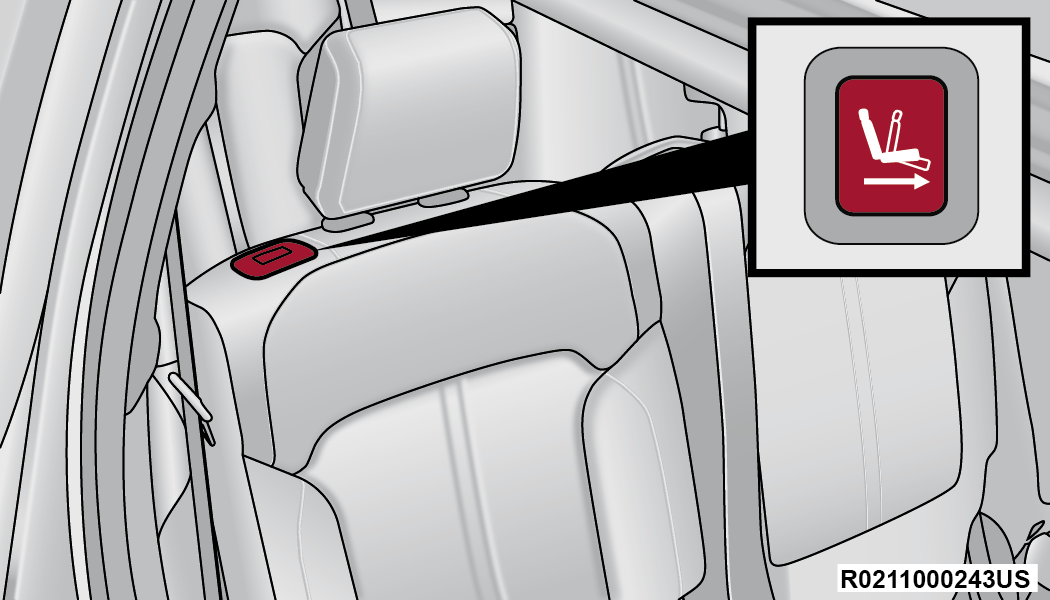
Bench Seat Easy Entry Button
To return the seat to a sitting position, push the seatback rearward until the seat locks.
Emergency Straps
In the event that the vehicle loses power, the Easy Entry buttons will not function. There are emergency straps located on the back of the second row outboard seats to allow the third row occupants to manually fold the seats flat to exit the vehicle.
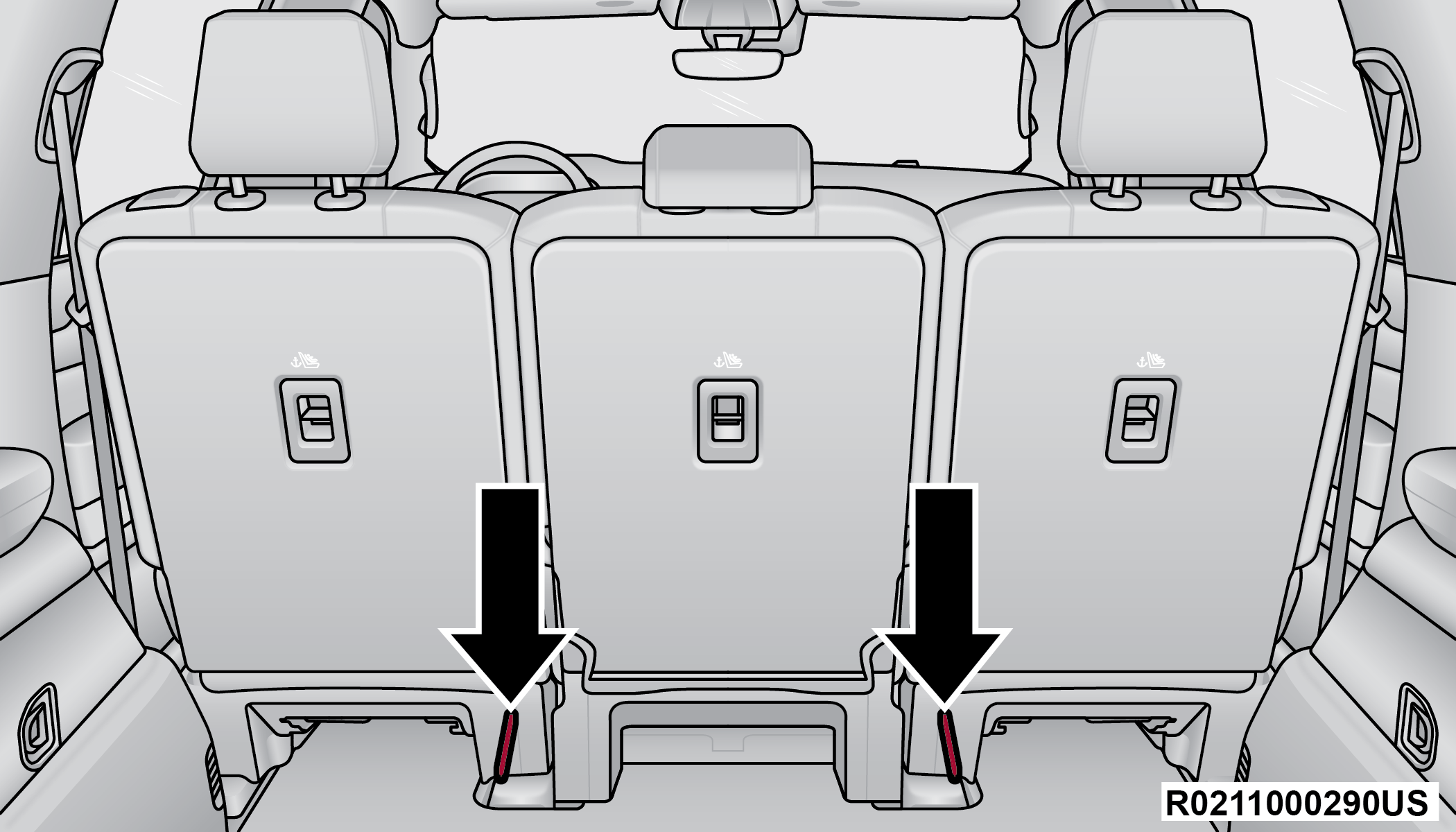
Emergency Straps
Pull the emergency straps to fold the second row seat flat.
SECOND ROW CAPTAIN’S CHAIRS — IF EQUIPPED
SECOND ROW CAPTAIN’S CHAIRS FORWARD/REARWARD ADJUSTMENT
Lift up on the adjusting bar located at the front of the seat near the floor and release it when the seat is at the desired position. Then, using body pressure, move forward and rearward on the seat to be sure that the seat adjusters have latched.
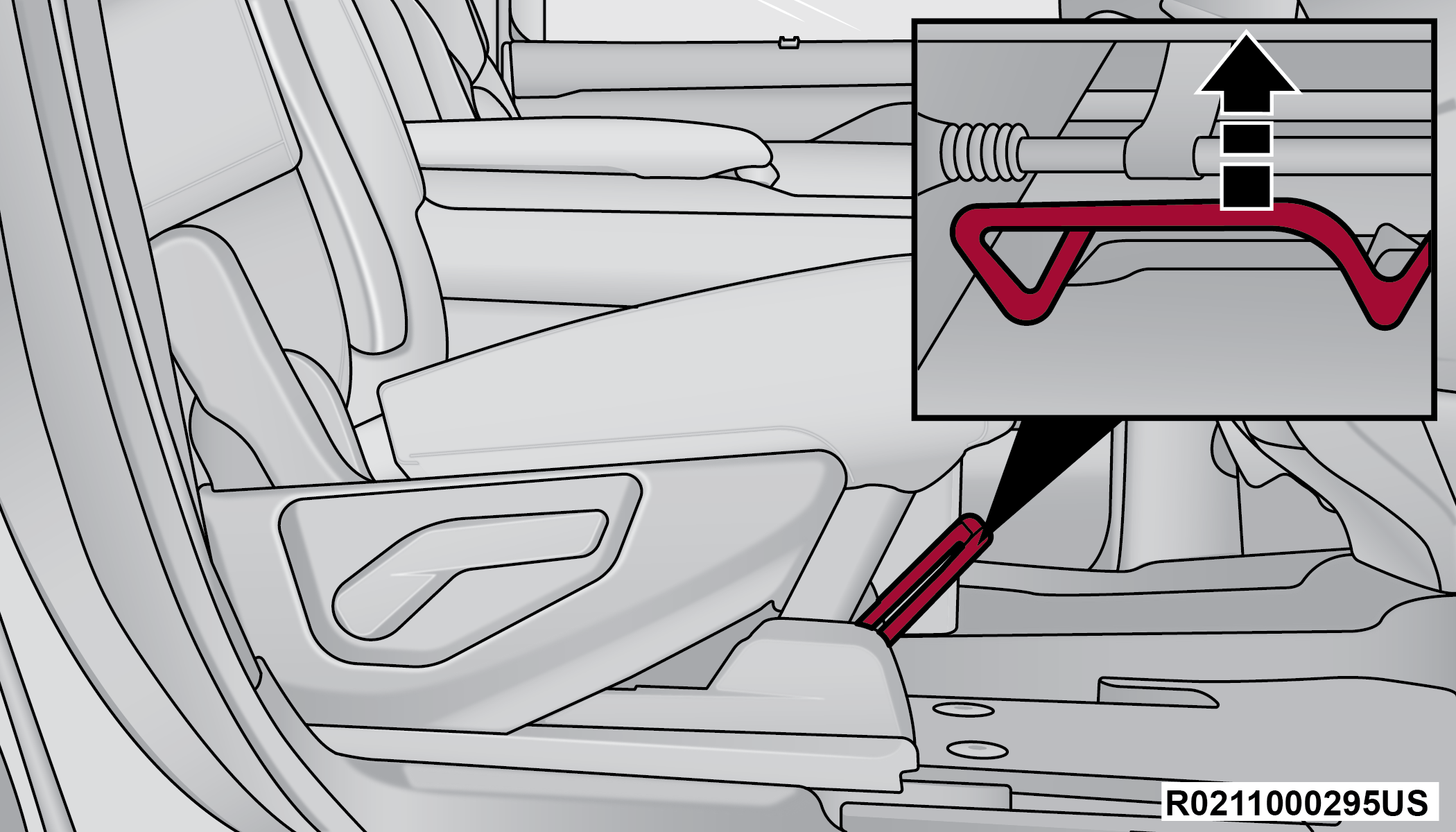
Rear Seat Adjustment Bar
SECOND ROW CAPTAIN’S CHAIRS RECLINE ADJUSTMENT
To recline, lean forward slightly and lift the lever located on the outboard side of the seat. Then, push the seat rearward to the desired position and release the lever. To return the seatback to its normal position, lean forward and lift the lever. To ensure the seatback is latched, use body pressure to lean forward and rearward.
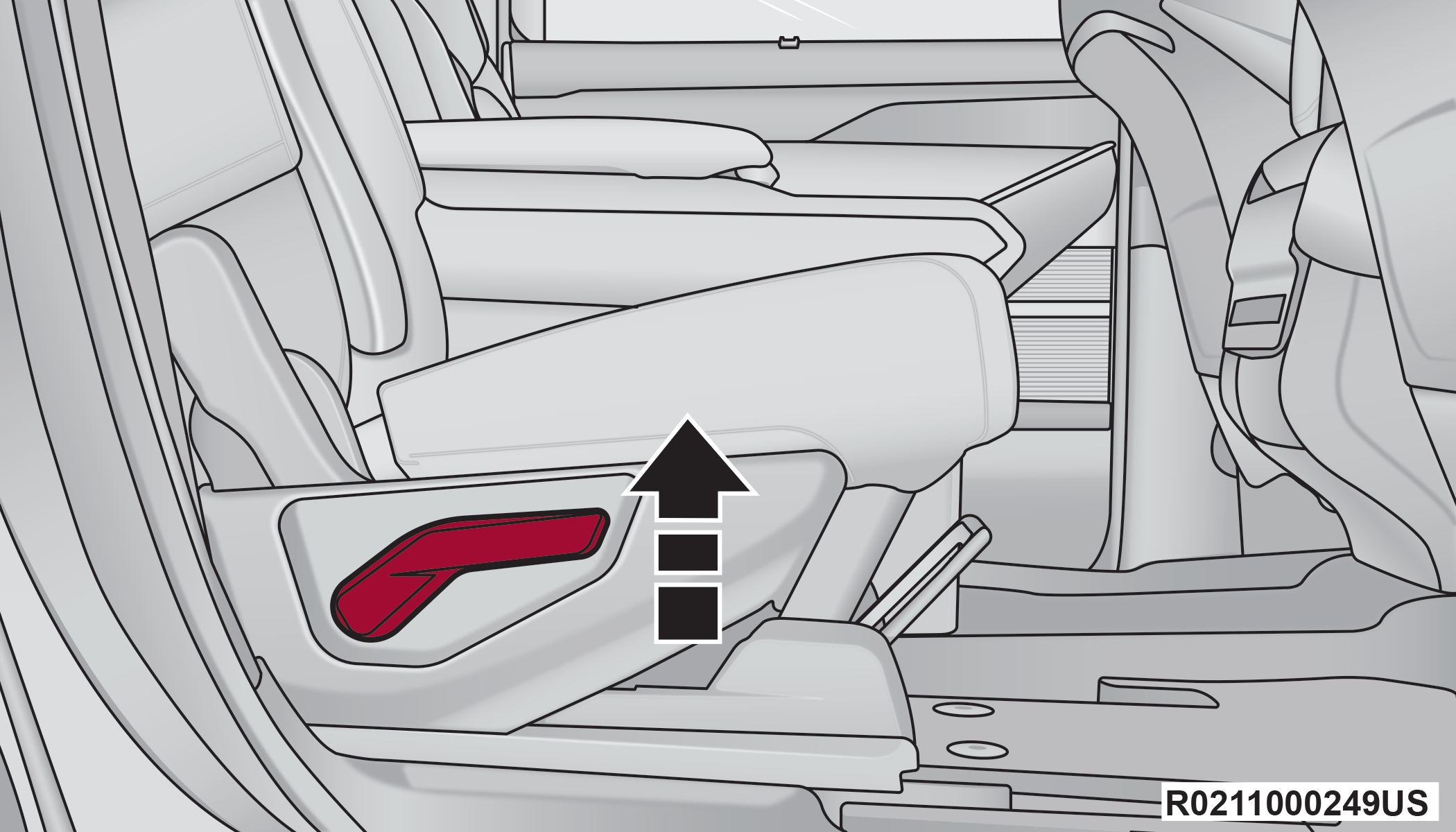
Rear Seat Recline Lever
Warning:
Do not ride with the seatback reclined so that the shoulder belt is no longer resting against your chest. In a collision you could slide under the seat belt, which could result in serious injury or death.
SECOND ROW CAPTAIN’S CHAIRS FOLD FLAT SEATS
The second row seatbacks can be folded flat to carry cargo.
Note:
Prior to folding the rear seat, it may be necessary to position the front seat to its mid-track position especially if the seat is equipped with Rear Seat Entertainment. Also, be sure that the front seats are fully upright and positioned forward. This will allow the rear seat to fold down easily.
Pull upward on the recline lever located on the outboard side of each second row seat, and let the seatback fold forward automatically.
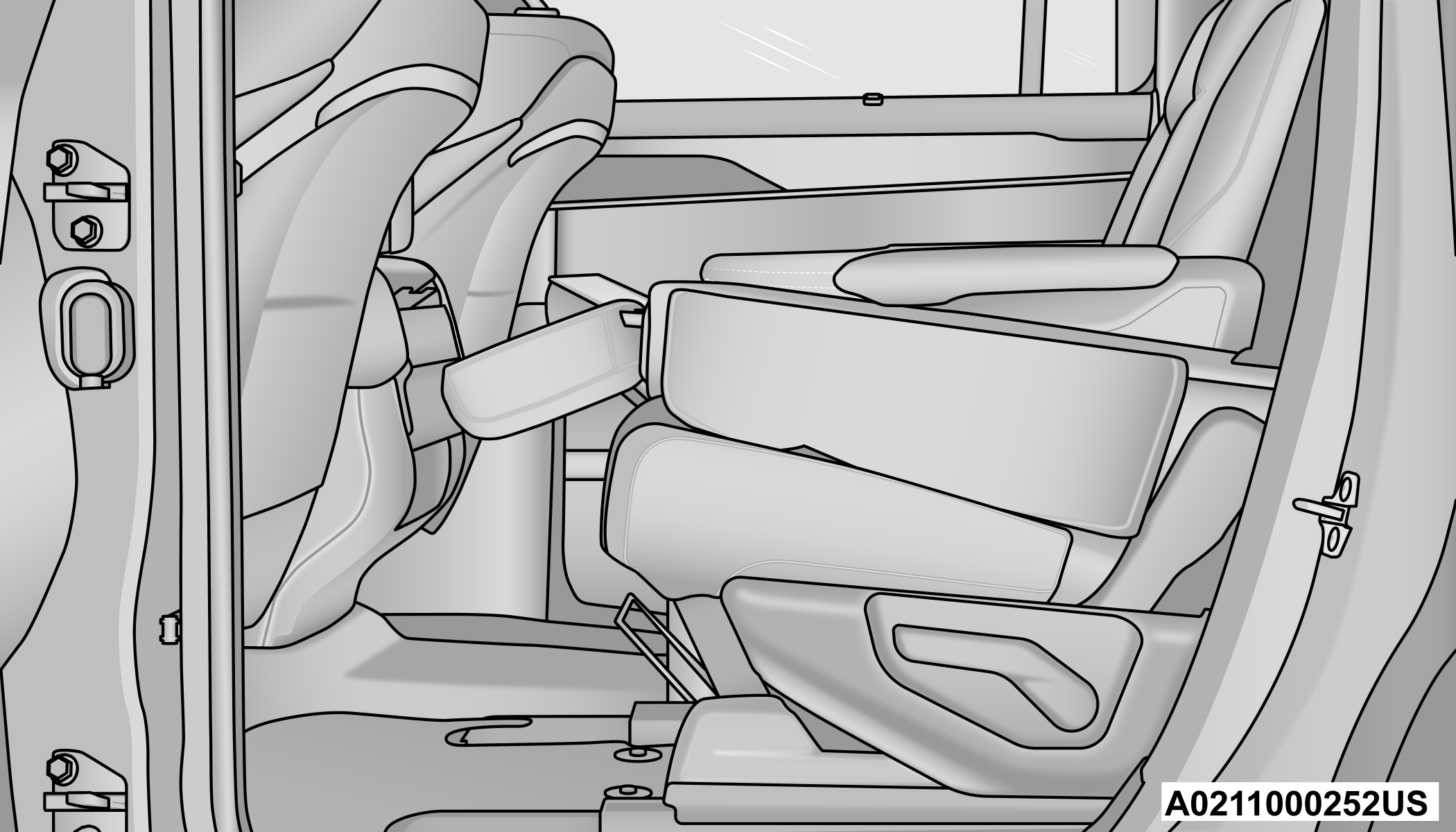
Second Row Captain’s Chair Folded Flat
To Raise The Rear Seats
Fold the seatbacks upward to their original position, and lock them into place.
Warning:
Be certain that the seatback is securely locked into position. If the seatback is not securely locked into position the seat will not provide the proper stability for child seats and/or passengers. An improperly latched seat could cause serious injury.
SECOND ROW CAPTAIN’S CHAIR EASY ACCESS FOR THIRD ROW
The second row captain’s chairs can slide forward to allow passengers to easily access the third row seats.
Press the easy entry button located on the outboard side of the seatback. Once pressed, the entire seat will pitch forward, allowing the seat to slide forward.
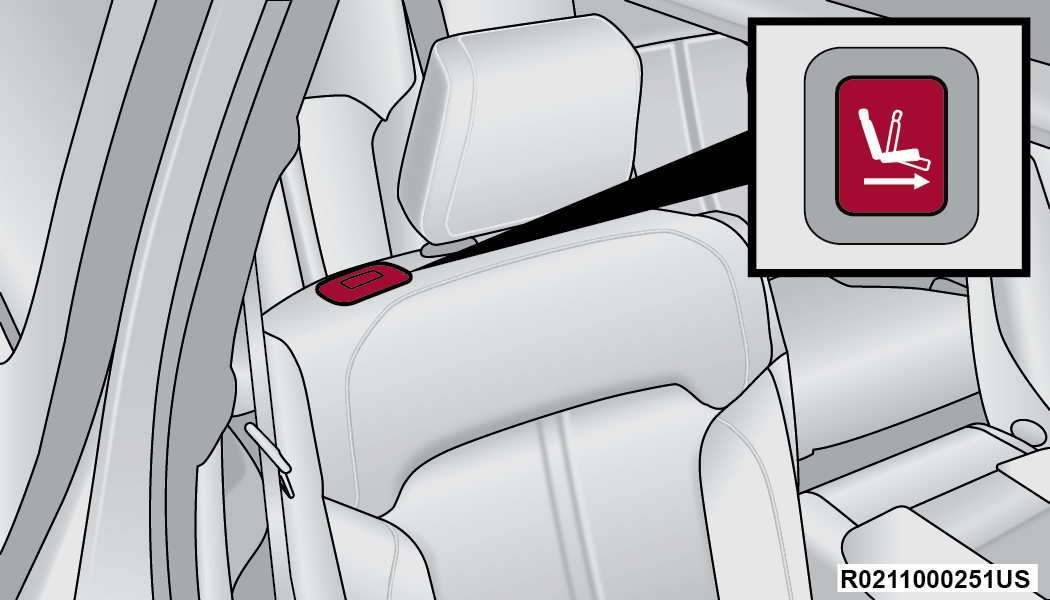
Captain’s Chair Easy Entry Button
To return the seat to a sitting position, push the seatback rearward until the seat locks.
Emergency Straps
In the event that the vehicle loses power, the Easy Entry buttons will not function. There are emergency straps located on the back of the second row outboard seats to allow the third row occupants to manually fold the seats flat to exit the vehicle.
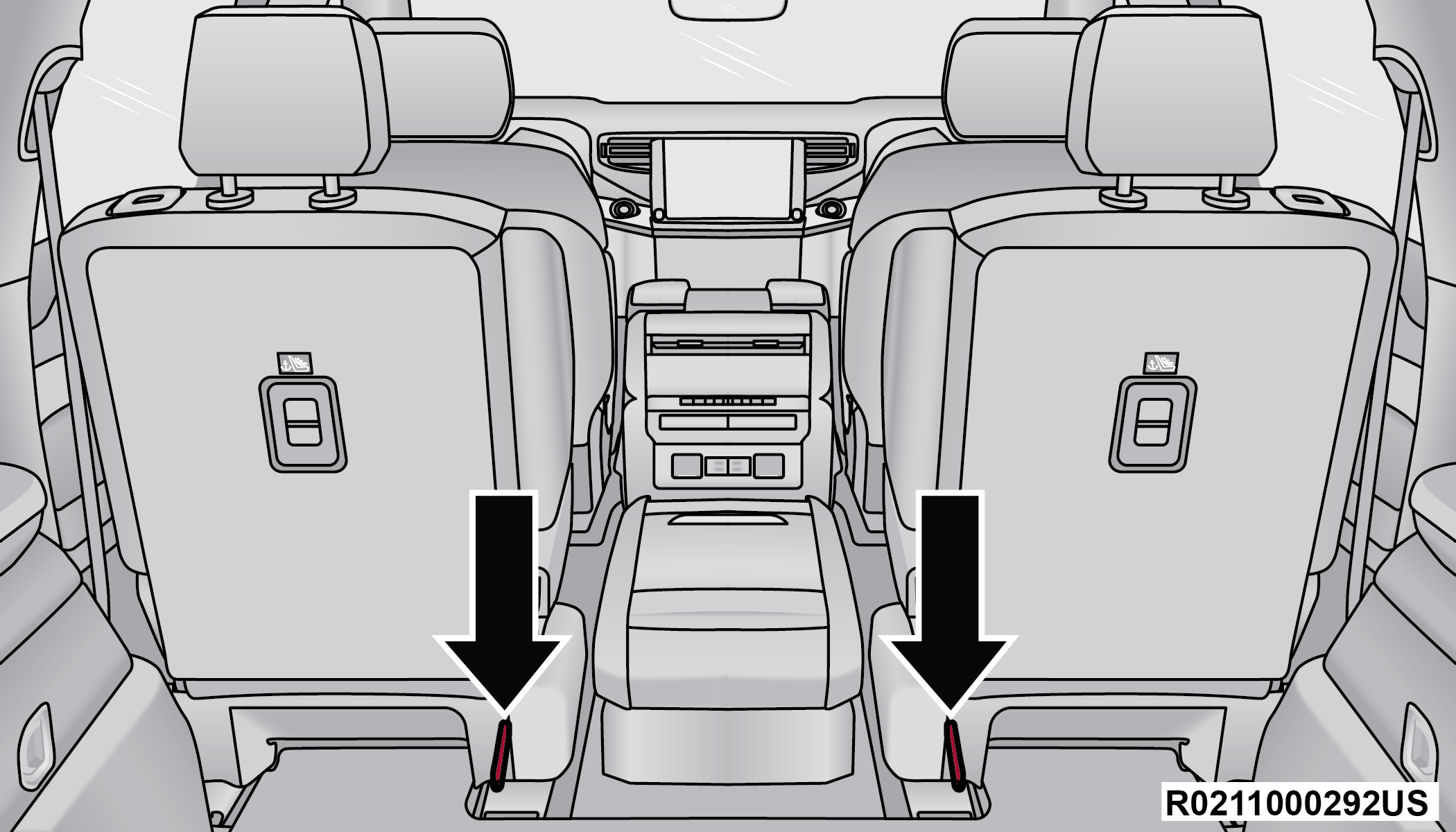
Emergency Straps
Pull the emergency straps to fold the second row seat flat.
MANUAL FOLDING THIRD ROW — IF EQUIPPED
Both third row seats can be folded flat to increase the cargo area. To lower either seat, pull on the release straps located on both sides of the rear cargo area, near the bottom of the seat.
Note:
The second row seats must be in their full upright position or folded flat when folding the third row seats.
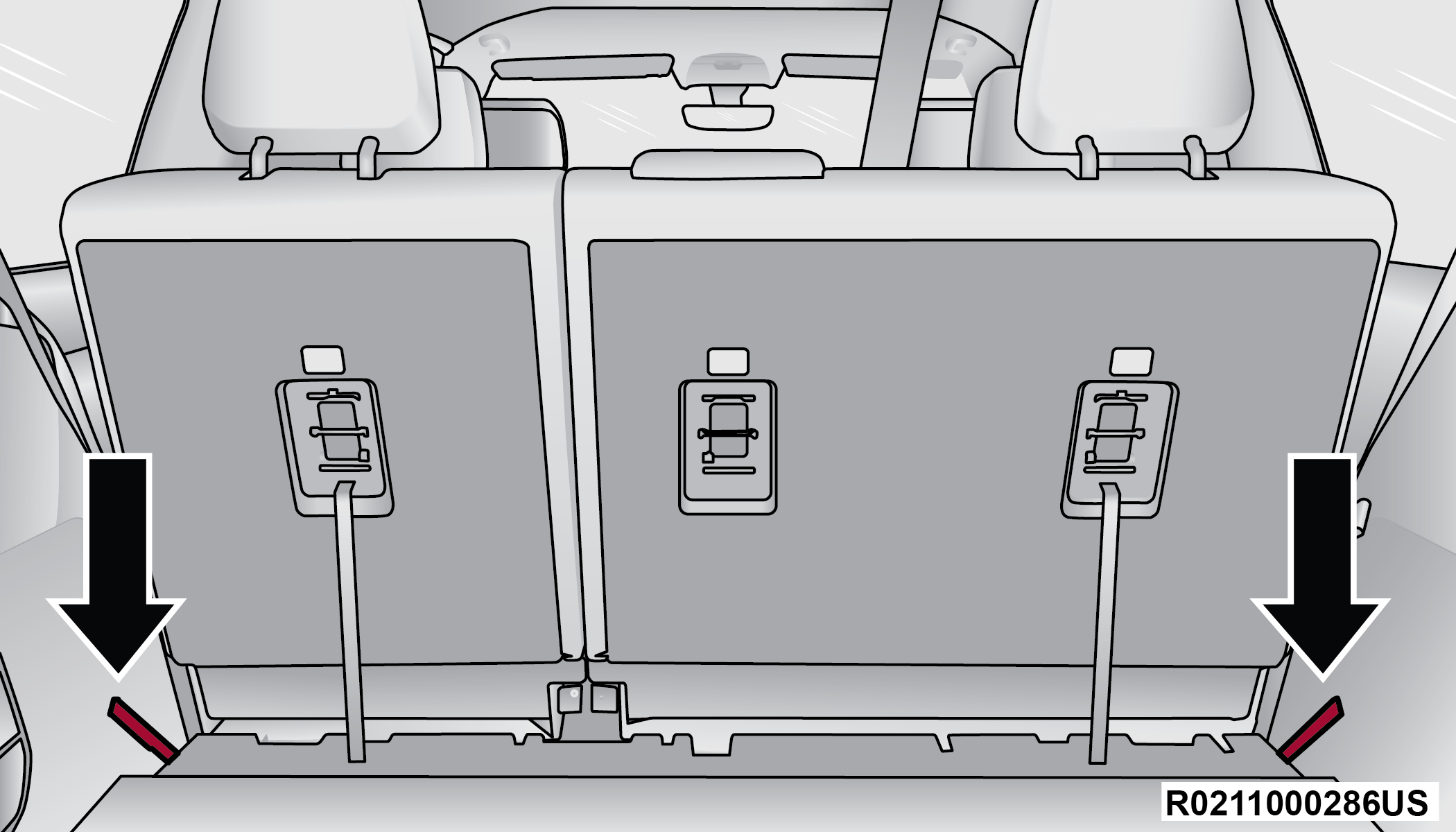
Release Straps
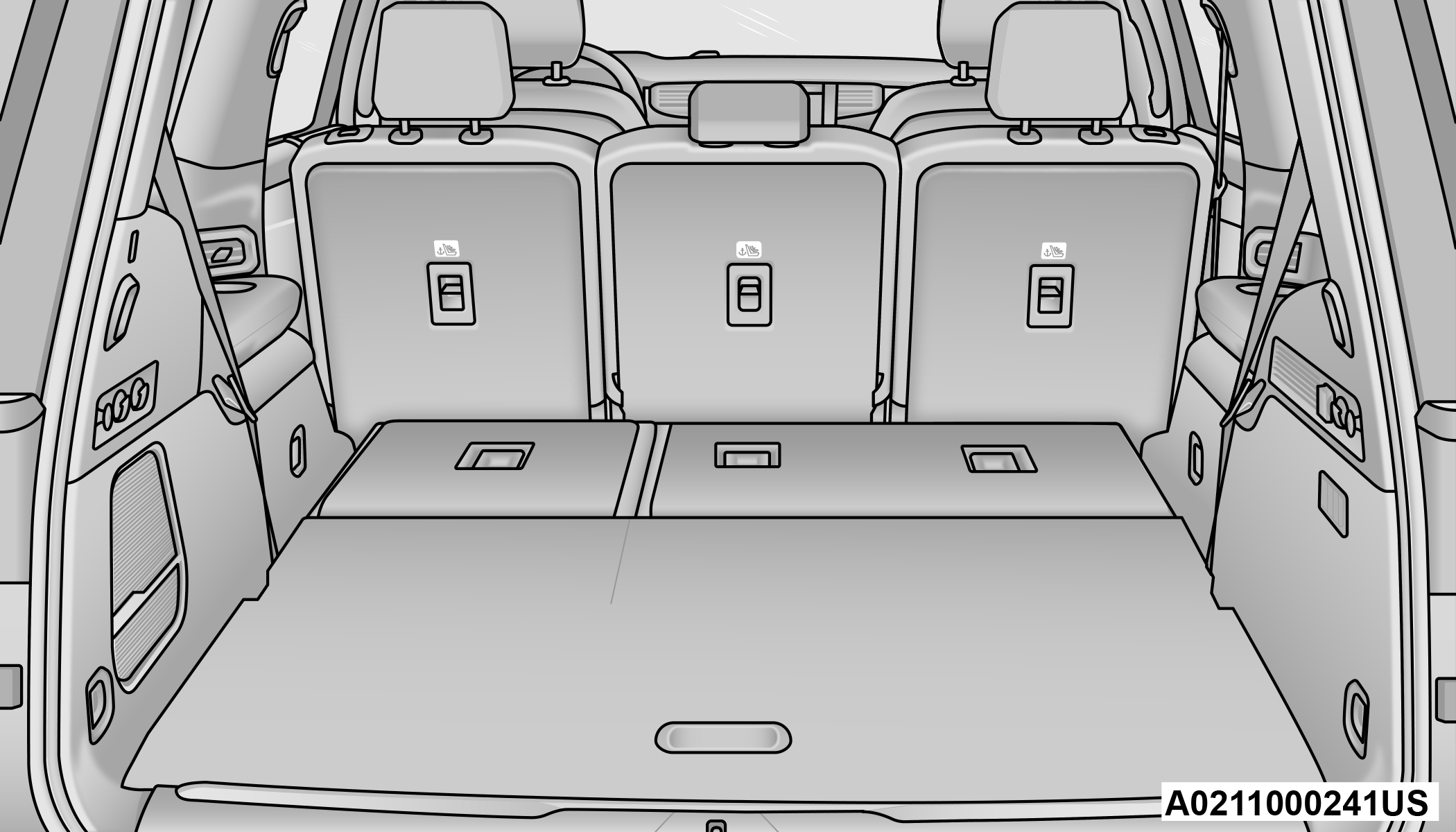
Third Row Folded
To raise the seat, pull the seatback up and push back to lock it into place. You can also use the return straps in the rear cargo area, on the back of the seat.
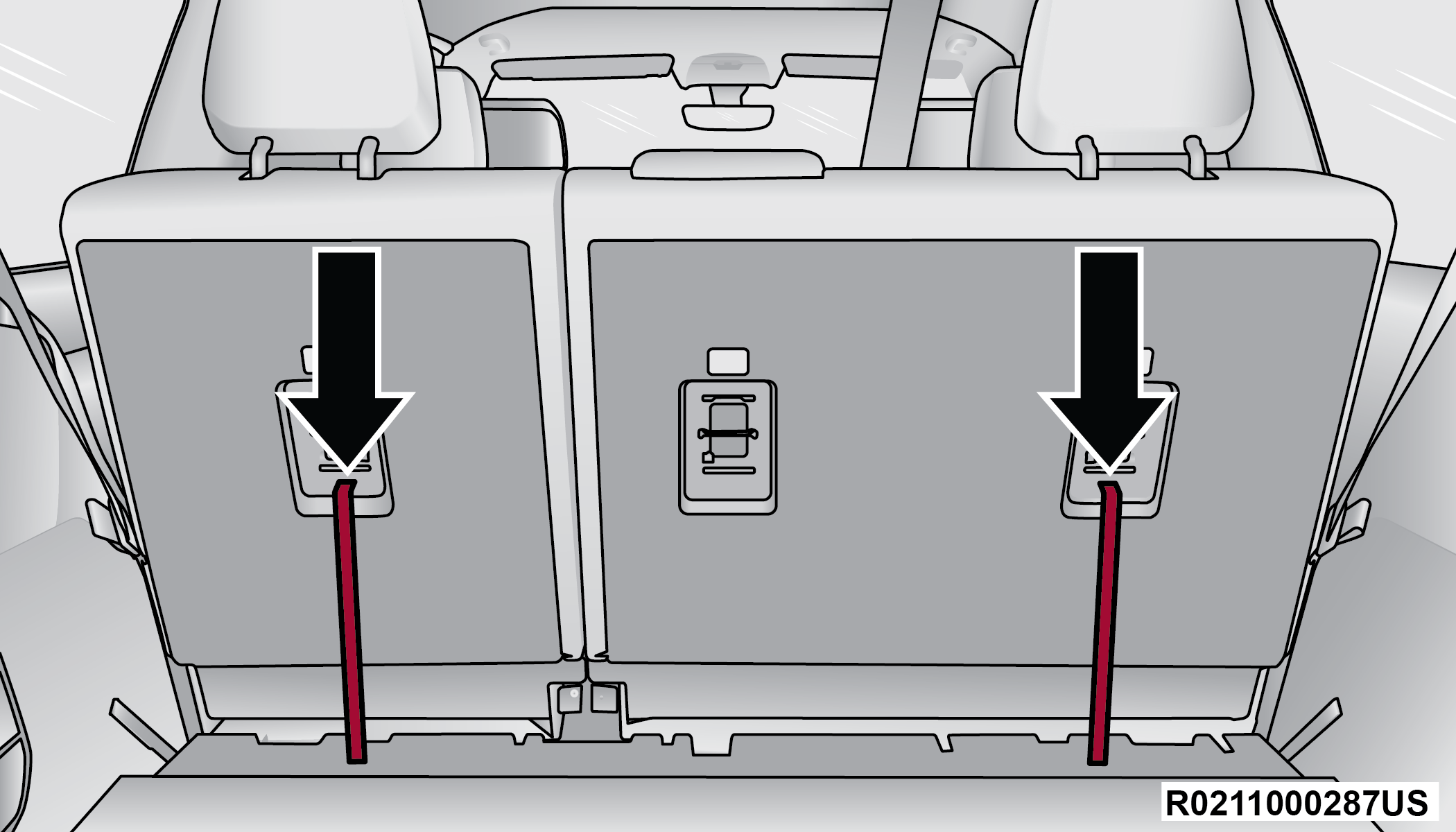
Return Straps
To recline the seat, pull the recline straps, located on the sides of the seat.
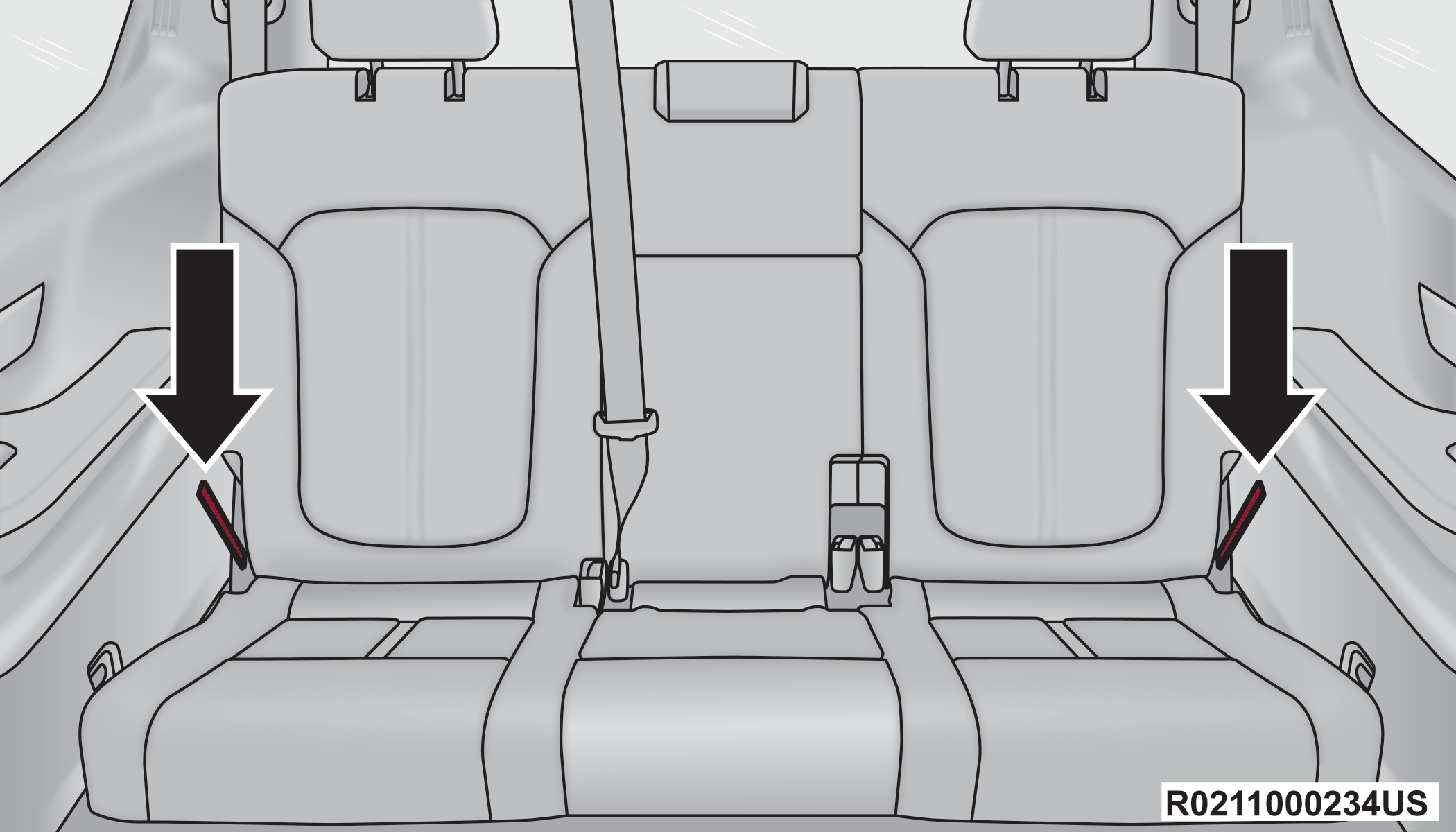
Recline Straps
Warning:
Be certain that the seatback is securely locked into position. If the seatback is not securely locked into position the seat will not provide the proper stability for child seats and/or passengers. An improperly latched seat could cause serious injury.
POWER ADJUSTMENT (FRONT SEATS) — IF EQUIPPED
Wagoneer models will be equipped with 8-way power driver and front passenger seats. The power seat switches are located on the outboard side of the seat. There are two switches that control the movement of the seat cushion and the seatback.
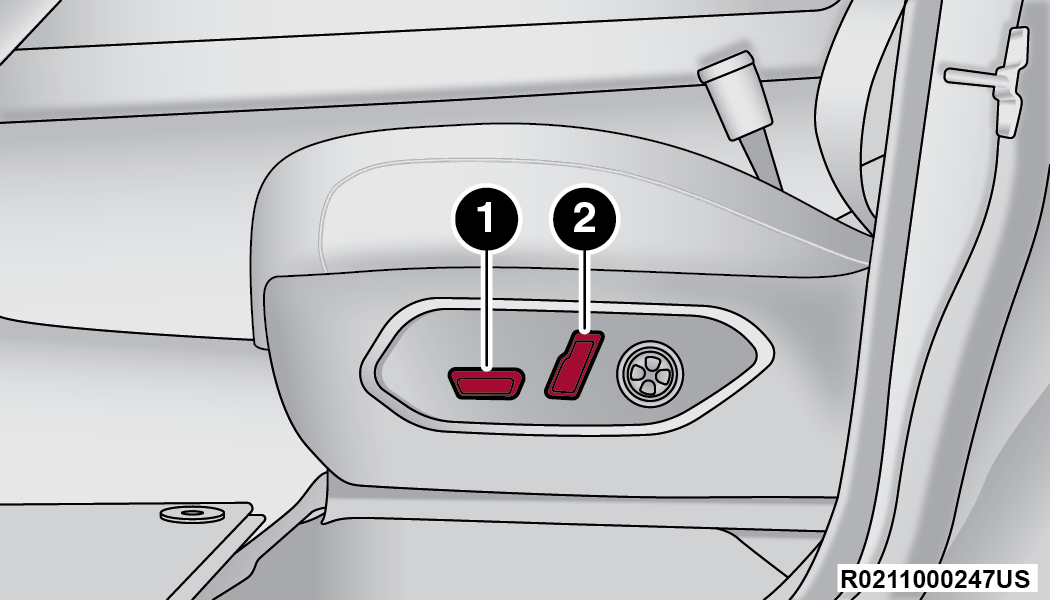
Wagoneer Power Seat Switches
|
1 — Seat Switch |
|
2 — Seatback Switch |
Grand Wagoneer models will be equipped with 20-way power driver and front passenger seats. The power seat switches are located on the driver and front passenger door panels near the door handles. These switches control the movement of the seat cushion and the seatback.
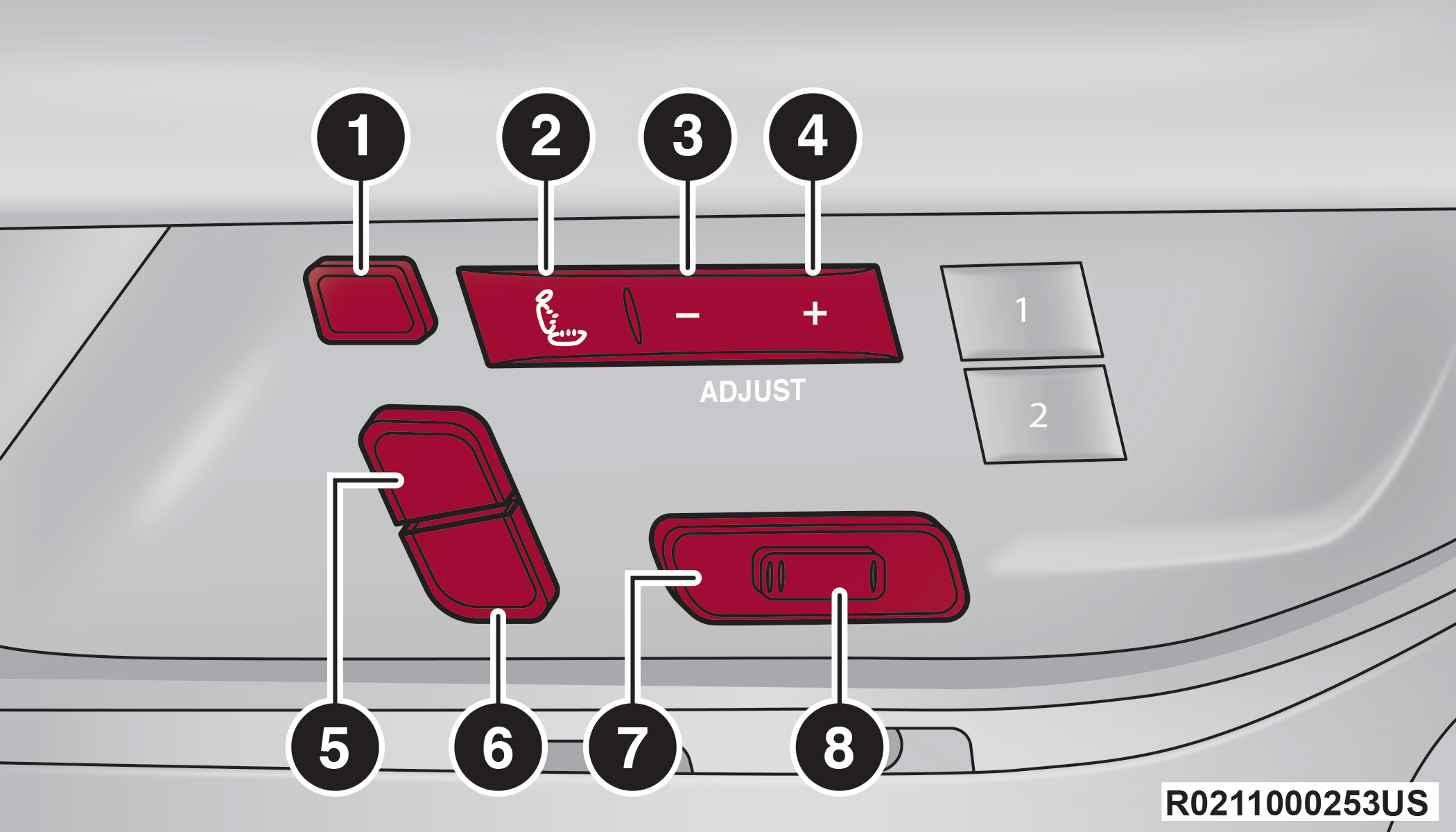
Grand Wagoneer Power Seat Switches
|
1 — Front Headrest Adjustment Switch |
|
2 — Power Massage Switch |
|
3 — Decrease Back/Thigh Bolster & Lumbar Switch |
|
4 — Increase Back/Thigh Bolster & Lumbar Switch |
|
5 — Upper Seatback Switch |
|
6 — Seatback Recline Switch |
|
7 — Seat Switch (Multiple Functions) |
|
8 — Cushion Extender Switch |
ADJUSTING THE SEAT FORWARD OR REARWARD
The seat can be adjusted both forward and rearward. Push the seat switch forward or rearward. The seat will move in the direction of the switch. Release the switch when the desired position has been reached.
ADJUSTING THE SEAT UP OR DOWN
The height of the seats can be adjusted up or down. Pull upward or push downward on the rear of seat switch, the seat will move in the direction of the switch. Release the switch when the desired position has been reached.
TILTING THE SEAT UP OR DOWN
The angle of the seat cushion can be adjusted in two directions. Pull upward or push downward on the front of the seat switch, the front of the seat cushion will move in the direction of the switch. Release the switch when the desired position has been reached.
RECLINING THE SEATBACK
The angle of the seatback can be adjusted forward or rearward. Push the seatback recline switch forward or rearward, the seat will move in the direction of the switch. Release the switch when the desired position is reached.
For Grand Wagoneer models, the angle of the upper seatback can also be adjusted forward or rearward. Push the upper seatback switch forward or rearward, and the seat will move in the direction of the switch. Release the switch when the desired position is reached.
Warning:
-
Adjusting a seat while driving may be dangerous. Moving a seat while driving could result in loss of control which could cause a collision and serious injury or death.
-
Seats should be adjusted before fastening the seat belts and while the vehicle is parked. Serious injury or death could result from a poorly adjusted seat belt.
-
Do not ride with the seatback reclined so that the shoulder belt is no longer resting against your chest. In a collision you could slide under the seat belt, which could result in serious injury or death.
CAUTION:
Do not place any article under a power seat or impede its ability to move as it may cause damage to the seat controls. Seat travel may become limited if movement is stopped by an obstruction in the seat's path.
POWER SEAT BOLSTER ADJUSTMENT — IF EQUIPPED
In Grand Wagoneer models, the front driver and passenger seatback and seat cushion bolsters can be extended outward, or retracted inward by using the (+) and (–) adjustment switches on the door panel. The bolsters can also be adjusted directly in the Front Comfort And Convenience Display or the Uconnect display.
Push the (+) switch to extend the bolsters, or push the (–) switch to retract the bolsters.
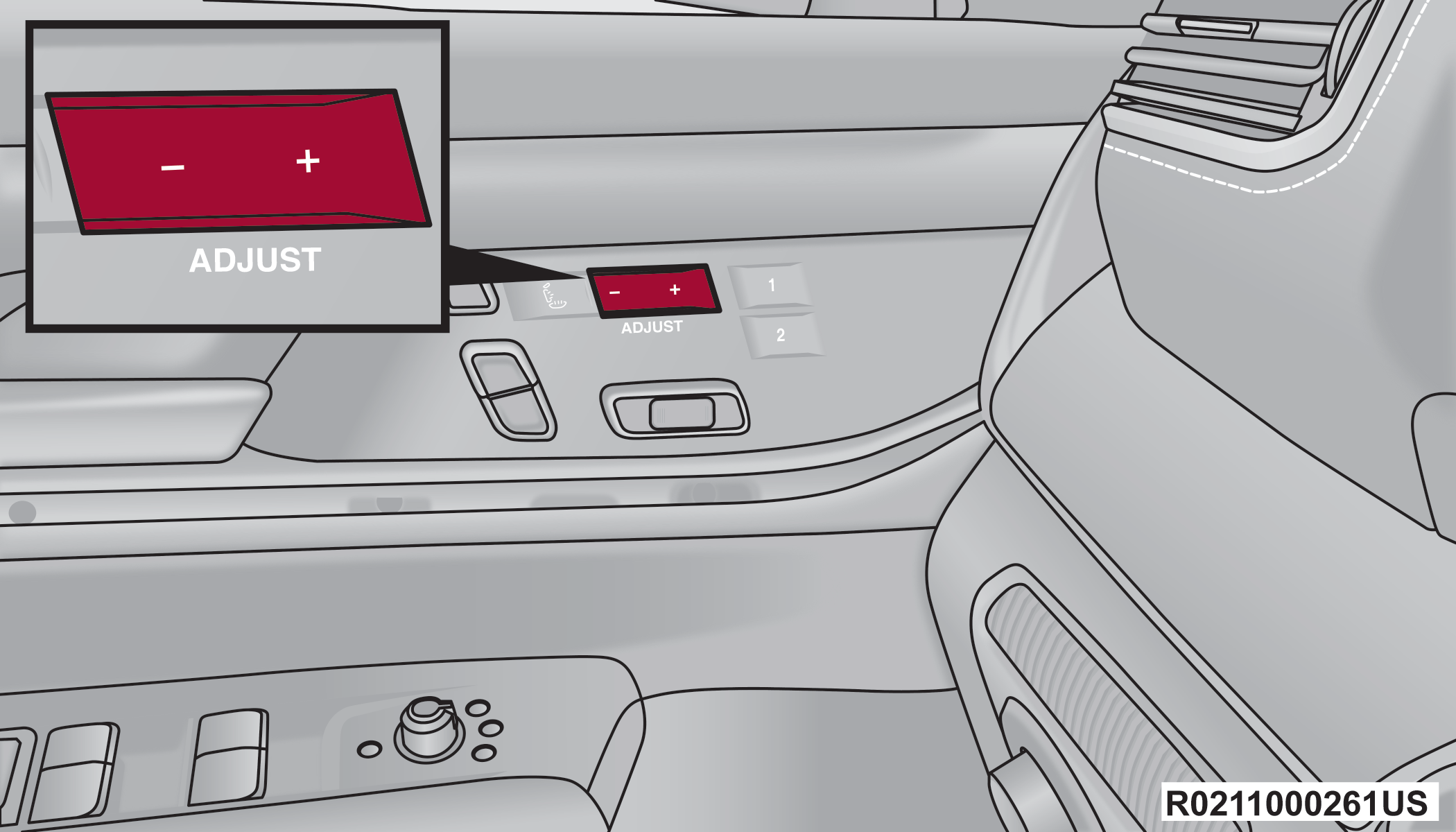
Seat Bolster Adjustment Switches
When either the (+) or the (–) switch is pushed, the Front Comfort And Convenience Display Front Comfort And Convenience Display — If Equipped will change to the Seat menu. The last selected seat item of lumbar in/out, lumbar up/down, back bolster, or thigh bolster will be retained. Select the desired adjustment type, and then press the (+) or (–) switch to adjust.
Note:
If the Front Comfort And Convenience Display is in the stowed position, the Seat menu will appear in the main Uconnect display.
CUSHION EXTENDER — IF EQUIPPED
In Grand Wagoneer models, the cushion can be extended forward a couple inches (centimeters) to increase thigh support. Push the cushion extender switch forward or rearward to extend or retract the cushion. Release the switch when the desired position has been reached.
POWER LUMBAR — IF EQUIPPED
The front driver and passenger seats may be equipped with power lumbar adjustment.
The Wagoneer power lumbar switch is located on the outboard side of the power seat. Push the switch forward to increase the lumbar support. Push the switch rearward to decrease the lumbar support. Pushing upward or downward on the switch will raise and lower the position of the support.
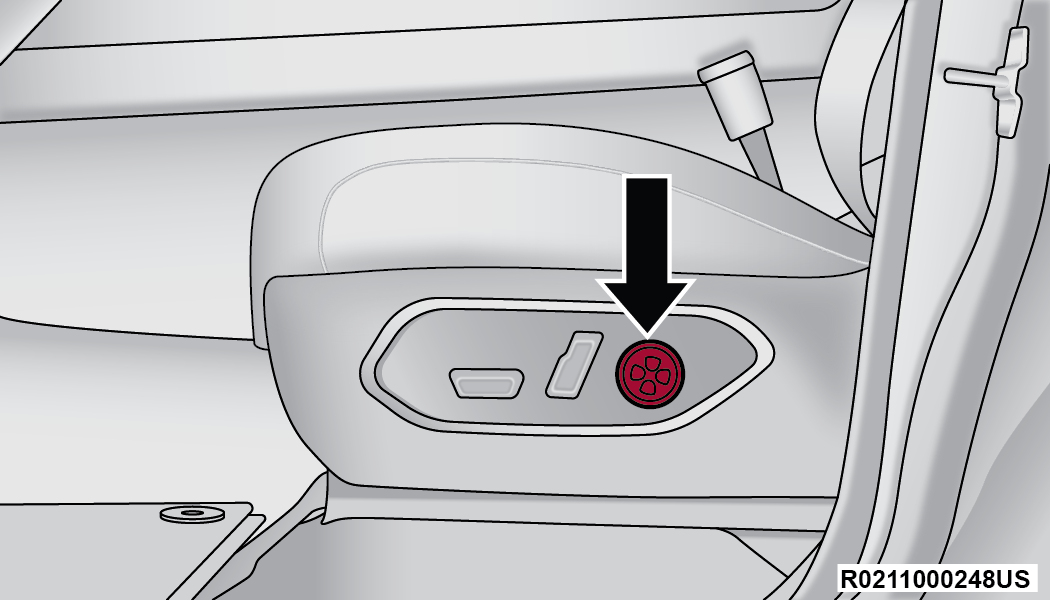
Wagoneer Power Lumbar Adjustment Switch
The Grand Wagoneer power lumbar adjustment switches are located on the door trim. The (+) and (–) switches can be used to adjust lumbar support in/out and up/down. The power lumbar can also be adjusted directly in the Front Comfort And Convenience Display or the Uconnect display.
Grand Wagoneer Power Lumbar Adjustment Switches
When either the (+) or the (–) switch is pushed, the Front Comfort And Convenience Display Front Comfort And Convenience Display — If Equipped will change to the Seat menu. The last selected seat item of lumbar in/out, lumbar up/down, back bolster, or thigh bolster will be retained. Select the desired adjustment type, and then press the (+) or (–) switch to adjust.
Note:
If the Front Comfort And Convenience Display is in the stowed position, the Seat menu will display on the main Uconnect screen.
EASY ENTRY/EXIT SEAT — IF EQUIPPED
This feature provides automatic driver seat positioning to enhance driver mobility when entering and exiting the vehicle.
The distance the driver seat moves depends on where you have the driver seat positioned when you place the vehicle’s ignition in the OFF position.
-
When you place the vehicle’s ignition in the OFF position, the driver seat will move about 2.4 inches (6 cm) rearward if the driver seat position is greater than or equal to 2.7 inches (7 cm) forward of the rear stop. The seat will return to its previously set position when you place the vehicle’s ignition in the ON/RUN position.
-
The Easy Entry/Easy Exit feature is disabled when the driver seat position is less than 0.9 of an inch (2.3 cm) forward of the rear stop. At this position, there is no benefit to the driver by moving the seat for Easy Exit or Easy Entry.
When enabled in Uconnect Settings, Easy Entry and Easy Exit positions are stored in each memory setting profile DRIVER AND PASSENGER MEMORY SETTINGS — IF EQUIPPED.
Note:
The Easy Entry/Exit feature is not enabled when the vehicle is delivered from the factory. The Easy Entry/Exit feature is enabled or disabled through the programmable features in the Uconnect system UCONNECT SETTINGS.
POWER ADJUSTMENT (REAR SEATS) — IF EQUIPPED
Warning:
-
Adjusting a seat while driving may be dangerous. Moving a seat while driving could result in loss of control which could cause a collision and serious injury or death.
-
Seats should be adjusted before fastening the seat belts and while the vehicle is parked. Serious injury or death could result from a poorly adjusted seat belt.
-
Do not ride with the seatback reclined so that the shoulder belt is no longer resting against your chest. In a collision you could slide under the seat belt, which could result in serious injury or death.
-
Do not place the seat belt webbing behind the third row stow clip when using the seat belt to restrain an occupant. The seat belt will not be positioned properly on the occupant and they could be more seriously injured in an accident as a result.
CAUTION:
Do not place any article under a power seat or impede its ability to move as it may cause damage to the seat controls. Seat travel may become limited if movement is stopped by an obstruction in the seat's path.
THIRD ROW POWER RECLINE — IF EQUIPPED
If equipped, the power recline switch for the third row seats is located on the trim panel next to the seat. This switch adjusts the seatback angle forward/rearward for occupant comfort.
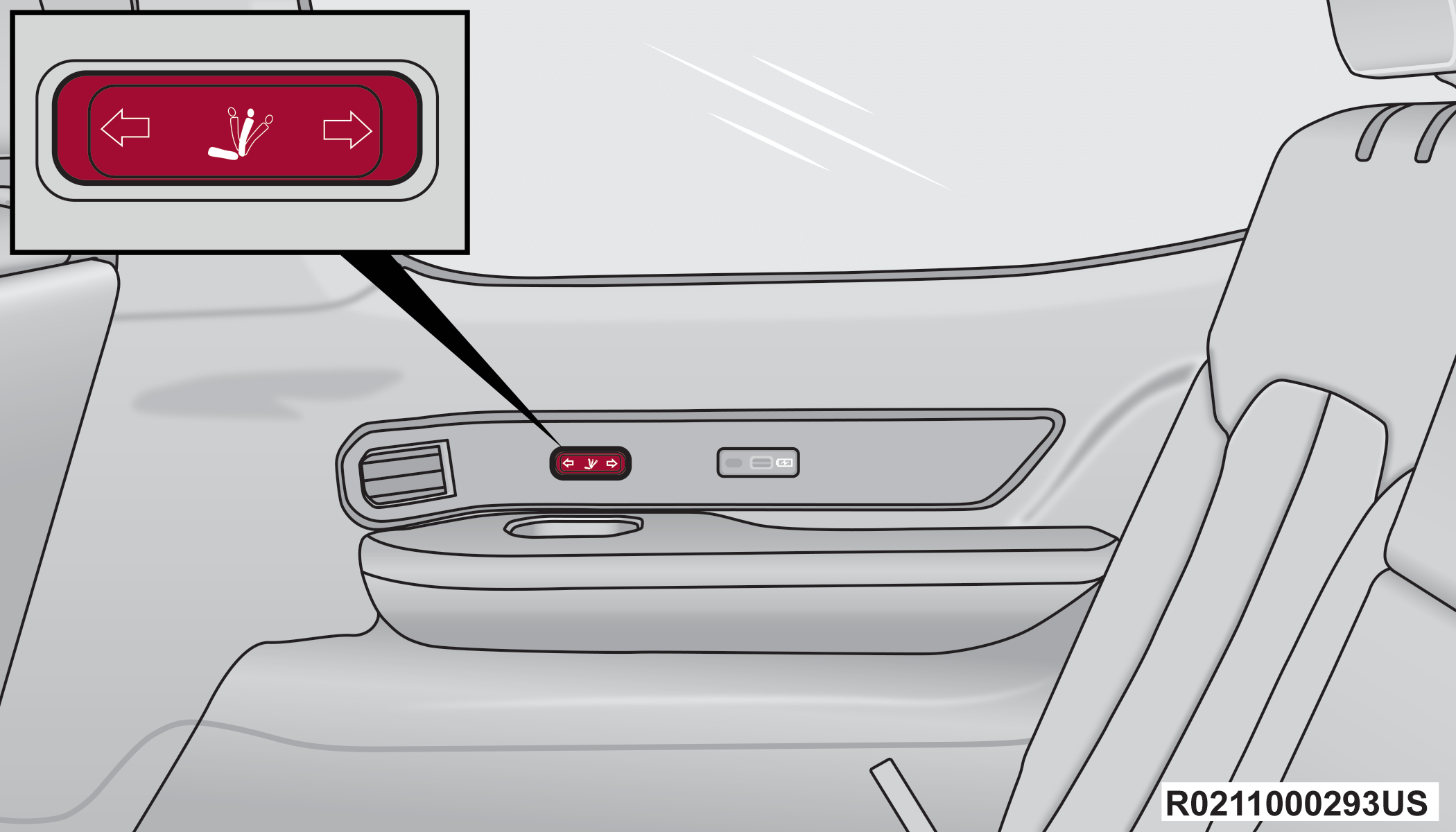
Third Row Power Recline Switch
The angle of the seatback can be adjusted forward or rearward. Push and hold the forward or rearward button. The seat will move in the direction of the button push. Release the button when the desired position is released.
REAR SEAT POWER FOLDING SEATBACKS — IF EQUIPPED
A one-touch power folding seat switch is located in the right rear trim panel inside the cargo area, as part of a switch bank.
The switch bank allows multiple power folding positions for the second and third row seats.
The second row seats can be folded using these switches, while the third row can be folded or unfolded.
Note:
The third row seat belts may interfere with the power folding of the seat. Place the seat belt webbing behind the stow clip before stowing or opening the seat. When the seat is in the desired position, remove the webbing from the stow clip so that it is ready for use. Never leave the seat belt in the stow clip when it is used to restrain an occupant.
Note:
-
The head restraints will lower automatically as necessary when the power seat begins to move Head Restraints.
-
The head restraint can also be lowered manually using the pull strap located at the back of the seat.
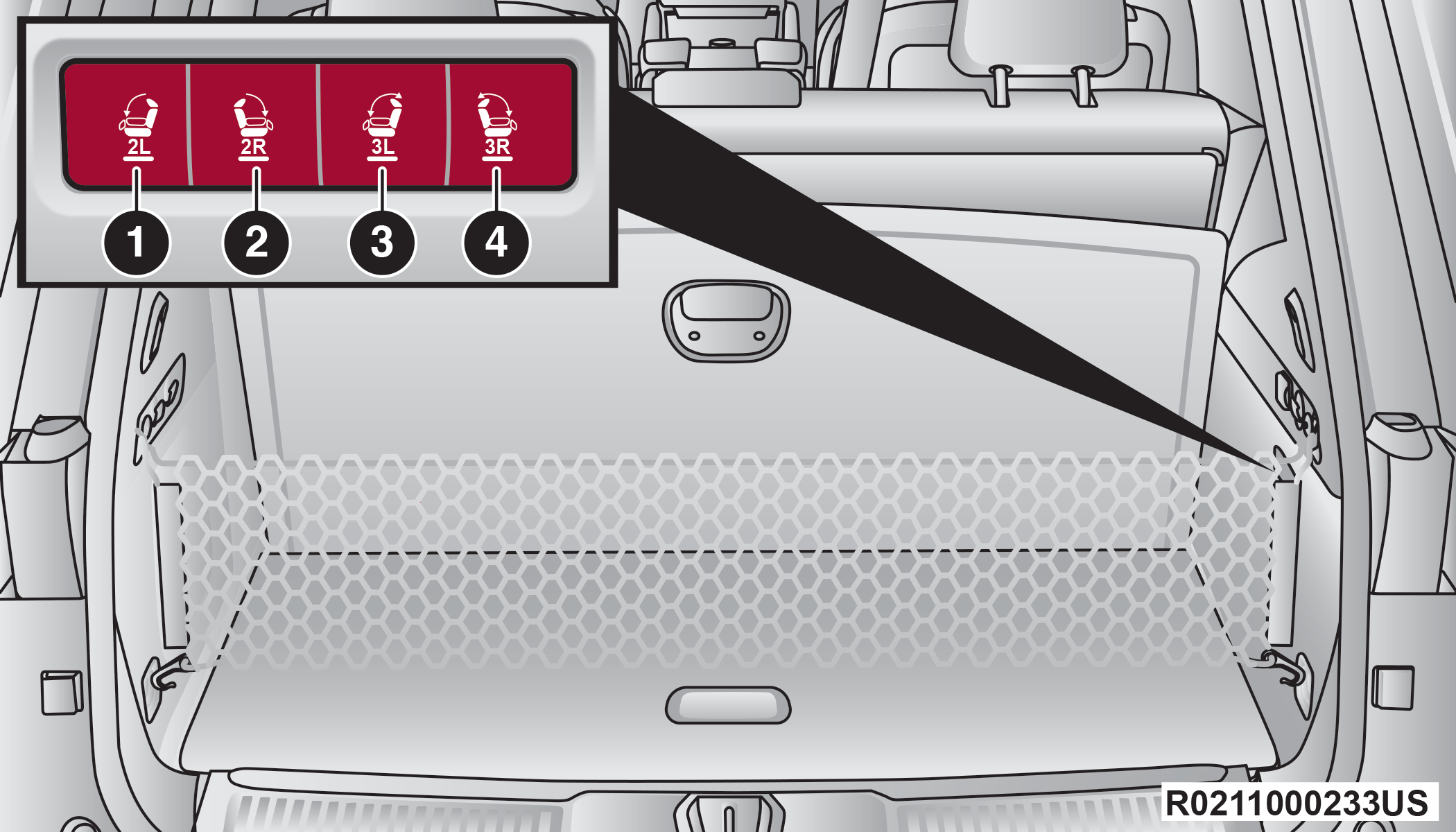
Rear Panel Power Switch Bank
|
1 — Second Row Left Side Fold |
|
2 — Second Row Right Side Fold |
|
3 — Third Row Left Side Fold/Unfold |
|
4 — Third Row Right Side Fold/Unfold |
There are also power folding switches for the third row seats located on the C-pillar (just behind the rear doors on the trim panels).
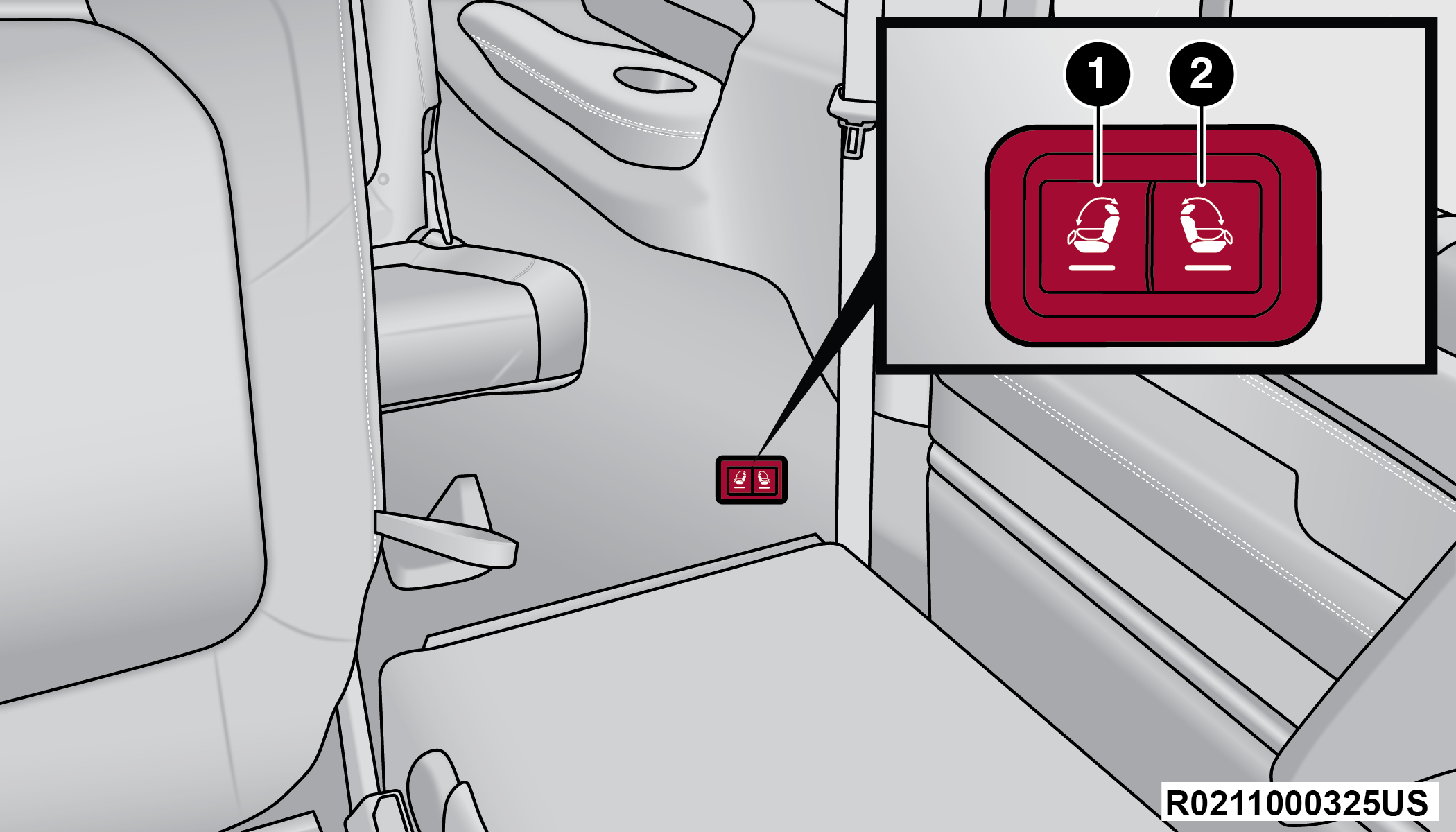
C-Pillar Power Folding Switches (Left Side Shown)
|
1 — Third Row Left Side Fold/Unfold |
|
2 — Third Row Right Side Fold/Unfold |
POWER SEAT MASSAGE — IF EQUIPPED
In Grand Wagoneer models, the driver’s and front passenger’s seats may be equipped with power massage.
The seat massage feature can be turned on/off through the massage button located on the door panel near the handle, or through the Controls menu on the radio screen.
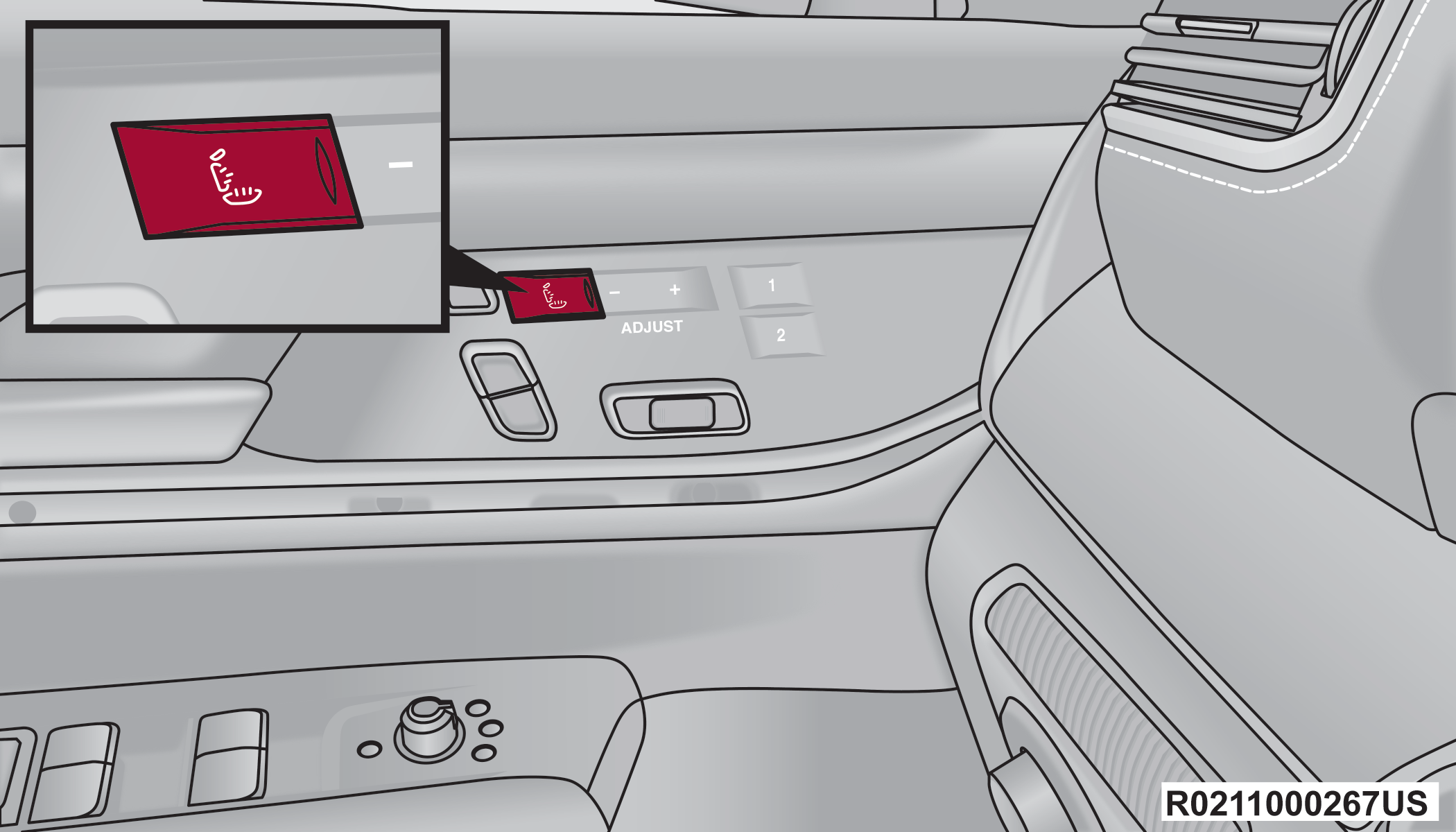
Door Panel Massage Button
Once activated by either method, the massage controls screen will display on the Front Comfort And Convenience Display Front Comfort And Convenience Display — If Equipped, or on the standard Uconnect display if the Front Comfort And Convenience Display is stowed. “Massage Type” and “Intensity Level” can be selected for the activated seat.
There are four intensity levels and five massage types that can be selected.
Intensity Levels:
-
High
-
Med
-
Low
-
Off
Massage Types:
-
Waterfall
-
Lower Back
-
Extend
-
Low Extend
-
Rock Climb
The massage type and intensity level status will be synchronized between the main Uconnect display and the Front Comfort and Convenience Display.
The selected settings will save in the system’s memory when turned off, and will resume the next time the system is turned on.
Note:
-
For vehicles equipped with a selectable back/cushion feature for massage seats, the massage feature can be deselected for either the seatback or seat cushion. If both options are deselected, massage will turn off.
-
The engine must be running for the power seatback massage to operate.
-
The massage feature will turn off after 20 minutes of use. However, if the massage type or intensity level is changed, the timer then resets.
HEATED SEATS — IF EQUIPPED
Warning:
-
Persons who are unable to feel pain to the skin because of advanced age, chronic illness, diabetes, spinal cord injury, medication, alcohol use, exhaustion or other physical condition must exercise care when using the seat heater. It may cause burns even at low temperatures, especially if used for long periods of time.
-
Do not place anything on the seat or seatback that insulates against heat, such as a blanket or cushion. This may cause the seat heater to overheat. Sitting in a seat that has been overheated could cause serious burns due to the increased surface temperature of the seat.
FRONT HEATED SEATS
 The front heated seats control buttons are located on the sides of the radio or within the Uconnect system. You can access the controls through the Climate screen.
-
Press the heated seat button once to turn the HI setting on.
-
Press the heated seat button a second time to turn the MED setting on.
-
Press the heated seat button a third time to turn the LO setting on.
-
Press the heated seat button a fourth time to turn the heating elements off.
The heating elements can be turned on in the seatback only, seat cushion only, or both. Press the seat image on the touchscreen or push the seat zone button on the side of the radio to cycle through these seat zones. An LED will illuminate next to the selected zone(s). If equipped with touchscreen buttons, the selected zones will be highlighted on the seat image.
Note:
-
Once a heat setting is selected, heat will be felt within two to five minutes.
-
The engine must be running for the heated seats to operate.
-
The level of heat selected will stay on until the operator changes it.
For information on use with the Remote Start system, see Remote Start Comfort Systems — If Equipped.
REAR HEATED SEATS — IF EQUIPPED
The two second row outboard seats may be equipped with heated seats. There are two heated seat switches that allow the rear passengers to operate the seats independently. The heated seat switches for each heater are located on the rear of the center console.
If equipped with a Rear Comfort And Convenience Display, heated seat settings can be selected within the display Rear Climate Control Description And Functions.
You can choose from HI, MED, LO, or OFF heat settings. Indicator lights in each switch illuminate indicating the level of heat in use.
-
Push the heated seat switch once to turn the HI setting on.
-
Push the heated seat switch a second time to turn the MED setting on.
-
Push the heated seat switch a third time to turn the LO setting on.
-
Push the heated seat switch a fourth time to turn the heating elements off.
The level of heat selected will stay on until the operator changes it.
Note:
The engine must be running for the heated seats to operate.
VENTILATED SEATS — IF EQUIPPED
Located in the seat cushion and seatback are fans that draw the air from the passenger compartment and move air through fine perforations in the seat cover to help keep the occupant cooler in higher ambient temperatures.
FRONT VENTILATED SEATS
 The ventilated seats control buttons are located on the sides of the radio or within the Uconnect system. The fans operate at three speeds: HI, MED and LO.
-
Press the ventilated seat button once to choose HI.
-
Press the ventilated seat button a second time to choose MED.
-
Press the ventilated seat button a third time to choose LO.
-
Press the ventilated seat button a fourth time to turn the ventilation off.
The fans can be turned on in the seatback only, seat cushion only, or both. Press the seat image on the touchscreen or push the seat zone button on the side of the radio to cycle through these seat zones. An LED will illuminate next to the selected zone(s). If equipped with touchscreen buttons, the selected zones will be highlighted on the seat image.
Note:
The engine must be running for the ventilated seats to operate.
For information on use with the Remote Start system, see Remote Start Comfort Systems — If Equipped.
REAR VENTILATED SEATS — IF EQUIPPED
The two second row outboard seats may be equipped with ventilated seats. The rear ventilated seat control switches are located on the rear of the center console and allow the rear passengers to operate the seats independently.
If equipped with a Rear Comfort And Convenience Display, ventilated seat settings can be selected within the display Rear Climate Control Description And Functions.
You can choose from HI, MED, LO, or OFF fan speed. Indicator lights in each switch illuminate indicating the level of fan speed in use.
-
Push the ventilated seat switch once to choose HI.
-
Push the ventilated seat switch a second time to choose MED.
-
Push the ventilated seat switch a third time to choose LO.
-
Push the ventilated seat switch a fourth time to turn the ventilation off.
Note:
The engine must be running for the ventilated seats to operate.
HEAD RESTRAINTS
Head restraints are designed to reduce the risk of injury by restricting head movement in the event of a rear impact. Head restraints should be adjusted so that the top of the head restraint is located above the top of your ear.
Warning:
-
All occupants, including the driver, should not operate a vehicle or sit in a vehicle’s seat until the head restraints are placed in their proper positions in order to minimize the risk of neck injury in the event of a crash.
-
Head restraints should never be adjusted while the vehicle is in motion. Driving a vehicle with the head restraints improperly adjusted or removed could cause serious injury or death in the event of a collision.
FRONT HEAD RESTRAINTS
Your vehicle is equipped with front four-way driver and passenger head restraints.
The Wagoneer is equipped with manual four-way head restraints, and the Grand Wagoneer is equipped with power four-way head restraints with adjustable wings.
If your vehicle is equipped with manual front head restraints, to raise the head restraint, push the adjustment button, located on the left side of the head restraint, and pull upward on the head restraint. To lower the head restraint, push the adjustment button, and push downward on the head restraint.
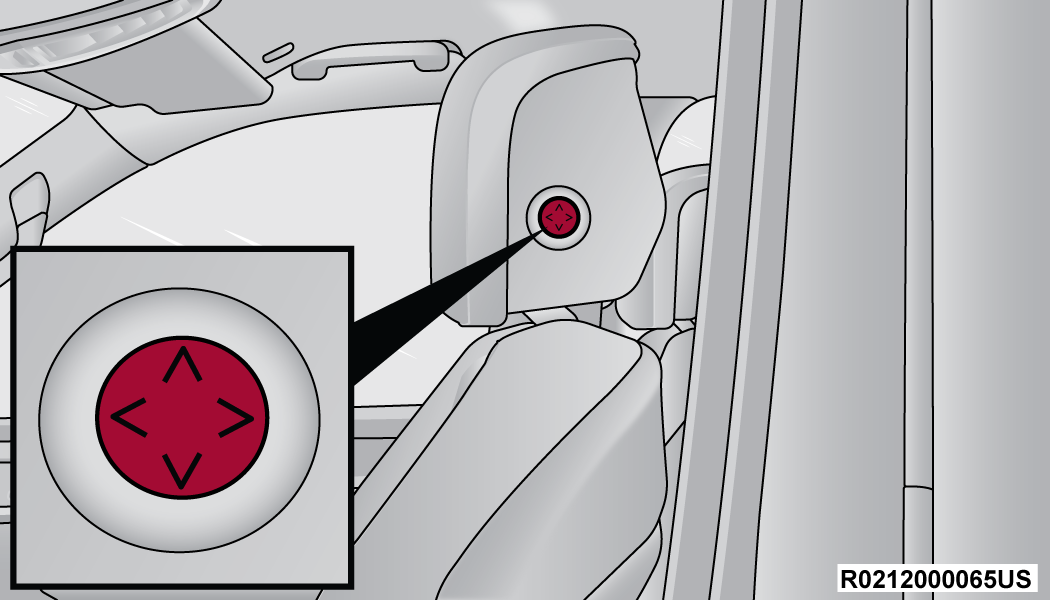
Wagoneer Head Restraint Adjustment Button
To adjust the head restraint forward, press the adjustment button on the left side of the head restraint, and pull the top of the head restraint toward the front of the vehicle as desired and release. To adjust the head restraint rearward, press the adjustment button, and push the top of the head restraint toward the rear of the vehicle as desired and release.
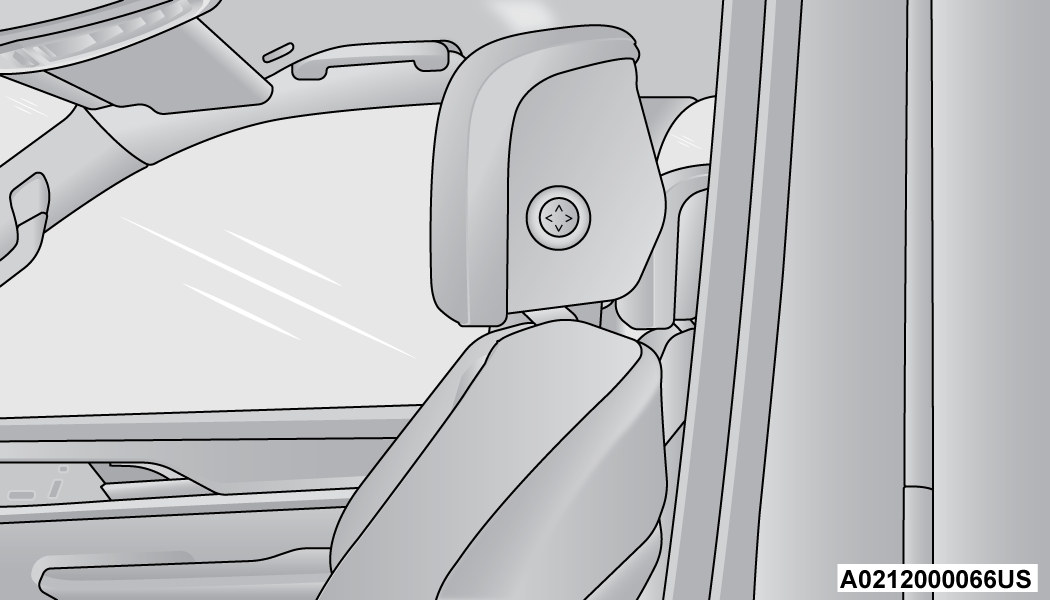
Upright Position (Manual Head Restraint)
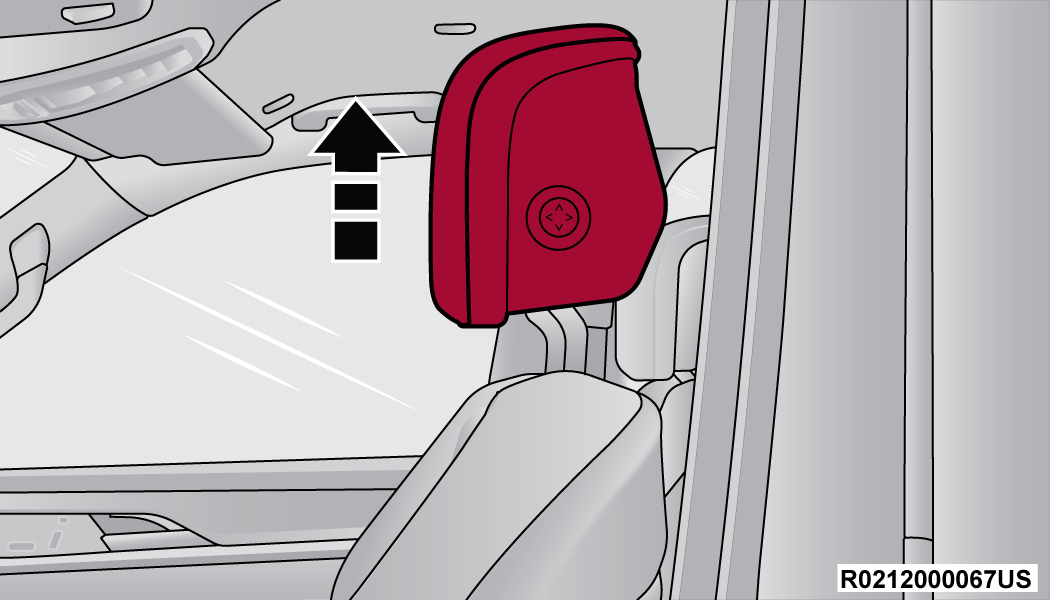
Upward Adjustment (Manual Head Restraint)
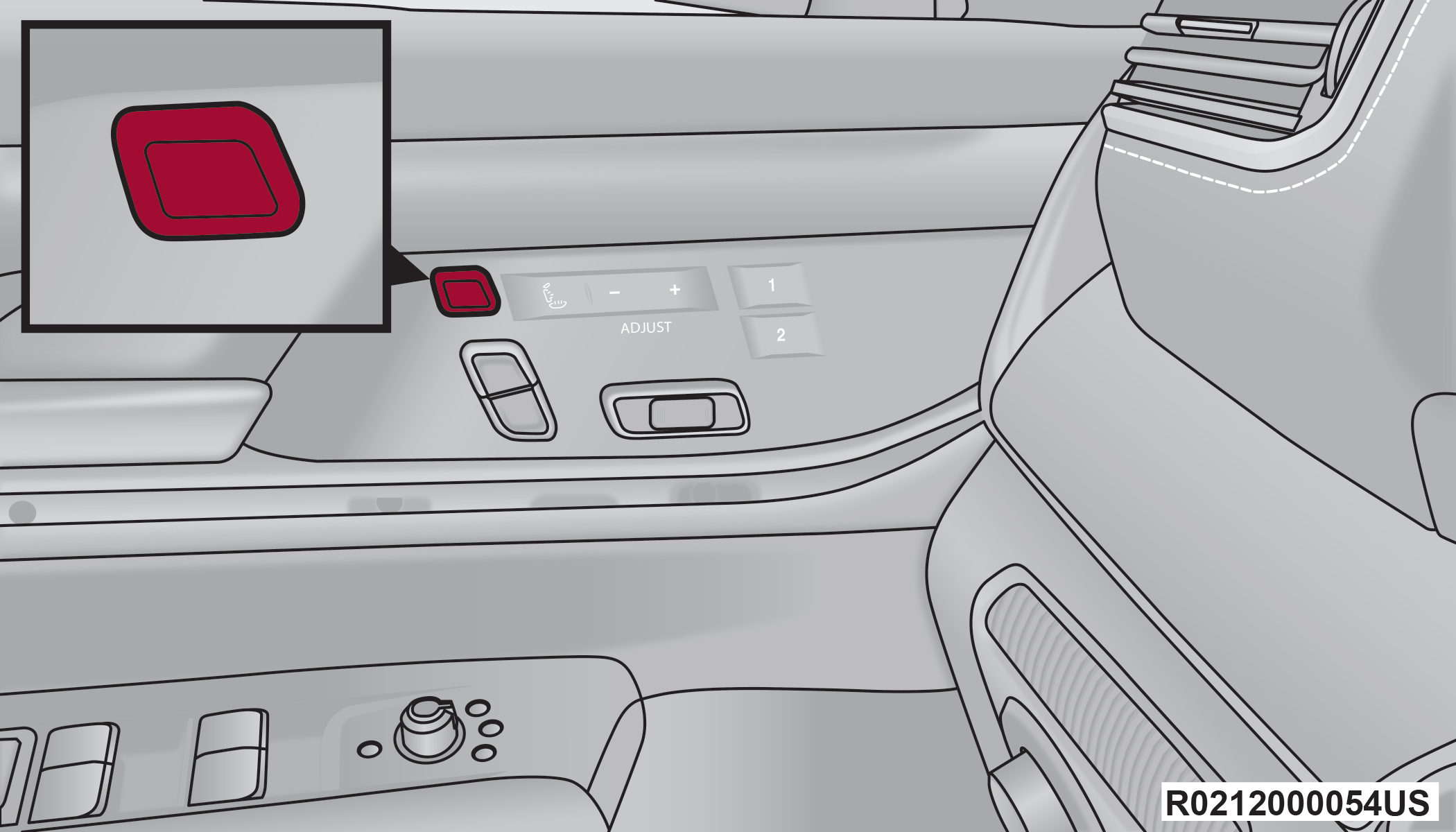
Grand Wagoneer Head Restraint Adjustment Switch
If your vehicle is equipped with power front head restraints, push upward or push downward on the head restraint adjustment switch, located on the door trim panel, to raise or lower the head restraint. The head restraint will move in the direction of the switch. Release the switch when the desired position has been reached.
The head restraint can also be adjusted both forward and rearward. Push the head restraint switch forward or rearward. The head restraint will move in the direction of the switch. Release the switch when the desired position has been reached.
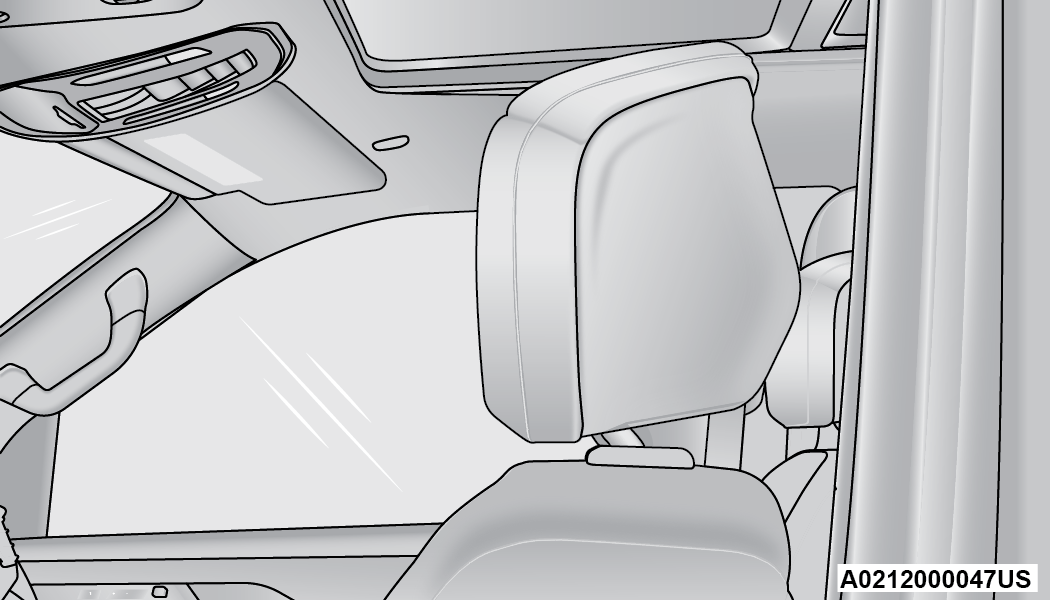
Upright Position (Power Head Restraint)
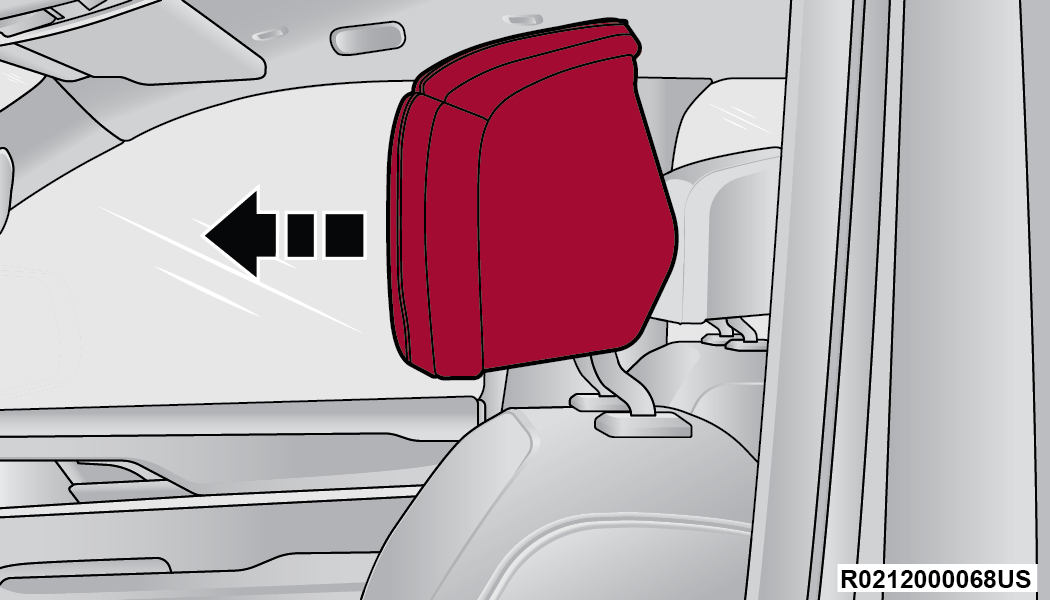
Forward Adjustment (Power Head Restraint)
Grand Wagoneer front power head restraints are also equipped with adjustable wings, located on the outer left-hand and right-hand front face of the head restraint.
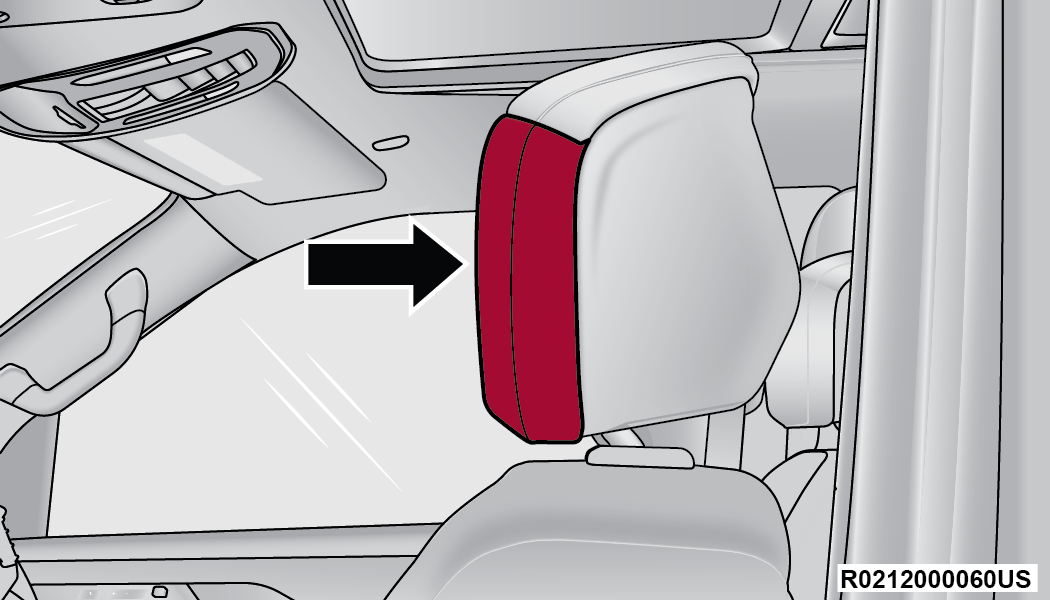
Adjustable Wing (Left-Hand Side Shown)
To adjust the wings for additional comfort and support, pull forward on the wings. To return the wings, push the wings rearward to the flat position.
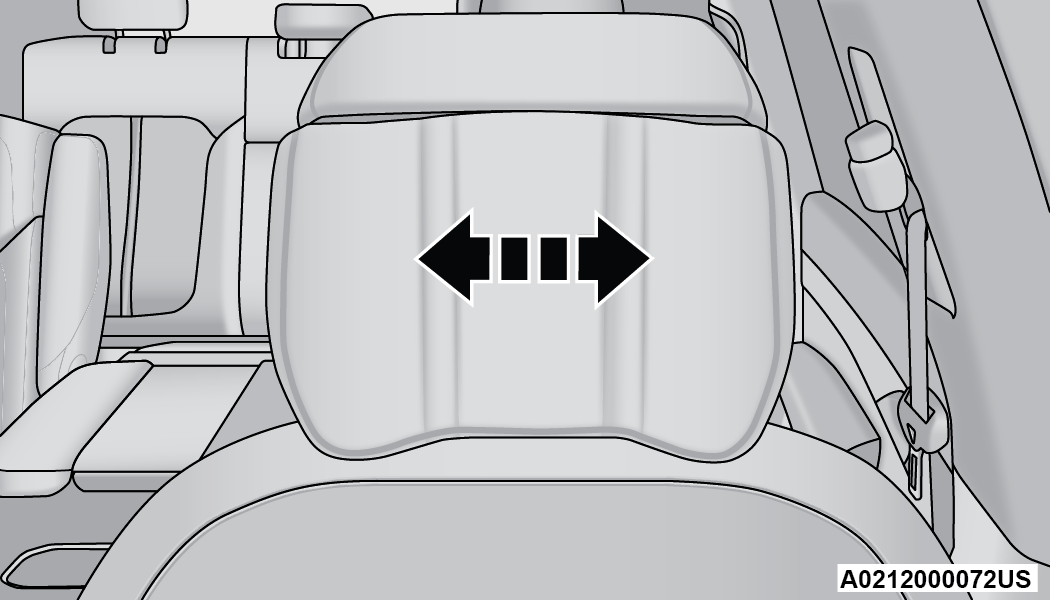
Wing Adjustment
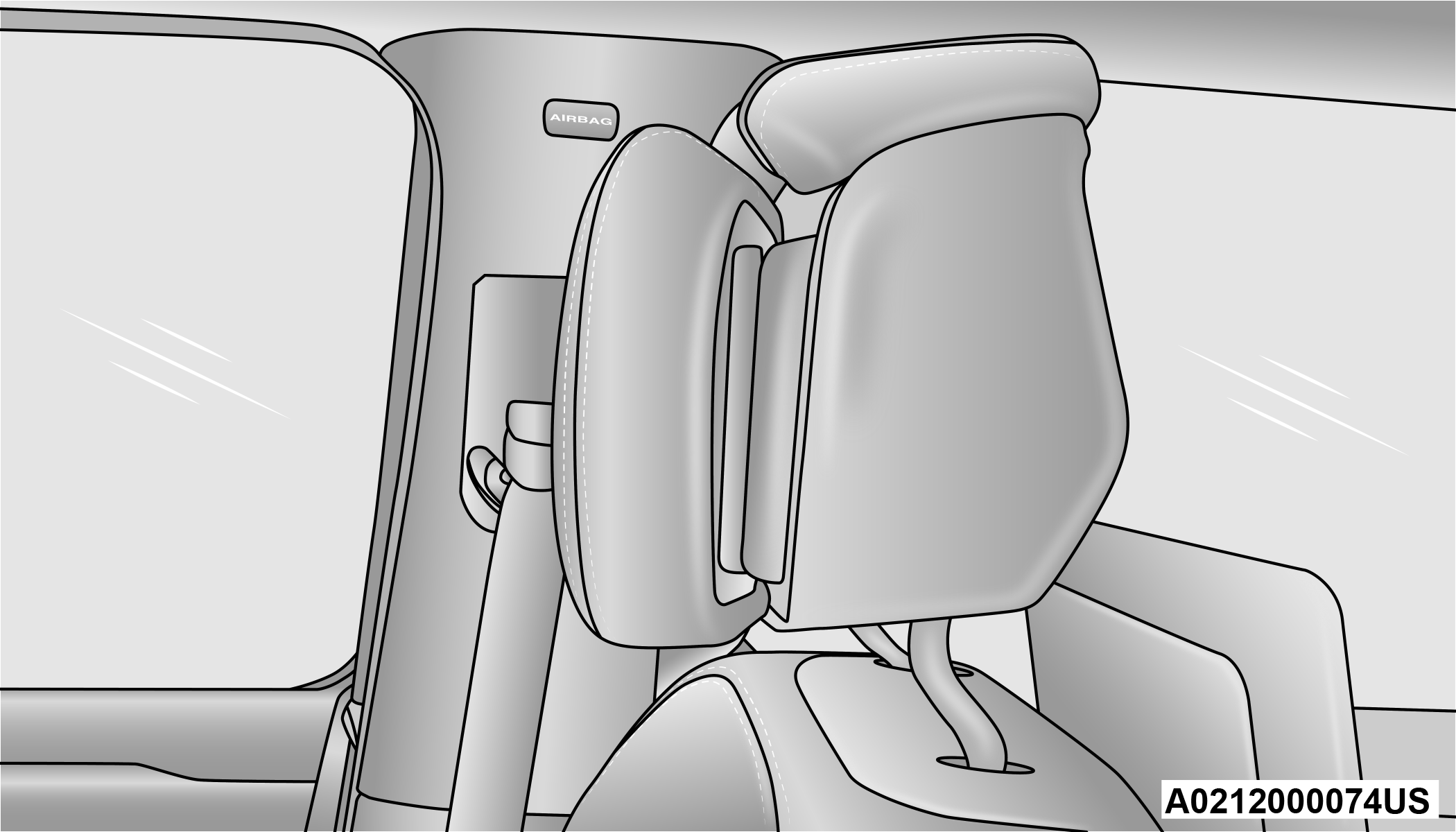
Wing Extended (Left-Hand Side Shown)
Note:
The head restraints should only be removed by qualified technicians, for service purposes only. If either of the head restraints require removal, see an authorized dealer.
Warning:
-
All occupants, including the driver, should not operate a vehicle or sit in a vehicle’s seat until the head restraints are placed in their proper positions in order to minimize the risk of neck injury in the event of a crash.
-
Head restraints should never be adjusted while the vehicle is in motion. Driving a vehicle with the head restraints improperly adjusted or removed could cause serious injury or death in the event of a collision.
HEAD RESTRAINTS — SECOND ROW CAPTAIN’S CHAIRS
If the second row is equipped with captain’s chairs, the head restraints are not adjustable or removable. They automatically fold forward when the seatback is folded, and do not return to their normal position when the seatback is raised. After returning the seatback to its upright position after a folding operation, raise the head restraint until it locks in place.
The driver can also fold the second row outboard head restraints through the radio, for improved visibility when the vehicle is in REVERSE and there are no occupants in the seats.
 Press the Headrest Fold button within the Controls menu of the Uconnect system to power fold the second row outboard head restraints.
Note:
-
The head restraints must be raised manually when occupying the second row.
-
Do not fold if there are passengers seated in the second row seats.
Warning:
-
All occupants, including the driver, should not operate a vehicle or sit in a vehicle’s seat until the head restraints are placed in their proper positions in order to minimize the risk of neck injury in the event of a crash.
-
Head restraints should never be adjusted while the vehicle is in motion. Driving a vehicle with the head restraints improperly adjusted or removed could cause serious injury or death in the event of a collision.
HEAD RESTRAINTS — SECOND ROW BENCH
If the second row is equipped with a bench seat, the head restraints on the outboard seats are not adjustable or removable. They automatically fold forward when the seatback is folded, and do not return to their normal position when the seatback is raised. After returning the seatback to its upright position after a folding operation, raise the head restraint until it locks in place.
The driver can also fold the second row outboard head restraints through the radio, for improved visibility when the vehicle is in REVERSE, and there are no occupants in the seats.
Press the Headrest Fold button within the Controls menu of the Uconnect system to power fold the second row outboard head restraints.
Note:
-
The head restraints must be raised manually when occupying the second row.
-
Do not fold if there are passengers seated in the second row seats.
The center head restraint has one adjustment position, and can be adjusted up, when the seat is occupied, or down for storage. To adjust this head restraint, push the adjustment button, located on the base of the head restraint, while pulling upward or pushing downward until it locks into place.
Note:
The center head restraint is not removable.
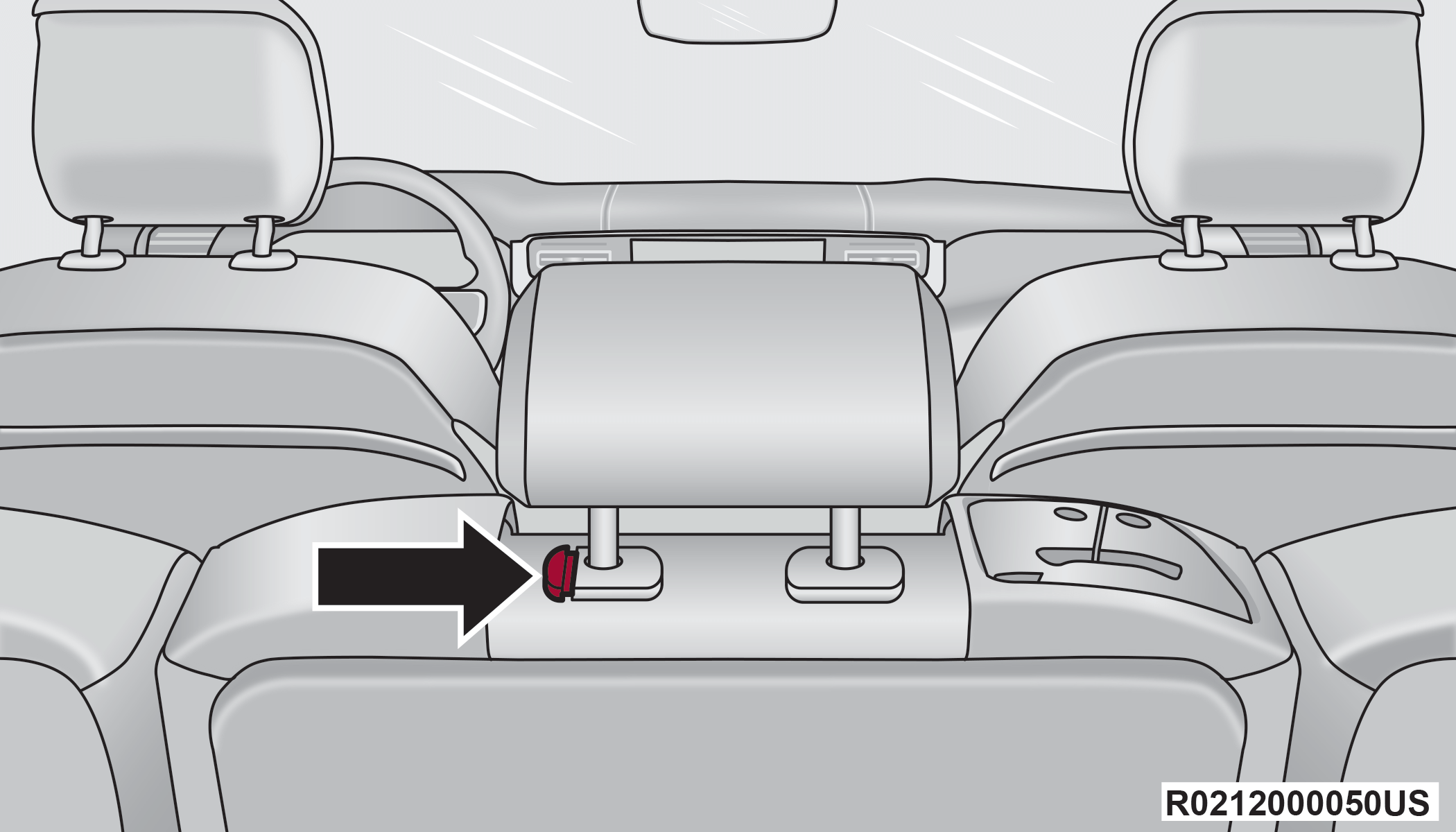
Center Seat Head Restraint Adjustment Button
Note:
For information on child restraint tethering, see OCCUPANT RESTRAINT SYSTEMS.
Warning:
-
All occupants, including the driver, should not operate a vehicle or sit in a vehicle’s seat until the head restraints are placed in their proper positions in order to minimize the risk of neck injury in the event of a crash.
-
Head restraints should never be adjusted while the vehicle is in motion. Driving a vehicle with the head restraints improperly adjusted or removed could cause serious injury or death in the event of a collision.
THIRD ROW HEAD RESTRAINTS
The head restraint in the center position can be raised and lowered for tether routing or height adjustment OCCUPANT RESTRAINT SYSTEMS.
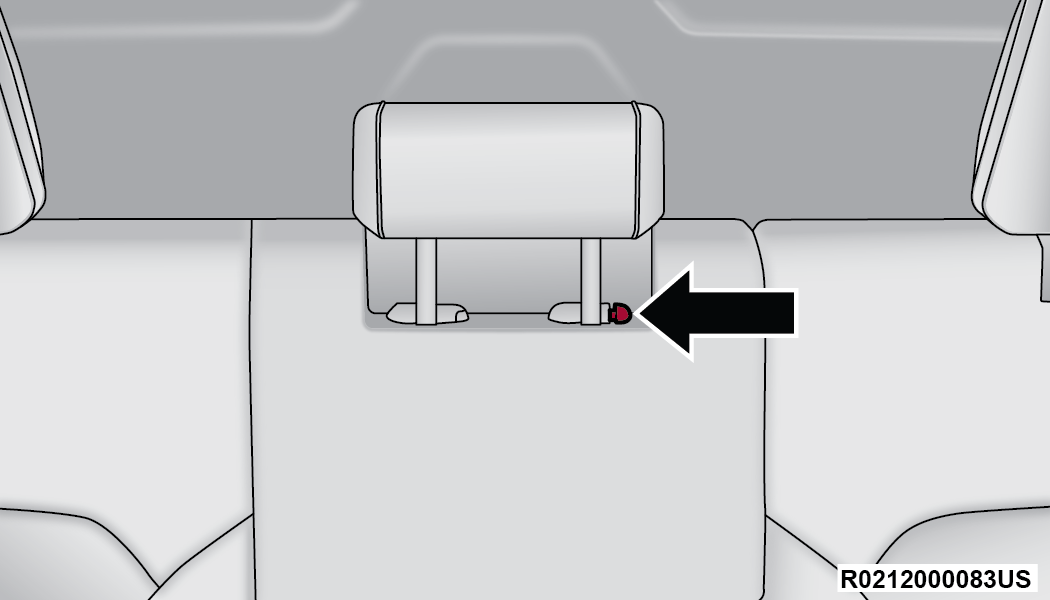
Center Head Restraint Adjustment Button
Note:
The center head restraint should only be removed by qualified technicians, for service purposes only. If the head restraint requires removal, see an authorized dealer.
The third row outboard head restraints are not adjustable or removable, but can be folded for improved visibility when the vehicle is in REVERSE, and there are no occupants in the seats.
Press the Headrest Fold button within the Controls menu of the Uconnect system to power fold the third row head restraints.
The head restraints will also automatically fold when the seatbacks are folded forward using the release handles on the backs of the seats from the cargo area.
Note:
-
The head restraints must be raised manually when occupying the third row.
-
Do not fold if there are passengers seated in the third row seats.
Warning:
-
All occupants, including the driver, should not operate a vehicle or sit in a vehicle’s seat until the head restraints are placed in their proper positions in order to minimize the risk of neck injury in the event of a crash.
-
Head restraints should never be adjusted while the vehicle is in motion. Driving a vehicle with the head restraints improperly adjusted or removed could cause serious injury or death in the event of a collision.
Download Manual