Honda Sensing®
Honda Sensing® is a driver support system which employs the use of two distinctly different kinds of sensors: a radar sensor located in the front lower grille and a front sensor camera mounted to the interior side of the windshield, behind the rearview mirror.
Honda Sensing® has following functions.
* Not available on all models
Continued
507
uuHonda Sensing® u
Press to activate standby mode for ACC with LSF*/ACC* and LKAS. Or press to cancel these systems.
Press to activate or cancel the LKAS.
Press RES/+ button to resume the ACC with LSF*/ACC* or increase the vehicle speed.
Press SET/− button to set the ACC with LSF*/ ACC* or decrease the vehicle speed.
Press the  (interval) button to change the ACC with LSF*/ACC* following interval.
Press to cancel ACC with LSF*/ACC*.
uuHonda Sensing® u
You can see the current state of ACC with LSF*/ACC* and LKAS.
a Indicates that ACC with LSF*/ACC*, and LKAS are ready to be activated.
b Indicates that LKAS is activated and whether or not traffic lane lines are detected.
c Indicates whether or not a vehicle is detected ahead.
d Shows the set vehicle speed.
e Shows the set vehicle interval.
Models with head-up display
You can have the head-up display show you the current state of each function.
2 Head-Up Display* P. 157
509
uuHonda Sensing® uCollision Mitigation Braking SystemTM (CMBSTM)
Can assist you when there is a possibility of your vehicle colliding with a vehicle or a pedestrian detected in front of yours. The CMBSTM is designed to alert you when a potential collision is determined, as well as to reduce your vehicle speed to help minimize collision severity when a collision is deemed unavoidable.
When to use
The camera is located behind the rearview mirror.
The radar sensor is at the lower part of the front bumper.
The system starts monitoring the roadway ahead when your vehicle speed is about 3 mph (5 km/h) and there is a vehicle in front of you.
The CMBSTM activates when:
510
uuHonda Sensing® uCollision Mitigation Braking SystemTM (CMBSTM)
At system’s earliest collision alert stage, you can change the distance (Long/ Normal/Short) between vehicles at which alerts will come on through audio/ information screen setting options.
2 Customized Features P. 370, 381
Continued 511
uuHonda Sensing® uCollision Mitigation Braking SystemTM (CMBSTM)
|
Distance between vehicles |
CMBSTM |
|||
|
The radar sensor detects a vehicle |
Audible & Visual WARNINGS |
Braking |
||
|
Stage one |
Normal Vehicle Long Short Ahead Your Vehicle |
There is a risk of a collision with the vehicle ahead of you. |
When in Long, visual and audible alerts come on at a longer distance from a vehicle ahead than in Normal setting, and in Short, at a shorter distance than in Normal. |
— |
|
Stage two |
Your Vehicle Vehicle Ahead |
The risk of a collision has increased, time to respond is reduced. |
Visual and audible alerts. |
Lightly applied |
|
Stage three |
Your Vehicle Vehicle Ahead |
The CMBSTM determines that a collision is unavoidable. |
Forcefully applied |
uuHonda Sensing® uCollision Mitigation Braking SystemTM (CMBSTM)
When you turn the CMBSTM on and off, do the following.
 symbol and push it.
u The message appears on the driver information interface when the system becomes on or off.
The CMBSTM is turned on every time you start the engine, even if you turned it off the last time you drove the vehicle.
Continued 513
uuHonda Sensing® uCollision Mitigation Braking SystemTM (CMBSTM)
The system may automatically shut off and the safety support indicator (amber) will come on under certain conditions. Some examples of these conditions are listed below. Other conditions may reduce some of the CMBSTM functions.
2 Front Sensor Camera P. 568
uuHonda Sensing® uCollision Mitigation Braking SystemTM (CMBSTM)
* Not available on all models
Continued
515
uuHonda Sensing® uCollision Mitigation Braking SystemTM (CMBSTM)
Limitations applicable to pedestrian detection only
6.6 feet (2 meters) in height.
The CMBSTM may automatically shut itself off and the safety support indicator (amber) comes and stays on when:
Once the conditions that caused the CMBSTM to shut off improve or are addressed (e.g., cleaning), the system comes back on.
uuHonda Sensing® uCollision Mitigation Braking SystemTM (CMBSTM)
With Little Chance of a Collision The CMBSTM may activate even when you are aware of a vehicle ahead of you, or when there is no vehicle ahead. Some examples of this are:
Your vehicle approaches another vehicle ahead of you and you change lanes to pass.
Your vehicle approaches or passes another vehicle that is making a left or right turn.
Continued
uuHonda Sensing® uCollision Mitigation Braking SystemTM (CMBSTM)
When driving through curves, your vehicle comes to a point where an oncoming vehicle is right in front of you.
You drive under a low or narrow bridge at high speed.
You drive over speed bumps, steel road plates, etc., or your vehicle approaches train tracks or roadside objects (such as a traffic sign and guard rail) on a curve or, when parking, stationary vehicles and walls.
uuHonda Sensing® uAdaptive Cruise Control (ACC) with Low Speed Follow (LSF)*
Helps maintain a constant vehicle speed and a set following interval behind a vehicle detected ahead of yours and, if the detected vehicle comes to a stop, can decelerate and stop your vehicle, without you having to keep your foot on the brake or the accelerator.
When ACC with LSF slows your vehicle by applying the brakes, your vehicle’s brake lights will illuminate.
Continued
uuHonda Sensing® uAdaptive Cruise Control (ACC) with Low Speed Follow (LSF) *
520
uuHonda Sensing® uAdaptive Cruise Control (ACC) with Low Speed Follow (LSF)*
When driving at about 25 mph (40 km/h) or above: Take your foot off the pedal and press the SET/– button when you reach the desired speed. The moment you release the button, the set speed is fixed, and ACC with LSF begins.
When driving slower than about 25 mph (40 km/h): If the vehicle is moving and the brake pedal is not depressed, pressing the button fixes the set speed to about 25 mph (40 km/h) regardless of current vehicle speed. If the vehicle is stationary, you can set the vehicle speed even with the brake pedal depressed.
When ACC with LSF starts operating, the vehicle icon, interval bars and set speed appear on the driver information interface.
When you use ACC with LSF, Straight Driving Assist (a feature of the Electric Power Steering system) is activated.
By enabling the steering system to automatically compensate for natural steering pull, Straight Driving Assist makes it easier for you to keep your vehicle in a straight line.
Continued
uuHonda Sensing® uAdaptive Cruise Control (ACC) with Low Speed Follow (LSF) *
ACC with LSF monitors if a vehicle ahead of you enters the ACC with LSF range. If a vehicle is detected doing so, the ACC with LSF system maintains or decelerates your vehicle’s set speed in order to keep the vehicle’s set following interval from the vehicle ahead.
2 To Set or Change Following Interval P. 529
When a vehicle whose speed is slower than your set speed is detected in front of you, your vehicle starts to slow down.
522
* Not available on all models
uuHonda Sensing® uAdaptive Cruise Control (ACC) with Low Speed Follow (LSF)*
Your vehicle maintains the set speed without having to keep your foot on the brake or accelerator pedal.
If there previously was a vehicle detected ahead that kept your vehicle from traveling at the set speed, ACC with LSF accelerates your vehicle to the set speed, and then maintains it.
You can temporarily increase the vehicle speed. In this case, there is no audible or visual alert even if a vehicle is in the ACC with LSF range.
ACC with LSF stays on unless you cancel it. Once you release the accelerator pedal, the system resumes an appropriate speed for keeping the following interval while a vehicle ahead is within the ACC with LSF range.
Continued 523
uuHonda Sensing® uAdaptive Cruise Control (ACC) with Low Speed Follow (LSF) *
Your vehicle also stops, automatically. The Stopped message appears on the driver information interface.
When the vehicle ahead of you starts again, the vehicle icon on the driver information interface blinks. If you press the RES/+ or SET/
– button, or depress the accelerator pedal, ACC with LSF operates again within the prior set speed.
If no vehicle is ahead of you before you resume driving, depress the accelerator pedal and ACC with LSF will operate again within the prior set speed.
uuHonda Sensing® uAdaptive Cruise Control (ACC) with Low Speed Follow (LSF)*
ACC with LSF Conditions and Limitations The system may automatically shut off and the ACC with LSF indicator will come on under certain conditions. Some examples of these conditions are listed below. Other
conditions may reduce some of the ACC with LSF functions.
* Not available on all models
Continued 525
uuHonda Sensing® uAdaptive Cruise Control (ACC) with Low Speed Follow (LSF) *
uuHonda Sensing® uAdaptive Cruise Control (ACC) with Low Speed Follow (LSF)*
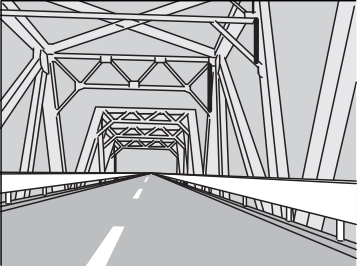 When driving through a narrow iron bridge.
Continued
527
uuHonda Sensing® uAdaptive Cruise Control (ACC) with Low Speed Follow (LSF) *
To Adjust the Vehicle Speed Increase or decrease the vehicle speed using the RES/+ or SET/– button on the steering wheel.
uuHonda Sensing® uAdaptive Cruise Control (ACC) with Low Speed Follow (LSF)*
Press the  (Interval) button to change the ACC with LSF following interval.
Each time you press the button, the following interval (the interval behind a vehicle detected ahead of you) setting cycles through extra long, long, middle, and short following intervals.
Determine the most appropriate following interval setting based on your specific driving conditions. Be sure to adhere to any following interval requirements set by local regulation.
Continued
529
uuHonda Sensing® uAdaptive Cruise Control (ACC) with Low Speed Follow (LSF) *
The higher your vehicle’s following speed is, the longer the short, middle, long or extra long following interval becomes. See the following examples for your reference.
|
Following Interval |
When the Set Speed is: |
||
|
50 mph (80 km/h) |
65 mph (104 km/h) |
||
|
Short |
|
83 feet 25 meters 1.1 sec |
100 feet 31 meters 1.1 sec |
|
Middle |
|
110 feet 33 meters 1.5 sec |
137 feet 42 meters 1.5 sec |
|
Long |
|
154 feet 47 meters 2.1 sec |
200 feet 61 meters 2.1 sec |
|
Extra Long |
|
207 feet 63 meters 2.9 sec |
272 feet 83 meters 2.9 sec |




When your vehicle stops automatically because a vehicle detected ahead of you has stopped, the interval between the two vehicles will vary based on the ACC with LSF interval setting.
uuHonda Sensing® uAdaptive Cruise Control (ACC) with Low Speed Follow (LSF)*
To cancel ACC with LSF, do any of the following:
u The ACC with LSF indicator (green) goes off.
u When the LSF function has stopped the vehicle, you cannot cancel ACC with LSF by depressing the brake pedal.
Continued 531
uuHonda Sensing® uAdaptive Cruise Control (ACC) with Low Speed Follow (LSF) *
The beeper sounds and a message appears on the driver information interface when ACC with LSF is automatically canceled. Any of these conditions may cause the ACC with LSF to automatically cancel:
In the following cases, a buzzer sounds, ACC with LSF is deactivated, and the Cruise Cancelled: Slope Too Steep. Watch Downhill Speed message appears in the driver information interface.
The ACC with LSF automatic cancellation can be also triggered by the following causes. In these cases, the parking brake will be automatically applied.
532
uuHonda Sensing® uAdaptive Cruise Control (ACC) with Low Speed Follow (LSF)*
Press and hold the  (interval) button for one second. Cruise Mode Selected appears on the driver information interface for two seconds, and then the mode switches to Cruise.
To switch back to ACC with LSF, press and hold the  button again for one second.
Desired speed in a range above roughly 25 mph (40 km/h) ~.
To Set the Vehicle Speed Take your foot off the pedal and press the SET/– button when you reach the desired speed.
The moment you release the SET/– button, the set speed is fixed, and cruise control begins. The CRUISE CONTROL indicator comes on.
When you use cruise control, Straight Driving Assist (a feature of the Electric Power Steering system) is activated.
By enabling the steering system to automatically compensate for natural steering pull, Straight Driving Assist makes it easier for you to keep your vehicle in a straight line.
Continued 533
uuHonda Sensing® uAdaptive Cruise Control (ACC) with Low Speed Follow (LSF) *
To Adjust the Vehicle Speed Each time you press the RES/+ or SET/– button, the vehicle speed is increased or decreased by about 1 mph (1.6 km/h).
If you keep pressing the RES/+ or SET/– button, the vehicle speed increases or decreases until you release it. This speed is then set.
To cancel cruise control, do any of the following:
The CRUISE CONTROL indicator goes off.
uuHonda Sensing® uAdaptive Cruise Control (ACC)*
Helps maintain a constant vehicle speed and a set following interval behind a vehicle detected ahead of yours, without you having to keep your foot on the brake or the accelerator.
* Not available on all models
Continued
535
uuHonda Sensing® uAdaptive Cruise Control (ACC) *
536
uuHonda Sensing® uAdaptive Cruise Control (ACC)*
Take your foot off the pedal and press down the SET/– button when you reach the desired speed. The moment you release the button, the set speed is fixed, and ACC begins.
When ACC starts operating, the vehicle icon, interval bars and set speed appear on the driver information interface.
When you use ACC, Straight Driving Assist (a feature of the Electric Power Steering system) is activated.
By enabling the steering system to automatically compensate for natural steering pull, Straight Driving Assist makes it easier for you to keep your vehicle in a straight line.
Continued 537
uuHonda Sensing® uAdaptive Cruise Control (ACC) *
ACC monitors if a vehicle ahead of you enters the ACC range. If a vehicle is detected doing so, the ACC system maintains or decelerates your vehicle’s set speed in order to keep the vehicle’s set following interval from the vehicle ahead.
2 To Set or Change Following Interval P. 544
When a vehicle whose speed is slower than your set speed is detected in front of you, your vehicle starts to slow down.
538
uuHonda Sensing® uAdaptive Cruise Control (ACC)*
Your vehicle maintains the set speed without having to keep your foot on the brake or accelerator pedal.
If there previously was a vehicle detected ahead that kept your vehicle from traveling at the set speed, ACC accelerates your vehicle to the set speed, and then maintains it.
You can temporarily increase the vehicle speed. In this case, there is no audible or visual alert even if a vehicle is in the ACC range.
ACC stays on unless you cancel it. Once you release the accelerator pedal, the system resumes an appropriate speed for keeping the following interval while a vehicle ahead is within the ACC range.
Continued 539
uuHonda Sensing® uAdaptive Cruise Control (ACC) *
ACC Conditions and Limitations The system may automatically shut off and the ACC indicator will come on under certain conditions. Some examples of these conditions are listed below. Other
conditions may reduce some of the ACC functions.
uuHonda Sensing® uAdaptive Cruise Control (ACC)*
Continued
541
uuHonda Sensing® uAdaptive Cruise Control (ACC) *
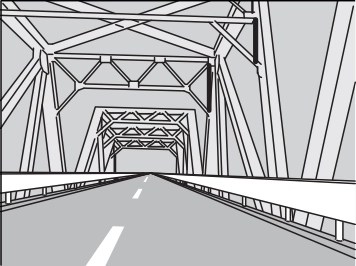 When driving through a narrow iron bridge.
uuHonda Sensing® uAdaptive Cruise Control (ACC)*
To Adjust the Vehicle Speed Increase or decrease the vehicle speed using the RES/+ or SET/– button on the steering wheel.
Continued 543
uuHonda Sensing® uAdaptive Cruise Control (ACC) *
Press the  (interval) button to change the ACC following interval.
Each time you press the button, the following interval (the interval behind a vehicle detected ahead of you) setting cycles through extra long, long, middle, and short following intervals.
Determine the most appropriate following interval setting based on your specific driving conditions. Be sure to adhere to any following interval requirements set by local regulation.
uuHonda Sensing® uAdaptive Cruise Control (ACC)*
The higher your vehicle’s following speed is, the longer the short, middle, long or extra long following interval becomes. See the following examples for your reference.
|
Following Interval |
When the Set Speed is: |
||
|
50 mph (80 km/h) |
65 mph (104 km/h) |
||
|
Short |
|
84 feet 26 meters 1.1 sec |
102 feet 31 meters 1.1 sec |
|
Middle |
|
111 feet 34 meters 1.5 sec |
139 feet 43 meters 1.5 sec |
|
Long |
|
155 feet 48 meters 2.1 sec |
202 feet 62 meters 2.1 sec |
|
Extra Long |
|
215 feet 66 meters 3.0 sec |
282 feet 86 meters 3.0 sec |




Continued
uuHonda Sensing® uAdaptive Cruise Control (ACC) *
To cancel ACC, do any of the following:
u The ACC indicator (green) goes off.
uuHonda Sensing® uAdaptive Cruise Control (ACC)*
The beeper sounds and a message appears on the driver information interface when ACC is automatically canceled. Any of these conditions may cause the ACC to automatically cancel:
In the following cases, a buzzer sounds, ACC is deactivated, and the Cruise Cancelled: Slope Too Steep. Watch Downhill Speed message appears in the driver information interface.
Continued 547
uuHonda Sensing® uAdaptive Cruise Control (ACC) *
Press and hold the  (interval) button for one second. Cruise Mode Selected appears on the driver information interface for two seconds, and then the mode switches to Cruise.
To switch back to ACC, press and hold the  button again for one second.
Desired speed in a range above roughly 25 mph (40 km/h) ~.
To Set the Vehicle Speed Take your foot off the pedal and press the SET/– button when you reach the desired speed.
The moment you release the SET/– button, the set speed is fixed, and cruise control begins. The CRUISE CONTROL indicator comes on.
When you use cruise control, Straight Driving Assist (a feature of the Electric Power Steering system) is activated.
By enabling the steering system to automatically compensate for natural steering pull, Straight Driving Assist makes it easier for you to keep your vehicle in a straight line.
548
uuHonda Sensing® uAdaptive Cruise Control (ACC)*
To cancel cruise control, do any of the following:
uuHonda Sensing® uLane Keeping Assist System (LKAS)
Provides steering input to help keep the vehicle in the middle of a detected lane and provides tactile and visual alerts if the vehicle is detected drifting out of its lane.
The system applies torque to the steering to keep the vehicle between the left and right lane lines. The applied torque becomes stronger as the vehicle gets closer to either of the lane lines.
Rapid vibrations on the steering wheel and a warning display alert you that the vehicle is drifting out of a detected lane.
When you operate the turn signals to change lanes, the system is suspended, and resumes after the signals are off.
If you make a lane change without operating the turn signals, the LKAS alerts activate, and torque is applied to the steering.
uuHonda Sensing®uLane Keeping Assist System (LKAS)
Lane Keep Support Function Provides assistance to keep the vehicle in the center of the lane. When the vehicle nears a white or yellow line, steering force of the electric power steering will become
stronger.
Lane Departure Warning Function When the vehicle enters the warning area, the LKAS alerts you with slight steering wheel vibration as well as a warning display.
Continued 551
uuHonda Sensing® uLane Keeping Assist System (LKAS)
When the System can be Used
The system can be used when the following conditions are met.
u The LKAS is on in the driver information interface.
The system is ready to use.
u Lane outlines appear on the driver information interface.
The system is activated.
552
uuHonda Sensing®uLane Keeping Assist System (LKAS)
u The dotted outer lines change to solid ones once the system starts operating after detecting the left and right lane markings.
To cancel the LKAS:
Press the MAIN or LKAS button.
The LKAS is turned off every time you stop the engine, even if you turned it on the last time you drove the vehicle.
Continued 553
uuHonda Sensing® uLane Keeping Assist System (LKAS)
u Turning the wipers off or setting it to LO
resumes the LKAS.
u Increasing the vehicle speed to about 45 mph (72 km/h) or more resumes the LKAS.
u The LKAS resumes and starts detecting the lane lines again once you release the brake pedal.
Models with automatic intermittent wipers
u The LKAS resumes when the wipers stop or operate at low speed.
554
uuHonda Sensing®uLane Keeping Assist System (LKAS)
The beeper sounds if the LKAS is automatically canceled.
LKAS Conditions and Limitations The system may not detect lane markings and therefore may not keep the vehicle in the middle of a lane under certain conditions, including the following:
Continued
555
uuHonda Sensing® uLane Keeping Assist System (LKAS)
|
Very wide or narrow traffic lane |
uuHonda Sensing®uLane Keeping Assist System (LKAS)
* Not available on all models
557
uuHonda Sensing® uRoad Departure Mitigation (RDM) System
Alerts and helps to assist you when the system determines a possibility of your vehicle unintentionally crossing over detected lane markings and/or leaving the roadway altogether.
The front camera behind the rearview mirror monitors left and right lane markings (in white or yellow). If your vehicle is getting too close to detected lane markings without a turn signal activated, the system, in addition to a visual alert, applies steering torque and alerts you with rapid vibrations on the steering wheel, to help you remain within the detected lane.
2 Customized Features P. 370, 381
As a visual alert, the Lane Departure message appears on the driver information interface.
If the system determines that its steering input is insufficient to keep your vehicle on the roadway, it may apply braking.
u Braking is applied only when the lane markings are solid continuous lines. The system cancels assisting operations when you turn the steering wheel to avoid crossing over detected lane markings.
If the system operates several times without detecting driver response, the system beeps to alert you.
* Not available on all models
uuHonda Sensing®uRoad Departure Mitigation (RDM) System
How the System Activates The system becomes ready to start searching for lane markings when all the following conditions are met:
Continued 559
uuHonda Sensing® uRoad Departure Mitigation (RDM) System
When you turn the RDM on and off, do the following.
u The message appears on the driver information interface when the system becomes on or off.
The RDM is in the previously selected ON or
OFF setting each time you start the engine.
RDM Conditions and Limitations The system may not properly detect lane markings and the position of your vehicle under certain conditions. Some examples of these conditions are listed below.
* Not available on all models
uuHonda Sensing®uRoad Departure Mitigation (RDM) System
* Not available on all models
561
uuHonda Sensing® uTraffic Sign Recognition System
Reminds you of road sign information, such as the current speed limit, your vehicle has just passed through, showing it on the driver information interface and the head-up display*.
How the System Works When the camera located behind the rearview mirror captures traffic signs while driving, the system displays the ones that are recognized as designated for your
vehicle. The sign icon will be displayed until the vehicle reaches a predetermined time and distance.
The sign icon also may switch to another one or disappear when:
* Not available on all models
uuHonda Sensing® uTraffic Sign Recognition System
If the system does not detect any traffic signs while you are driving, the image below may appear.
* Not available on all models
Continued 563
uuHonda Sensing® uTraffic Sign Recognition System
Traffic Sign Recognition System Conditions and Limitations The traffic sign recognition system may not be able to recognize the traffic sign in the following cases.
uuHonda Sensing® uTraffic Sign Recognition System
Continued
565
uuHonda Sensing® uTraffic Sign Recognition System
The traffic sign recognition system may not operate correctly, such as displaying a sign that does not follow the actual regulation for the roadway or does not exist at all in the following cases.
u Regarding the speed limit sign, it may display higher or lower speed than the actual speed limit.
uuHonda Sensing® uTraffic Sign Recognition System
The speed limit sign icon is displayed on the right half of the screen.
You can continue displaying reduced-size traffic sign icon on the driver information interface and head-up display* even while the main mode is not selected.
2 Customized Features P. 370, 381
* Not available on all models
567
uuHonda Sensing® uFront Sensor Camera
The camera, used in systems such as LKAS, RDM, ACC*, ACC with LSF*, CMBSTM and traffic sign recognition system, is designed to detect an object that triggers any of the systems to operate its functions.
This camera is located behind the rearview mirror.
To help reduce the likelihood that high interior temperatures will cause the camera’s sensing system to shut off, when parking, find a shady area or face the front of the vehicle away from the sun. If you use a reflective sun shade, do not allow it to cover the camera housing.
Covering the camera can concentrate heat on it.
uuHonda Sensing®uFront Sensor Camera
uuHonda Sensing® uRadar Sensor
The radar sensor is at the lower part of the front bumper.
Download Manual