Turn signals
Switching the turn signals on and off
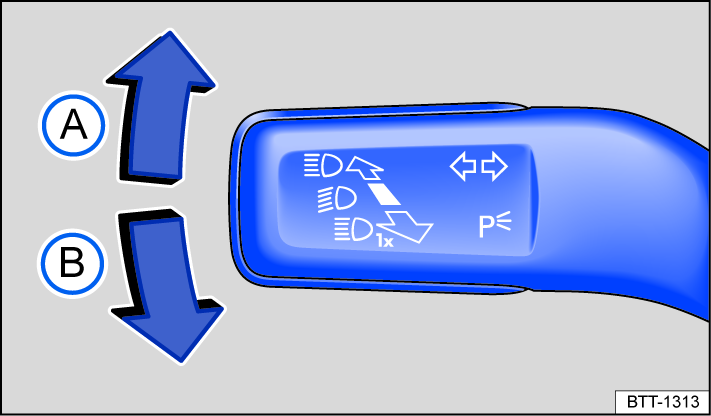
Fig. 77 On the left side of the steering column: turn signal and high beam lever.
-
Switch the ignition on.
-
Move the turn signal and high beam lever from the center position to the following position fig. 77:
-
 Right turn signal
  .
. -
 Left turn signal
  .
.
-
-
Move the turn signal and high beam lever back to the original position to turn off the turn signal.
If there is no sound when the turn signal is on, contact an authorized Volkswagen dealer or authorized Volkswagen Service Facility and have the vehicle inspected.
3-blink turn signal (convenience indicating)
To use the 3-blink turn signal (convenience indicating), press the turn signal and high beam lever upward or downward to the pressure point and then release the lever. The turn signal will blink three times.
To stop the 3-blink turn signal (convenience indicating) before it ends, press the turn signal and high beam lever immediately to the pressure point in the opposite direction and release.
The 3-blink turn signal (convenience indicating) can be switched on and off in the Light & visibility menu in the instrument cluster display ⇒ Settings menu. In vehicles without a Light & visibility menu, the function can be deactivated by an authorized Volkswagen dealer or authorized Volkswagen Service Facility.
 WARNING
Using the turn signals incorrectly, not using the turn signals, or forgetting to turn the turn signal off can mislead other road users. This can cause accidents and serious injuries.
-
Always use the turn signals correctly when changing lanes, passing, or turning.
-
Switch the turn signal off again once you have finished changing lanes, passing, or turning.
 The emergency flashers also work when the ignition is switched off ⇒ In case of an emergency.
Download Manual