Headlights
Switching the lights on and off
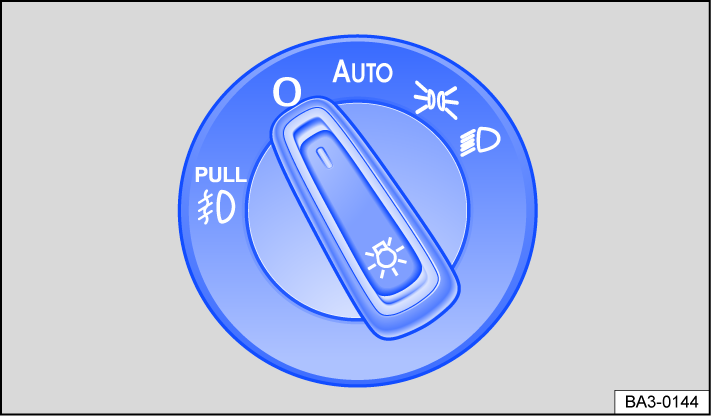
Fig. 78 Next to the steering wheel: light switch (one version).
Switching the lights on
-
Switch the ignition on.
-
Turn the light switch to the desired position:
- AUTO
- Automatic headlights: the low beam headlight will switch on or off depending on the weather and environmental conditions →
 , ⇒ Light functions.
- Parking light switched on. The green symbol in the light switch turns on.

- The low beam headlights are switched on.
Switching the lights off
-
Switch the ignition off.
-
Turn the light switch to the desired position:

- The lights are switched off.
- AUTO
- The “Leaving home” function (orientation lighting) can be switched on ⇒ “Coming home” and “Leaving home” function (orientation lighting).
- Parking light switched on. The green symbol in the light switch turns on.
- Low beam headlights are switched off - As long as the vehicle key remains in the ignition lock or if the driver’s door is closed on vehicles with Keyless Access, the parking lights stay on.
Daytime running lights 
The optional daytime running lights can increase the visibility of your vehicle in traffic during the daytime.
The daytime running light turns on automatically every time the ignition is switched on if the light switch is in the , or AUTO position (if brightness detected); the green indicator light in the instrument cluster comes on.
Daytime running lights parking function
Depending on the equipment, the vehicle may have a daytime running lights parking function to turn off the daytime running lights temporarily when the ignition is switched on.
Switch the daytime running light off:
-
Switch the ignition on.
-
Turn the light switch to the
position. -
Apply the parking brake.
Switch the daytime running light on:
-
Release the parking brake.
 WARNING
Accidents and serious injuries may occur if the road is not well lit and the vehicle cannot be seen by others on the road, or is very difficult to see.
-
The light assistance systems are only aids. The driver is always responsible for turning on the correct vehicle lighting.
-
Always turn on the low beam headlights in the dark, in the fog, and when visibility is poor.
WARNING
The parking lights or daytime running lights are not bright enough to illuminate the road sufficiently and to be seen by other road users.
-
Always turn on the low beam headlights in the dark, in the fog, and when visibility is poor.
-
The taillights do not switch on with the daytime running lights. A vehicle without its taillights turned on may not be seen by other road users in the dark, in the fog, and when visibility is poor.
WARNING
Automatic headlight control AUTO only turns the low beam headlights on and off when there are changes in brightness.
-
Turn on the low beam headlights manually in certain weather conditions, such as in fog.
 When reverse gear is engaged, the cornering light on both sides of the vehicle may turn on to better illuminate the surroundings while maneuvering.
Switching the fog lights on and off
When the ignition is switched on, the fog lights can be switched on with the light switch in the positions parking light and low beam headlight ⇒ Switching the lights on and off:
-
Switching on the fog lights : pull the light switch up to the first level. The
 green indicator light in the light switch will turn on.
 -
To switch off the fog lights, push in the light switch or turn to the
position.
Light functions
Automatic headlight control AUTO
If the light switch is in the AUTO position, the vehicle lighting switches on and off automatically along with the instrument and switch lighting, depending on the lighting conditions. When the lights are turned on, the indicator lamp in the light switch lights up yellow.
Automatic headlight control is merely an aid and cannot always accurately detect all driving situations.
Cornering lights
The cornering light turns on automatically when turning slowly or around very tight curves.
Warning tones when lights are not turned off
If the vehicle key was removed from the ignition lock and the driver’s door was opened, the warning tones will sound under the following conditions:
-
When the parking light is switched on
. -
Light switch in
position, on vehicles without orientation lighting ⇒ “Coming home” and “Leaving home” function (orientation lighting).
If the “Coming home” function is switched on, the warning tone to indicate that the lights are still turned on will not sound when opening the driver's door.
WARNING
If the vehicle is stopped without enough lighting so that the vehicle cannot be seen or is difficult for others on the road to see, this can cause accidents and serious injuries.
-
Always stop the vehicle safely and with enough lighting. Follow the applicable legal regulations.
Switching the high beam headlights on and off
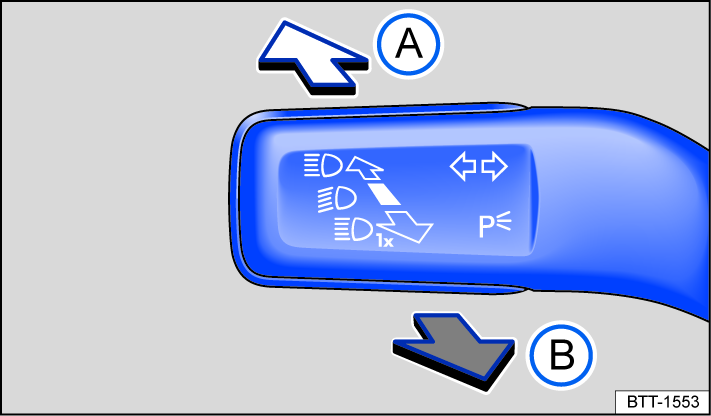
Fig. 79 On the left side of the steering column: turn signal and high beam lever.
-
Switch the ignition and the low beam headlights on.
-
Move the turn signal and high beam lever from the center position to the following position fig. 79:

 High beam headlights switched on.
 Activate the headlight flashers or turn off the high beam headlights. The headlight flashers will stay on as long as the lever is pulled.
If the high beam headlights or headlight flashers are turned on, the blue  indicator light will be on in the instrument cluster.
WARNING
Using the high beam headlights incorrectly can cause accidents and serious injuries, because the high beams can distract and create glare for other drivers.
Switching the continuous parking light on both sides of the vehicle on and off
When the continuous parking lights on both sides of the vehicle are switched on, both headlights will turn on as well as the parking lights and sections of the taillights.
Switching on the continuous parking lights on both sides of the vehicle:
-
When the ignition is switched on, turn the light switch to the
position. -
Switch the ignition off.
-
Lock the vehicle from the outside.
Automatic parking light deactivation
The vehicle switches off the parking lights or continuous parking lights after 30 minutes, so that the engine can still be started.
If the battery does not have enough capacity for the parking lights to run for 30 minutes, the 12 V vehicle battery may drain enough that the engine may not be able to start .
WARNING
If the vehicle is stopped without enough lighting so that the vehicle cannot be seen or is difficult for others on the road to see, this can cause accidents and serious injuries.
-
Always stop the vehicle safely and with enough lighting. Follow the applicable legal regulations.
“Coming home” and “Leaving home” function (orientation lighting)
When you are entering and exiting the vehicle in the dark, the “Coming home” and “Leaving home” function illuminates the immediate area around the vehicle.
The “Coming home” and “Leaving home” function controls the rain/light sensor automatically.
In the Light & visibility menu, the lighting time can be adjusted and the function can be switched on or off ⇒ Settings menu.
Switching the “Coming home” function on
-
Switch the ignition off.
The “Coming home” lighting switches on if the automatic headlight control AUTO is switched on and the rain/light sensor detects darkness.
The lighting time begins when the last vehicle door or trunk lid is closed.
Switching the “Coming home” function off
-
Turns off automatically after the set lighting time has elapsed.
-
OR: automatically if a vehicle door or the trunk lid is opened approximately 30 seconds after switching on.
-
OR: switch off the lights.
-
OR: switch on the ignition.
Switching the “Leaving home” function on
-
Unlock the vehicle when the automatic headlight control AUTO is switched on and the rain/light sensor detects darkness.
Switching the “Leaving home” function off
-
Turns off automatically after the lighting time has elapsed.
-
OR: lock the vehicle.
-
OR: switch off the lights.
-
OR: switch on the ignition.
If the “Coming home” function is switched on, the warning tone to indicate that the lights are still turned on will not sound when opening the driver's door.
Headlight range control
The headlight range must always be adapted to the vehicle load level. This provides the driver with the best possible visibility and oncoming traffic is not dazzled. Contact an authorized Volkswagen dealer or authorized Volkswagen Service Facility for assistance to determine if your vehicle is equipped with headlight range control.
Without headlight range control
The light cone of the low beam headlight must be adapted to the vehicle load level by an authorized Volkswagen dealer or authorized Volkswagen Service Facility ⇒ .
Dynamic headlight range control
The headlight range automatically adjusts to the vehicle load when the headlights are switched on ⇒ .
WARNING
Heavy objects in the vehicle can cause the headlights to dazzle and distract other road users. This can cause accidents and serious injuries.
-
Always adapt the light cone to the vehicle load level so that other road users are not dazzled.
WARNING
If the dynamic headlight range control fails or malfunctions, the headlights may create glare and distract other road users. This can cause accidents and serious injuries.
-
Have the headlight range control inspected immediately by an authorized Volkswagen dealer or authorized Volkswagen Service Facility.
Troubleshooting
 Turn signal indicator light
The green indicator light flashes.
If a turn signal light on the vehicle is not working, the indicator light will blink twice as fast.
-
Check the lights and replace any bulbs as necessary ⇒
 Introduction.
 -
If the malfunction continues, contact an authorized Volkswagen dealer or authorized Volkswagen Service Facility.
 Exterior lighting malfunction
The yellow indicator light turns on.
The headlights have completely or partially failed.
-
Check the lights and replace any bulbs as necessary ⇒
Introduction. -
If the malfunction continues, contact an authorized Volkswagen dealer or authorized Volkswagen Service Facility.
Download Manual