High Beam Assist
Activating the high beam assist
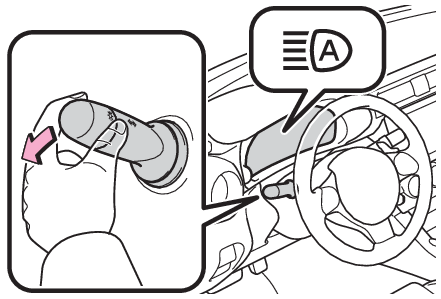
Turn the headlight switch to position and push the lever forward.
After the lever is operated, it will immediately return to its original position.
The high beam assist will turn on and the high beam assist indicator will illuminate.
Note:
Conditions to turn the high beams on/off automatically
- When all of the following conditions are met, the high beams will be turned on automatically (after approximately 1 second):
The vehicle speed is approximately 20 mph (32 km/h) or more.
The area ahead of the vehicle is dark.
There are no vehicles ahead with headlights or tail lights turned on.
There are few streetlights on the road ahead. - If any of the following conditions is met, the high beams will turn off automatically:
The vehicle speed is below approximately 10 mph (16 km/h).
The area ahead of the vehicle is not dark.
Vehicles ahead have their headlights or tail lights turned on.
There are many streetlights on the road ahead.
Stereo camera detection information
- If EyeSight is malfunctioning or temporarily disabled, the high beam assist will not operate, and the low beam headlights will turn on.
- The high beams may not be automatically turned off in the following situations:
When a vehicle suddenly appears from around a curve
When the vehicle is cut in front of by another vehicle
When vehicles ahead cannot be detected due to repeated curves, road dividers or roadside trees
When vehicles ahead appear in a faraway lane on a wide road
When the lights of vehicles ahead are not on - The high beams may be turned off if a vehicle ahead that is using fog lights without its headlights turned on is detected.
- House lights, street lights, traffic signals, and illuminated billboards or signs and other reflective objects may cause the high beams to change to the low beams, or the low beams to remain on.
- The following factors may affect the amount of time taken for the high beams to turn on or off:
The brightness of the headlights, fog lights, and tail lights of vehicles ahead
The movement and direction of vehicles ahead
When a vehicle ahead only has operational lights on one side
When a vehicle ahead is a two-wheeled vehicle
The condition of the road (gradient, curve, condition of the road surface, etc.)
The number of passengers and amount of luggage in the vehicleWhen there is a lag in response due to the limitations of the detection range of the stereo camera - The high beams may turn on or off unexpectedly.
- Bicycles or similar vehicles may not be detected.
- In the following situations the system may not be able to correctly detect the surrounding brightness level. This may cause the low beams to remain on or the high beams to flash or dazzle pedestrians or vehicles ahead. In such a case, it is necessary to manually switch between the high and low beams.
When driving in inclement weather (heavy rain, snow, fog, sandstorms, etc.)
When the windshield is obscured by fog, mist, ice, dirt, etc.
When the windshield is cracked or damaged
When the stereo camera is deformed or dirty
When the temperature of the stereo camera is extremely high
When the surrounding brightness level is equal to that of headlights, tail lights or fog lights
When headlights or tail lights of vehicles ahead are turned off, dirty, changing color, or not aimed properly
When the vehicle is hit by water, snow, dust, etc. from a preceding vehicle
When driving through an area of intermittently changing brightness and darkness
When frequently and repeatedly driving ascending/descending roads, or roads with rough, bumpy or uneven surfaces (such as stone-paved roads, gravel roads, etc.)
When frequently and repeatedly taking curves or driving on a winding road
When there is a highly reflective object ahead of the vehicle, such as a sign or mirror
When the back of a preceding vehicle is highly reflective, such as a container on a truck
When the vehicle’s headlights are damaged or dirty, or are not aimed properly
When the vehicle is listing or titling due to a flat tire, a trailer being towed, etc.Immediately after the engine is started
When the headlights are changed between the high beams and low beams repeatedly in an abnormal manner
When the driver believes that the high beams may be flashing or dazzling pedestrians or other drivers
How to temporarily lower the sensitivity of the high beam assist function
The sensitivity of the high beam assist function can be lowered by using the following operations.
- After turning the engine switch to ON, turn the headlight switch to position and push the lever forward.
- After the high beam assist indicator on the meter will illuminate, turn the engine switch off.
- Turn the engine switch to ON and within approximately 15 seconds, press the switch more than 10 times consecutively.
When the sensitivity of the high beam assist function is lowered, the high beam assist indicator on the meter will flash.
Note:
The sensitivity of the high beam assist function
- The sensitivity of the high beam assist function cannot be lowered in the following conditions:
Adaptive Cruise Control or Conventional Cruise Control indicator is illuminated.
The EyeSight warning light is illuminated. - The sensitivity of the high beam assist function returns to normal level the next time the engine switch is turned off and the engine is restarted.
Turning the high beams on/off manually
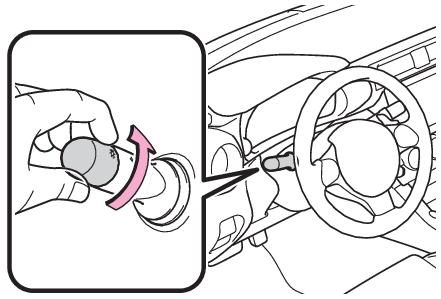
Switching to the low beams
Turn the headlight switch to position.
The high beam assist indicator will turn off.
To turn the high beam assist on again, turn the headlight switch to position.
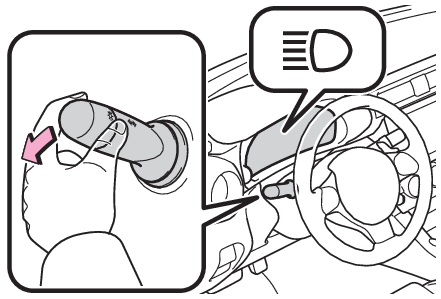
Switching to the high beams
Push the lever forward.
The high beam assist indicator will turn off and the high beam indicator will illuminate.
To turn the high beam assist on again, push the lever forward again.
Download Manual