Headlight switch
Operating instructions
Operating the switch turns on the lights as follows:
For the U.S.A.
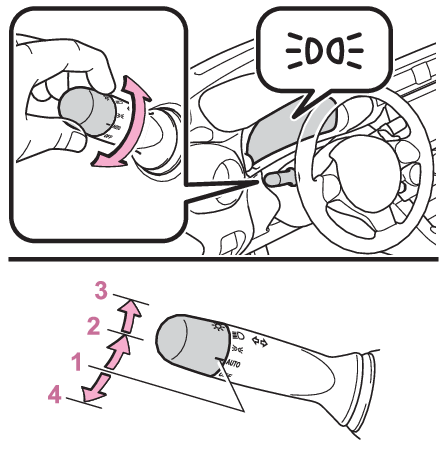
AUTO The headlights, parking/daytime running lights ( Daytime running light system) and all the lights listed above turn on and off automatically. (When the engine switch is in ON.)
 The side marker, parking, tail, license plate, instrument panel lights and daytime running lights ( Daytime running light system) turn on.
 The headlights and all lights listed above (except daytime running lights) turn on.
OFF The daytime running lights turn on. ( Daytime running light system)
For Canada
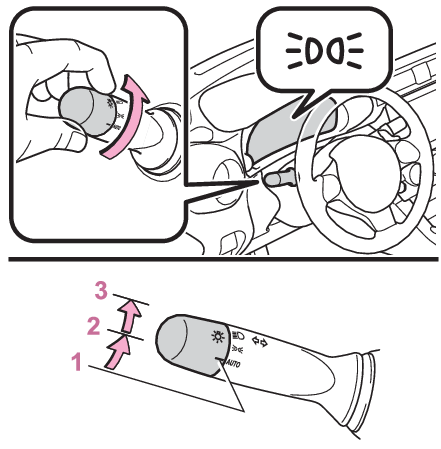
AUTO The headlights, parking/daytime running lights ( Daytime running light system) and all the lights listed above turn on and off automatically. (When the engine switch is in ON.)
The side marker, parking, tail, license plate, instrument panel lights and daytime running lights ( Daytime running light system) turn on.
The headlights and all lights listed above (except daytime running lights) turn on.
Note:
AUTO mode can be used when
The engine switch is in ON.
Daytime running light system
- The daytime running lights illuminate using the same lights as the parking lights and illuminate brighter than the parking lights.
- To make your vehicle more visible to other drivers during daytime driving, the daytime running lights turn on automatically when all of the following conditions are met. (The daytime running lights are not designed for use at night.)
The engine is running
The shift lever is shifted out of P (vehicles with an automatic transmission)
The parking brake is released
The headlight switch is in the (U.S.A. only), or * position
*When the surroundings are bright
The daytime running lights remain on after they illuminate, even if the parking brake is set again.
- When the turn signal indicators are flashing, the daytime running light on the side that the turn signals are flashing will turn off.
- When the emergency flashers are flashing, both daytime running lights will turn off.
- Compared to turning on the headlights, the daytime running light system offers greater durability and consumes less electricity, so it can help improve fuel economy.
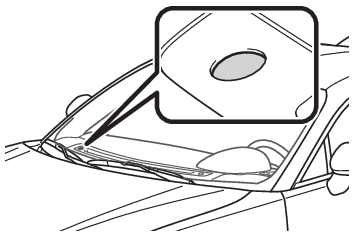
Headlight control sensor
In the following situations, the automatic light control system may not operate correctly.
- When an object is placed on the sensor or something which blocks the sensor is affixed to the windshield
- When the surrounding area is lit by light other than natural light
Automatic light off system
When the light switch is in : The headlights and tail lights turn off 30 seconds after a door is opened and closed if the engine switch is turned off. (The lights turn off immediately if on the key is pressed twice after both side doors are closed.)
To turn the lights on again, turn the engine switch to ON, or turn the light switch off once and then back to or (except for Canada).
Light reminder buzzer
A buzzer sounds when the engine switch is turned off and the driver’s door is opened while the lights are turned on.
Automatic headlight leveling system
The level of the headlights is automatically adjusted according to the number of passengers and the loading condition of the vehicle to ensure that the headlights do not interfere with other road users.
Windshield wiper linked headlight illumination
When driving during daytime with the headlight switch turned to , if the windshield wipers are used, the headlights will turn on automatically after several seconds to help enhance the visibility of your vehicle.
Battery-saving function
In order to prevent the battery of the vehicle from discharging, if the headlights and/or tail lights are on when the engine switch is turned off the battery saving function will operate and automatically turn off all the lights after approximately 20 minutes.When any of the following are performed, the battery-saving function will be disabled.
- When the engine switch is turned to ACC or ON
- When the headlight switch is in the position (U.S.A. only)
- When a door is opened or closed
Welcome light illumination control
The headlights and tail lights automatically turn on at night when the doors are unlocked using the wireless remote control if the light switch is in the position. The headlights and tail lights will turn off automatically after approximately 30 seconds.
Customization
Some functions can be customized. ( Customizable features)
Notice:
To prevent battery discharge
Do not leave the lights on longer than necessary when the engine is not running.
Turning on the high beam headlights
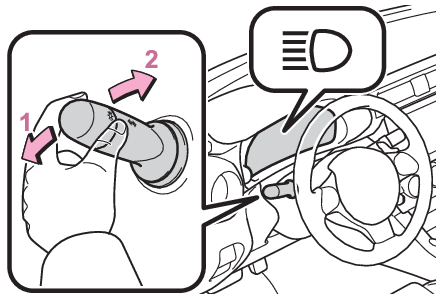
With the headlights on, push the lever away from you to turn on the high beams.
Vehicles without high beam assist: If the lever is pushed and released, the high beam headlights will turn on. Pull and release the lever to turn off the high beam headlights and turn on the low beam headlights.
Vehicles with high beam assist: If the lever is pushed and released with the headlight switch in position, the high beam assist will turn on. When the high beam assist is operating, the headlights will automatically change between the high beams and low beams according to the conditions. If the lever is pushed forward and released again, the high beam assist will turn off and the high beam headlights will turn on.
To manually turn the high beam headlights on, push and release the lever with the headlight switch in position. If the lever is pulled and released, the high beam headlights will turn off and the low beam headlights will turn on.
Illuminate the high beam headlights while the lever is pulled
Even if the lights are off, the high beam headlights will illuminate. When the lever is released, the headlights will return to the low beam headlights or will turn off.
SRH (Steering Responsive Headlights) *
*If equipped
The SRH (Steering Responsive Headlights) is a function which, according to the steering wheel operation and vehicle speed when the vehicle is being driven forward, automatically adjusts the angle of the headlights to illuminate intersections and corners, improving visibility.
This function operates when the vehicle speed is 8 km/h or higher.
Turning SRH off
The SRH can be turned off through a setting on the meter. (Customizable features)
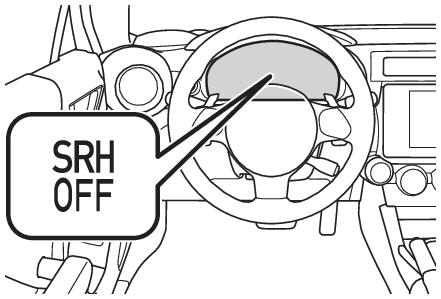
When the SRH is off, the SRH OFF indicator will illuminate.
SRH warning light
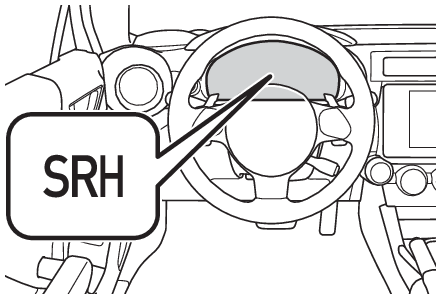
If the SRH malfunctions, the SRH warning light will illuminate and a message will be displayed on the multi-information display. Have the vehicle inspected by your Toyota dealer as soon as possible. ( If a warning message is displayed)
Note:
Customization
Some functions can be customized. (Customizable features)
Download Manual