Replacement of lamp bulbs
Caution
► Bulbs are extremely hot immediately after being turned off.
When replacing a bulb, wait for it to cool sufficiently before touching it. You could otherwise be burnt.
Note
► If you are unsure of how to carry out the work as required, we recommend you to consult a specialist.
► Be careful not to scratch the vehicle body when removing a lamp or lens.
► When it rains or when the vehicle has been washed, the inside of the lens sometimes becomes foggy. This is the same phenomenon as when window glass mists up on a humid day, and does not indicate a functional problem.
When the lamp is switched on, the heat will remove the fog. However, if water gathers inside the lamp, we recommend you to have the lamp checked.
Bulb capacity
When replacing a bulb, use a new bulb with the same wattage and colour.
Outside
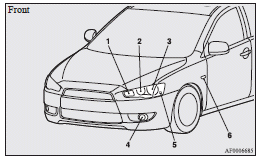
Except for vehicles equipped with high intensity discharge headlamps
1. Front turn-signal lamps: 21 W (WY21W)
2. Headlamps, high-beam: 60 W (HB3)
3. Headlamps, low beam: 51 W (HB4)
4. Front fog lamps1: 55 W (H11)
5. Position lamps: 5 W (W5W)
6. Side turn-signal lamps2: 5 W
Vehicles equipped with high intensity discharge headlamps
1. Front turn-signal lamps: 21 W (WY21W)
2. Bending lamps (Adaptive Front lighting System (AFS)): 55 W (H11)
3. Headlamps, high/low beam (Discharge bulb)2: 35 W
4. Front fog lamps1: 55 W (H11)
5. Position lamps: 5 W (W5W)
6. Side turn-signal lamps2: 5 W
1 If so equipped
2 Have the lamps bulbs replaced at a MITSUBISHI MOTORS Authorized Service Point.
Warning
► Check with a MITSUBISHI MOTORS Authorized Service Point when it is necessary to repair a high intensity discharge headlamp or to replace the bulb. The power circuit, bulb and electrodes generate high voltages that may cause a severe shock.
Note
► For the side turn-signal lamp, it is not possible to repair or replace just the bulb.
Check with a MITSUBISHI MOTORS Authorized Service Point when the lamp needs to be repaired or replaced.
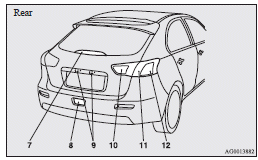
7. High-mounted stop lamp
8. Rear fog lamp: 21 W (W21W)
9. Licence plate lamps: 5 W (W5W)
10. Reversing lamps: 16 W (W16W)
11. Stop and tail lamps: 21/5 W (W21/5W)
12. Rear turn-signal lamps: 21 W (WY21W)
Codes in parentheses indicate bulb types.
Note
► The high-mounted stop lamp uses LEDs rather than bulbs. For repair and replacement, we recommend you to consult a specialist.
Inside
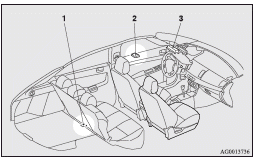
1- Cargo room lamp: 8 W
2- Rear room lamp: 8 W
3- Front room & map lamps: 8 W
Headlamps (low beam, except for vehicles with high intensity discharge headlamps)
1. For petrol-powered vehicles equipped with turbocharger, when replacing the bulb on the left side, remove the bolt (A) holding down the relay box and move the relay box towards the rear of the vehicle.
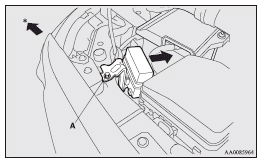
: Front of the vehicle
2. For petrol-powered vehicles equipped with turbocharger, when replacing the bulb on the right side, lift up the engine coolant reservoir (B).
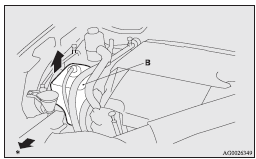
: Front of the vehicle
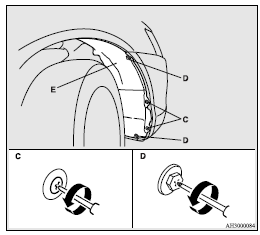
3. When replacing the bulb on the right side of the vehicle in case of diesel-powered vehicles, turn the steering wheel to the left to create enough work space. And then, remove the clips (C) and screws (D) to turn up the cover (E).
4. Turn the bulb (F) anticlockwise, and then remove the headlamp bulb with holder.
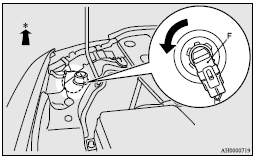
: Front of the vehicle
5. While pressing the tab (G), pull out the bulb (H).
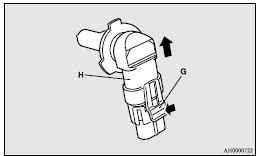
6. To install the bulb, perform the removal steps in reverse.
Caution
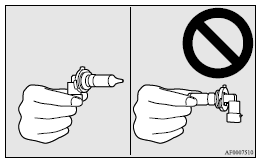
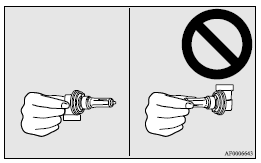
► Handle halogen lamp bulbs with care.
The gas inside halogen lamp bulbs is highly pressurized, so dropping, knocking, or scratching a halogen lamp bulb can cause it to shatter.
► Never hold the halogen lamp bulb with a bare hand, dirty glove, etc. The oil from your hand could cause the bulb to break the next time the headlamps are operated.
If the glass surface is dirty, it must be cleaned with alcohol, paint thinner, etc., and refit it after drying it thoroughly.
Bending lamps (Adaptive Front lighting System (AFS)) (for vehicles equipped with high intensity discharge headlamps)
1. When replacing the bulb on the right side of the vehicle, remove the bolt (A) holding down the washer tank spout and move the spout towards the rear of the vehicle.
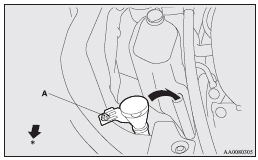
: Front of the vehicle
2. Turn the cap (B) anticlockwise to remove it.
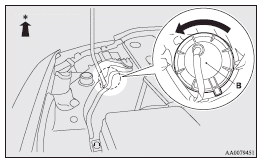
: Front of the vehicle
3. Turn the bulb (C) anticlockwise to remove it.
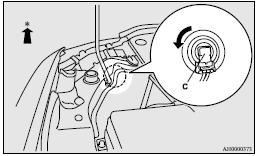
: Front of the vehicle
4. While pressing the tab (D), pull out the bulb (E).
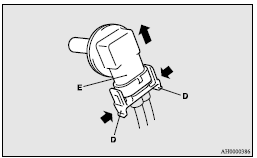
5. To install the bulb, perform the removal steps in reverse.
Caution
► Handle halogen lamp bulbs with care.
The gas inside halogen lamp bulbs is highly pressurized, so dropping, knocking, or scratching a halogen lamp bulb can cause it to shatter.
► Never hold the halogen lamp bulb with a bare hand, dirty glove, etc. The oil from your hand could cause the bulb to break the next time the bending lamps (Adaptive Front lighting System (AFS)) are operated.
If the glass surface is dirty, it must be cleaned with alcohol, paint thinner, etc., and refit it after drying it thoroughly.
Position lamps (except for vehicles equipped with high intensity discharge headlamps)
1. For petrol-powered vehicles equipped with turbocharger, when replacing the bulb on the left side, remove the bolt (A) holding down the relay box and move the relay box towards the rear of the vehicle.
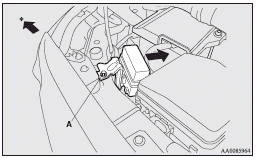
: Front of the vehicle
2. For petrol-powered vehicles equipped with turbocharger, when replacing the bulb on the right side, lift up the engine coolant reservoir (B).
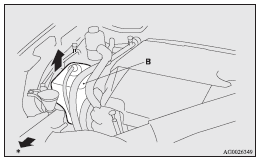
: Front of the vehicle
3. When replacing the bulb on the right side of the vehicle in case of diesel-powered vehicles, turn the steering wheel to the left to create enough work space. And then, remove the clips (C) and screws (D) to turn up the cover (E).
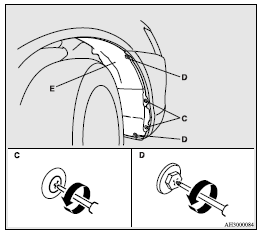
4. Turn the socket (F) anticlockwise to remove it.
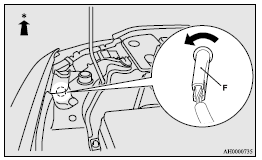
: Front of the vehicle
5. Pull the bulb out of the socket.
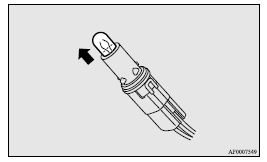
6. To install the bulb, perform the removal steps in reverse.
Position lamps (for vehicles equipped with high intensity discharge headlamps)
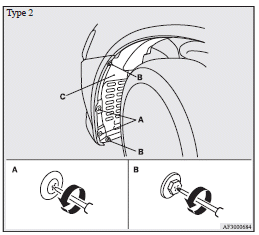
1. To create enough work space, turn the steering wheel all the way in the direction opposite to the side you wish to replace.
2. Remove the clips (A) and screws (B) to turn up the cover (C).
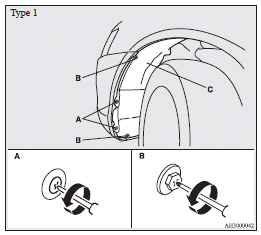
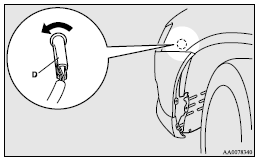
3. Turn the socket (D) anticlockwise to remove it.
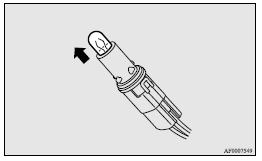
4. Pull the bulb out of the socket.
5. To install the bulb, perform the removal steps in reverse.
Front turn-signal lamps
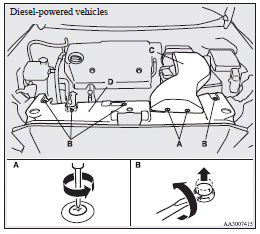
1. Remove the clips (A) and clips (B), then remove the duct (C) and the upper cover (D).
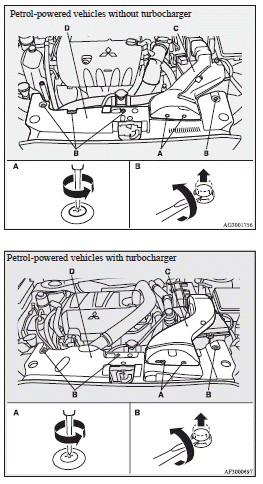
2. Remove the entire socket and bulb assembly (E) by turning it anticlockwise.
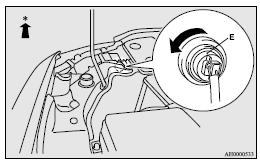
: Front of the vehicle
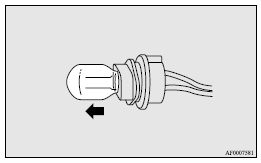
3. Remove the bulb by pulling it out.
4. To install the bulb, perform the removal steps in reverse.
Front fog lamps (Type 1)
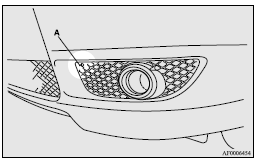
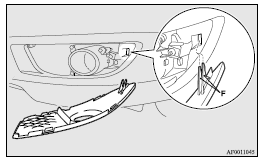
1. Remove the screw (A) and pull the cover out.
2. Remove the screws (B) and pull the entire lamp unit out.
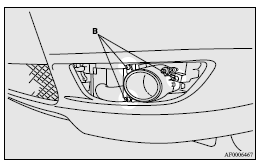
Note
► When unfastening the screws, be careful not to mistakenly move the beam position adjustment screw (C).
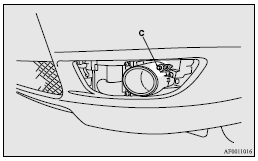
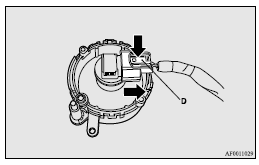
3. Push the connector (D) to disconnect and remove the fog lamp.
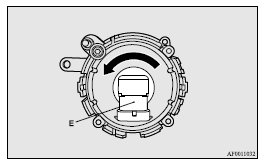
4. Remove the bulb assembly (E) by turning it anticlockwise.
Caution
► Handle halogen lamp bulbs with care.
The gas inside halogen lamp bulbs is highly pressurized, so dropping, knocking, or scratching a halogen lamp bulb can cause it to shatter.
► Never hold the halogen lamp bulb with a bare hand, dirty glove, etc.
The oil from your hand could cause the bulb to break the next time the fog lamps are operated.
If the glass surface is dirty, it must be cleaned with alcohol, paint thinner, etc., and refit it after drying it thoroughly.
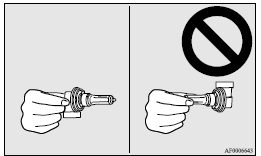
5. To install the bulb, perform the removal steps in reverse.
Note
► When mounting the cover, align the hooks (F) on the cover with the hole in the body.
Rear combination lamps
Stop and tail lamps and rear turn-signal lamps
1. Insert a straight blade (or minus) screwdriver with the end covered with a cloth or other object at the edge of the cover and pry gently to remove the cover.
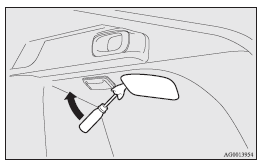
2. Remove the socket and bulb assemblies by turning them anticlockwise.
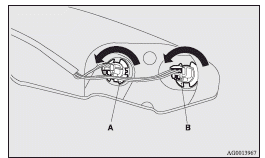
A- Rear turn-signal lamp
B- Stop and tail lamp
3. Remove the bulb by pulling it out.
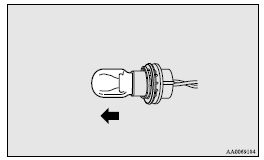
4. To install the bulb, perform the removal steps in reverse.
Note
► When installing the cover, make sure the arrow on the cover is pointing in the direction of the front of the vehicle.
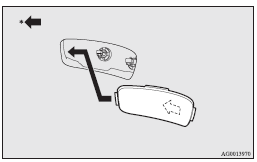
: Front of the vehicle
Reversing lamps
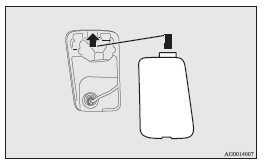
1. Insert a straight blade (or minus) screwdriver with the end covered with a cloth or other object into the cut out area of the cover and pry gently to remove the cover.
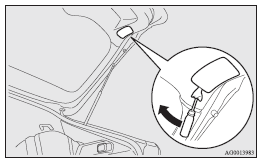
2. Remove the socket and bulb assembly by turning it anticlockwise.
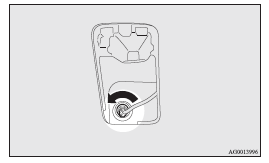
3. Remove the bulb by pulling it out.
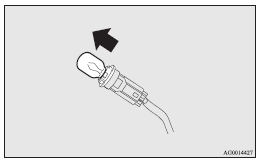
4. To install the bulb, perform the removal steps in reverse.
Note
► When installing the lid, align the tab on the lid with the hole on the vehicle side.
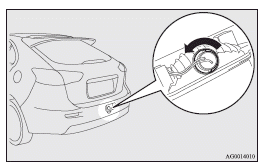
Rear fog lamp
1. Remove the socket and bulb assembly by turning it anticlockwise.
2. Remove the bulb by pulling it out.
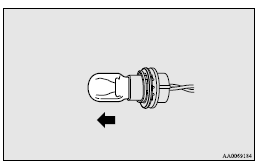
3. To install the bulb, perform the removal steps in reverse.
Licence plate lamps
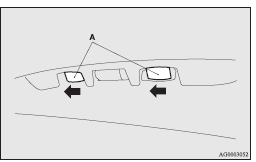
1. Remove while pressing the lamp unit (A) to the left side.
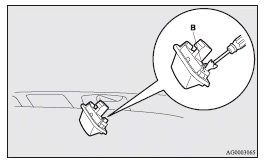
2. Insert a minus screwdriver with the end covered with a cloth or other object to press the hook (B) aside and remove the lens.
3. Remove the bulb by pulling it out.
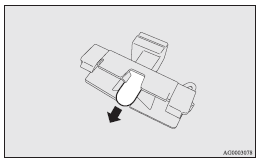
4. To install the bulb, perform the removal steps in reverse.
Note
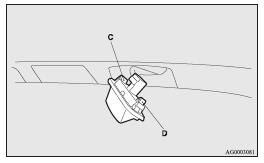
► When installing the lamp, insert tab (C) first then align and insert tab (D).
Front room & map lamps
When replacing the bulb, put the front room & map lamps switch into the “OFF” position.
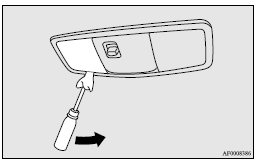
1. Insert a straight blade (or minus) screwdriver with a cloth over its tip into the notch of the lamp assembly. Gently pry to remove the lens.
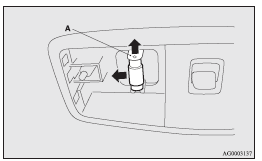
2. While holding down the tab (A), pull out the bulb.
3. To install the bulb, perform the removal steps in reverse.
Note
► When mounting the lens, align the tab (B) to the hole on the vehicle body.
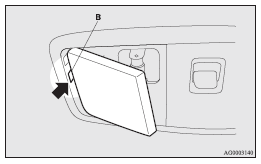
Rear room lamp
When replacing the bulb, put the rear room lamp switch into the “OFF” position.
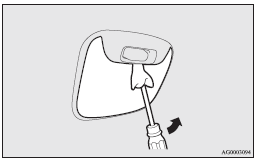
1. Insert a straight blade (or minus) screwdriver with a cloth over its tip into the notch of the lamp assembly and pry gently to remove the lens.
2. While holding down the tab (A), pull out the bulb.
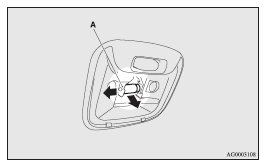
3. To install the bulb, perform the removal steps in reverse.
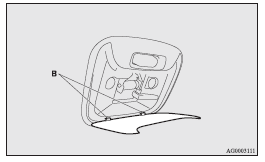
Note
► When mounting the lens, align the tabs (B) with the holes on the vehicle body.
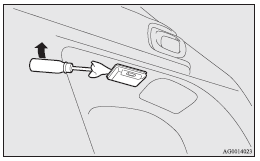
Cargo room lamp
When replacing the bulb, put the cargo room lamp switch into the “OFF” position.
1. Insert a straight blade (or minus) screwdriver with a cloth over its tip into the notch of the lamp assembly and pry gently to remove the lens.
2. Remove the bulb by pulling it out.
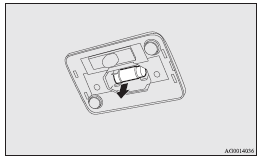
3. To install the bulb, perform the removal steps in reverse.