Interior Equipment
Sunvisors
Lower the sunvisor to block sunlight from the front.
To block sunlight from the side, lower and unhook the sunvisor, and then swing it to the side.
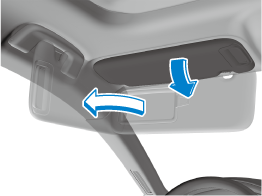
Side Extension Sunvisors (Some Models)
The visor extender extends the sunvisor's range of sun shading.
To use, pull it out.
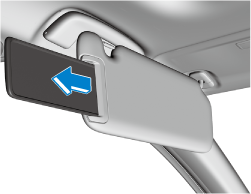
When moving the sunvisor, retract the visor extender to its original position. Otherwise, the visor extender could hit the rearview mirror.
Vanity Mirrors
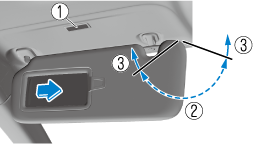
To use the vanity mirror, lower the sunvisor.
If your vehicle is equipped with a vanity mirror light, it will illuminate when you open the cover.
The vanity mirror will only illuminate in the tilt range shown in the figure.
-
Vanity mirror light
-
On
-
Off
If a vanity mirror light is left on with the ignition switched OFF, the light is turned off automatically to prevent the battery from being discharged.
The vanity mirror light can be turned on again by doing any of the following operations:
-
Opening/closing any door.
-
Unlocking any door.
-
Switching the ignition to ACC or ON.
-
Switching an overhead light/front map light on.
Interior Lights
Do not leave the lights on for long periods while the engine is turned off. Otherwise the battery power could be depleted.
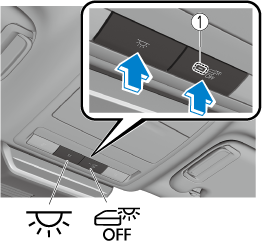
Overhead lights
Front
-
Indicator light
|
Switch |
Overhead Lights |
|---|---|

ON/OFF |
Press the switch to turn it on. Press the switch again to turn off the lights. |

DOOR OFF |
The door interlock can be switched ON/OFF. When the door interlock is OFF, the indicator light in the switch turns on. Door interlock ON (indicator light in switch is off)
Door interlock OFF (indicator light in switch is on)
|
Rear
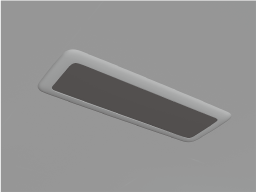
The rear overhead light also turn on and off when the front overhead light switch is operated.
Map lights
Press the switch to illuminate the map lights, and then press the switch again to turn them off.
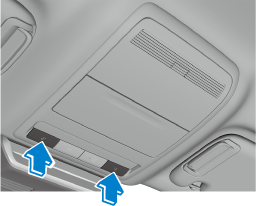
The map lights will not turn off even if the switch is pressed in the following cases:
-
The overhead lights turn on by operating the overhead light ON/OFF switch (
 ).
). -
The overhead lights turn on in conjunction with a door opening/closing.
-
The illuminated entry system is on.
Trunk light (4–door)
The trunk light is on when the trunk is open and off when it is closed.
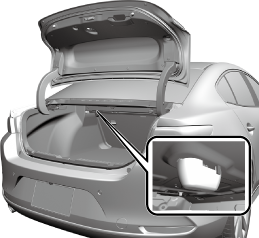
Do not leave the trunk open for long periods while the engine is turned off. Otherwise the battery power could be depleted.
Luggage compartment light (5–door)
The luggage compartment light is on when the liftgate is open and off when it is closed.
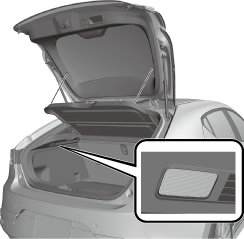
Do not leave the liftgate open for long periods while the engine is turned off. Otherwise the battery power could be depleted.
Illuminated Entry System
The overhead lights turn on when any of the following operations is done with the overhead light switch in the DOOR position.
-
The driver's door is unlocked with the ignition is switched OFF.
-
The ignition is switched OFF with all doors closed.
-
The illumination time differs depending on the operation.
-
The vehicle is equipped with a battery saver. If an interior light is left on with the ignition switched OFF, the light turns off automatically after a certain period of time has passed to prevent battery depletion.
-
The operation of the illuminated entry system can be changed.
Refer to the Settings section in the Mazda Connect Owner's Manual.
-
The illuminated entry system does not operate in conjunction with the overhead lights when the overhead lights are turned on using the overhead light ON/OFF switch.
Accessory Socket
Only use genuine Mazda accessories or the equivalent requiring no greater than 120 W (DC 12 V, 10 A).
The accessory socket can be used regardless of whether the ignition is on or off.
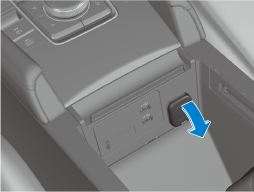
-
To prevent accessory socket damage or electrical failure, pay attention to the following:
-
Do not use accessories that require more than 120 W (DC 12 V, 10 A).
-
Do not use accessories that are not genuine Mazda accessories or the equivalent.
-
Close the cover when the accessory socket is not in use to prevent foreign objects and liquids from getting into the accessory socket.
-
Correctly insert the plug into the accessory socket.
-
Do not insert the cigarette lighter into the accessory socket.
-
-
Noise may occur on the audio playback depending on the device connected to the accessory socket.
-
Depending on the device connected to the accessory socket, the vehicle's electrical system may be affected, which could cause the warning light to illuminate. Disconnect the connected device and make sure that the problem is resolved. If the problem is resolved, disconnect the device from the socket and switch the ignition off. If the problem is not resolved, consult an Authorized Mazda Dealer.
To prevent discharging of the battery, do not use the socket for long periods with the engine off or idling.
Connecting the accessory socket
-
Open the lid.
-
Pass the connection plug cord through the cutout of the console and insert the plug into the accessory socket.
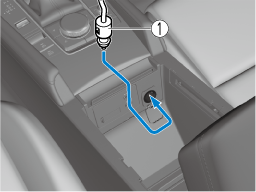
-
Plug
Cup Holder
Never use a cup holder to hold hot liquids while the vehicle is moving:
Using a cup holder to hold hot liquids while the vehicle is moving is dangerous. If the contents spill, you could be scalded.
Do not put anything other than cups or drink cans in cup holders:
Putting objects other than cups or drink cans in a cup holder is dangerous.
During sudden braking or maneuvering, occupants could be hit and injured, or objects could be thrown around the vehicle, causing interference with the driver and the possibility of an accident. Only use a cup holder for cups or drink cans.
Front
Type A
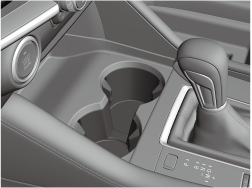
Type B
To use the cup holder, push the release button.
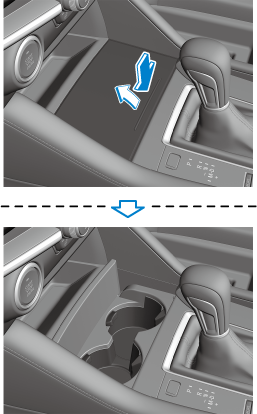
Rear (Some Models)
The rear cup holder is on the rear center armrest.
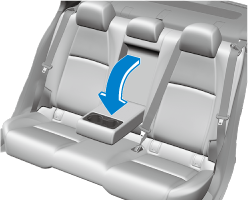
Bottle Holder
Bottle holders are on the inside of the doors.

-
Bottle holder
Do not use the bottle holders for containers without caps. The contents may spill when opening/closing the door or while driving the vehicle.
Assist Grips
Never hang heavy or sharp objects on the assist grips and coat hooks:
Hanging heavy or sharp-ended objects such as a coat hanger from the assist grips or coat hooks is dangerous as they can fly off and hit an occupant in the cabin if a curtain air bag was to deploy, which could result in serious injury or death.
Do not use the assist grips when getting in and out of the vehicle or getting out of a seat:
An assist grip could break under a heavy load resulting in injury.
Use the assist grips to support your body while seated in the vehicle and while the vehicle is moving.
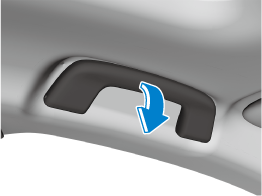
Rear Coat Hooks
Never hang heavy or sharp objects on the assist grips and coat hooks:
Hanging heavy or sharp-ended objects such as a coat hanger from the assist grips or coat hooks is dangerous as they can fly off and hit an occupant in the cabin if a curtain air bag was to deploy, which could result in serious injury or death.
Always hang clothes on the coat hooks and the assist grips without hangers.
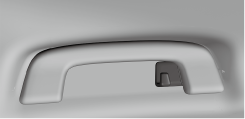
Storage Compartments
Keep storage boxes closed when driving:
Driving with the storage boxes open is dangerous. To reduce the possibility of injury in an accident or a sudden stop, keep the storage boxes closed when driving.
When loading cargo, make sure that it is completely secured:
If the cargo is not completely secured, it may move or collapse while driving or during sudden braking, resulting in injury or an accident.
Do not put articles in storage spaces with no lid:
Putting articles in storage spaces with no lid is dangerous as they could be thrown around the cabin during sudden braking, maneuvering, or acceleration and cause an accident depending on how the article is stored.
Do not leave lighters or eyeglasses in the storage boxes while parked under the sun. A lighter could explode or the plastic material in eyeglasses could deform and crack from high temperature.
Overhead Console (Some Models)
This console box is designed to store eyeglasses or other accessories.
Push and release to open.
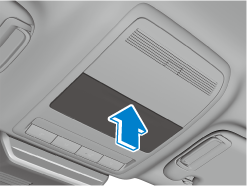
Storage Pocket
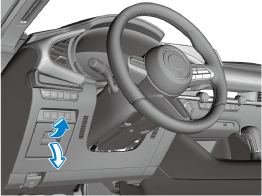
To use, open the lid.
Glove Compartment
To open the glove compartment, pull the knob toward you.
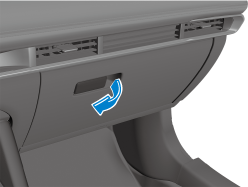
To close the glove compartment, firmly press in the center of the glove compartment lid.
Center Console
Sliding
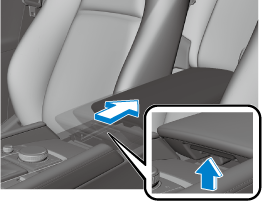
The console lid can be slid rearward in 2 steps.
Slide the console lid rearward while pulling the knob.
Opening/closing
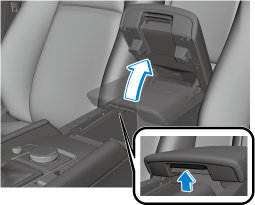
The console lid can be opened at the 1st or 2nd step of the slide positions.
Pull the console lid up while pulling the knob.
Do not put your hands or fingers around the moving part of the console lid when operating it. Otherwise, your hands or fingers could be injured.
If a rear seatback is folded, open/close the console lid while it is slid to the 1st step. The console lid and the rear seat (head restraint) will contact each other and the console lid cannot be opened/closed while it is slid to the 2nd step.
Center console divider
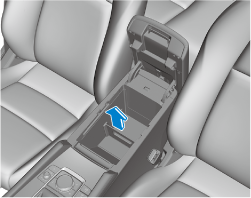
Small items can be placed using the center console divider.
Luggage Compartment
Loading golf bags (4–door)
(Some golf bags may not fit using the following methods depending on their sizes.)
Up to two golf bags can be carried in the trunk.
First golf bag: Place the golf bag in the luggage compartment with its bottom pointed to the left and fit it into the front of the compartment.
Second golf bag: Place the golf bag in the luggage compartment with its bottom pointed to the left and fit it into the back of the compartment.
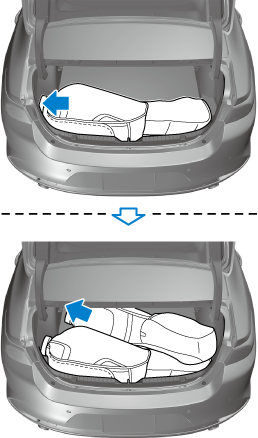
-
The arrows indicate the bottoms of the golf bags.
Download Manual