Exterior Lamps
USING THE TURN SIGNAL LAMPS
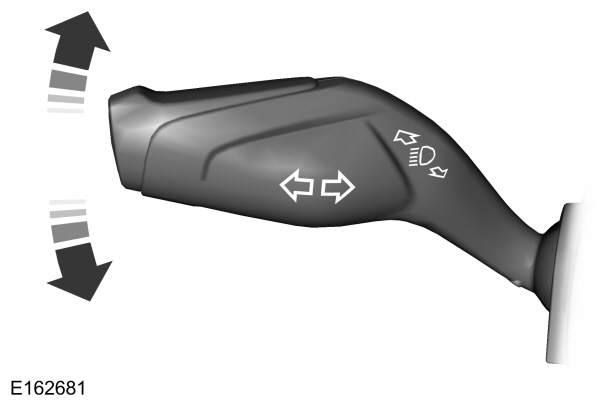

Set the lever to the middle position to switch the turn signal lamps off.
Note: Tap the lever up or down to make the turn signal lamps flash three times.
Turn Signal Lamp Indicator
Note: An increase in the rate of flashing warns of a failed turn signal lamp.
SWITCHING THE DAYTIME RUNNING LAMPS ON AND OFF - VEHICLES WITH: CONFIGURABLE DAYTIME RUNNING LAMPS
Configurable Daytime Running Lamps
 WARNING: The daytime running lamps system does not activate the rear lamps and may not provide adequate lighting during low visibility driving conditions. Make sure you switch the headlamps on, as appropriate, during all low visibility conditions. Failure to do so may result in a crash. WARNING: The daytime running lamps system does not activate the rear lamps and may not provide adequate lighting during low visibility driving conditions. Make sure you switch the headlamps on, as appropriate, during all low visibility conditions. Failure to do so may result in a crash. |
- Using the instrument cluster controls on the steering wheel, select Settings.
- Select Vehicle.
- Select Lighting.
- Switch Daytime Running Lights on or off.
The daytime running lamps turn on when all of the following occur:
- You switch the system on.
- You switch your vehicle on.
- The transmission is not in park (P) for vehicles with automatic transmissions or you release the parking brake for vehicles with manual transmissions.
- The lighting control is in the autolamps position.
- The headlamps are off.
Note: Other lighting control positions do not turn on the daytime running lamps.
SWITCHING THE DAYTIME RUNNING LAMPS ON AND OFF - VEHICLES WITH: DAYTIME RUNNING LAMPS (DRL)
| WARNING: The daytime running lamps system does not activate the rear lamps and may not provide adequate lighting during low visibility driving conditions. Make sure you switch the headlamps on, as appropriate, during all low visibility conditions. Failure to do so may result in a crash. |
Daytime running lamps are always on unless you switch on the headlamps or your vehicle is in park (P).
USING THE FRONT FOG LAMPS
To switch the lamps on or off:
Set the lighting control to the parking lamps, headlamps or autolamps position.
Note: When the lighting control is in the autolamps position, you cannot switch the fog lamps on unless the low beam headlamps are on.
2. 
Note: Only switch the front fog lamps on during reduced visibility.
Note: The brightness of the daytime running lamps may decrease when the front fog lamps are switched on.
Note: The front fog lamps lights switch off automatically when high beams are activated.
Front Fog Lamps Indicator
| It illuminates when you switch the front fog lamps on. |
EXTERIOR LAMP INDICATORS
Front Fog Lamp
| It illuminates when you switch the front fog lamps on. |
Turn Signal Lamp
Note: An increase in the rate of flashing warns of a failed turn signal lamp.
Download Manual