Automatic High Beam Control Troubleshooting
AUTOMATIC HIGH BEAM CONTROL – INFORMATION MESSAGES
| Message | Description |
|---|---|
|
Front Camera Low Visibility Clean Screen |
The camera has reduced visibility.Clean the windshield.If the message continues to appear, have your vehicle checked as soon as possible. |
|
Front Camera Temporarily Not Available |
The camera has malfunctioned.Wait a short period of time for the camera to cool down.If the message continues to appear, have your vehicle checked as soon as possible. |
|
Front Camera Malfunction Service Required |
The camera has malfunctioned.Have your vehicle checked as soon as possible. |
Adaptive Front Lighting
HOW DOES ADAPTIVE FRONT LIGHTING WORK
Adaptive front lighting adapts when you are steering around a curve or if the camera detects lane markings indicating a curve.
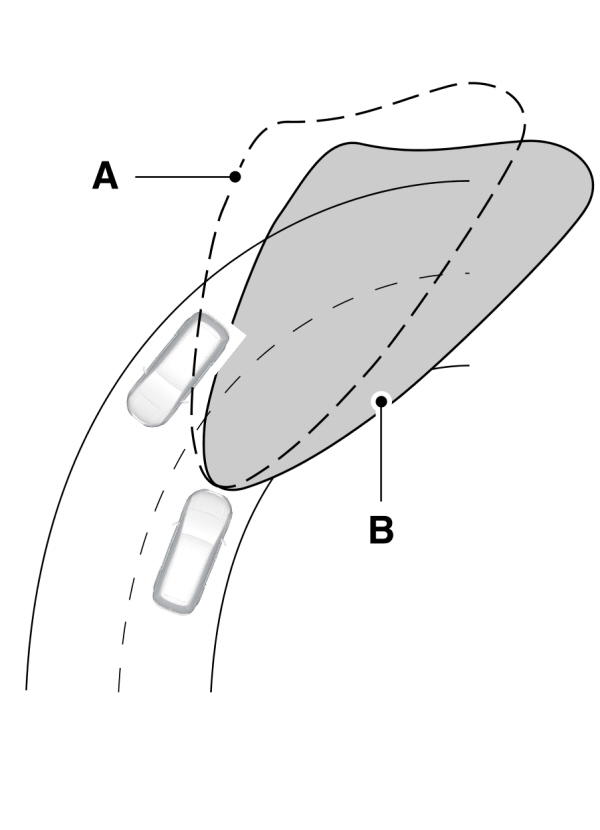
A Without adaptive front lighting. Without adaptive front lighting.B With adaptive front lighting. |
SWITCHING ADAPTIVE FRONT LIGHTING ON AND OFF
- Using the instrument cluster controls on the steering wheel, select Settings.
- Select Vehicle.
- Select Lighting.
- Switch Adaptive Headlamps on or off.
Set the lighting control to the autolamps position to use the adaptive front lighting.
Download Manual