Turn signal lever and high beam switch
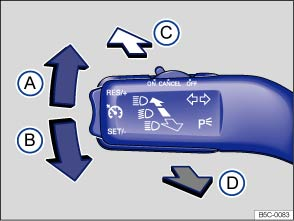
Fig. 83 On the left side of the steering column: Turn signal lever and high beam switch.
 Read and follow the introductory information and safety information first⇒
 Introduction to the subject
Move the lever to the desired position
 Right turn signal
 .
 Left turn signal
 .
 Switching high beams on ⇒ . An indicator light
 lights up in the instrument cluster when the high beams are switched on.
 Switching the high beams off and operating the headlight flasher. The headlight flasher turns on the high beams as long as the lever is pulled and manually held in the pulled position. The indicator light
Move the lever back to the home position to turn the selected feature off.
Convenience turn signal (lane change feature)
To use the convenience turn signal, move the lever up or down slightly, just to the point of resistance and then release it. If you have the convenience turn signal switched on, the turn signals and the turn signal indicator flash 3 times. If it is switched off, they flash as long as you hold the lever up or down, and go out when you release the lever.
The convenience turn signal feature can be deactivated by an authorized Volkswagen dealer or authorized Volkswagen Service Facility.
 WARNING
Improper use of high beams can distract and blind others, causing accidents and serious injuries.

The turn signal light works only when the ignition is switched on. The emergency flasher works even when the ignition is switched off ⇒ In an emergency .
The indicator light flashes twice as fast if a turn signal bulb is burned out.
High beams can only be switched on when the low beams are on.
Download Manual