Headlight switch
Operating instructions
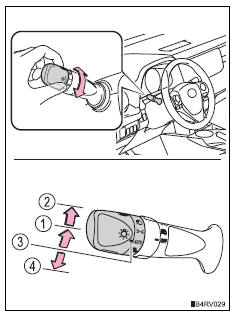
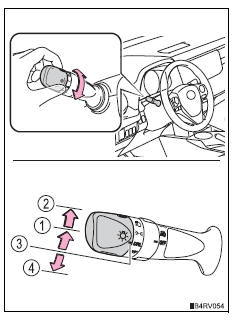
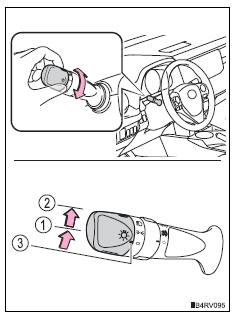
Turning the end of the lever turns on the lights as follows:
Type a
 The side marker, parking, tail, license plate, daytime running lights and instrument panel lights turn on.
 The headlights and all lights listed above (except daytime running lights) turn on.
 The headlights and all the lights listed above turn on and off automatically.
(When the engine switch is in the “on” position [vehicles without a smart key system] or ignition on mode [vehicles with a smart key system])
 Off
Off
 The daytime running
lights turn on.
Type b
 The side marker, parking,
tail, license plate, daytime running lights and instrument panel lights turn on. The headlights and all
lights listed above (except daytime running lights) turn on. The daytime running lights
turn on. Off
Off
Type c
 The side marker, parking,
tail, license plate, daytime running lights and instrument panel lights turn on. The headlights and all
lights listed above (except daytime running lights) turn on. The daytime running lights
turn on.
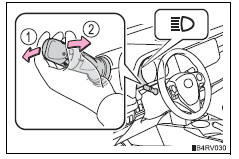
Turning on the high beam headlights
- With the headlights on, push the lever away from you to turn on the high beams.
Pull the lever toward you to the center position to turn the high beams off.
- Pull the lever toward you and release it to flash the high beams once.
You can flash the high beams with the headlights on or off.
Daytime running light system
- To make your vehicle more visible to other drivers, the headlights turn on automatically (at a reduced intensity) whenever the engine is started and the parking brake is released. Daytime running lights are not designed for use at night.
- Compared to turning on the headlights, the daytime running light system offers greater durability and consumes less electricity, so it can help improve fuel economy.
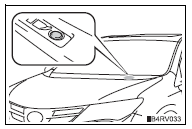
Headlight control sensor (if equipped)
The sensor may not function properly if an object is placed on the sensor, or anything that blocks the sensor is affixed to the windshield.
Doing so interferes with the sensor detecting the level of ambient light and may cause the automatic headlight system
to malfunction.
Automatic light off system
When the light switch is in  or
or  : the lights turn off 30 seconds after the engine switch is turned to the “lock” position (vehicles without a smart key system) or off (vehicles with a smart key system) and a door is opened and all of the doors are closed. (The lights turn off immediately if
  on thekey is pressed while all the doors are locked.) When the light switch is in
  :
:
the lights turn off after the engine switch is turned to the “lock” position (vehicles without a smart key system) or off (vehicles with a smart key system) and the driver’s door is opened.
To turn the lights on again, turn the engine switch to the “on” position (vehicles without a smart key system) or to ignition on mode (vehicles with a smart key system), or turn the light switch off, then turn it to  or to
or to  .
.
If any of the doors is kept open and the engine switch is in the “lock” position (vehicles without a smart key system) or off (vehicles with a smart key system), the lights automatically turn off after 20 minutes.
Light reminder buzzer
Vehicles without a smart key system
A buzzer sounds when the engine switch is turned to the “lock” position, the key is removed and the driver’s door is opened while the lights are turned on.
Vehicles with a smart key system
A buzzer sounds when the engine switch is turned off and the driver’s door is opened while the lights are turned on.
Customization
Settings (e.G. Light sensor sensitivity) can be changed.
Notice
To prevent battery discharge
Do not leave the lights on longer than necessary when the engine is not running.
Download Manual