Interior light
CAUTION
When leaving your vehicle, make sure the lights are turned off to avoid battery discharge.
Dome light
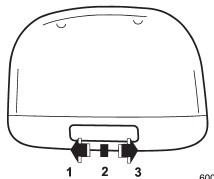
1) ON
2) DOOR
3) OFF
The dome light switch has three positions:
ON: The light remains on continuously.
OFF: The light remains off.
DOOR: The dome light illuminates automatically in the following cases.
Map light

To turn on the map light, press the lens.
To turn it off, press the lens again.
CAUTION
Do not keep watching the light source because they use LEDs. Doing so could damage your eyes.
Door interlock switch

1) Door interlock switch
The door interlock switch has the following positions.
OFF: The map lights do not illuminate automatically in conjunction with a door opening. However, the lights can be turned on manually by pressing the map light lens.
DOOR: The map lights illuminate automatically when any of the doors (other than the rear gate or trunk lid) is opened even while the map light is off. Several seconds after all of the doors (other than the rear gate or trunk lid) are closed, the map lights gradually turn off. For details, refer to “OFF Delay Timer” .
Cargo area light (Outback)

1) DOOR
2) OFF
3) ON
The cargo area light switch has the following positions.
OFF: The light remains off.
ON: The light remains on continuously.
DOOR: The light illuminates only when the rear gate is opened. The light gradually turns off several seconds after the rear gate is closed. For details, refer to “OFF Delay Timer”.
OFF Delay Timer
The following lights have an automatic illumination function.
- Dome light
- Map lights
- Trunk (Legacy)
- Cargo area light (Outback)
When the interior light switch is set to the “DOOR” position, the light will automatically turn on and off depending on the locking and unlocking of the doors, the opening and closing of the doors, as well as the position of the ignition switch.
NOTE
The setting for the period of time in which the lights remain on (OFF delay timer) can be changed by a SUBARU dealer. Contact your SUBARU dealer for details. Also, the setting can be changed by operating the center information display. For details, refer to “Car settings” FP220 (11.6-inch display models) or “Vehicle setting icons” FP239 (dual 7.0-inch display models).