Light control switch
Models with "keyless access with push-button start system": The light control switch operates when the push-button ignition switch is in the "ACC" or "ON" position. Regardless of the position of the light control switch, the illuminated lights are turned off when the push-button ignition switch is turned off. Models without "keyless access with push-button start system": The light control switch operates when the key is inserted in the ignition switch. Regardless of the position of the light control switch, the illuminated lights are turned off when the key is removed from the ignition switch. NOTE The light control switch can be operated (except auto on/off headlights), even under the following conditions.
If the driver's door is opened while the headlights are illuminated under such conditions, a chirp sound will inform the driver that the lights are illuminated. |
Headlights
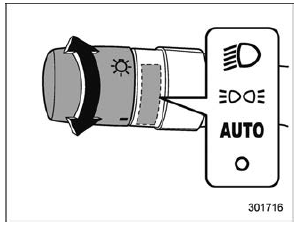
To turn on the headlights, turn the knob on the end of the turn signal lever.
"  " position: The headlights are all off.
" " position: Instrument panel illumination, headlights, parking lights, front side marker lights, rear side marker lights, tail lights and license plate lights are on.
" " position: Instrument panel illumination, parking lights, front side marker lights, rear side marker lights, tail lights and license plate lights are on.
" " position: auto on/off headlights When the ignition switch is in the "ON" position, the instrument panel illumination, headlights, parking lights, front side marker lights, rear side marker lights, tail lights and license plate lights are automatically on or off depending on the level of the ambient light.
The light sensitivity of the auto on/off headlights can be changed by operating the multi information display. For details, refer to "Auto Headlights" . Also, the setting can be changed by a SUBARU dealer. Consult your SUBARU dealer for details.
Automatic headlight turn on function that is linked with wiper operation: While the light control switch is in the "AUTO" position, the headlights will automatically turn on when the windshield wipers operate several times. The headlights will automatically turn off when the wipers stop.
The ON/OFF setting of this function can be changed by operating the multi information display. For details, refer to "Auto Headlights" . Also, the setting can be changed by a SUBARU dealer.
Consult your SUBARU dealer for details.
Welcome lighting function
The welcome lighting function turns on the low beam headlight for smooth approaching to or exiting from the vehicle at night or in a dark place.
The function is activated while all of the following conditions are met.
- The light control switch is in the "AUTO" position
- It is dark enough to turn on the auto on/ off headlights
When approaching: While the welcome lighting function is activated, the low beam headlights will automatically illuminate when unlocking the doors (for Outback, including the rear gate) by using the remote keyless entry system.
The low beam headlights will remain illuminated for 30 seconds*1 and then turn off. However, if any of the following operations is done, the low beam headlights will turn off.
- The doors are locked.
- The light control switch is turned to a position other than "AUTO".
- The ignition switch is turned to the "ON" position.
When exiting: While the welcome lighting function is activated, the low beam headlights will remain illuminated even when either of the following operation is done.
- The push-button ignition switch is turned to the "OFF" status (models with "keyless access with push-button start system")
- The key is pulled out from the ignition switch (models without "keyless access with push-button start system")
The low beam headlights will turn off under any of the following conditions.
- 3 minutes have passed since the low beam headlights were illuminated by the welcome lighting function.
- 30 seconds have passed since the door is opened and closed.*1
- The light control switch is turned to a position other than "AUTO".
- The locking procedure is performed twice. When performing the unlocking procedure after performing the locking procedure, perform the locking procedure twice again.
*1: The setting for the period of time in which the low beam headlights remain on by the welcome lighting function can be changed by a SUBARU dealer. Contact your SUBARU dealer for details. Also, you can change the setting by operating the multi information display. For details, refer to "Welcome Lighting" .
For models with the genuine SUBARU navigation system, you can change the setting by using the navigation system. For details, refer to the Owner's Manual supplement for the navigation system.
Sensor for the auto on/off headlights
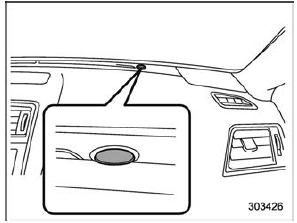
The sensor is on the instrument panel as shown in the illustration.
| CAUTION If any object is placed on or near the sensor, the sensor may not detect the level of the ambient light correctly and the auto on/off headlights may not operate properly. |
High/low beam change (dimmer)
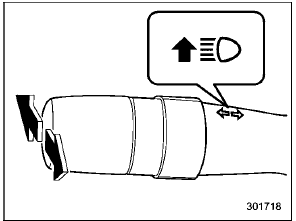
To change from low beam to high beam, push the turn signal lever forward. When the headlights are on high beam, the high beam indicator light "  " on the combination meter is also on.
To switch back to low beam, pull the lever back to the center position.
High beam assist function (if equipped)
NOTE
- Do not overestimate the capacity of the high beam assist function. The driver always has the responsibility to understand the surrounding situation, to drive safely, and to change the headlight mode manually if necessary.
- Observe the following points in order to operate the high beam assist function properly.
- Do not touch the camera or the lens.
- Do not apply any strong impact to the camera or the inside mirror.
- Do not disassemble the camera or inside mirror.
- Do not spill liquid on the inside mirror and camera.
- Do not place any objects over the dashboard.
- Do not carry excessive luggage.
- Do not modify the vehicle.
- When replacing the windshield glass, use the genuine SUBARU parts (or equivalent products).
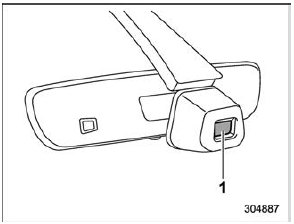
- Camera for high beam assist function
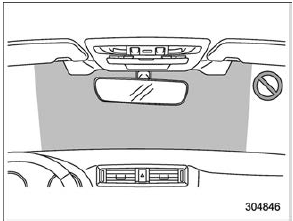
NOTE Observe the following points in order to operate the high beam assist function properly.
- Do not attach labels or stickers to the windshield glass near the camera.
- Do not attach any accessories near the inside mirror and camera.
If it is necessary to attach a label, sticker or accessory in the position shown above, consult your SUBARU dealer.
The high beam assist function automatically changes the headlight from high beam to low beam (or vice versa). When all of the following conditions are met, the headlight will change to high beam.
- When the vehicle speed increases to or above 20 mph (32 km/h)
- There is no preceding vehicle.
- The forward area of the vehicle is dark.
When any of the following conditions is met, the headlight will change to low beam.
- When the vehicle speed decreases to or below 10 mph (16 km/h).
- When the forward area of the vehicle is bright.
- When there is a preceding or oncoming vehicle.
NOTE The factory setting (default setting) for this function is set as "operational".
This setting can be changed to OFF (non-operation) at SUBARU dealers.
For more details, contact a SUBARU dealer.
How to use the high beam assist function
The high beam assist function will be activated when all the following conditions are met.
- The light control switch is in the "AUTO" position and the low beam headlights are on automatically.
- The turn signal lever is pushed forward
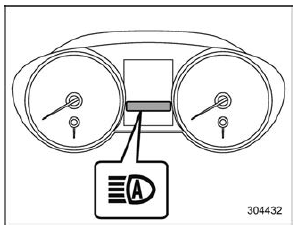
High beam assist indicator (green)
When the high beam assist function is activated, the high beam assist indicator on the combination meter will illuminate.
Malfunction of the high beam assist function:
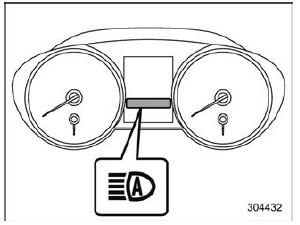
High beam assist warning indicator (yellow)
When the high beam assist function malfunctions, the high beam assist warning indicator on the combination meter will appear. In this case, have your vehicle inspected by your SUBARU dealer.
Temporary stop of high beam assist function: If the high beam assist function stops temporarily due to poor visibility or abnormal temperature, the message appears on the combination meter. When the condition is canceled, the system will be restored.
NOTE Even when the operation conditions of the high beam assist function are met, there may be a case in which the high beam assist indicator does not illuminate and an abnormal condition warning is given. In this case, turn the ignition switch to the "LOCK"/"OFF" position and then the "ON" position again. Check if the high beam assist indicator illuminates. If the indicator does not illuminate, have the vehicle inspected at a SUBARU dealer.
How to temporarily lower the sensitivity of the high beam assist function
The sensitivity of the high beam assist function can be lowered by using the following operations.
- Turn the ignition switch to the "ON" position.
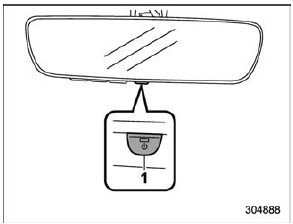
1) Automatic dimming on/off button
- Press and hold the automatic dimming on/off button for 15 to 20 seconds.
When the sensitivity of the high beam assist function is lowered, the LED indicator on the automatic dimming on/off button will flash.
NOTE
- The sensitivity of the high beam assist function cannot be lowered while driving.
- You can resume the sensitivity of the high beam assist function by using either of the following operations.
- Turn the ignition switch to the "LOCK"/"OFF" position and then start the engine.
- Press and hold the automatic dimming on/off button for 15 to 20 seconds again.
How to change the headlight mode manually
Change to the low beam: When you return the turn signal lever to the center position, the high beam assist function will turn off and the high beam assist indicator will turn off.
Change to the high beam: When you turn the light control switch to the " " position, the headlight mode will be changed to the high beam.
At this time, the high beam assist function will turn off, the high beam assist indicator will turn off and the high beam indicator light will turn on.
NOTE
- After manually changing the headlight mode to the high beam, if you turn on the high beam assist function, return the light control switch to the "AUTO" position.
- When manually changing the headlight mode to the high beam, if you turn the light control switch to the " " position, the parking lights, front side marker lights, rear side marker lights, tail lights and license plate lights will turn on.
Tips for the high beam assist system
- The high beam assist function recognizes the condition surrounding the vehicle based on the brightness of illumination ahead of your vehicle, etc. Therefore, the headlight mode may switch in some situations that do not match to the driver's sense.
- A bicycle or cargo cycle may not be detected.
- Under the following situations, the brightness of ambient illumination may not be detected correctly and the high beam assist function may not work properly.
As a result, the glare of the high beam may disturb the driving of an oncoming vehicle or vehicle ahead. Also, the low beam mode may continue although there are no oncoming vehicles and vehicles ahead. In the such cases, change the headlight mode manually.
- In bad weather (fog, snow, sand storm, heavy rain, etc.)
- When the windshield glass is dirty or fogged
- When the windshield is cracked or damaged
- When the inside mirror or the camera is deformed or dirty
- If there are lights similar to the headlights or the tail lights in the surrounding area
- When an oncoming vehicle or vehicle ahead is driven without its headlights and tail lights on
- If the headlights of an oncoming vehicle or the tail lights of a vehicle ahead are dirty or discolored, or if the light beams are not aimed correctly
- When a rapid change of brightness continues while driving
- When driving on a road with many ups and downs or uneven surfaces
- When driving on a road with many curves
- When there are some objects that reflect light strongly, such as a road sign or a mirror in vehicle ahead
- When the rear part of the vehicle ahead, such as a container, reflects light strongly
- When the headlights of your vehicle are damaged or dirty
- When your vehicle is tilted, such as in case the vehicle has a flat tire or is being towed
- In the following conditions, the headlight mode will not be automatically changed from the high beam to the low beam.
- When your vehicle passes an oncoming vehicle suddenly in a blind curve
- When another vehicle passes in front of your vehicle
- When an oncoming vehicle or vehicle ahead comes in and out of view because of continuous curves, median strips, roadside trees, etc.
- If the camera detects the light of the front fog lights of an oncoming vehicle, the headlight mode may change from the high beam to the low beam automatically.
. The headlight mode may change from the high beam to the low beam, or the low beam mode may continue, when affected by a street light, traffic signal, illumination of an advertisement board, or a reflective object such as a road sign and signboard.
- The timing of the change of headlight mode may differ due to the following factors.
- the vehicle condition (e.g., number of passengers or weight of loaded cargo)
- surrounding situation (e.g., movement and direction of an oncoming vehicle or vehicle ahead)
- detection limitations of the camera angle
Headlight flasher
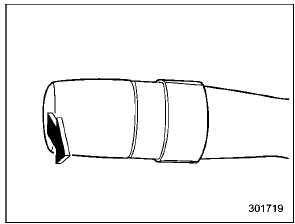
| CAUTION Do not hold the lever in the flashing position for more than just a few seconds. |
To flash the headlights, pull the lever toward you and then release it. The high beam will stay on for as long as you hold the lever. The headlight flasher works even though the lighting switch is in the off position.
When the headlights are on high beam, the high beam indicator light " " on the combination meter also illuminates.
Daytime running light system
| WARNING The brightness of the illumination of the high beam headlights is reduced by the daytime running light system.
The light switch must always be turned to the " |
 " position when it is dark outside.
The high beam headlights will automatically illuminate at reduced brightness when the engine has started, under the following conditions.
- The parking brake is fully released.
- The light switch is in the off or " " position.
- The light switch is in the "AUTO" position and the headlights do not turn on automatically.
- The select lever is in a position other than the "P" position (CVT models).
NOTE
- When the light switch is in the "
 " position, the front side marker lights, tail lights and license plate lights are illuminated.
 - While the turn signal is flashing, the high beam headlight on the side which the turn signal is flashing turns off.
- While the hazard warning flasher is on, the high beam headlights turn off.
Headlight beam leveler (models with HID headlights)
|
The HID headlights generate more light than conventional halogen headlights. Therefore a driver of an oncoming vehicle may experience too much glare when your headlight beam height adjustment is high due to the vehicle carrying heavy load. The automatic headlight beam leveler adjusts the headlight beam height automatically and optimally according to the load being carried by the vehicle. |