Exterior Lights
The headlight switch is located on the left side of the instrument panel. The headlight switch controls the operation of the headlights, side marker and parking lights, daytime running lights, fog lights and the dimming of the instrument cluster and interior lighting.
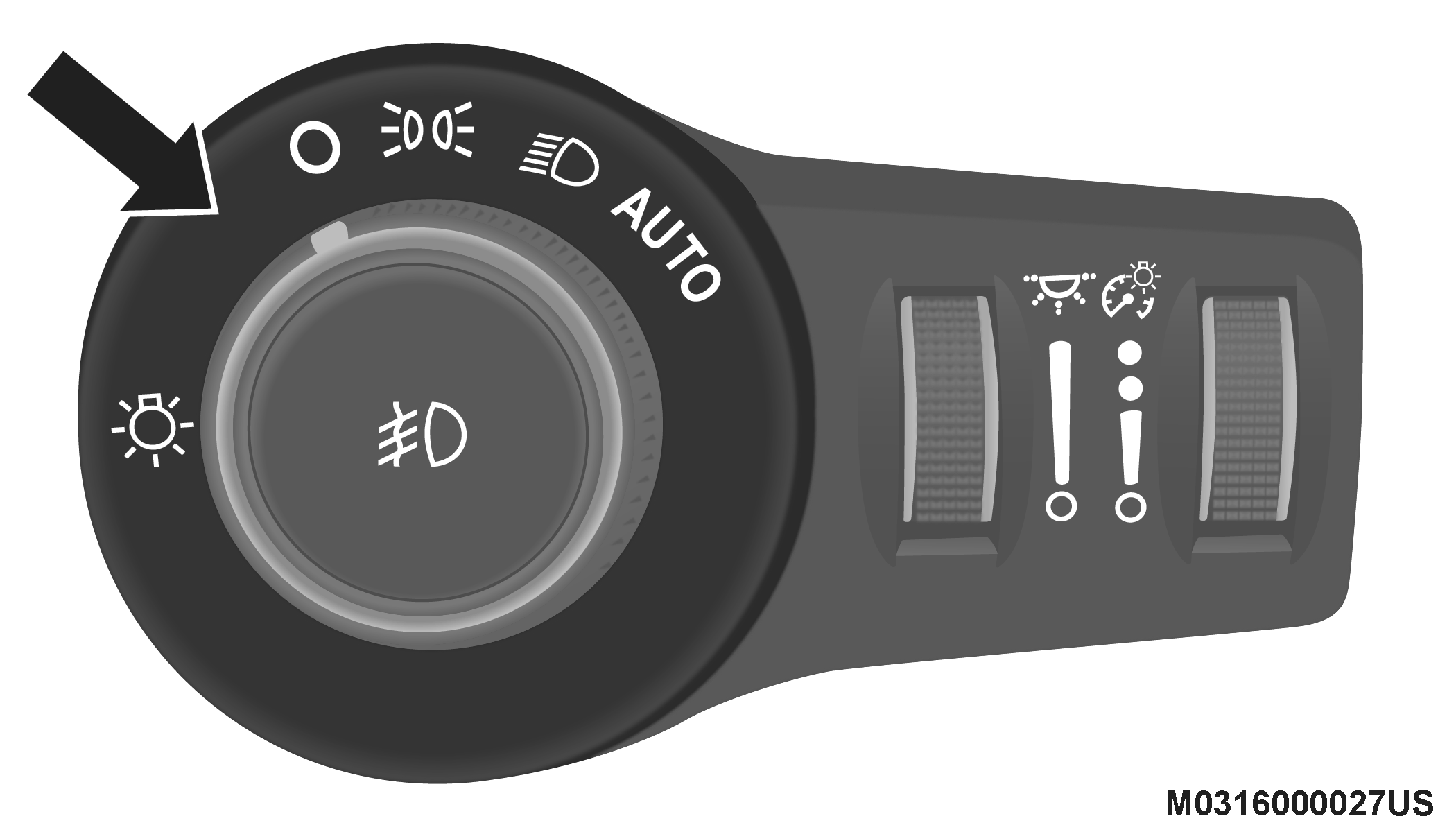
Headlight Switch
Turning on the headlights will illuminate the instrument cluster and the controls located on the instrument panel.
DAYTIME RUNNING LIGHTS (DRLS) — IF EQUIPPED
The Daytime Running Lights (DRLs), if enabled through Uconnect Settings, will turn on when the instrument cluster is on and remain on unless the headlights are turned on or the instrument cluster is switched off.
In the bulb lighting version, the DRLs will be disabled during turn signal operation and resume operation when the turn signal operation has ended.
HIGH BEAMS
To turn on the high beam headlights, push the turn signal lever forward (toward the front of the vehicle) and an indicator will illuminate in the cluster. To turn off the high beams, pull the turn signal lever rearward (toward the rear of the vehicle).
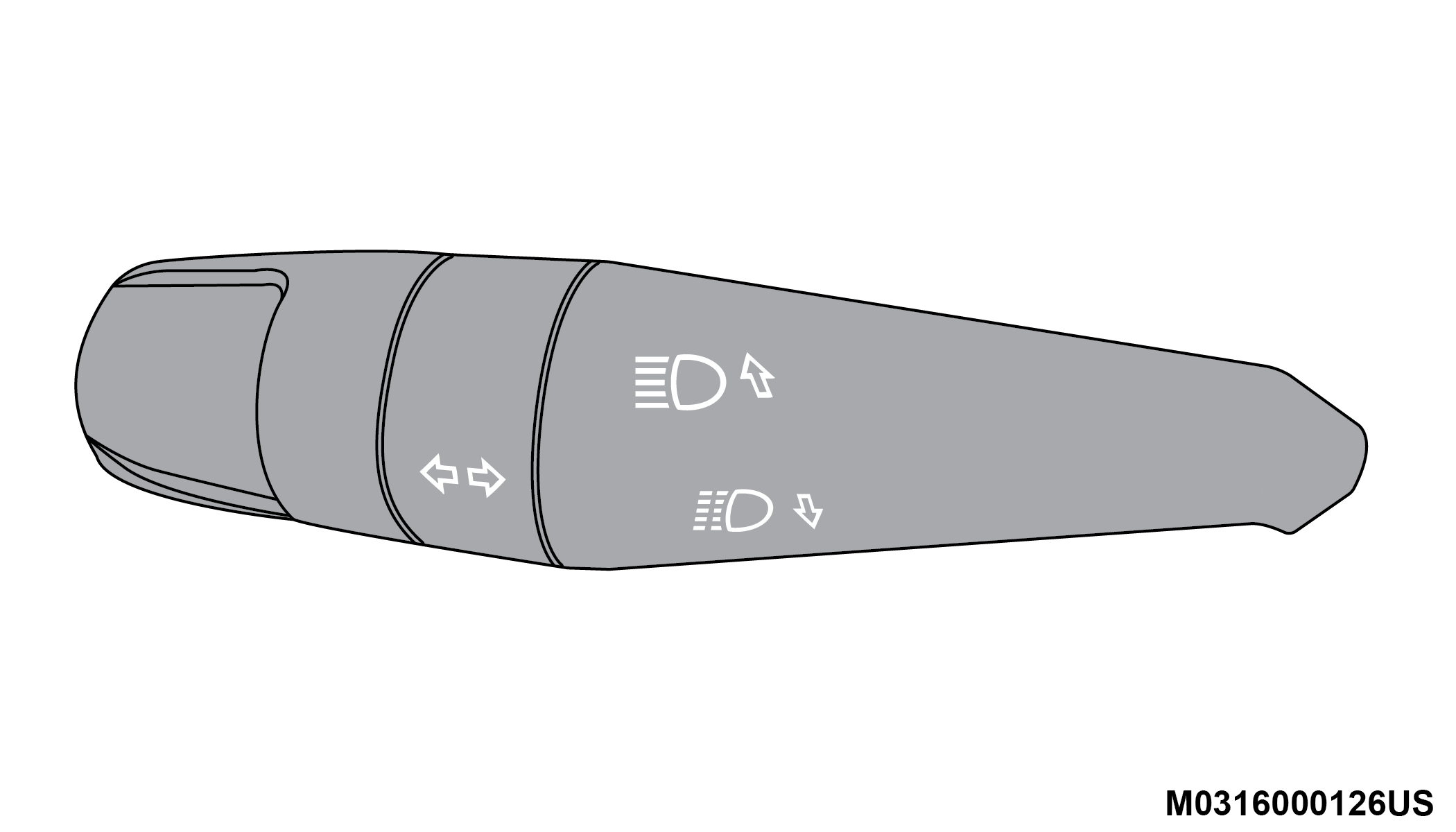
High Beam And Turn Signal Controls
Note:
The headlights must be on for the high beams to activate.
FLASH-TO-PASS
You can signal another vehicle with your headlights by lightly pulling the multifunction lever toward you. This will cause the headlights to turn on at high beam and remain on until the lever is released.
AUTOMATIC HEADLIGHTS — IF EQUIPPED
This system automatically turns the headlights on or off according to ambient light levels. To turn the system on, rotate the headlight switch clockwise to the last detent (AUTO position) for automatic headlight operation. To turn the automatic system off, move the headlight switch out of the AUTO position.
Note:
The ignition must be in the ON/RUN position before the headlights will come on in the automatic mode.
LIGHT SENSOR
The light sensor is equipped with an infrared LED, located on the windshield. It detects changes in light intensity outside the vehicle, based on the sensitivity of light set by using the menu on the display or on the Uconnect system.
The higher the sensitivity, the lesser the amount of external light required for controlling the lighting.
AUTOMATIC HIGH BEAM HEADLAMP CONTROL — IF EQUIPPED
The Automatic High Beam Headlamp Control system provides increased forward lighting at night by automating high beam control through the use of a digital camera mounted on the inside rearview mirror. This camera detects vehicle specific light and automatically switches from high beams to low beams until the approaching vehicle is out of view.
Note:
-
The multifunction lever must be in the high beam position in order to activate the Automatic High Beams.
-
The Automatic High Beam Headlamp Control can be turned on or off using the Uconnect System. Refer to “Uconnect Settings” in “Multimedia” for further information.
-
Broken, muddy, or obstructed headlights and taillights of vehicles in the field of view will cause headlights to remain on longer (closer to the vehicle). Also, dirt, film, and other obstructions on the windshield or camera lens will cause the system to function improperly.
When set to AUTO, the system automatically turns the headlights on or off based on ambient light levels.
PARKING LIGHTS
Rotate the headlight switch to the first detent to turn on the parking lights. The parking light indicator in the instrument cluster display will illuminate.
HEADLIGHT DELAY
This feature provides the safety of headlight illumination for up to 90 seconds when leaving your vehicle in an unlit area.
The time delay of the headlights is programmable between 0, 30, 60 and 90 seconds. Refer to “Uconnect Settings” in “Multimedia” for further information.
Headlight Delay Activation
To activate the delay feature, place the ignition in the STOP/OFF position while the headlights are still on. The delay interval begins when the headlight switch is turned off from the low beam position.
If the headlight switch is in AUTO position and headlights were on before the ignition is STOP/OFF, the delay interval begins automatically.
Headlight Delay Deactivation
The feature is disabled by turning on the headlights, the parking lights or by placing the ignition in the RUN position.
If you shut off the lights before the ignition is turned on, they will turn off in the normal manner.
Note:
The lights must be turned off within two minutes of placing the ignition in the STOP/OFF position to activate this feature.
FRONT FOG LIGHTS — IF EQUIPPED
The front fog light switch is built into the headlight switch.

To activate the front fog lights, turn on the parking lights or the low beam headlights and push the fog light button on the headlight switch. The front fog lights feature is latching, which means that every time that the button is pressed and the fog lights are activated, the vehicle memorizes the request and re-activates the front fog lights every time that the parking lights or low beams are active. To deactivate the feature, push the front fog button again. The front fog lights are deactivated each time the parking or low beam lights are deactivated or the ignition is placed in the OFF position.
An indicator light in the instrument cluster illuminates when the fog lights are turned on.
Note:
The fog lights will operate with the low beam headlights or parking lights on. Selecting the high beam headlights will turn off the fog lights.
Cornering Lights
The cornering lights are a feature to improve visibility at night while turning the vehicle. When activated, a light incorporated in the front fog light will illuminate on the side of the vehicle the steering wheel is rotated or the turn signal indicator is on. It can be activated through the Uconnect System.
Refer to “Uconnect Settings” in “Multimedia” for further information.
TURN SIGNALS
Move the multifunction lever up or down and the arrows on each side of the instrument cluster flash to show proper operation of the front and rear turn signal lights.
Note:
In the bulb lighting version, if the Daytime Running Lights are on and a turn signal is activated, the Daytime Running Lamp will turn off on the side of the vehicle in which the turn signal is flashing. The Daytime Running Lamp will turn back on when the turn signal is turned off.
LANE CHANGE ASSIST
Tap the lever up or down once, without moving beyond the detent, and the turn signal (left or right) will flash to signal other drivers of a lane change, then automatically turn off.
COURTESY LIGHTS
The Courtesy Lights feature allows you to activate the low beam, parking lights, and sidemarker lights for 25 seconds when the vehicle is unlocked (through the key fob or the Passive Entry door handles [if equipped]). The Courtesy Lights feature can be activated or deactivated through the Uconnect Settings. When a door is open with the feature active, the activation of the lights is extended for 10 seconds. The feature is disabled when the vehicle is locked or when the ignition is placed in the OFF position.
Download Manual