Steering Wheel Audio Controls
The remote sound system controls are located on the rear surface of the steering wheel. Reach behind the wheel to access the switches.
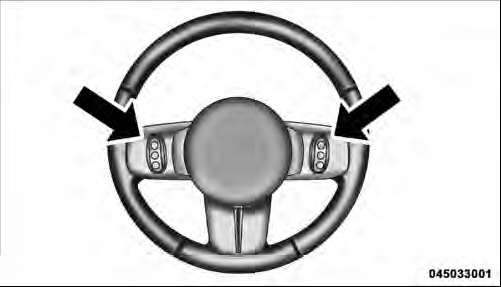
Remote Sound System Controls (Back View Of Steering Wheel)
The right-hand control is a rocker-type switch with a pushbutton in the center and controls the volume and mode of the sound system. Pressing the top of the rocker switch will increase the volume, and pressing the bottom of the rocker switch will decrease the volume.
Pressing the center button will make the radio switch between the various modes available (AM/FM/SAT/ CD/HDD/AUX/VES, etc.).
The left-hand control is a rocker-type switch with a pushbutton in the center. The function of the left-hand control is different depending on which mode you are in.
The following describes the left-hand control operation in each mode.
Radio Operation
Pressing the top of the switch will “Seek” up for the next listenable station and pressing the bottom of the switch will “Seek” down for the next listenable station.
The button located in the center of the left-hand control will tune to the next preset station that you have programmed in the radio preset pushbutton.
CD Player
Pressing the top of the switch once will go to the next track on the CD. Pressing the bottom of the switch once will go to the beginning of the current track, or to the beginning of the previous track if it is within one second after the current track begins to play.
If you press the switch up or down twice, it plays the second track; three times, it will play the third, etc.
The center button on the left side rocker switch has no function for a single-disc CD player. However, when a multiple-disc CD player is equipped on the vehicle, the center button will select the next available CD in the player.
Download Manual