Exterior Lighting
EXTERIOR LIGHTING CONTROL
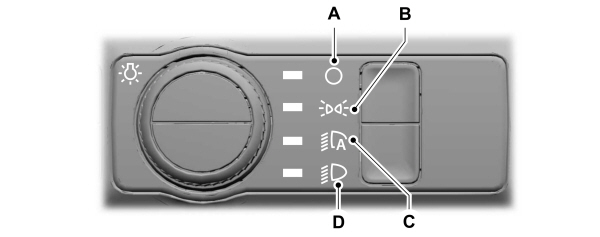
A Lamps off. Lamps off.B Parking lamps on.C Autolamps on.D Headlamps on. |
Rotate the control to make a selection.
Note: The lighting control defaults to autolamps every time you switch your vehicle on.
Headlamps
USING THE HIGH BEAM HEADLAMPS
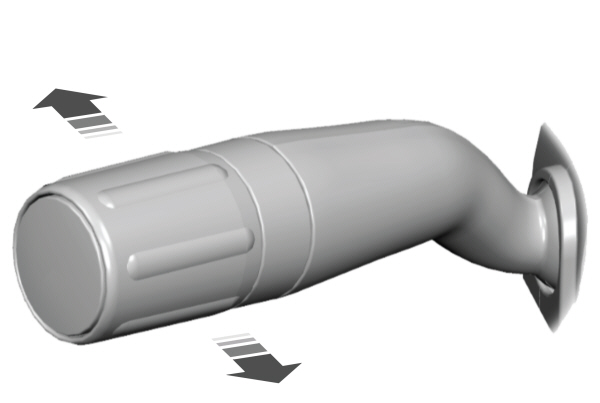

Push the lever forward again or pull the lever toward you to switch the high beams off.
Slightly pull the lever toward you and release it to flash the headlamps.
HEADLAMP INDICATORS
Lamps On
 Illuminates when you switch the low beam headlamps or the parking lamps on. Illuminates when you switch the low beam headlamps or the parking lamps on. |
Headlamp High Beam
| Illuminates when you switch the high beam headlamps on. |
HEADLAMPS – FREQUENTLY ASKED QUESTIONS
Why is there condensation in the headlamps?
- Headlamps have vents to accommodate normal changes in air pressure. Condensation can be a natural by-product of this design. When moist air enters the lamp assembly through the vents, there is a possibility that condensation can occur when the temperature is cold. When normal condensation occurs, a fine mist can form on the interior of the lens. The fine mist eventually clears and exits through the vents during normal operation.
How much condensation is acceptable?
- The presence of a fine mist, for example no streaks, drip marks or large droplets. A fine mist covers less than 50% of the lens.
How long does it take for the acceptable condensation to clear?
- Clearing time can take as long as 48 hours under dry weather conditions.
How much condensation is unacceptable?
- A water puddle inside the lamp. Streaks, drip marks or large droplets present on the interior of the lens.
What should I do if unacceptable condensation is present?
- Have your vehicle checked as soon as possible.
Why do my headlamps turn off when I have them switched on when I switch my vehicle off?
- The battery saver turns the headlamps off after a short period of time after you switch your vehicle off.
Autolamps
WHAT ARE AUTOLAMPS
 WARNING: The system does not relieve you of your responsibility to drive with due care and attention. You may need to override the system if it does not turn the headlamps on in low visibility conditions, for example daytime fog. WARNING: The system does not relieve you of your responsibility to drive with due care and attention. You may need to override the system if it does not turn the headlamps on in low visibility conditions, for example daytime fog. |
Autolamps turn the headlamps on in low light situations or when the windshield wipers operate.
AUTOLAMP SETTINGS - VEHICLES WITH: 12 INCH SCREEN
- Press Settings on the touchscreen.
- Press Vehicle Settings.
- Press Lighting.
- Press Autolamp Delay.
- Press a setting.
AUTOLAMP SETTINGS - VEHICLES WITH: 15 INCH SCREEN
- Access the vehicle drawer on the touchscreen.
- Press SETTINGS.
- Press Vehicle.
- Press Lighting.
- Press Autolamp Delay.
- Press a setting.
Exterior Lamps
USING THE TURN SIGNAL LAMPS
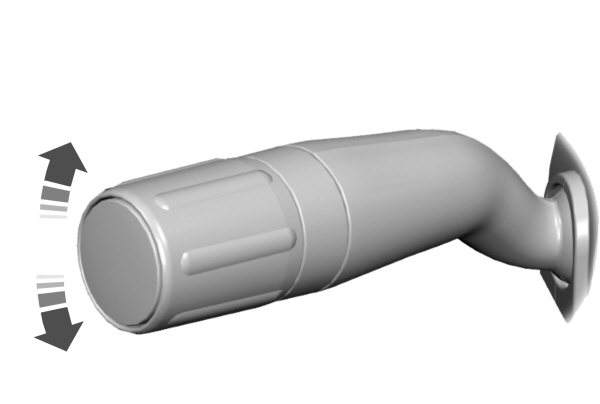

Set the lever to the middle position to switch the turn signal lamps off.
Note: Tap the lever up or down to make the turn signal lamps flash three times.
Turn Signal Lamp Indicator
Note: An increase in the rate of flashing warns of a failed turn signal lamp.
SWITCHING THE DAYTIME RUNNING LAMPS ON AND OFF - VEHICLES WITH: CONFIGURABLE DAYTIME RUNNING LAMPS/15 INCH SCREEN
| WARNING: The daytime running lamps system does not activate the rear lamps and may not provide adequate lighting during low visibility driving conditions. Make sure you switch the headlamps on, as appropriate, during all low visibility conditions. Failure to do so may result in a crash. |
- Access the vehicle drawer on the touchscreen.
- Press SETTINGS.
- Press Vehicle.
- Press Lighting.
- Switch Daytime Running Lights on or off.
The daytime running lamps turn on when all of the following occur:
- You switch the system on.
- You switch the vehicle on.
- The vehicle is not in park (P).
- The lighting control is in the autolamps position.
- The headlamps are off.
Note: Other lighting control positions do not turn on the daytime running lamps.
SWITCHING THE DAYTIME RUNNING LAMPS ON AND OFF - VEHICLES WITH: CONFIGURABLE DAYTIME RUNNING LAMPS/12 INCH SCREEN
| WARNING: The daytime running lamps system does not activate the rear lamps and may not provide adequate lighting during low visibility driving conditions. Make sure you switch the headlamps on, as appropriate, during all low visibility conditions. Failure to do so may result in a crash. |
- Press Settings on the touchscreen.
- Press Vehicle Settings.
- Press Lighting.
- Switch Daytime Running Lights on or off.
The daytime running lamps turn on when all of the following occur:
- You switch the system on.
- You switch your vehicle on.
- The vehicle is not in park (P).
- The lighting control is in the autolamps position.
- The headlamps are off.
Note: Other lighting control positions do not turn on the daytime running lamps.
SWITCHING THE DAYTIME RUNNING LAMPS ON AND OFF - VEHICLES WITH: DAYTIME RUNNING LAMPS (DRL)
| WARNING: The daytime running lamps system does not activate the rear lamps and may not provide adequate lighting during low visibility driving conditions. Make sure you switch the headlamps on, as appropriate, during all low visibility conditions. Failure to do so may result in a crash. |
Daytime running lamps are always on unless you switch on the headlamps or your vehicle is in park (P).
SWITCHING THE CARGO LAMPS ON
 Press the button in the lighting control or in the rear cargo box. Press the button in the lighting control or in the rear cargo box. |
SWITCHING THE SPOT LAMPS ON AND OFF
The spot lamp buttons are near the lighting control.
 Press the button to switch on the left-hand spot lamp. Press the button to switch on the left-hand spot lamp. |
 Press the button to switch on the right-hand spot lamp. Press the button to switch on the right-hand spot lamp. |
Move the position of the exterior mirrors to adjust the aim.
Note: Make sure you switch your vehicle on, with the vehicle in accessory mode or running.
Note: The spot lamps turn off after 6 mph (10 km/h).
Note: The spot lamps illuminate the area in front of and to the side of your vehicle.
EXTERIOR LAMP INDICATORS
Turn Signal Lamp
Note: An increase in the rate of flashing warns of a failed turn signal lamp.
EXTERIOR LAMPS ON AUDIBLE WARNING
Sounds when you open the driver door and the exterior lamps are on.
Exterior Zone Lighting (If Equipped)
WHAT IS EXTERIOR ZONE LIGHTING
Exterior zone lighting divides the exterior lighting into zones and allows you to switch them on and off to provide lighting around the perimeter of your vehicle.
USING THE EXTERIOR ZONE LIGHTING - VEHICLES WITH: 12 INCH SCREEN
- Press Features on the touchscreen.
- Press Zone Lighting.
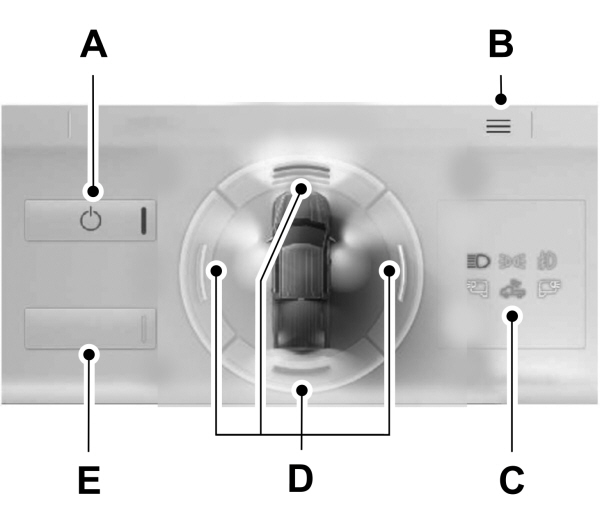
| AOn and off button. B Settings menu.C Exterior lamp indicators.D Individual zones on and off.E All zones on and off. |
You can use zone lighting when your vehicle is on or off. When it is off, the lighting turns off after a certain period of time.
You can also use individual zone controls to switch on each zone.
Note: Make sure to remove exterior lighting covers when using zone lighting.
Note: When your vehicle is off and the timer has one minute remaining, the direction indicators flash six times.
USING THE EXTERIOR ZONE LIGHTING - VEHICLES WITH: 15 INCH SCREEN
- Access the vehicle drawer on the touchscreen.
- Press CONTROLS.
- Press Zone Lighting.
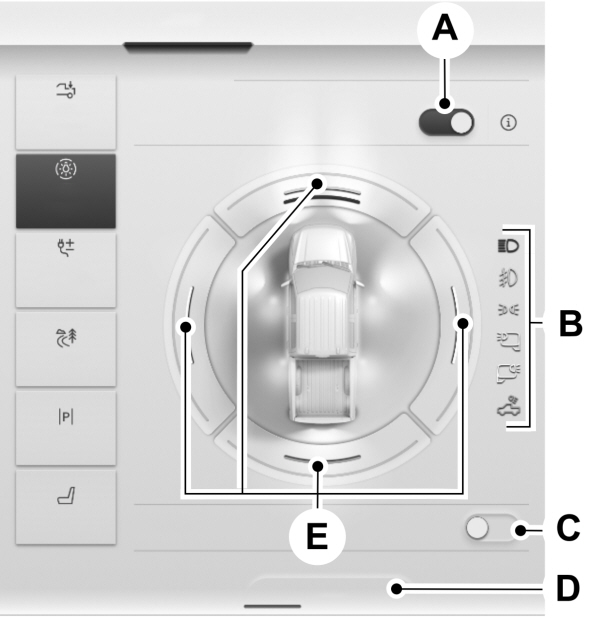
| AOn and off button. B Exterior lamp indicators.C All zones on and off.D Settings menu.E Individual zones on and off. |
You can use zone lighting when your vehicle is on or off. When it is off, the lighting turns off after a certain period of time.
You can also use individual zone controls to switch on each zone.
Note: Make sure to remove exterior lighting covers when using zone lighting.
Note: When your vehicle is off and the timer has one minute remaining, the direction indicators flash six times.
Note: Indicators on the touchscreen illuminate when the lights outside of the zone lighting control are on.
Note: You can remotely control the zone lighting using the FordPass app.
Note: Vehicles without spot lamps only have two zones.
EXTERIOR ZONE LIGHTING SETTINGS - VEHICLES WITH: 12 INCH SCREEN
- Press Features on the touchscreen.
- Press Zone Lighting.
- Press the settings menu in the upper right-hand corner.
- Press a setting.
Enable Autolamp Override
This setting allows your vehicle to override the autolamps when using zone lighting.
When you access zone lighting for the first time, you can choose this setting. You can change this setting at any time.
Include Reverse Lamps
This setting turns the reverse lamps on when you switch the rear lighting zone on.
Switch this setting off if you have a backup alarm installed to prevent the reverse lamps from turning on and sounding the alarm when using zone lighting.
EXTERIOR ZONE LIGHTING SETTINGS - VEHICLES WITH: 15 INCH SCREEN
- Access the vehicle drawer on the touchscreen.
- Press CONTROLS.
- Press Zone Lighting.
- Press Settings.
- Press a setting.
Enable Autolamp Override
This settings allows the vehicle to override the autolamps when zone lighting is on.
When you access zone lighting for the first time, you can choose this setting. You can change this setting at any time.
Include Reverse Lamps
This setting turns the reverse lamps on when you switch the rear lighting zone on.
Switch this setting off if you have a backup alarm installed to prevent the reverse lamps from turning on and sounding the alarm when using zone lighting.
Automatic High Beam Control
HOW DOES AUTOMATIC HIGH BEAM CONTROL WORK
Automatic high beam control turns the high beams on if it is dark enough and no other traffic is present. If it detects an approaching vehicle’s headlamps or tail lamps, or street lighting ahead, the system turns the high beams off.
A camera sensor, centrally mounted behind the windshield of your vehicle, continuously monitors conditions to turn the high beams on and off.
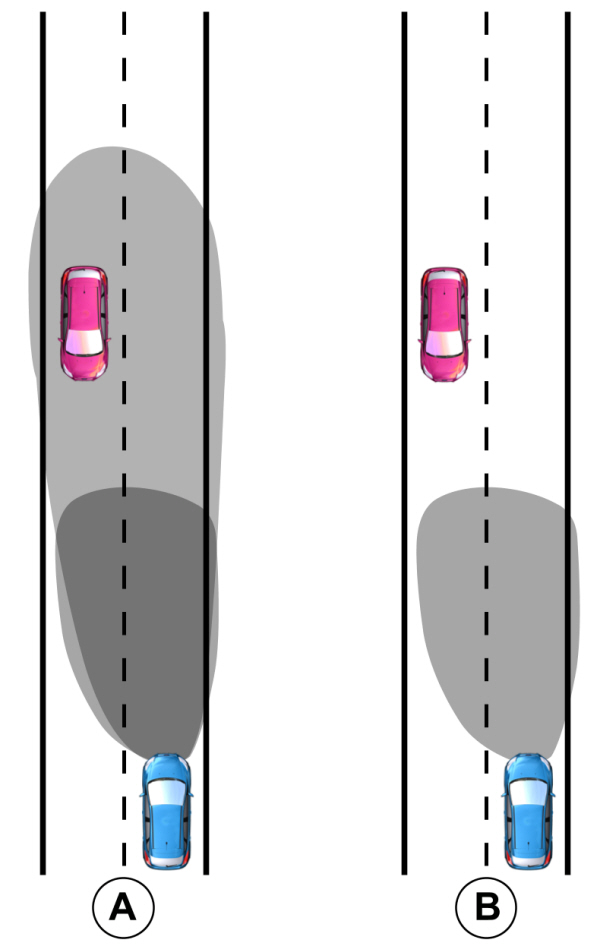
| AWithout automatic high beam control. B With automatic high beam control. |
AUTOMATIC HIGH BEAM CONTROL PRECAUTIONS
| WARNING: The system does not relieve you of your responsibility to drive with due care and attention. You may need to override the system if it does not turn the high beams on or off. WARNING: The system may not switch the high beams off if the lights of oncoming vehicles are hidden by obstacles, for example guard rails. WARNING: You may need to override the system when approaching other road users. WARNING: In situations with poor visibility, such as fog, heavy rain or other inclement weather, you may need to override or completely switch off the system. |
AUTOMATIC HIGH BEAM CONTROL REQUIREMENTS
The system turns the high beams on if all of the following occur:
- You switch the system on.
- You set the lighting control to the autolamps position.
- The ambient light level is low enough that you require high beams.
- There is no traffic in front of your vehicle.
- The vehicle speed is greater than approximately 32 mph (52 km/h).
AUTOMATIC HIGH BEAM CONTROL LIMITATIONS
The system turns the high beams off if any of the following occur:
- You switch the system off.
- You set the lighting control to any position except autolamps.
- The ambient light level is high enough that you do not require high beams.
- The system detects an approaching vehicle's headlamps or a leading vehicle's tail lamps.
- The system detects severe rain, snow or fog.
- The system detects street lighting.
- The camera has reduced visibility.
- The vehicle speed falls below approximately 19 mph (30 km/h).
SWITCHING AUTOMATIC HIGH BEAM CONTROL ON AND OFF - VEHICLES WITH: 12 INCH SCREEN
- Press Settings on the touchscreen.
- Press Vehicle.
- Press Lighting.
- Switch Auto High Beam on or off.
SWITCHING AUTOMATIC HIGH BEAM CONTROL ON AND OFF - VEHICLES WITH: 15 INCH SCREEN
- Access the vehicle drawer on the touchscreen.
- Press SETTINGS.
- Press Vehicle.
- Press Lighting.
- Switch Auto Highbeam on or off.
AUTOMATIC HIGH BEAM CONTROL INDICATORS
 Illuminates to confirm when the system is ready to assist. Illuminates to confirm when the system is ready to assist. |
OVERRIDING AUTOMATIC HIGH BEAM CONTROL
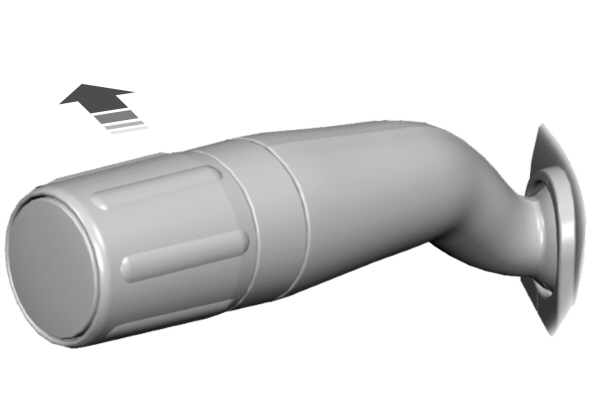
Push the lever away from you to switch the high beams on.
Push the lever away from you again to switch the high beams off.
Push the lever away from you for a third time to switch automatic high beam control back on.
AUTOMATIC HIGH BEAM CONTROL – INFORMATION MESSAGES
| Message | Details |
|---|---|
|
Front Camera Low Visibility Clean Screen |
The camera has reduced visibility.Clean the windshield.If the message continues to appear, have your vehicle checked as soon as possible. |
|
Front Camera Temporarily Not Available |
The camera has malfunctioned.Wait a short period of time for the camera to cool down.If the message continues to appear, have your vehicle checked as soon as possible. |
|
Front Camera Malfunction Service Required |
The camera has malfunctioned.Have your vehicle checked as soon as possible. |
Glare Free Lighting
HOW DOES GLARE FREE LIGHTING WORK
Glare free lighting enhances visibility and minimizes glare for other road users.
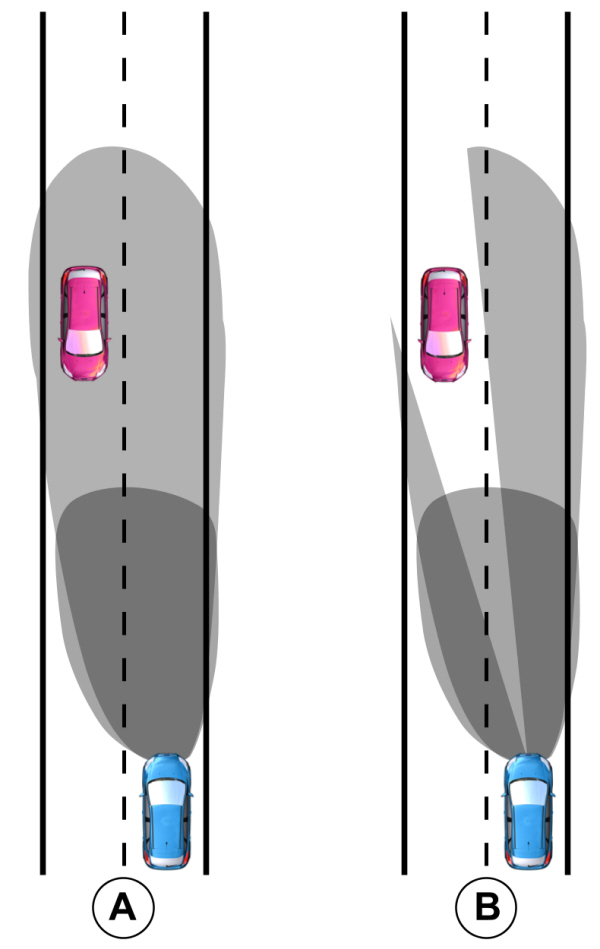
| AWithout glare free lighting. B With glare free lighting. |
GLARE FREE LIGHTING PRECAUTIONS
| WARNING: The system does not relieve you of your responsibility to drive with due care and attention. You may need to override the system if it does not adapt the light. WARNING: The system may not adapt the lighting to avoid glare if the lights of oncoming vehicles are hidden by obstacles such as guard rails. WARNING: You may need to override the system when approaching other road users. WARNING: You may need to override the system during inclement weather. WARNING: Do not use the system in poor visibility, for example fog, heavy rain, spray or snow. |
GLARE FREE LIGHTING REQUIREMENTS
The system turns on if all of the following occur:
- You switch the system on.
- You set the lighting control to the autolamps position.
- The ambient light level is low enough.
- Your vehicle speed is greater than approximately 32 mph (52 km/h).
The system adapts the lighting to avoid glare if all of the following occur:
- You switch the system on.
- You set the lighting control to the autolamps position.
- The system detects an approaching vehicle's headlamps or rear lamps.
GLARE FREE LIGHTING LIMITATIONS
The system turns off if any of the following occur:
- You switch the system off.
- You set the lighting control to any position except autolamps.
- The ambient light level is high enough.
- The system detects severe rain, snow or fog.
- The system detects street lighting.
- The camera has reduced visibility.
- The vehicle speed falls below approximately 19 mph (30 km/h).
Note: The deactivation speed is lower on curves.
SWITCHING GLARE FREE LIGHTING ON AND OFF - VEHICLES WITH: 12 INCH SCREEN
- Press Settings on the touchscreen.
- Press Vehicle.
- Press Lighting.
- Switch Glare-Free Lighting on or off.
SWITCHING GLARE FREE LIGHTING ON AND OFF - VEHICLES WITH: 15 INCH SCREEN
- Access the vehicle drawer on the touchscreen.
- Press SETTINGS.
- Press Vehicle.
- Press Lighting.
- Switch Glarefree Lighting on or off.
GLARE FREE LIGHTING INDICATORS
| Illuminates to confirm when the system is ready to assist. |
OVERRIDING GLARE FREE LIGHTING
Push the lever away from you to switch the high beams on.
Push the lever away from you again to switch the high beams off.
Push the lever away from you for a third time to switch glare free lighting back on.
GLARE FREE LIGHTING – INFORMATION MESSAGES
| Message | Details |
|---|---|
|
Front Camera Low Visibility Clean Screen |
The camera has reduced visibility.Clean the windshield.If the message continues to appear, have your vehicle checked as soon as possible. |
|
Front Camera Temporarily Not Available |
The camera has malfunctioned.Wait a short period of time for the camera to cool down.If the message continues to appear, have your vehicle checked as soon as possible. |
|
Front Camera Malfunction Service Required |
The camera has malfunctioned.Have your vehicle checked as soon as possible. |
Adaptive Front Lighting
HOW DOES ADAPTIVE FRONT LIGHTING WORK
Adaptive front lighting adapts when you are steering around a curve or if the camera detects lane markings indicating a curve.
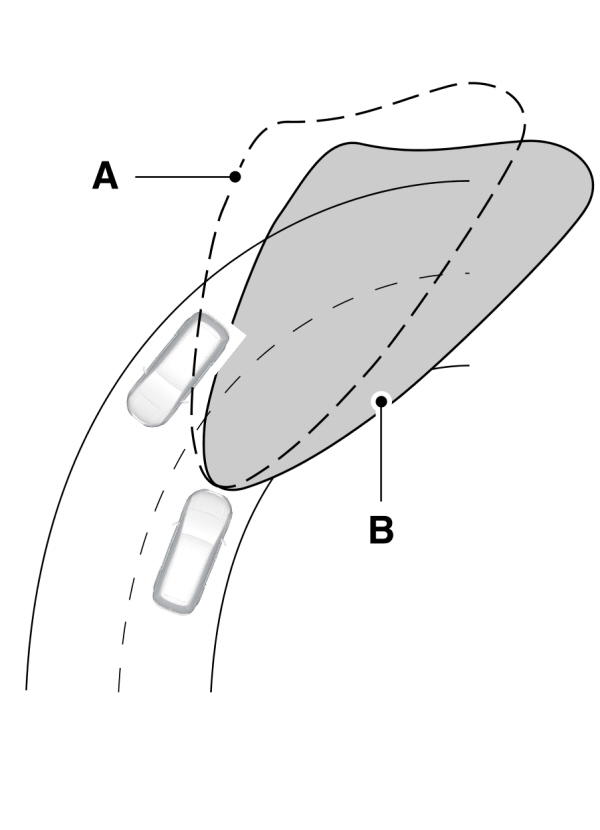
| AWithout adaptive front lighting. B With adaptive front lighting. |
SWITCHING ADAPTIVE FRONT LIGHTING ON AND OFF
Set the lighting control to the autolamps position to use adaptive front lighting.
Note: Other lighting control positions do not turn on adaptive front lighting.
Download Manual