Interior lights
General information
Depending on the equipment version, interior lights, footwell lights, entry lights, ambient lighting, and speaker lighting are automatically controlled.
Overview
Buttons in the vehicle
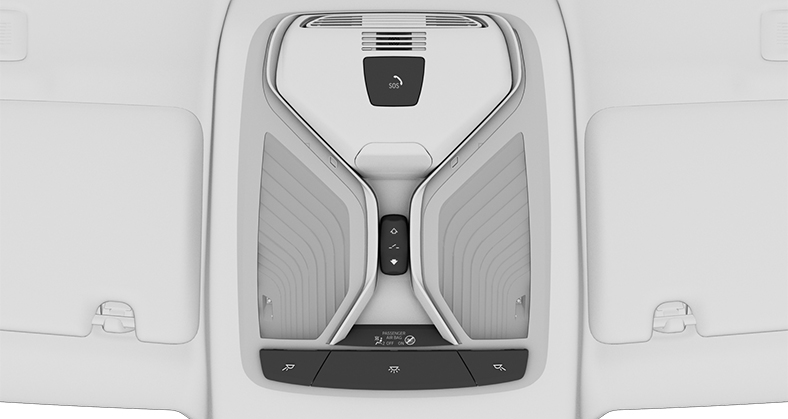
1 Reading light
2 Interior lights
3 Reading light
Switching the interior lights on/off

Press the button.
To switch off permanently: press the button and hold for approx. 3 seconds.
The interior lights in the rear of the vehicle can be switched on and off independently. The button is located in the rear roofliner.
Switching the reading lights on/off

Press the button.
Depending on the vehicle equipment, the reading lights are located next to the interior lights in the front and rear.
Ambient light
General information
Depending on the equipment version, lighting can be adjusted for some lights in the car's interior.
Switching on/off
The ambient light is switched on when the vehicle is unlocked, and switched off when the vehicle is locked.
If the ambient light was deactivated via iDrive, it will not be switched on when the vehicle is unlocked.
- "CAR"
- "Settings"
- "Interior lighting"
- "Ambient lighting"
Selecting the color scheme
- "CAR"
- "Settings"
- "Interior lighting"
- "Color"
- Select the desired setting.
Setting the brightness
- "CAR"
- "Settings"
- "Interior lighting"
- "Brightness"
- Select the desired setting.
Dynamic light
Individual actions, for example incoming calls or opened doors, are indicated by light effects.
- "CAR"
- "Settings"
- "Interior lighting"
- "Dynamic light"
- Select the desired setting.
Dimmed while driving
Some lights of the interior lighting are dimmed when the vehicle is driven in the dark.
- "CAR"
- "Settings"
- "Interior lighting"
- "Dimmed for night driving"
Download Manual