Lights
Lights and lighting
Switches in the vehicle
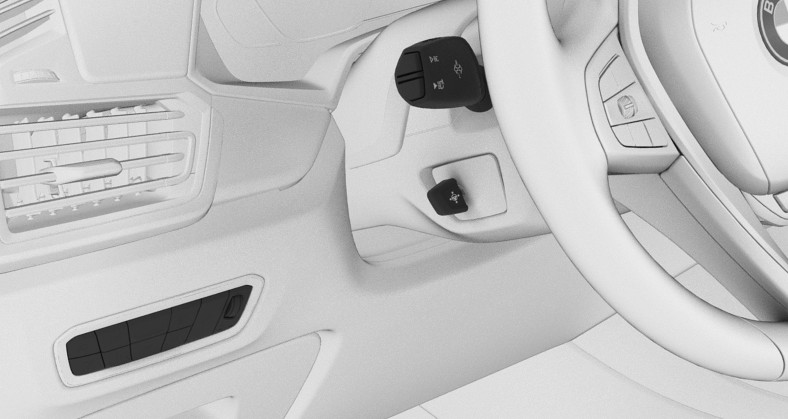
1 Light switch element
Lighting functions
|
Icon |
Function |
|---|---|
|
|
Front fog lights. |
|
|
Lights off. Daytime driving lights. |
|
|
Parking lights. |
|
|
Automatic headlight control. Adaptive lighting functions. |
|
|
Low beams. |
|
|
Instrument lighting. |
|
|
Right roadside parking light. |
|
|
Left roadside parking light. |








Automatic headlight control
Principle
The low beams are switched on and off automatically depending on the ambient brightness, for example in tunnels, in twilight or if there is precipitation.
General information
A blue sky with the sun low on the horizon can cause the lights to be turned on.
If the low beams are switched on manually, the automatic headlight control is deactivated.
Activating

Press the button on the light switch element.
The LED in the button lights up.

The indicator light in the instrument cluster is illuminated when the low beams are switched on.
System limits
The automatic headlight control cannot replace your personal judgment of lighting conditions.
For example, the sensors are unable to detect fog or hazy weather. In these situations, turn the lights on manually.
Parking lights, low-beams and roadside parking lights
General information
If the driver's door is opened when the drive-ready state is switched off, the exterior lighting is automatically switched off after a period of time.
Parking lights
General information
The parking lights can only be switched on in the low speed range.
Turning on

Press the button on the light switch element.

The indicator light in the instrument cluster lights up.
The vehicle is illuminated on all sides.
Do not use the parking lights for extended periods; otherwise, they might drain the vehicle battery and it would then be impossible to switch on drive-ready state.
Turning off

Press the button on the light switch element or switch on the drive-ready state.
After the drive-ready state is switched on, the automatic headlight control will be activated.
Low beams
Turning on

Press the button on the light switch element.
The low beams illuminate when drive-ready state is switched on.
The indicator light in the instrument cluster lights up.
Press the button again to switch on the low beams when the standby state is switched on.
Turning off
Depending on the national-market version, the low beams can be switched off in the low speed range.
Press the button on the light switch element.
Roadside parking lights
When the vehicle is parked, a one-sided roadside parking light can be switched on.
Depending on the national-market version, this function may be deactivated.
|
Button |
Function |
|---|---|
|
|
Right roadside parking light on. |
|
|
Left roadside parking light off. |


Switching off the roadside parking light:
Press the button on the light switch element or switch on the drive-ready state.
Welcome lights
Principle
The welcome light turns on automatically for a limited period of time when approaching or unlocking the vehicle.
General information
Depending on the equipment, the exterior lighting of the vehicle can be set individually.
Activating/deactivating welcome light
- "CAR"
- "Settings"
- "Exterior lighting"
- Depending on the equipment, select the following setting:
- "Welcome and goodbye"
When unlocking the vehicle, individual lighting functions are switched on for a limited time. - "Door handle lights"
Door handles and the ground in front of the doors are illuminated for a limited time. - "Welcome Light Carpet"
The area next to the vehicle is illuminated for a limited time.
LED light carpet
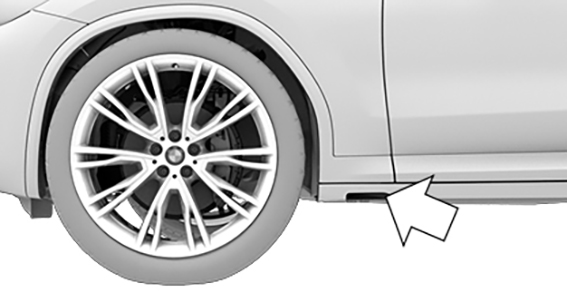
The light source is located in the position indicated.
Keep the light source clean and unobstructed.
Pathway lighting
Principle
For the pathway lighting, the exterior lighting turns on for a certain period of time after leaving the vehicle in order to illuminate the area surrounding the vehicle.
Switching pathway lighting on
After switching off the drive-ready state, briefly push the turn signal lever forward.
Setting the duration
- "CAR"
- "Settings"
- "Exterior lighting"
- "Pathway lighting"
- Select the desired setting.
- "OK"
Daytime driving lights
General information
The daytime driving lights light up when drive-ready state is switched on.
Activating/deactivating daytime driving lights
In some countries, daytime driving lights are mandatory, so it may not be possible to deactivate the daytime driving lights in front.
- "CAR"
- "Settings"
- "Exterior lighting"
- Depending on the national-market version: "Daytime driving lights" or "Daytime driving lights, rear"
Adaptive lighting functions
Principle
Adaptive lighting functions enable dynamic illumination of the road.
General information
The adaptive lighting functions may consist of one system or multiple systems, depending on the equipment version:
Adaptive Light Control.
Activating
Press the button on the light switch element.
The LED in the button lights up.
The adaptive lighting functions are active when the drive-ready state is switched on.
Adaptive Light Control
General information
Depending on the steering-wheel angle and other parameters, the light from the headlight follows the course of the road.
To avoid blinding oncoming traffic, the Adaptive Light Control does not swivel to the opposite lane when the vehicle is at a standstill.
Adaptive headlight range control
The adaptive headlight range control feature balances out acceleration and braking processes as well as the vehicle load conditions in order to avoid blinding oncoming traffic.
Automatic High Beam Assistant
Principle
The Automatic High Beam Assistant detects other road users early on and automatically switches the high beams on or off depending on the traffic situation.
General information
The Automatic High Beam Assistant ensures that the high beams are switched on, whenever the traffic situation allows. In the low speed range, the high beams are not switched on by the system.
The system responds to light from oncoming traffic and traffic driving ahead of you, and to ambient lighting, for instance in towns and cities.
The high beams can be switched on and off manually at any time.
Activating Automatic High Beam Assistant
Press the button on the light switch element.
The LED in the button lights up.
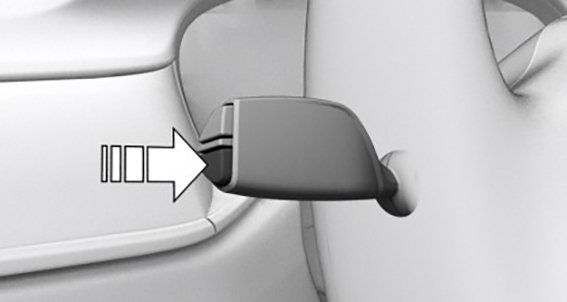
Press the button on the turn signal lever.

The indicator light in the instrument cluster is illuminated when the low beams are switched on.
The headlights are automatically changed between low beams and high beams.

The blue indicator light in the instrument cluster lights up when the system switches on the high beams.
Interruption of journey with activated Automatic High Beam Assistant: the Automatic High Beam Assistant remains activated when driving continues.
The Automatic High Beam Assistant is deactivated when manually switching the high beams on and off.
To reactivate the Automatic High Beam Assistant, press the button on the turn signal lever.
Deactivating Automatic High Beam Assistant
Press the button on the turn signal lever.
Sensitivity of the Automatic High Beam Assistant
General information
The sensitivity of the Automatic High Beam Assistant can be adjusted.
Safety information
Do not blind oncoming traffic

Functional requirements
Setting at standstill only.
Drive-ready state is switched on.
Light is turned off.
Increasing sensitivity
Push the turn signal lever to the front for approximately 10 seconds.
A Check Control message is displayed. The system responds more sensitively.
Resetting the sensitivity
Push the turn signal lever to the front again for approx. 10 seconds or switch off the drive-ready state.
The sensitivity of the Automatic High Beam Assistant is reset to the factory settings.
System limits
The Automatic High Beam Assistant cannot replace the driver's personal judgment of when to use the high beams. In situations that require this, therefore dim manually.
The system is not fully functional in the following situations, and driver intervention may be necessary:
In very unfavorable weather conditions, such as fog or heavy precipitation.
When detecting poorly-lit road users such as pedestrians, cyclists, horseback riders and wagons; when driving close to train or ship traffic; or at animal crossings.
In tight curves, on hilltops or in depressions, in crossing traffic or half-obscured oncoming traffic on highways.
In poorly-lit towns and cities or in the presence of highly reflective signs.
When the windshield in front of the interior mirror is fogged up, dirty or covered with stickers, etc.
Fog lights
Front fog lights
Principle
The front fog lights work alongside the low beams to illuminate a wider area of the roadway.
Functional requirement
Low beams are switched on.
Front fog light on/off

Press the button.

The green indicator light in the instrument cluster lights up if the front fog lights are switched on.
If the automatic headlight control is activated, the low beams will come on automatically when you switch on the front fog lights.
When the high beams or headlight flasher are activated, the front fog lights are not switched on.
Instrument lighting
Functional requirement
The parking lights or low beams must be switched on to set the brightness.
Setting the brightness
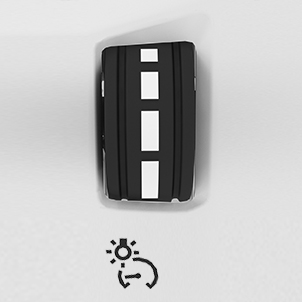
Adjust the brightness with the thumbwheel.
Interior lighting
General information
Depending on the equipment version, interior lights, footwell lights, entry lights, ambient lighting, and speaker lighting are automatically controlled.
Overview
Buttons in the vehicle
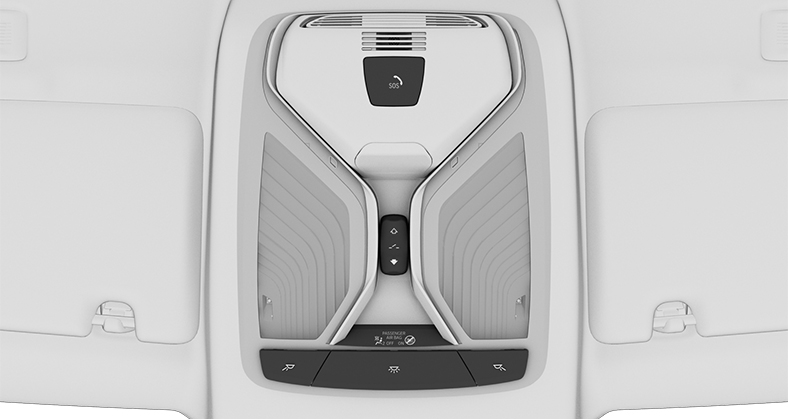
1 Reading light
2 Interior lights
3 Reading light
Turning interior lights on/off

Press the button.
To switch off permanently: press the button and hold for approx. 3 seconds.
The interior lights in the rear of the vehicle can be switched on and off independently. The button is located in the rear headliner.
Turning reading lights on/off

Press the button.
Depending on the vehicle equipment, the reading lights are located next to the interior lights in the front and rear.
Ambient light
General information
Depending on the equipment version, lighting can be adjusted for some lights in the car's interior.
Activating/deactivating ambient light
- "CAR"
- "Settings"
- "Interior lighting"
- "Ambient lighting"
Turning ambient light on/off
The ambient light is switched on when the vehicle is unlocked, and switched off when the vehicle is locked.
If the ambient light was deactivated via iDrive, it will not be turned on when the vehicle is unlocked.
Selecting the color
- "CAR"
- "Settings"
- "Interior lighting"
- "Color"
- Select the desired setting.
Setting the brightness
- "CAR"
- "Settings"
- "Interior lighting"
- "Brightness"
- Select the desired setting.
Dynamic light
Individual actions, for example incoming calls or opened doors, are indicated by light effects.
- "CAR"
- "Settings"
- "Interior lighting"
- "Dynamic light"
- Select the desired setting.
Dimmed while driving
Some lights of the interior lighting are dimmed when the vehicle is driven in the dark.
- "CAR"
- "Settings"
- "Interior lighting"
- "Dimmed for night driving"