Interior lights
General information
The interior lights, footwell lights, access lights and courtesy lights are controlled automatically.
Thumb wheel for the instrument lighting controls brightness of some of these features.
Overview
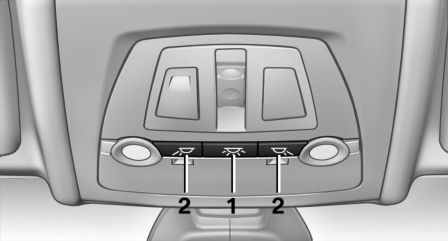
- Interior lights
- Reading lamp
Switching the interior lights on and off
 Press button.
To reel off permanently: press the button for approx. 3 seconds.
Switch back on: press button.
Reading lights
 Press button.
Reading lights are located at the front and rear next to the interior lights.
Ambient light
Depending on the equipment, the lighting can be individually adjusted in the interior for some lights.
Selecting color scheme
1. "Settings"
2. "Lighting"
3. "Ambient:"
4. Select desired setting.
Setting the brightness
The brightness of the ambient light can be adjusted via the thumbwheel for the instrument lighting or on the Control Display.
1. "Settings"
2. "Lighting"
3. "Brightness:"
4. Adjust the brightness.
Download Manual