Lights
Overview
Switches in the vehicle
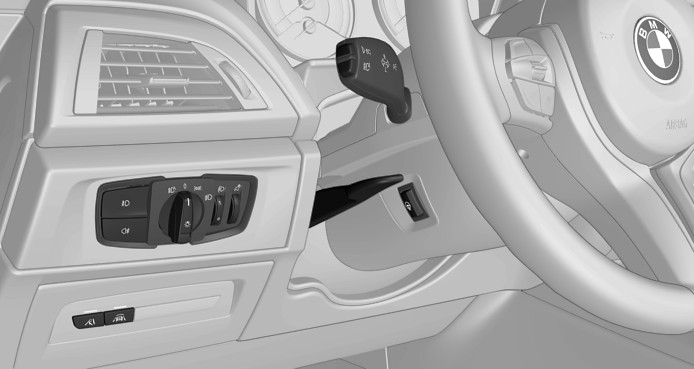
1-Light switch element
Light functions
|
Icon |
Function |
|---|---|
|
|
Automatic headlight control. Adaptive light functions. |
|
|
Lights off. Daytime running lights. |
|
|
Parking lights. |
|
|
Low beams. |
|
|
Instrument lighting. |


Parking lights, low beams and roadside parking lights
General information
Position of switch: ,
, ,
,
If the driver's door is opened when the ignition is switched off, the exterior lighting is automatically switched off.
Parking lights
Position of switch:
The vehicle is illuminated on all sides.
Do not use the parking lights for extended periods; otherwise, they might drain the battery and it would then be impossible to start the engine.
Canada: when parking, switch on the one-sided roadside parking light.
Low beams
Position of switch:
The low beams light up when the ignition is switched on.
Canada: roadside parking light
Concept
The vehicle can be illuminated on one side.
Switching on
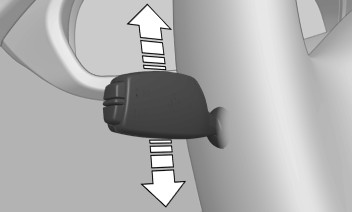
With radio-ready state switched off, press the lever either up or down past the resistance point.
Switching off
Press the lever back into the standard position.
Welcome lights and pathway lighting
Welcome lights
General information
Depending on the vehicle equipment and the ambient brightness, individual light functions may be switched on briefly when the vehicle is unlocked.
Activating/deactivating
Position of switch:,
Via iDrive:
- "My Vehicle"
- "Vehicle settings"
- "Lighting"
- "Exterior lighting"
- "Welcome lights"
The setting is stored for the driver profile currently used.
Headlight courtesy delay feature
General information
The low beams stay illuminated for a particular time if the high beams are switched on after radio-ready state is switched off.
Setting the duration
Via iDrive:
- "My Vehicle"
- "Vehicle settings"
- "Lighting"
- "Exterior lighting"
- "Pathway lighting"
- Set length of time.
The setting is stored for the driver profile currently used.
Automatic headlight control
Concept
The low beams are switched on and off automatically depending on the ambient brightness, for example in tunnels, in twilight or if there is precipitation.
General information
A blue sky with the sun low on the horizon can cause the lights to be switched on.
When emerging from a tunnel during the day, the low beams are not switched off immediately but instead only after approx. 2 minutes.
Activating
Position of switch:
The indicator light in the instrument cluster is illuminated when the low beams are switched on.
System limits
The automatic headlight control cannot serve as a substitute for your personal judgment of lighting conditions.
For example, the sensors are unable to detect fog or hazy weather. In these situations, switch the lights on manually.
Daytime running lights
General information
Position of switch:,,
The daytime running lights light up when the ignition is switched on. After the ignition is switched off, the parking lights light up in position.
Activating/deactivating
In some countries, daytime running lights are mandatory, so it may not be possible to deactivate the daytime running lights.
Via iDrive:
- "My Vehicle"
- "Vehicle settings"
- "Lighting"
- "Exterior lighting"
- Select the desired setting.
Settings are stored for the profile currently used.
Adaptive headlight range control
The adaptive headlight range control feature balances out acceleration and braking processes as well as the vehicle load conditions in order to avoid dazzling oncoming traffic. Illumination of the road is optimized.
Instrument lighting
Overview
1-Light switch element
Functional requirement
The parking lights or low beams must be switched on to set the brightness.
Adjusting
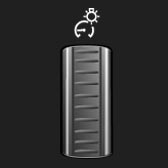
Adjust the brightness with the thumbwheel.
Interior lights
General information
Depending on the equipment, the interior lights, footwell lights, entry lights, and courtesy lights are controlled automatically.
The thumbwheel for the instrument lighting controls brightness of some of these features.
Overview
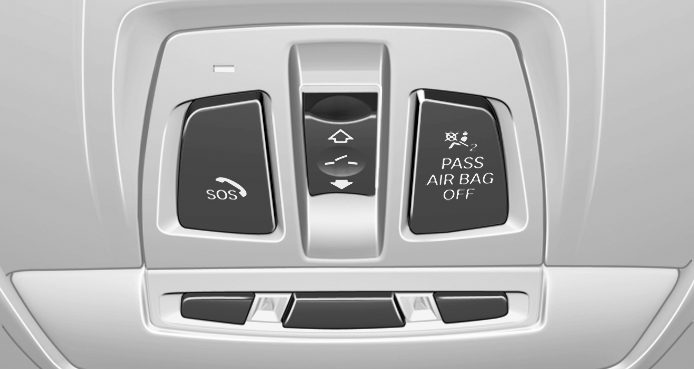
1-Reading light
2-Interior lights
3-Reading light
Switching the interior lights on/off

Press the button.
To switch off permanently: press the button and hold for approx. 3 seconds.
Switching the reading lights on/off

Press the button.
Depending on the vehicle equipment, the reading lights are located next to the interior lights in the front and rear.
Ambient light
General information
Depending on the equipment version, lighting can be adjusted for some lights in the car's interior.
Selecting the color scheme
Via iDrive:
- "My Vehicle"
- "Vehicle settings"
- "Lighting"
- "Interior lighting"
- "Ambient lighting"
- Select the desired setting.
Setting the brightness
Depending on the equipment, the brightness of the ambient light can be adjusted via the thumbwheel for the instrument lighting or on the Control Display.
Via iDrive:
- "My Vehicle"
- "Vehicle settings"
- "Lighting"
- "Interior lighting"
- "Brightness"
- Adjust the brightness.