Disclaimer: Not affiliated with or endorsed by Chrysler Motor Company. For informational purposes only. Full Disclaimer
How to Remote Start a Chrysler Pacifica
Updated:
The ability to remotely start your vehicle can be a game-changer, especially in extreme weather conditions. If you own a Chrysler Pacifica, you're in luck, as it comes equipped with a convenient remote start feature.
This feature allows you to start your vehicle's engine from a distance using a key fob or a smartphone app. It lets you warm up or cool down your car before you even step foot inside, making those chilly winter mornings or scorching summer afternoons a little more bearable.
The benefits of remote start go beyond just comfort. By starting your Chrysler Pacifica remotely, you can defrost your windows, ensuring better visibility during winter drives.
You can also pre-cool or pre-heat your car, saving you precious time on hot summer days or freezing winter nights. With remote start, you can step into a comfortable vehicle without having to endure the extremes of the weather outside.
Pacifica Key Fob

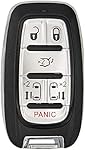
The Chrysler Pacifica key fob is your trusty sidekick when it comes to utilizing the remote start feature. It's a small device that fits comfortably in your hand and allows you to control various functions of your vehicle.
Along with the remote start button, it typically includes buttons for locking, unlocking, a panic alarm, and a trunk release.
Shop From Amazon


How the Remote Start Function Works
To initiate remote start, simply press and hold the remote start button on your key fob for a few seconds. This sends a signal to your vehicle's engine, instructing it to start up. Some key fobs also have a range extender, allowing you to start your Pacifica from an even greater distance.
Keep in mind that for safety reasons, the doors remain locked while the engine is running, and the vehicle will shut off automatically after a certain period of time if you do not enter it.
Activating the Remote Start Feature

To activate remote start, simply press and hold the remote start button on your key fob for a few seconds. Your Pacifica's engine will come to life, and you'll notice the lights and accessories powering on. Remember to keep your key fob within the recommended distance for the remote start to work effectively.
Understanding Remote Start Limitations
While remote start is a convenient feature, it's important to understand its limitations. For safety reasons, some jurisdictions may have regulations on remote start usage, especially in public areas.
Additionally, extreme weather conditions or battery limitations may affect the duration of the remote start feature. Always use remote start responsibly and refer to your vehicle's manual for any specific guidelines or restrictions.
Now that you're armed with knowledge about remote start in your Chrysler Pacifica, enjoy the convenience and comfort it brings to your daily drives! Just remember not to get too spoiled by never having to sit in a hot or cold car again.
Remote Start Not Working

So, you've finally mastered the art of remote starting your Chrysler Pacifica, only to be greeted by silence when you press that magical button.
Don't panic just yet! There could be a few reasons why your remote start isn't working as expected. Here are some possible causes to consider:
Shop From Amazon


Weak Battery
Your fob may need a fresh set of batteries to transmit the signal effectively. Give those batteries a little attention, and they might just give you the remote start you've been longing for.
Distance Limitations
Keep in mind that most remote start systems have a limited range. If you're too far away from your vehicle, the signal may not reach the Pacifica's remote start module. Take a step (or a few) closer and see if that solves the problem.
System Malfunctions
Like any advanced technology, remote start systems can occasionally hiccup. It could be due to a faulty module or a wiring issue. If you suspect this might be the case, it's best to consult a professional or the Chrysler dealership for further assistance.
Troubleshooting Tips and Solutions

Now that we have identified a few possible culprits for your remote start troubles, let's dive into some troubleshooting tips to get that remote start back on track:
Check for a Blinking Light
If your fob has an LED light, check if it blinks when you press the remote start button. If it doesn't, it's a good indication that the signal isn't transmitting. Try replacing the batteries, and if that doesn't work, consult the user manual or a professional.
Vehicle in the Right Conditions
Ensure that your Chrysler Pacifica meets the necessary conditions for remote start. For example, make sure the doors are locked, the transmission is in "park," and the hood is closed properly. These conditions may vary depending on the specific model and year of your vehicle.
Double-Check the Settings
Sometimes, accidental changes to the remote start settings can cause issues. Take a quick peek at the settings menu and make sure everything is configured correctly. You never know; that rogue button press might be the root of all evil.
Remember, troubleshooting remote start problems can sometimes require a bit of trial and error. If you exhaust all your options and still can't get it to work, it's best to reach out to professionals who can diagnose and fix the issue for you. Your dream of effortless remote starts is worth it!
Additional Features and Customizations
Congratulations on mastering remote start! Now it's time to explore some of the other fantastic features that the Chrysler Pacifica has to offer.
From luxurious interiors to advanced safety technologies, the Pacifica is packed with goodies. Take a moment to discover features like Stow 'n Go seating. Need extra storage space?
The Pacifica's Stow and Go seating allows you to fold seats into the floor, making room for all your adventures, or let's be honest, shopping sprees.
You can also stay connected and entertained with the Uconnect system. From navigation to hands-free calling, this intuitive system has it all.

Nick Marchenko, PhD
Industrial Engineer & Automotive Content Specialist
Nick writes in-depth guides on car clubs, engine specs, vehicle ownership, and modifications, combining engineering knowledge with automotive passion.
Full profile → LinkedIn →You May Also Like
Here Are The 5 Chrysler Pacifica Years to Avoid
3 years agoAre you considering purchasing a Chrysler Pacifica? While this vehicle has some great features, it's important to be aware of the potential issues that come with it. From engine failures to body...
A Complete Guide on Bleeding Your Chrysler Pacifica Brakes to Ensure Brake Performance
2 years agoUnderstanding the Need for Brake Bleeding Upgrading the safety features on your dependable and family-friendly Chrysler Pacifica is crucial. Brake systems are essential, yet sometimes air gets into...
How to Fix Chrysler Pacifica Brake Light Fail - Complete DIY Guide
2 years agoEnsuring your Chrysler Pacifica's brake lights are operational is crucial for safety on the road. A non-functional brake light can lead to accidents and is considered illegal in many jurisdictions...
Decode Your Ride: Exploring the Chrysler Pacifica VIN Decoder
2 years agoEach Chrysler Pacifica comes equipped with a unique Vehicle Identification Number, or VIN. This sequence of digits and capital letters is essential, revealing critical information about the vehicle su...