Ride Control Systems
The vehicle has a Traction Control System (TCS) and StabiliTrak/Electronic Stability Control (ESC) system. These systems help limit wheel spin and assist the driver in maintaining control, especially on slippery road conditions.
TCS activates if it senses any of the drive wheels are spinning or beginning to lose traction. When this happens, TCS applies the brakes to the spinning wheels and reduces engine power to limit wheel spin.
StabiliTrak/ESC activates when the vehicle senses a difference between the intended path and the direction the vehicle is actually traveling. StabiliTrak/ESC selectively applies braking pressure to any one of the vehicle wheel brakes to assist the driver in keeping the vehicle on the intended path. Trailer Sway Control (TSC) is also on automatically when the vehicle is started. See Trailer Sway Control (TSC) 0 305.
If cruise control is being used and traction control or StabiliTrak/ESC begins to limit wheel spin, cruise control will disengage. Cruise control may be turned back on when road conditions allow.
Both systems come on automatically when the vehicle is started and begins to move. The systems may be heard or felt while they are operating or while performing diagnostic checks. This is normal and does not mean there is a problem with the vehicle.
It is recommended to leave both systems on for normal driving conditions, but it may be necessary to turn TCS off if the vehicle gets stuck in sand, mud, ice, or snow. See If the Vehicle Is Stuck 0 221 and “Turning the
Systems Off and On” later in this section.
When the transfer case (if equipped) is in Four-Wheel Drive Low, the stability system is automatically disabled,  comes on, and the appropriate message will appear on the Driver Information Center (DIC). Both
traction control and StabiliTrak/ESC are automatically disabled in this condition.
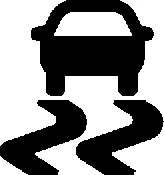
The indicator light for both systems is in the instrument cluster. This light will:
If either system fails to turn on or to activate, a message displays in the Driver Information Center (DIC), and d comes on
and stays on to indicate that the system is inactive and is not assisting the driver in maintaining control. The vehicle is safe to drive, but driving should be adjusted accordingly.
If d comes on and stays on:
Drive the vehicle. If d comes on and stays on, the vehicle may need more time to diagnose the problem. If the condition persists, see your dealer.
The button for TCS and StabiliTrak/ESC is on the center stack.
To turn off only TCS, press and release  . The traction off light i displays in the instrument cluster. The appropriate message will display in the DIC. To turn TCS on again,
press and release  . The traction off light i displayed in the instrument cluster will turn off.
If TCS is limiting wheel spin when  is pressed, the system will not turn off until the wheels stop spinning.
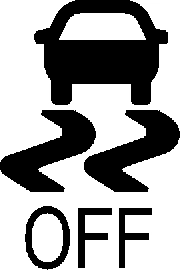
To turn off both TCS and StabiliTrak/ESC, press and hold  until the traction off light
i and the StabiliTrak/ESC OFF light  come on and stay on in the instrument cluster, then release. The appropriate
message will display in the DIC.
To turn TCS and StabiliTrak/ESC on again, press and release  . The traction off light
i and the StabiliTrak/ESC OFF light  in the instrument cluster turn off.
StabiliTrak/ESC will automatically turn on if the vehicle exceeds 56 km/h (35 mph).
Traction control will remain off.
The vehicle has a Trailer Sway Control (TSC) feature and a Hill Start Assist (HSA) feature. See Trailer Sway Control (TSC) 0 305 or
Hill Start Assist (HSA) 0 247.
Adding accessories can affect the vehicle performance. See Accessories and Modifications 0 322.
If equipped, Hill Descent Control (HDC) sets and maintains vehicle speed while driving down steep grades in a forward or reverse gear. The HDC switch is on the center stack, below the climate controls.
Press 5 to enable or disable HDC. Vehicle speed must be below 50 km/h (31 mph).
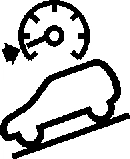
When enabled, the HDC light displays on the instrument cluster.
A blinking HDC light indicates the system is actively applying the brakes to maintain vehicle speed. HDC can maintain vehicle speeds between 1 and 22 km/h (1 and
14 mph) on grades greater than or equal to 10%.
If HDC is to be used for more than three minutes or on grades steeper than
25%, the transfer case should be put into Four-Wheel Drive Low (4 n) to reduce the possibility of brake overheating.
Noise from the Electronic Brake Control Module (EBCM) is normal when HDC is active.
When HDC is activated, the initial HDC speed is set to the current driving speed.
It can be increased or decreased by pressing
+RES or SET- on the steering wheel, or by applying the accelerator or brake pedal. This adjusted speed becomes the new set speed.
HDC will remain enabled between 30 and 60 km/h (19 and 37 mph); however, vehicle speed cannot be set or maintained in this range. HDC will automatically disable if the vehicle speed is above 80 km/h (50 mph) or above 60 km/h (37 mph) for at least
30 seconds.
5 must be pressed again to re-enable HDC. HDC may disable after an extended period of use. If this happens, HDC will require time to cool down. The length of time HDC remains active depends on road conditions, grade, set speed, vehicle loading, and outside temperature.
When enabled, if the vehicle speed is above 30 km/h (19 mph) and below 60 km/h
(37 mph), a DIC message will display.
Driver Mode Control (DMC) allows the driver to adjust the overall driving experience to better suit preference by adjusting multiple systems to fit specific driving needs. Drive mode availability and affected vehicle subsystems are dependent upon vehicle trim level, region, and optional features.
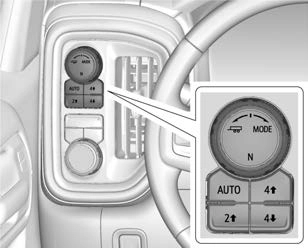
To activate Tow/Haul Mode turn the knob counterclockwise. To activate other drive modes turn the knob clockwise.
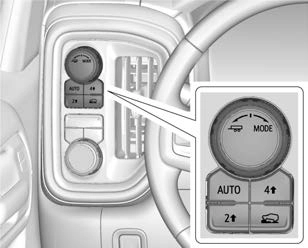
If equipped, select Terrain Mode by pressing the g below the 4 m transfer case button.
Normal Mode : Use for normal city and highway driving to provide a smooth ride. This setting provides balance between comfort and handling. This is the standard/ default mode. There is no persistent indicator in the instrument cluster for
this mode.
8 Sport Mode : Use where road conditions or personal preference demand a more controlled response.
When you enter this mode, you will immediately feel a down shift. In this mode the vehicle also monitors driving behaviors and automatically enables Performance Shift Features when spirited driving is detected. These features maintain lower transmission gears to increase available engine braking and improve acceleration response. The vehicle will exit these features and return to normal operation after a short period when spirited driving is no longer detected. If the vehicle has Magnetic Ride Control, the suspension will change to provide better cornering performance.
This feature is not intended for use when the vehicle is stuck in sand, mud, ice, snow, or gravel. If the vehicle becomes stuck, see If the Vehicle Is Stuck 0 221.
off-road recreational driving. Off-Road Mode should be used to improve driving at moderate speeds, on grass, gravel, dirt, unpaved roads, or snow-covered roads. The accelerator pedal is tuned for off-road use. This mode modifies pedal mapping,
All-Wheel Drive (AWD), ride height, Antilock Brake System (ABS), StabiliTrak/Electronic Stability Control (ESC), and Traction Control System (TCS) performance.
For more information on off-road driving see
Off-Road Driving 0 215.
_ Tow/Haul Mode : Use this mode when hauling heavy loads to provide increased performance and vehicle control. Tow/Haul Mode adjusts the transmission shift pattern, AWD, and ESC performance.
If the vehicle is turned off with Tow/Haul Mode active and then restarted within four hours or less, Tow/Haul will remain active. Otherwise, the vehicle will start in
Normal Mode.
If the vehicle has a diesel engine, exhaust braking is automatically activated when Tow/Haul Mode is selected. It maintains vehicle speed by automatically implementing a shift pattern that uses the engine and the transmission to slow the vehicle. The system will command downshifts and use the turbocharger on the engine to reduce vehicle speed when the brake is applied. The normal tow/haul shift pattern will return once the vehicle is on a low grade or when the accelerator pedal is pressed.
While in the Electronic Range Select (ERS) Mode (see “manual mode”), grade breaking is deactivated, allowing the driver to select a range and limiting the highest gear available.
For more information on trailer weight specifications, see Towing Equipment 0 296.
g Terrain Mode : Use for finer control during low speed, off-road driving. When using this mode it will mimic the characteristics of four-wheel-drive low (4 n) without the torque capabilities.
Use when:
Hill and Mountain Roads 0 219.
When in Terrain Mode, the vehicle will shift automatically but may hold a lower gear longer to maximize engine torque. The steering will change to provide more precise control. A unique pedal map, transmission shift pattern, and rpm control are utilized to give better control at lower speeds and over rough terrain. When the vehicle comes to a stop, Vehicle Hold is engaged. TCS will be optimized for maximum torque transfer across axles, and Active Braking During Lift Throttle will be engaged.
Active Braking During Lift Throttle:
Active Braking During Lift Throttle will reduce the back and forth between the accelerator and brake pedals.
Vehicle Hold Features:
. When the vehicle comes to a stop on an incline grade in forward gear or on a decline grade in reverse gear, Vehicle Hold is engaged until the accelerator pedal is pressed.
Terrain Mode is only available on vehicles equipped with the single speed
transfer case.
Terrain Mode can only be active when:
Frequent use of this mode may cause brake wear due to the light braking.
The vehicle will automatically exit the mode if the brakes get too hot. Terrain Mode can be turned back on after the brakes have cooled.
When Terrain Mode is selected:
If equipped, the limited-slip differential can give more traction on snow, mud, ice, sand, or gravel. It works like a standard axle most of the time, but when traction is low, this feature allows the drive wheel with the most traction to move the vehicle. For vehicles with the limited-slip differential,
driven under severe conditions, the rear axle fluid should be changed. See Maintenance Schedule 0 409.
Vehicles with a locking rear axle can give more traction on snow, mud, ice, sand,
or gravel. It works like a standard axle most of the time, but when traction is low, this feature will allow the rear wheel with the most traction to move the vehicle.
Download Manual