Steps to take in an emergency
Do not tow with a sling-type truck to prevent body damage.
8
474 8-2. Steps to take in an emergency
Release the parking brake. Use a towing dolly under the
front wheels.
If your vehicle is transported by a flatbed truck, it should be tied down at the locations shown in the illustration.
If you use chains or cables to tie down your vehicle, the angles shaded in black must be 45°.
Do not overly tighten the tie downs or the vehicle may be dam- aged.
8-2. Steps to take in an emergency
475
A driver must be in the vehicle to steer and operate the brakes. The vehicle’s wheels, drive train, axles, steering and brakes must be in good condition.
Take care not to damage the vehi- cle body.
If the engine does not start, turn the engine switch to the“ON” posi- tion.
Vehicles with a smart key system: Enter the vehicle being towed and start the engine.
If the engine does not start, turn the engine switch to IGNITION ON mode. 8
Vehicles with a continuously variable transmission: When the shift lever cannot be shifted: P. 183, 188
If the engine is not running, the power assist for the brakes and steering will not function, making steering and braking more difficult.
Wheel nut wrench is stored in the trunk. (P. 509)
476 8-2. Steps to take in an emergency
8-2. Steps to take in an emergency
477
8
478 8-2. Steps to take in an emergency
(Water dripping from the air conditioning after use is normal.)
8-2. Steps to take in an emergency
479
Vehicles without a smart key system
Vehicles with a smart key system
8
480 8-2. Steps to take in an emergency
|
Warning light |
Warning light/Details/Actions |
|
(U.S.A.) (Canada) |
Brake system warning light (warning buzzer)*1 Indicates that: The brake fluid level is low; or
The brake system is malfunctioning
This light also comes on when the parking brake is not released. If the light turns off after the parking brake is fully released the system is operating normally. Immediately stop the vehicle in a safe place and con- tact your Toyota dealer. Continuing to drive the vehi- cle may be dangerous. |
|
(U.S.A.) (Canada) |
Malfunction indicator lamp Indicates a malfunction in: The electronic engine control system;
The electronic throttle control system; or
The electronic continuously variable transmission con- trol system.
Have the vehicle inspected by your Toyota dealer immediately. |
|
SRS warning light Indicates a malfunction in: The SRS airbag system;
The front passenger occupant classification system; or
The seat belt pretensioner system
Have the vehicle inspected by your Toyota dealer immediately. |
8-2. Steps to take in an emergency
481
8
482 8-2. Steps to take in an emergency
|
Warning light |
Warning light/Details/Actions |
|
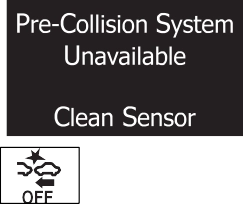
PCS (Pre-Collision System) warning light When the warning light flashes (and a buzzer sounds): Indicates a malfunction in the PCS (Pre-Collision system) Have the vehicle inspected by your Toyota dealer immediately. When the warning light flashes (and a buzzer does not sound): Indicates that the PCS (Pre-Collision system) is temporar- ily unavailable, possibly due to either of the following: An area around the radar sensor or camera sensor being dirty or covered with condensation, ice, stickers, etc.
Clear the dirt, condensation, ice, stickers, etc. (P. 209) Radar sensor or camera sensor operational conditions (such as temperature etc.) being not met
Driving is possible in this case. The PCS (Pre-Colli- sion System) will be enabled if the operational condi- tions (such as temperature etc.) are met again. When the warning light is illuminated: Either the VSC (Vehicle Stability Control) system or PCS (Pre-Collision system) is disabled or both are disabled. To enable the PCS, enable both the VSC system and PCS. (P. 217, 259) |
|
|
(Orange) |
LDA (Lane Departure Alert with steering control) indica- tor The warning light comes on and a warning message is displayed to indicate that the LDA (Lane Departure Alert with steering control) system is not available temporarily or has detected a malfunction. P. 491, 492 |
|
Tire pressure warning light*3 When the light comes on: Low tire inflation pressure such as Natural causes (P. 484)
Flat tire (P. 509)
Adjust the tire inflation pressure to the specified level. The light will turn off after a few minutes. In case the light does not turn off even if the tire inflation pressure is adjusted, have the system checked by your Toyota dealer. When the light comes on after blinking for 1 minute: Malfunction in the tire pressure warning system Have the system checked by your Toyota dealer. |
8-2. Steps to take in an emergency
*1: Parking brake engaged warning buzzer:
P. 490
*2: Driver’s seat belt buzzer:
483
Vehicles without a smart key system: The driver’s seat belt buzzer sounds to alert the driver that his or her seat belt is not fastened. Once the engine switch is turned to the“ON” position, the buzzer sounds for 6 seconds. If the vehicle reaches a speed of 12 mph (20 km/h), the buzzer sounds once. If the seat belt is still unfastened after 24 seconds, the buzzer will sound intermittently for 6 seconds. Then, if the seat belt is still unfastened, the buzzer will sound in a different tone for 90 more seconds.
Vehicles with a smart key system: The driver’s seat belt buzzer sounds to alert the driver that his or her seat belt is not fastened. Once the engine switch is turned to IGNITION ON mode, the buzzer sounds for 6 seconds. If the vehicle reaches a speed of 12 mph (20 km/h), the buzzer sounds once. If the seat belt is still unfastened after 24 seconds, the buzzer will sound intermittently for 6 seconds. Then, if the seat belt is still unfastened, the buzzer will sound in a different tone for 90 more seconds.
Front passenger’s seat belt buzzer:
The front passenger’s seat belt buzzer sounds to alert the front passenger that his or her seat belt is not fastened. The buzzer sounds once if the vehicle reaches a speed of 12 mph (20 km/h). If the seat belt is still unfas- tened after 24 seconds, the buzzer will sound intermittently for 6 seconds. Then, if the seat belt is still unfastened, the buzzer will sound in a different tone for 90 more seconds.
Rear passenger’s seat belt buzzer:
The rear passenger’s seat belt buzzer sounds to alert the rear passengers that his or her seat belt is not fastened. The buzzer sounds for 6 seconds after the vehicle reaches a speed of 12 mph (20 km/h). Then, if the seat belt is still unfastened, the buzzer will sound in a different tone for 24 more seconds.
*3: If equipped 8
484 8-2. Steps to take in an emergency
This warning light system monitors the airbag sensor assembly, front impact sensors, side impact sensors (front door), side impact sensors (front), side impact sensors (rear), driver’s seat belt buckle switch, front passenger occu- pant classification system,“AIR BAG ON” indicator light,“AIR BAG OFF” indi- cator light, front passenger’s seat belt buckle switch, seat belt pretensioners (front), airbags, interconnecting wiring and power sources. (P. 36)
If luggage is placed on the front passenger seat, the front passenger detec- tion sensor may cause the warning light to flash and the warning buzzer to sound even if a passenger is not sitting in the seat.
First check the following:
If it is, fill the fuel tank immediately.
The light will go off after several driving trips.
If the light does not go off even after several trips, contact your Toyota dealer as soon as possible.
Check the tire inflation pressure and adjust to the appropriate level. Push- ing the tire pressure warning reset switch will not turn off the tire pressure warning light.
The tire pressure warning light may come on due to natural causes such as natural air leaks and tire inflation pressure changes caused by tem- perature. In this case, adjusting the tire inflation pressure will turn off the warning light (after a few minutes).
8-2. Steps to take in an emergency
485
The compact spare tire is not equipped with a tire pressure warning valve and transmitter. If a tire goes flat, the tire pressure warning light will not turn off even though the flat tire has been replaced with the spare tire. Replace the spare tire with the repaired tire and adjust the tire inflation pressure. The tire pressure warning light will go off after a few minutes.
The tire pressure warning system will be disabled in the following condi- tions:
(When the condition becomes normal, the system will work properly.)
The tire pressure warning system may be disabled in the following condi- tions:
(When the condition becomes normal, the system will work properly.)
of tires.) 8
If the tire pressure warning light frequently comes on after blinking for 1 minute when the engine switch is turned on, have it checked by your Toyota dealer.
In some cases, the buzzer may not be heard because of noisy place or an audio sound.
When the battery charge becomes insufficient or the voltage temporarily drops, the electric power steering system warning light may come on and the warning buzzer may sound.
486 8-2. Steps to take in an emergency
8-2. Steps to take in an emergency
487
WARNING
Each tire, including the spare (if provided), should be checked monthly when cold and inflated to the inflation pressure recommended by the vehicle manufacturer on the vehicle placard or tire inflation pressure label (tire and load information label). (If your vehicle has tires of a dif- ferent size than the size indicated on the vehicle placard or tire inflation pressure label [tire and load information label], you should determine the proper tire inflation pressure for those tires.)
As an added safety feature, your vehicle has been equipped with a tire pressure monitoring system (TPMS-tire pressure warning system) that illuminates a low tire pressure telltale (tire pressure warning light) when one or more of your tires is significantly under-inflated. Accordingly, when the low tire pressure telltale (tire pressure warning light) illumi- nates, you should stop and check your tires as soon as possible, and inflate them to the proper pressure. Driving on a significantly under- inflated tire causes the tire to overheat and can lead to tire failure. Under-inflation also reduces fuel efficiency and tire tread life, and may affect the vehicle’s handling and stopping ability.
Please note that the TPMS (tire pressure warning system) is not a sub- stitute for proper tire maintenance, and it is the driver’s responsibility to maintain correct tire pressure, even if under-inflation has not reached the level to trigger illumination of the TPMS low tire pressure telltale (tire pressure warning light).
Your vehicle has also been equipped with a TPMS (tire pressure warn- ing system) malfunction indicator to indicate when the system is not operating properly. The TPMS (tire pressure warning system) malfunc- tion indicator is combined with the low tire pressure telltale (tire pressure warning light). When the system detects a malfunction, the telltale will flash for approximately one minute and then remain continuously illumi-
nated. This sequence will continue upon subsequent vehicle start-ups 8
as long as the malfunction exists. When the malfunction indicator is illu- minated, the system may not be able to detect or signal low tire pres- sure as intended.
TPMS (tire pressure warning system) malfunctions may occur for a vari- ety of reasons, including the installation of replacement or alternate tires or wheels on the vehicle that prevent the TPMS (tire pressure warning system) from functioning properly. Always check the TPMS (tire pres- sure warning system) malfunction telltale after replacing one or more tires or wheels on your vehicle to ensure that the replacement or alter- nate tires and wheels allow the TPMS (tire pressure warning system) to continue to function properly.
488 8-2. Steps to take in an emergency
8-2. Steps to take in an emergency
489
The master warning light also comes on or flashes in order to indicate that a message is cur- rently being displayed on the multi- information display.
If any of the warning message or indicator comes on again after the following actions have been performed, contact your Toyota dealer.
8
490 8-2. Steps to take in an emergency
|
Warning message |
Details/Actions |
|
Monochrome display Color display
|
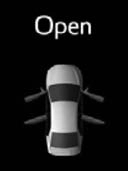
Indicates that one or more of the doors is not fully closed. The system also indicates which doors are not fully closed. If the vehicle reaches a speed of 3 mph (5 km/h), flashes and a buzzer sounds to indicate that the door(s) are not yet fully closed. Make sure that all the doors are closed. |
|
Monochrome display Color display
|
Indicates that the trunk is not fully closed. If the vehicle reaches a speed of 3 mph (5 km/h), flashes and a buzzer sounds to indicate that the trunk is not yet fully closed. Close the trunk. |
|
(U.S.A.) (Canada) (Flashes) |
Indicates that the vehicle is being driven at 3 mph (5 km/h) or more with the parking brake still engaged. A buzzer also sounds. Release the parking brake. |




8-2. Steps to take in an emergency
491
8
|
|

492 8-2. Steps to take in an emergency
|
Warning message |
Details/Actions |
|
(Flashes) (Orange) |
Indicates that the LDA (Lane Departure Alert with steering control) and pre-collision system are temporarily canceled due to high temperatures around the camera sensor Turn the LDA (Lane Departure Alert with steering control) system off, wait for the area around the camera sensor to cool, and then turn the LDA (Lane Departure Alert with steering control) system back on. |
|
(Orange) |
The LDA (Lane Departure Alert with steering con- trol) system is temporarily canceled due to a mal- function in a sensor other than the camera sensor. A buzzer also sounds. Turn the LDA (Lane Departure Alert with steering control) system off and follow the appropriate troubleshooting procedures for warning message. Afterward, drive the vehicle for a short time, and then turn the LDA (Lane Departure Alert with steering control) system back on. |
|
(Flashes) (Orange) |
Indicates that the LDA (Lane Departure Alert with steering control) and pre-collision system are temporarily canceled because dirt, rain, conden- sation, ice, snow, etc., are present on the wind- shield in front of the camera sensor Turn the LDA (Lane Departure Alert with steering control) system off, remove any dirt, rain, condensation, ice, snow, etc., from the windshield, and then turn the LDA (Lane Departure Alert with steering control) system back on. |
|
|
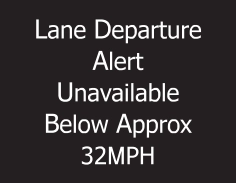
Indicates that the LDA (Lane Departure Alert with steering control) system cannot be used because the vehicle speed is lower than approximately 32 mph (50 km/h) Drive the vehicle at 32 mph (50 km/h) or higher. |








8-2. Steps to take in an emergency
493
8
494 8-2. Steps to take in an emergency
|
Warning message |
Details/Actions |
|
|
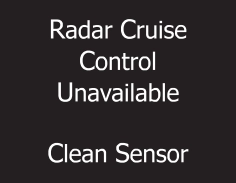
Indicates that the radar sensor is dirty or covered with ice A buzzer also sounds. Clean the sensor. |
|
|
Indicates that the dynamic radar cruise control system cannot be used temporarily due to bad weather A buzzer also sounds. Use the dynamic radar cruise control sys- tem when it becomes available again. |
|
|
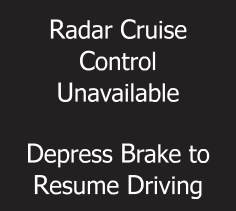
Indicates that the dynamic radar cruise control system brake control function is temporarily unavailable A buzzer also sounds. Depress the brake. |
|
Monochrome display
Color display
|
Indicates a malfunction in the dynamic radar cruise control system. Press the“ON-OFF” button once to deacti- vate the system, and then press the button again to reactivate the system.
A buzzer also sounds.
Have the vehicle inspected by your Toyota dealer. |



8-2. Steps to take in an emergency
495
8
496 8-2. Steps to take in an emergency
|
Warning message |
Details/Actions |
|
(Flashes) |
Indicates that the pre-collision system sensor is dirty, covered with ice, etc. Remove any dirt, ice, etc. |
|
Monochrome display
Color display
|
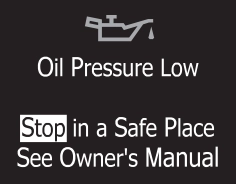
Indicates abnormal engine oil pressure. The warning message is shown if the engine oil pressure is too low.
A buzzer also sounds.
Immediately stop the vehicle in a safe place and contact your Toyota dealer. Continuing to drive the vehicle may be dangerous. |
|
(Flashes) |
Vehicles without a smart key system: Indicates that the engine switch is turned off or turned to the“ACC” position mode and the driver’s door is opened while the lights are turned on. A buzzer also sounds. Turn the lights off. Vehicles with a smart key system: Indicates that the engine switch is turned off or turned to ACCESSORY mode and the driver’s door is opened while the lights are turned on. A buzzer also sounds. Turn the lights off. |
|
(Flashes) (If equipped) |
Indicates that the moon roof is not fully closed (with the engine switch off, and the driver’s door open) A buzzer also sounds. Close the moon roof. |


8-2. Steps to take in an emergency
497
8
498 8-2. Steps to take in an emergency
|
Warning message |
Details/Actions |
|
Monochrome display Color display
(U.S.A. only) |
Indicates that all maintenance is required to cor- respond to the driven distance on the mainte- nance schedule*. Comes on approximately 5000 miles (8000 km) after the message has been reset. (The indicator will not work properly unless the message has been reset.) Perform the necessary maintenance. Please reset the message after the mainte- nance is performed (P. 415) |

*: Refer to the separate“Scheduled Maintenance Guide” or“Owner’s Manual Supplement” for the maintenance interval applicable to your vehicle.
Message displays used in this section are intended as examples, and may differ from the image that is actually displayed on the multi-information dis- play.
P. 485
8-2. Steps to take in an emergency
499
|
Interior buzzer |
Exterior buzzer |
Warning message |
Details/Actions |
|
Con- tinu- ous |
⎯ |
Monochrome display Color display
(Flashes) (Vehicles with a continuously variable transmission) |
The driver’s door was opened while any shift lever other than P was selected without turning off the engine switch. Shift the shift lever to P. |

8
500 8-2. Steps to take in an emergency
|
Interior buzzer |
Exterior buzzer |
Warning message |
Details/Actions |
|
Con- tinu- ous |
Contin- uous |
Monochrome display (Displayed alternately) Color display
(Displayed alternately) (Flashes) (Vehicles with a continuously variable transmission) |
The driver’s door was opened and closed while the electronic key was not in the vehicle, the shift lever was not in P and the engine switch was not turned off. Shift the shift lever to P. Bring the electronic key back into the vehicle. |


8-2. Steps to take in an emergency
501
8
502 8-2. Steps to take in an emergency
|
Interior buzzer |
Exterior buzzer |
Warning message |
Details/Actions |
|
Once |
⎯ |
Monochrome display Color display
(Flashes) |
The electronic key is not detected when an attempt is made to start the engine. Start the engine with the electronic key present. |
|
9 times |
⎯ |
Monochrome display Color display
(Flashes) |
An attempt was made to drive when the regular key was not inside the vehicle. Confirm that the elec- tronic key is inside the vehicle. |


8-2. Steps to take in an emergency
503
8
504 8-2. Steps to take in an emergency
|
Interior buzzer |
Exterior buzzer |
Warning message |
Details/Actions |
|
Once |
⎯ |
(Flashes) (Vehicles with a continuously variable transmission) |
The steering lock could not be released within 3 seconds of the engine switch being pressed. Press the engine switch while depressing the brake pedal and moving the steering wheel left and right. |
|
(Flashes) (Vehicles with a manual transmission) |
The steering lock could not be released within 3 seconds of the engine switch being pressed. Press the engine switch while depressing the clutch pedal and moving the steering wheel left and right. |


8-2. Steps to take in an emergency
505
8
506 8-2. Steps to take in an emergency
|
Interior buzzer |
Exterior buzzer |
Warning message |
Details/Actions |
|
Once |
⎯ |
Monochrome display
Color display
(Flashes) (Vehicles with a continuously variable transmission) |
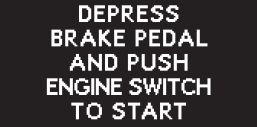
The driver’s door was opened and closed with the engine switch turned off and then the engine switch was put in ACCESSORY or IGNITION ON mode twice without the engine being started. Press the engine switch while depressing the brake pedal. |
|
During an engine starting pro- cedure in the event that the electronic key was not function- ing properly (P. 523), the engine switch was touched with the electronic key. Press the engine switch while depressing the brake pedal within 10 seconds of the buzzer sounding. |
|||
|
Monochrome display
Color display
(Flashes) (Vehicles with a manual transmission) |
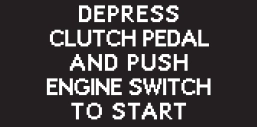
The driver’s door was opened and closed with the engine switch turned off and then the engine switch was put in ACCESSORY or IGNITION ON mode twice without the engine being started. Press the engine switch while depressing the clutch pedal. |
||
|
During an engine starting pro- cedure in the event that the electronic key was not function- ing properly (P. 523), the engine switch was touched with the electronic key. Press the engine switch while depressing the clutch pedal within 10 sec- onds of the buzzer sound- ing. |


8-2. Steps to take in an emergency
507
8
508 8-2. Steps to take in an emergency
|
Interior buzzer |
Exterior buzzer |
Warning message |
Details/Actions |
|
⎯ |
⎯ |
Monochrome display
Color display
(Vehicles with a continuously variable transmission) |
Power was turned off due to the automatic power off function. Next time when starting the engine, increase the engine speed slightly and maintain that level for approximately 5 minutes to recharge the battery. |


Message displays used in this section are intended as examples, and may differ from the image that is actually displayed on the multi-information dis- play.
P. 485
8-2. Steps to take in an emergency
509
8
510 8-2. Steps to take in an emergency
|
|
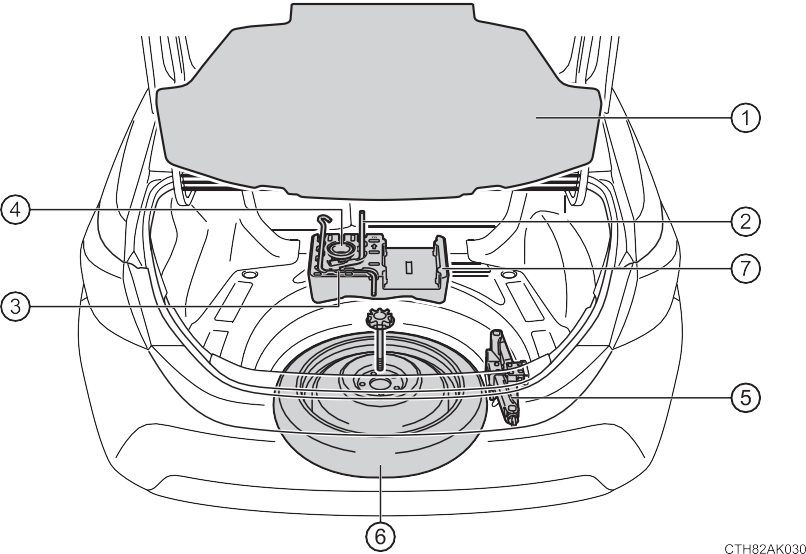
*: The jack attachment is used when raising your vehicle with a floor jack. (P. 427)
8-2. Steps to take in an emergency
511
cover. 8
512 8-2. Steps to take in an emergency
8-2. Steps to take in an emergency
513
|
Flat tire |
Wheel chock positions |
|
|
Front |
Left-hand side |
Behind the rear right-hand side tire |
|
Right-hand side |
Behind the rear left-hand side tire |
|
|
Rear |
Left-hand side |
In front of the front right-hand side tire |
|
Right-hand side |
In front of the front left-hand side tire |
To protect the wheel ornament, place a rag between the wrench and the wheel ornament, as shown in the illustration.
(one turn).
514 8-2. Steps to take in an emergency
The jack point guides are located under the rocker panel. They indicate the jack point positions.
When resting the tire on the ground, place the tire so that the wheel design faces up to avoid scratching the wheel surface.
8-2. Steps to take in an emergency
515
8
516 8-2. Steps to take in an emergency
If foreign matter is on the wheel contact surface, the wheel nuts may loosen while the vehicle is in motion, causing the tire to come off.
When replacing a steel wheel with a compact spare tire, tighten the wheel nuts until the tapered portion comes into loose contact with the disc wheel seat.
When replacing an aluminum wheel with a compact spare tire, tighten the wheel nuts until the tapered portion comes into loose contact with the disc wheel seat.
8-2. Steps to take in an emergency
Tightening torque:
76 ft•lbf (103 N•m, 10.5 kgf•m)
517
8
518 8-2. Steps to take in an emergency
Use the compact spare tire temporarily, and only in an emergency.
The vehicle becomes lower when driving with the compact spare tire compared to when driving with standard tires.
The tire pressure warning system must be reset. (P. 442)
As the compact spare tire is not equipped with a tire pressure warning valve and transmitter, low inflation pressure of the spare tire will not be indicated by the tire pressure warning system. Also, if you replace the compact spare tire after the tire pressure warning light comes on, the light remains on.
Install the compact spare tire on one of the rear wheels of the vehicle. Perform the following steps and fit tire chains to the front tires:
1 Replace a rear tire with the compact spare tire.
2 Replace the flat front tire with the tire removed from the rear of the vehi- cle.
3 Fit tire chains to the front tires.
Align the cutout of the wheel ornament with the valve stem as shown the illus- tration.
8-2. Steps to take in an emergency
519
The vehicle speed may not be correctly detected, and the following sys- tems may not operate correctly:
Do not drive at speeds in excess of 50 mph (80 km/h) when a compact spare tire is installed on the vehicle.
The compact spare tire is not designed for driving at high speeds. Fail- ure to observe this precaution may lead to an accident causing death or serious injury.
Before driving, make sure all the tools and jack are securely in place in 8
their storage location to reduce the possibility of personal injury during a
collision or sudden braking.
520 8-2. Steps to take in an emergency
8-2. Steps to take in an emergency
521
Try to restart the engine again following correct starting procedures. (P. 171, 174)
One of the following may be the cause of the problem:
8
(P. 522)
522 8-2. Steps to take in an emergency
Contact your Toyota dealer if the problem cannot be repaired, or if repair procedures are unknown.
Even if the engine can be started using the above steps, the system may be malfunctioning. Have the vehicle inspected by your Toyota dealer.
8-2. Steps to take in an emergency
523
103) in order to perform the fol- lowing operations:
Turning the key rearward unlocks the driver’s door. Turning the key once again within 5 seconds unlocks the other doors.
8
524 8-2. Steps to take in an emergency
Manual transmission: Shift the shift lever to N and depress the clutch pedal.
When the electronic key is detected, a buzzer sounds and the engine switch will turn to IGNITION ON mode.
When the smart key system is deactivated in customization set- ting, the engine switch will turn to ACCESSORY mode.
sion) or clutch pedal (manual transmission) and check that is shown on the multi-information display.
In the event that the engine still cannot be started, contact your Toyota dealer.
8-2. Steps to take in an emergency
525
Shift the shift lever to P (continuously variable transmission) or N (manual transmission) and press the engine switch as you normally do when stopping the engine.
As the above procedure is a temporary measure, it is recommended that the electronic key battery be replaced immediately when the battery is depleted. (P. 455)
Release the brake pedal (continuously variable transmission) or clutch pedal
(manual transmission) and press the engine switch in step 3 above.
The engine does not start and modes will be changed each time the switch is pressed. (P. 176)
(Customizable features P. 564)
8
526 8-2. Steps to take in an emergency
When connecting the jumper (or booster) cables, depending on the situation, the alarm may activate and doors locked. (P. 70)
Raise the rear of the engine cover to remove the two rear clips, and then raise the front of the engine cover to remove the two front clips.
8-2. Steps to take in an emergency
527
8
528 8-2. Steps to take in an emergency
Maintain the engine speed of the second vehicle and turn the engine switch to the“ON” position, then start the vehicle's engine.
Vehicles with a smart key system:
Maintain the engine speed of the second vehicle and turn the engine switch to IGNITION ON mode, then start the vehicle's engine.
Once the engine starts, have the vehicle inspected at your Toyota dealer as soon as possible.
8-2. Steps to take in an emergency
529
The engine cannot be started by push-starting.
The electricity stored in the battery will discharge gradually even when the vehicle is not in use, due to natural discharge and the draining effects of cer- tain electrical appliances. If the vehicle is left for a long time, the battery may discharge, and the engine may be unable to start. (The battery recharges automatically during driving.)
If you are unsure what mode the engine switch was in before the battery dis- charged, be especially careful when reconnecting the battery.
8
530 8-2. Steps to take in an emergency
8-2. Steps to take in an emergency
531
Carefully lift the hood after the steam subsides.
If you do not see steam: Carefully lift the hood.
If a large amount of coolant leaks, immediately contact your Toyota dealer.
8
532 8-2. Steps to take in an emergency
Water can be used in an emer- gency if engine coolant is unavail- able.
Stop the engine immediately and contact your Toyota dealer.
If the fan is operating:
Have the vehicle inspected at the nearest Toyota dealer.
8-2. Steps to take in an emergency
533
8
534 8-2. Steps to take in an emergency
Press to turn off TRAC.
Vehicles with a monochrome display
Vehicles with a color display
8-2. Steps to take in an emergency
535
8
536 8-2. Steps to take in an emergency
Download Manual