Driving procedures
Turn the engine switch to the“START” position and start the engine.
Manual transmission
Check that the parking brake is set. Check that the shift lever is set in N. Firmly depress the clutch pedal.
Turn the engine switch to the“START” position and start the engine.
“LOCK”
The steering wheel is locked and the key can be removed. (Vehicles with a continuously variable trans- mission: The key can be removed only when the shift lever is in P.)
Some electrical components such as the audio system can be used.
All electrical components can be used.
For starting the engine.
172 4-2. Driving procedures
Shift the shift lever to P (continuously variable transmission) or N (manual transmission). (P. 181, 184, 189)
Push in the key and turn it to the“LOCK” position.
The engine immobilizer system may not have been deactivated. (P. 67) Contact your Toyota dealer.
 When starting the engine, the engine switch may seem stuck in the“LOCK” position. To free it, turn the key while turn- ing the steering wheel slightly left and right.
A buzzer sounds if the driver’s door is opened while the engine switch is in the“LOCK” or“ACC” position to remind you to remove the key.
4-2. Driving procedures
173
174 4-2. Driving procedures
Continuously variable transmission: Check that the shift lever is set in P. Firmly depress the brake pedal.
Manual transmission: Check that the shift lever is set in N. Firmly depress the clutch pedal.
 will be displayed on the multi-information display. If it is not displayed, the engine cannot be started.
When operating the engine switch, one short, firm press is enough. It is not necessary to press and hold the switch.
The engine will crank until it starts or for up to 30 seconds, whichever is less.
Continue depressing the brake pedal (continuously variable trans- mission) or clutch pedal (manual transmission) until the engine is completely started.
The engine can be started from any engine switch mode.
4-2. Driving procedures
175
Set the parking brake (P. 192), and shift the shift lever to P.
Press the engine switch.
Release the brake pedal and check that“Power On” on the multi- information display is off.
Manual transmission Stop the vehicle.
Shift the shift lever to N.
Set the parking brake. (P. 192) Press the engine switch.
Release the clutch pedal and check that“Power On” on the multi- information display is off.
176 4-2. Driving procedures
Off*
The emergency flashers can be used.
The multi-information display will not be displayed.
Some electrical components such as the audio system can be used.
“Power On” will be displayed on the multi-information display.
All electrical components can be used.
“Power On” will be displayed on the multi-information display.
*: Vehicles with a continuously variable transmission: If the shift lever is in a position other than P when turning off the engine, the engine switch will be turned to ACCESSORY mode, not to off.
4-2. Driving procedures
177
Check that the parking brake is set. Shift the shift lever to P.
Check that“Power On” and“Turn Off Vehicle”/“TURN POWER OFF” are displayed alternately on the multi-information display and then press the engine switch once.
Check that“Power On” and“Turn Off Vehicle”/“TURN POWER OFF” on the multi-information display are off.
Message displays used in this section are intended as examples, and may differ from the image that is actually displayed on the multi-information dis- play.
Vehicles with a continuously variable transmission
If the vehicle is left in ACCESSORY mode for more than 20 minutes or IGNI- TION ON mode (the engine is not running) for more than an hour with the shift lever in P, the engine switch will automatically turn off. However, this function cannot entirely prevent battery discharge. Do not leave the vehicle with the engine switch in ACCESSORY or IGNITION ON mode for long peri- ods of time when the engine is not running.
Vehicles with a manual transmission
If the vehicle is left in ACCESSORY mode for more than 20 minutes or IGNI- TION ON mode (the engine is not running) for more than an hour, the engine switch will automatically turn off. However, this function cannot entirely pre- vent battery discharge. Do not leave the vehicle with the engine switch in ACCESSORY or IGNITION ON mode for long periods of time when the engine is not running.
178 4-2. Driving procedures
P. 105
P. 125
P. 126
“Shift to P position to Start” will be displayed on the multi-information dis- play.
After turning the engine switch off and opening and closing the doors, the steering wheel will be locked due to the steering lock function. Operating the engine switch again automatically cancels the steering lock.

 “Steering Lock Active” will be displayed on the multi-information display.
Vehicles with a continuously variable transmission: Check that the shift lever is set in P. Press the engine switch while turning the steering wheel left and right.
Vehicles with a manual transmission: Press the engine switch while turning the steering wheel left and right.
To prevent the steering lock motor from overheating, the motor may be sus- pended if the engine is turned on and off repeatedly in a short period of time. In this case, refrain from operating the engine. After about 10 seconds, the steering lock motor will resume functioning.
4-2. Driving procedures
179
The system may be malfunctioning. Have the vehicle inspected by your Toyota dealer immediately.
P. 455
P. 523
180 4-2. Driving procedures
4-2. Driving procedures
181
 Vehicles without a smart key system:
While the engine switch is in the“ON” position, depress the brake pedal and move the shift lever.
Vehicles with a smart key system:
While the engine switch is in IGNITION ON mode, depress the brake pedal and move the shift lever.
When shifting the shift lever between P and D, make sure that the vehicle is completely stopped.
*: If equipped
182 4-2. Driving procedures
|
Shift position |
Objective or function |
|
P |
Parking the vehicle/starting the engine |
|
R |
Reversing |
|
N |
Neutral |
|
D |
Normal driving* |
|
S |
Engine braking |
|
B |
Maximum engine braking |
*: To improve fuel efficiency and reduce noises, set the shift lever in D for normal driving.
Suitable for enhancing the fuel economy, because the torque cor- responding to the accelerator pedal depression amount can be generated more smoothly than it is in normal conditions and the oper- ation of the air conditioning system (heating/cooling) will be minimized.
Press the switch again to return to normal mode.
Even when performing the following actions with the intent of enabling engine braking, engine braking will not activate while downshifting to S because the dynamic radar cruise control will not be canceled. (P. 235)
The shift lock system is a system to prevent accidental operation of the shift lever in starting.
The shift lever can be shifted from P only when the engine switch is in the“ON” position (vehicles without a smart key system) or IGNITION ON mode (vehicles with a smart key system) and the brake pedal is being depressed.
4-2. Driving procedures
First, check whether the brake pedal is being depressed.
183
If the shift lever cannot be shifted with your foot on the brake pedal, there may be a problem with the shift lock system. Have the vehicle inspected by your Toyota dealer immediately.
The following steps may be used as an emergency measure to ensure that the shift lever can be shifted.
Releasing the shift lock:
Set the parking brake.
Vehicles without a smart key system: Turn the engine switch to the“LOCK” position.
Vehicles with a smart key system: Turn the engine switch off. Depress the brake pedal.
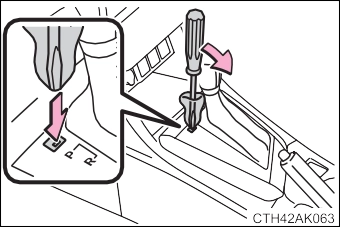 Pry the cover up with a flathead screw- driver or equivalent tool.
To prevent damage to the cover, cover the tip of the screwdriver with a rag.
Press the shift lock override button.
The shift lever can be shifted while the button is pressed.
184 4-2. Driving procedures
While the engine switch is in the“ON” position, depress the brake pedal and move the shift lever.
Vehicles with a smart key system:
While the engine switch is in IGNITION ON mode, depress the brake pedal and move the shift lever.
When shifting the shift lever between P and D, make sure that the vehicle is completely stopped.
*: If equipped
4-2. Driving procedures
185
|
Shift position |
Objective or function |
|
P |
Parking the vehicle/starting the engine |
|
R |
Reversing |
|
N |
Neutral |
|
D |
Normal driving*1 |
|
M |
7-speed sport sequential shiftmatic mode driving*2 (P. 186) |
*1: To improve fuel efficiency and reduce noises, set the shift lever in D for normal driving.
*2: Selecting gear step using the M position achieves suitable engine braking forces by operating the shift lever.
For powerful acceleration and driv- ing in mountainous regions.
Press the switch again to return to normal mode.
186 4-2. Driving procedures
Upshifting Downshifting
The selected gear step, from D1 to D7, will be displayed in the meter.
To return to normal D position driv- ing, the“+” paddle shift switch must be held down for a period of time.
Upshifting Downshifting
The gear changes once every time the shift lever is operated.
The selected gear step, from M1 to M7, will be displayed in the meter.
4-2. Driving procedures
187
This may indicate a malfunction in the continuously variable transmission system. Have the vehicle inspected by your Toyota dealer immediately.
(In this situation, the transmission will operate in the same manner as when the shift lever is in D.)
Even when performing the following actions with the intent of enabling engine braking, engine braking will not activate because the dynamic radar cruise control will not be canceled.
To help ensure safety and driving performance, downshifting operation may sometimes be restricted. In some circumstances, downshifting may not be possible even when the shift lever is operated. (A buzzer will sound twice.)
Sport mode is automatically deactivated if the engine switch is turned off after driving in sport mode.
The shift lock system is a system to prevent accidental operation of the shift lever in starting.
The shift lever can be shifted from P only when the engine switch is in the“ON” position (vehicles without a smart key system) or IGNITION ON mode (vehicles with a smart key system) and the brake pedal is being depressed.
188 4-2. Driving procedures
First, check whether the brake pedal is being depressed.
If the shift lever cannot be shifted with your foot on the brake pedal, there may be a problem with the shift lock system. Have the vehicle inspected by your Toyota dealer immediately.
The following steps may be used as an emergency measure to ensure that the shift lever can be shifted.
Releasing the shift lock:
Set the parking brake.
Vehicles without a smart key system: Turn the engine switch to the“LOCK” position.
Vehicles with a smart key system: Turn the engine switch off. Depress the brake pedal.
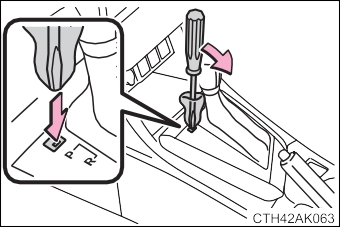 Pry the cover up with a flathead screw- driver or equivalent tool.
To prevent damage to the cover, cover the tip of the screwdriver with a rag.
Press the shift lock override button.
The shift lever can be shifted while the button is pressed.
4-2. Driving procedures
189
Fully depress the clutch pedal before operating the shift lever, and then release it slowly.
Shift the shift lever to R while lift- ing up the ring section.
*: If equipped
190 4-2. Driving procedures
Observe the following maximum allowable speeds in each gear when maxi- mum acceleration is necessary.
mph (km/h)
|
Shift position |
Maximum speed |
|
|
Vehicles with 15-inch and 16-inch tires |
Vehicles with 17-inch tires |
|
|
1 |
30 (49) |
30 (49) |
|
2 |
56 (91) |
56 (90) |
|
3 |
82 (133) |
82 (132) |
|
4 |
111 (179) |
111 (179) |
|
5 |
⎯ |
⎯ |
4-2. Driving procedures
191
Lane change to the right (move the lever partway and release it)
The right hand signals will flash 3 times.
The left hand signals will flash 3 times.
Vehicles without a smart key system The engine switch is in the“ON” position.
Vehicles with a smart key system
The engine switch is in IGNITION ON mode.
Check that a light bulb in the front or rear turn signal lights has not burned out.
Operate the lever again.
Operate the lever in the opposite direction.
The turn signals will keep flashing until the lever is released.
The number of times the turn signals flash during a lane change can be changed. (Customizable features P. 564)
192 4-2. Driving procedures
pull the parking brake lever while depressing the brake pedal.
To release the parking brake, slightly raise the lever and lower it completely while press- ing the button.
*1: For U.S.A.
*2: For Canada
P. 153
A buzzer will sound if the vehicle is driven at a speed of approximately 3 mph (5 km/h) or more with the parking brake engaged. (P. 480, 490)
P. 263
Download Manual