Do-it-yourself maintenance
|
Items |
Parts and tools |
|
Battery condition (P. 440) |
Warm water Baking soda Grease
Conventional wrench (for terminal clamp bolts)
Distilled water (batteries with vent plugs only)
|
|
Brake fluid level (P. 439) |
FMVSS No.116 DOT 3 or SAE J1703 brake fluid
Rag or paper towel
Funnel (used only for adding brake fluid)
|
|
Engine coolant level (P. 437) |
“Toyota Super Long Life Coolant” or a similar high quality ethylene glycol-based non-silicate, non- amine, non-nitrite and non-borate coolant with long- life hybrid organic acid technology
U.S.A.: “Toyota Super Long Life Coolant” is pre-mixed with 50% coolant and 50% deionized water. Canada: “Toyota Super Long Life Coolant” is pre-mixed with 55% coolant and 45% deionized water. Funnel (used only for adding engine coolant)
|
|
Engine oil level (P. 434) |
“Toyota Genuine Motor Oil” or equivalent
Rag or paper towel
Funnel (used only for adding engine oil)
|
|
Fuses (P. 470) |
Fuse with same amperage rating as original
|
|
Light bulbs (P. 473) |
Bulb with same number and wattage rating as origi- nal
Flathead screwdriver Wrench
|
|
Radiator/con- denser (P. 438) |
- |
|
Tire inflation pressure (P. 459) |
Tire pressure gauge
Compressed air source
|
|
Washer fluid (P. 443) |
Water or washer fluid containing antifreeze (for win- ter use)
Funnel (used only for adding water or washer fluid)
|
6-3. Do-it-yourself maintenance
429
430 6-3. Do-it-yourself maintenance
The hood will pop up slightly.
If the vehicle reaches a speed of 3 mph (5 km/h), the master warning light flashes and a buzzer sounds to indicate that the hood is not fully closed.
6-3. Do-it-yourself maintenance
431
432 6-3. Do-it-yourself maintenance
1 Fuse boxes (if equipped)
(P. 470)
Engine oil filler cap (P. 435)
Engine oil level dipstick
(P. 434)
Brake fluid reservoir
(P. 439)
Radiator (P. 438) Electric cooling fan Condenser (P. 438)
Engine coolant reservoir
(P. 437)
Washer fluid tank (P. 443)
3.5 L V6 (2GR-FKS) engine
6-3. Do-it-yourself maintenance
433
(P. 470)
Engine oil filler cap (P. 435)
Engine oil level dipstick
(P. 434)
Brake fluid reservoir
(P. 439)
Battery (P. 440)
Engine coolant reservoir
(P. 437)
Washer fluid tank (P. 443)
434 6-3. Do-it-yourself maintenance
Park the vehicle on level ground. After warming up the engine and turning it off, wait more than 5 minutes for the oil to drain back into the bottom of the engine.
Holding a rag under the end, pull the dipstick out.
2.5 L 4-cylinder (A25A-FKS) engine
3.5 L V6 (2GR-FKS) engine
Wipe the dipstick clean. Reinsert the dipstick fully.
Holding a rag under the end, pull the dipstick out and check the oil level.
Low Normal Excessive
The shape of the dipstick may differ depending on the type of vehicle or engine.
6-3. Do-it-yourself maintenance
435
Make sure to check the oil type and prepare the items needed before adding oil.
|
Engine oil selection |
P. 541 |
|
Oil quantity (Low Full) |
2.5 L 4-cylinder (A25A-FKS) engine 1.6 qt. (1.5 L, 1.3 Imp. qt.) 3.5 L V6 (2GR-FKS) engine 1.9 qt. (1.8 L, 1.6 lmp. qt.) |
|
Items |
Clean funnel |
Remove the oil filler cap by turning it counterclockwise. Add engine oil slowly, checking the dipstick.
Install the oil filler cap by turning it clockwise.
A certain amount of engine oil will be consumed while driving. In the following situations, oil consumption may increase, and engine oil may need to be refilled in between oil maintenance intervals.
436 6-3. Do-it-yourself maintenance
6-3. Do-it-yourself maintenance
437
Reservoir cap “F” line
“L” line
If the level is on or below the “L” line, add coolant up to the “F” line. (P. 531)
Only use “Toyota Super Long Life Coolant” or a similar high quality ethylene glycol based non-silicate, non-amine, non-nitrite, and non-borate coolant with long-life hybrid organic acid technology.
U.S.A.:
“Toyota Super Long Life Coolant” is a mixture of 50% coolant and 50% deion- ized water. (Minimum temperature: -31°F [-35°C])
Canada:
“Toyota Super Long Life Coolant” is a mixture of 55% coolant and 45% deion- ized water. (Minimum temperature: -44°F [-42°C])
For more details about engine coolant, contact your Toyota dealer.
Visually check the radiator, hoses, engine coolant reservoir caps, drain cock and water pump.
If you cannot find a leak, have your Toyota dealer test the cap and check for leaks in the cooling system.
438 6-3. Do-it-yourself maintenance
If either of the above parts is extremely dirty or you are not sure of their condition, have your vehicle inspected by your Toyota dealer.
6-3. Do-it-yourself maintenance
439
“MAX”
“MIN”
Make sure to check the fluid type and prepare the necessary item.
|
Fluid type |
FMVSS No.116 DOT 3 or SAE J1703 brake fluid |
|
Item |
Clean funnel |
Excess moisture in the brake fluid can cause a dangerous loss of braking effi- ciency. Use only newly opened brake fluid.
440 6-3. Do-it-yourself maintenance
Make sure that the battery terminals are not corroded and that there are no loose connections, cracks, or loose clamps.
Terminals
Hold-down clamp
Check that the fluid level is above the “LOWER LEVEL” line.
“LOWER LEVEL” line
If the fluid level is at or below the “LOWER LEVEL” line, add dis- tilled water.
If it is difficult to see the fluid
level from the side, check it by looking directly into the cell.
6-3. Do-it-yourself maintenance
441
When recharging, the battery produces hydrogen gas which is flammable and explosive. Therefore, observe the following before recharging:
If the system will not start even after multiple attempts, contact your Toyota dealer.
442 6-3. Do-it-yourself maintenance
6-3. Do-it-yourself maintenance
443
situations:
444 6-3. Do-it-yourself maintenance
 Check the spare tire condition and pressure if not rotated.
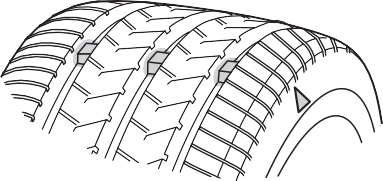
New tread Worn tread
Treadwear indicator
The location of treadwear indicators is shown by a “TWI” or “” mark, etc., molded into the sidewall of each tire.
Replace the tires if the treadwear indicators are showing on a tire.
Rotate the tires in the order shown.
To equalize tire wear and extend tire life, Toyota recommends that tire rotation is carried out at the same interval as tire inspection.
Do not fail to initialize the tire pressure warning system after tire rotation.
6-3. Do-it-yourself maintenance
445
Vehicles without a tire inflation pressure display function
If the tire pressure drops below a predetermined level, the driver is warned by a warning light. (P. 498)
Vehicles with a tire inflation pressure display function
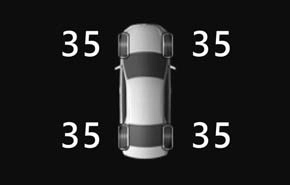
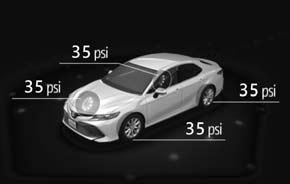 4.2-inch display 7-inch display
4.2-inch display 7-inch display
446 6-3. Do-it-yourself maintenance
When new tire pressure warning valve and transmitters are installed, new ID codes must be registered in the tire pressure warning computer and the tire pressure warning system must be initialized. (P. 448)
When the tire pressure warning system is initialized, the current tire inflation pressure is set as the benchmark pressure.
Park the vehicle in a safe place and stop the engine for 20 min- utes or more.
The initialization procedure cannot be started while the vehicle is moving.
Adjust the tire inflation pressure to the specified cold tire inflation pressure level. (P. 545)
Make sure to adjust the tire pressure to the specified cold tire infla- tion pressure level. The tire pressure warning system will operate based on this pressure level.
Start the engine. (P. 204, 206)
Select (4.2-inch display) or  (7-inch display) on the multi- information display using the meter control switches on the steer- ing wheel. (P. 100, 112).
6-3. Do-it-yourself maintenance
447
Select “TPWS” and then press  .
.
Select “Set Pressure” then press and hold until the tire pressure warning light blinks 3 times.
Then a message will be dis- played on the multi-information display.
Vehicles with a tire inflation pressure display function: “- -” will be displayed on the multi- information display for the inflation pressure of each tire while initialization is being per- formed.
Vehicles with a tire inflation pressure display function: Drive at approximately 25 mph (40 km/h) or more for approximately 10 to 30 minutes.
When initialization is complete, the inflation pressure of each tire will be displayed on the multi-information display.
Even if the vehicle is not driven at approximately 25 mph (40 km/h) or more, initialization can be completed by driving for a long time. However, if initialization does not complete after driving for 1 hour or more, park the vehicle in a safe place for approximately 20 minutes and then drive the vehicle again.
448 6-3. Do-it-yourself maintenance
Every tire pressure warning valve and transmitter has a unique ID code. In addition to the set of tire pressure warning system sensor ID codes initially registered to the vehicle, a second set of ID codes can be registered.
A second set of tire pressure warning system sensor ID codes can be registered at your Toyota dealer. When 2 sets of ID codes have been registered, either ID code set can be selected.
Vehicles with a tire inflation pressure display function
Every tire pressure warning valve and transmitter has a unique ID code. When replacing a tire pressure warning valve and transmitter, it is necessary to register the ID codes.
The ID codes can be registered on (4.2-inch display) or  (7- inch display) of the multi-information display.
When 2 sets of ID codes are registered, the corresponding ID code set for the installed wheels can be selected on (4.2-inch display) or  (7-inch display) of the multi-information display. It is not nec- essary to reregister the ID codes each time the wheels are changed.
For information regarding changing the registered ID codes for an ID code set, contact your Toyota dealer.
6-3. Do-it-yourself maintenance
449
Select (4.2-inch display) or  (7-inch display) on the multi- information display using the meter control switches on the steer- ing wheel. (P. 100, 112)
4.2-inch display: Select “Vehicle Settings” and then press  . 7-inch display: Select
  and then press and hold
  .
.
Select “TPWS” and then press  .
.
Select “Change Wheel” then press and hold until the tire pressure warning light blinks slowly 3 times.
Then a message will be dis- played on the multi-information display.
When registration is being per- formed, the tire pressure warn- ing light will blink for approximately 1 minute then illuminate and “- -” will be dis- played for the inflation pres- sure of each tire on the multi- information display.
Drive at approximately 25 mph (40 km/h) or more for approxi- mately 10 to 30 minutes.
Registration is complete when the tire pressure warning light turns off and the inflation pressure of each tire is displayed on the multi- information display.
Even if the vehicle is not driven at approximately 25 mph (40 km/h) or more, registration can be completed by driving for a long time. However, if registration does not complete after driving for 1 hour or more, perform the procedure again from the beginning.
Initialize the tire pressure warning system. (P. 446)
450 6-3. Do-it-yourself maintenance
Tires should be replaced if:
If you are not sure, consult with your Toyota dealer.
If the ID codes of the tire pressure warning valve and transmitters are not registered, the tire pressure warning system will not work properly. In this case, after driving for about 20 minutes, the tire pressure warning light will blink for approximately 1 minute and then illuminate to indicate a system malfunction.
Any tire over 6 years old must be checked by a qualified technician even if it has seldom or never been used or damage is not obvious.
The tire pressure warning system does not replace routine tire inflation pressure checks. Make sure to check tire inflation pressure as part of your routine of daily vehicle checks.
Generally, low profile tires will wear more rapidly and tire grip perfor- mance will be reduced on snowy and/or icy roads when compared to standard tires. Be sure to use snow tires on snowy and/or icy roads and drive carefully at a speed appropriate for road and weather conditions.
Check that the maximum load of the replacement tire is greater than 1/2 of the Gross Axle Weight Ratings (GAWR) of either the front axle or the rear axle, whichever is greater.
For the GAWR, see the Certification Label. For the maximum load of the tire, see the load limit at maximum cold tire inflation pressure mentioned on the sidewall of the tire. (P. 552)
6-3. Do-it-yourself maintenance
451
Summer tires are high-speed performance tires best suited to highway driving under dry conditions. Since summer tires do not have the same traction performance as snow tires, summer tires are inadequate for driving on snow-covered or icy roads. For driving on snow-covered roads or icy roads, the use of snow tires is recommended. When install- ing snow tires, be sure to replace all four tires.
All season tires are designed to provide better traction in snow and to be adequate for driving in most winter conditions as well as for use year-round. All season tires, however, do not have adequate traction performance compared with snow tires in heavy or loose snow. Also, all season tires fall short in acceleration and handling performance com- pared with summer tires in highway driving.
For driving on snow-covered roads or icy roads, we recommend using snow tires. If you need snow tires, select tires of the same size, con- struction and load capacity as the originally installed tires. Since your vehicle has radial tires as original equipment, make sure your snow tires also have radial construction. Do not install studded tires without first checking local regulations for possible restrictions. Snow tires should be installed on all wheels. (P. 353)
The effectiveness of the tires as snow tires is lost.
452 6-3. Do-it-yourself maintenance
Vehicles with a tire inflation pressure display function: If tire position information is not correctly displayed due to the radio wave conditions, the display may be corrected by changing the location of the vehicle as the radio wave conditions may change.
Also, make sure the tires are cold before performing the initialization procedure or adjusting the tire inflation pressure.
The warning of the tire pressure warning system will change in accor- dance with the conditions under which it was initialized. For this reason, the system may give a warning even if the tire pressure does not reach a low enough level, or if the pressure is higher than the pressure that was adjusted to when the system was initialized.
6-3. Do-it-yourself maintenance
Vehicles without a tire inflation pressure display function
453
Initialization can be completed in a few minutes. However, in the following cases, the settings have not been recorded and the system will not oper- ate properly. If repeated attempts to record tire inflation pressure settings are unsuccessful, have the vehicle inspected by your Toyota dealer.
Vehicles with a tire inflation pressure display function
If initialization is not complete after driving approximately 30 minutes, continue driving for a while.
If initialization is not complete after driving for approximately 1 hour, park the vehicle in a safe place for approximately 20 minutes and then drive the vehicle again.
454 6-3. Do-it-yourself maintenance
If the vehicle is driven after ID code registration is started, to cancel reg- istration, perform the ID code registration start procedure again and turn the engine switch off before driving.
6-3. Do-it-yourself maintenance
455
If ID code registration is not complete after driving for approximately 30 minutes, continue driving for a while.
If ID registration is not complete after driving for approximately 1 hour, park the vehicle in a safe place for approximately 20 minutes and then perform the ID code registration procedure again.
456 6-3. Do-it-yourself maintenance
For vehicles sold in the U.S.A.
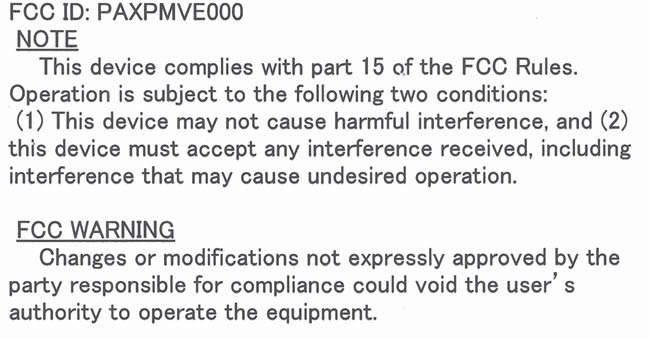

For vehicles sold in Canada
Model: PMV-E000
6-3. Do-it-yourself maintenance
457
458 6-3. Do-it-yourself maintenance
NOTICE
When a tire is repaired with liquid sealants, the tire pressure warning valve and transmitter may not operate properly. If a liquid sealant is used, contact your Toyota dealer or other qualified service shop as soon as possible. Make sure to replace the tire pressure warning valve and transmitter when replacing the tire. (P. 446)
Take particular care when driving on roads with loose surfaces or pot- holes.
These conditions may cause losses in tire inflation pressure, reducing the cushioning ability of the tires. In addition, driving on rough roads may cause damage to the tires themselves, as well as the vehicle’s wheels and body.
Low profile tires may cause greater damage than usual to the tire wheel when sustaining impact from the road surface. Therefore, pay attention to the following:
Do not continue driving, or your tires and/or wheels may be ruined.
6-3. Do-it-yourself maintenance
459

460 6-3. Do-it-yourself maintenance
Tire pressure gauge
Remove the tire valve cap.
Press the tip of the tire pressure gauge onto the tire valve. Read the pressure using the gauge gradations.
If the tire inflation pressure is not at the recommended level, adjust the pressure.
If you add too much air, press the center of the valve to deflate.
After completing the tire inflation pressure measurement and adjustment, apply soapy water to the valve and check for leakage.
Put the tire valve cap back on.
You should check tire inflation pressure every two weeks, or at least once a month.
Do not forget to check the spare.
Driving with incorrect tire inflation pressure may result in the following:
If a tire needs frequent inflating, have it checked by your Toyota dealer.
6-3. Do-it-yourself maintenance
When checking tire inflation pressure, observe the following:
461
If your vehicle has been parked for at least 3 hours or has not been driven for more than 1 mile or 1.5 km, you will get an accurate cold tire inflation pressure reading.
It is difficult to judge if a tire is properly inflated based only on its appear- ance.
Passengers and luggage weight should be placed so that the vehicle is balanced.
462 6-3. Do-it-yourself maintenance
Replacement wheels are available at your Toyota dealer.
*: Conventionally referred to as “offset”.
Toyota does not recommend using the following:
The wheels of your vehicle are equipped with tire pressure warning valve and transmitters that allow the tire pressure warning system to provide advance warning in the event of a loss in tire inflation pressure. When- ever wheels are replaced, tire pressure warning valve and transmitters must be installed. (P. 446)
6-3. Do-it-yourself maintenance
463
464 6-3. Do-it-yourself maintenance
Open the glove box and remove the glove box cover inside the glove box.
Remove the filter cover. Unlock the filter cover.
Move the filter cover in the direction of the arrow, and then pull it out of the claws.
Remove the filter case.
There may be foreign objects on top of the air conditioning filter.
6-3. Do-it-yourself maintenance
The “UP” marks shown on the fil- ter and the filter case should be pointing up.
465
Inspect and replace the air conditioning filter according to the maintenance schedule. In dusty areas or areas with heavy traffic flow, early replacement may be required. (For scheduled maintenance information, please refer to the “Schedule maintenance guide” or “Owner’s Manual Supplement”.)
The filter may be clogged. Check the filter and replace if necessary.
When fragrances are placed in your vehicle, the deodorizing effect may become significantly weakened in a short period.
When an air conditioning odor comes out continuously, replace the air condi- tioning filter.
466 6-3. Do-it-yourself maintenance
Replace the battery with a new one if it is depleted.
Vehicles without a smart key system Remove the key cover.
To prevent damage to the key,
cover the tip of the flathead screw- driver with a rag.
If the battery cover is difficult to remove, lift the edge to remove it.
Insert a new battery with the “+” terminal facing up.
6-3. Do-it-yourself maintenance
Push the entire edge of the battery cover into the key.
Align the key cover with the key and then press it straight into the key.
Make sure that the key cover is securely installed without any gaps between it and the key.
467
468 6-3. Do-it-yourself maintenance
Release the lock and remove the mechanical key.
Remove the key cover.
To prevent damage to the key, cover the tip of the flathead screw- driver with a rag.
When removing the cover, the electronic key module may stick to the cover and the battery may not be visible. In this case, remove the electronic key module in order to remove the battery.
Insert a new battery with the “+” terminal facing up.
Operate the or  switch and check that the doors can be locked/unlocked.
6-3. Do-it-yourself maintenance
469
Be careful not to lose the battery or any other small parts.
The following symptoms may occur:
470 6-3. Do-it-yourself maintenance
Engine compartment (type A) Engine compartment (type B)
(if equipped)
Push the tabs in and lift the lid off. Push the tabs in and lift the lid
off.
Under the driver’s side instru- ment panel
Remove the lid.
Make sure to push the claw when removing/installing the lid.
6-3. Do-it-yourself maintenance
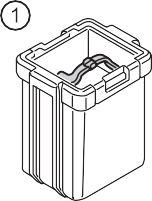
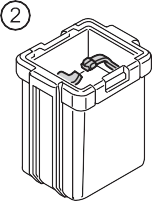
Only type A fuses can be removed using the pullout tool.

 Type A Type B
Type C
471
Replace the blown fuse with a new fuse of an appropriate amperage rat- ing. The amperage rating can be found on the fuse box lid.
472 6-3. Do-it-yourself maintenance
The fuses are designed to blow, protecting the wiring harness from damage.
6-3. Do-it-yourself maintenance
473
Front Rear
Front turn signal/parking lights (bulb type)
Front side marker lights (bulb type)
Back-up lights (bulb type)
Rear turn signal lights (bulb type)
Rear side marker lights (bulb type)
474 6-3. Do-it-yourself maintenance
Remove the light bulb.
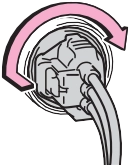 Install a new light bulb and then install the bulb base to the light unit by inserting it and turning it clockwise.
6-3. Do-it-yourself maintenance
Turn the steering wheel to the left when replacing the right side light bulb, and turn the steering wheel to the right when replac- ing the left side light bulb.
To protect the front bumper from being damaged, apply protective tape around the clip as shown in the illustra- tion.
Use masking tape, etc. Do not use duct tape, as it may leave residue or damage the paint when removed.
475
476 6-3. Do-it-yourself maintenance
To separate the front bumper from the fender liner, pry up the fender liner while pulling the front bumper outward as shown in the illustration.
Remove the light bulb.
Install a new light bulb and then install the bulb base to the light unit by inserting it and turning it clockwise.
6-3. Do-it-yourself maintenance
Make sure that the fender liner is correctly positioned on the inner side of the front bumper.
Remove the protective tape.
477
478 6-3. Do-it-yourself maintenance
Partly remove the trunk lid cover.
Disconnect the connector while depressing the lock release. (When replacing right side bulb only.)
Turn the bulb base counter- clockwise.
Remove the light bulb.
6-3. Do-it-yourself maintenance
479
Install a new light bulb and then install the bulb base to the light unit by inserting it and turning it clockwise.
Connect the connector. (When replacing right side bulb only.)
Reinstall the trunk lid cover with the clips.
480 6-3. Do-it-yourself maintenance
Use masking tape, etc. Do not use duct tape, as it may leave residue or damage the paint when removed.
 Insert a flathead screw- driver between the cover and the light unit and pry up the cover in several positions as shown in the illustration to disengage the claws (indicated by a dotted line).
Pull the cover toward the rear of the vehicle to dis- engage the claws (indi- cated by a dotted line) and remove the cover.
To prevent scratching the vehi- cle, wrap the tip of the flathead screwdriver with a cloth, etc.
Remove the light unit.
6-3. Do-it-yourself maintenance
481
Hold the folded portion and pull it toward the rear of the vehicle to remove the light unit.
Turn the bulb base counterclockwise.
Rear turn signal lights Rear side marker lights
Rear turn signal lights Rear side marker lights
482 6-3. Do-it-yourself maintenance
Rear turn signal lights Rear side marker lights
Align the tabs and push the light unit toward the front of the vehi- cle to install it.
Install the cover.
6-3. Do-it-yourself maintenance
483
If any of the lights listed below has burnt out, have it replaced by your Toyota dealer.
The lights other than the front turn signal/parking lights (bulb type), front side marker lights (bulb type), back-up lights (bulb type), rear turn signal lights (bulb type) and rear side marker lights (bulb type) consist of a number of LEDs. If any of the LEDs burn out, take your vehicle to your Toyota dealer to have the light replaced.
Temporary condensation build-up on the inside of the headlight lens does not indicate a malfunction.
Contact your Toyota dealer for more information in the following situations:
484 6-3. Do-it-yourself maintenance
|
485 |
|||
|
When trouble arises |
7 |
||
|
7-1. Essential information |
|||
|
Emergency flashers 486 |
|||
|
If your vehicle has |
|||
|
to be stopped in |
|||
|
an emergency 487 |
|||
|
If the vehicle is trapped |
|||
|
in rising water 489 |
|||
|
7-2. Steps to take in |
|||
|
an emergency |
|||
|
If your vehicle needs |
|||
|
to be towed 490 |
|||
|
If you think something |
|||
|
is wrong 493 |
|||
|
Fuel pump shut off |
|||
|
system 494 |
|||
|
If a warning light turns |
|||
|
on or a warning buzzer |
|||
|
sounds 495 |
|||
|
If a warning message |
|||
|
is displayed 505 |
|||
|
If you have a flat tire 510 |
|||
|
If the engine will not |
|||
|
start 521 |
|||
|
If the electronic key does |
|||
|
not operate properly |
|||
|
(vehicles with a smart |
|||
|
key system) 523 |
|||
|
If the vehicle battery |
|||
|
is discharged 526 |
|||
|
If your vehicle |
|||
|
overheats 531 |
|||
|
If the vehicle becomes |
|||
|
stuck 534 |
Download Manual