CRUISE CONTROL SYSTEMS — IF EQUIPPED
Your vehicle may be equipped with the Cruise Control system or the Adaptive Cruise Control (ACC) system:
In vehicles equipped with ACC, if an ACC distance is not set, Fixed Speed Cruise Control will not detect vehicles directly ahead of you. Always be aware of the mode selected.
CRUISE CONTROL — IF EQUIPPED
When engaged, the Cruise Control takes over accelerator operations at speeds greater than 20 mph (32 km/h), or 25 mph (40 km/h), depending on the powertrain equipped in the vehicle.
The Cruise Control buttons are located on the right side of the steering wheel.
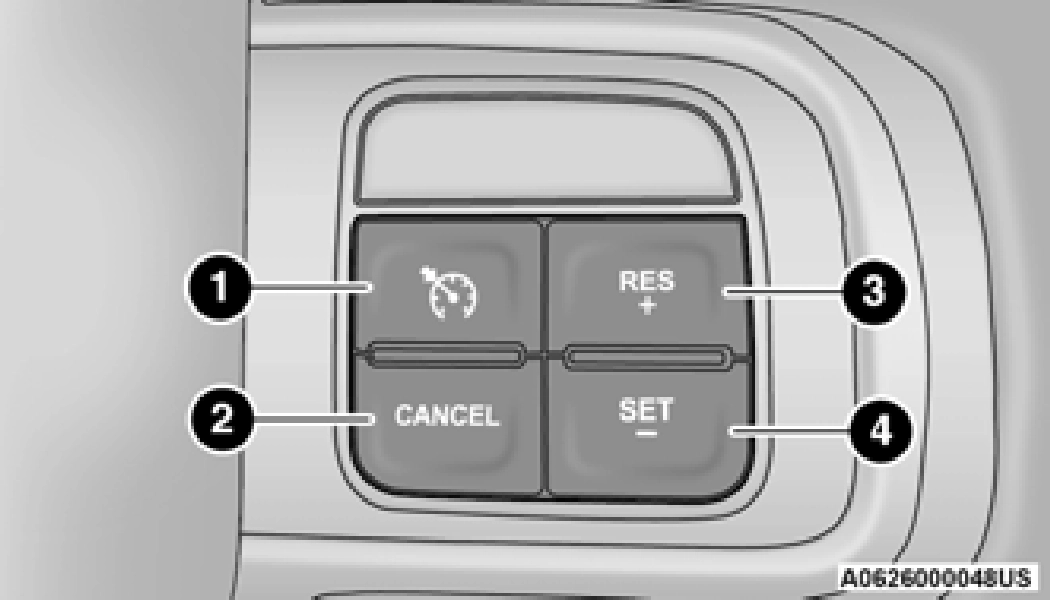
1 — On/Off Button 2 — CANCEL
3 — RES (+)
4 — SET (-)
In order to ensure proper operation, the Cruise Control system has been designed to shut down if multiple Cruise Control functions are operated at the same time. If this occurs, the Cruise Control system can be reactivated by pushing the Cruise Control on/off button and resetting the desired vehicle set speed.
To Activate
Push the on/off button to activate the Cruise Control. The cruise indicator light in the instrument cluster display will illuminate. To turn the system off, push the on/off button a second time. The cruise indicator light will turn off. The system should be turned off when not in use.
Turn the Cruise Control on. When the vehicle has reached the desired speed, push the SET (-) button and release. Release the accelerator and the vehicle will operate at the selected speed. Once a speed has been set, a message “CRUISE CONTROL SET TO MPH (km/h)” will
appear indicating the set speed. A cruise
indicator light, along with set speed will also appear and stay on in the instrument cluster display when the speed is set.
The vehicle should be traveling at a steady speed and on level ground before pushing the SET (-) button.
When Cruise Control is set, you can increase the speed by pushing the RES (+) button, or decrease speed by pushing the SET (-) button.
U.S. Speed (mph)
Metric Speed (km/h)
While the Cruise Controls is set, press the accelerator as you would normally. When the pedal is released, the vehicle will return to the set speed.
Using Cruise Control On Hills
The transmission may downshift on hills to maintain the vehicle set speed.
The Cruise Control system maintains speed up and down hills. A slight speed change on moderate hills is normal. On steep hills, a greater speed loss or gain may occur so it may be preferable to drive without Cruise Control.
To resume a previously set speed, push the RES (+) button and release. Resume can be used at any speed above 20 mph (32 km/h).
A soft tap on the brake pedal, pushing the CANCEL button, or normal brake pressure while slowing the vehicle will deactivate the Cruise Control without erasing the set speed from memory.
The following conditions will also deactivate the Cruise Control without erasing the set speed from memory:
Pushing the on/off button, or placing the ignition in the OFF position, erases the set speed from memory.
ADAPTIVE CRUISE CONTROL (ACC) — IF EQUIPPED
Adaptive Cruise Control (ACC) increases the driving convenience provided by Cruise Control while traveling on highways and major roadways. However, it is not a safety system and not designed to prevent collisions. The Cruise Control function performs differently if your vehicle is not equipped with ACC
page 200.
ACC will allow you to keep Cruise Control engaged in light to moderate traffic conditions without the constant need to reset your speed. ACC utilizes a radar sensor and a forward facing camera designed to detect a vehicle directly ahead of you to maintain a set speed.
tions to the vehicle will affect the perfor- 4
mance of the Adaptive Cruise Control and
Forward Collision Warning system.
(Continued)
(Continued)
The buttons on the right side of the steering wheel operate the ACC system.
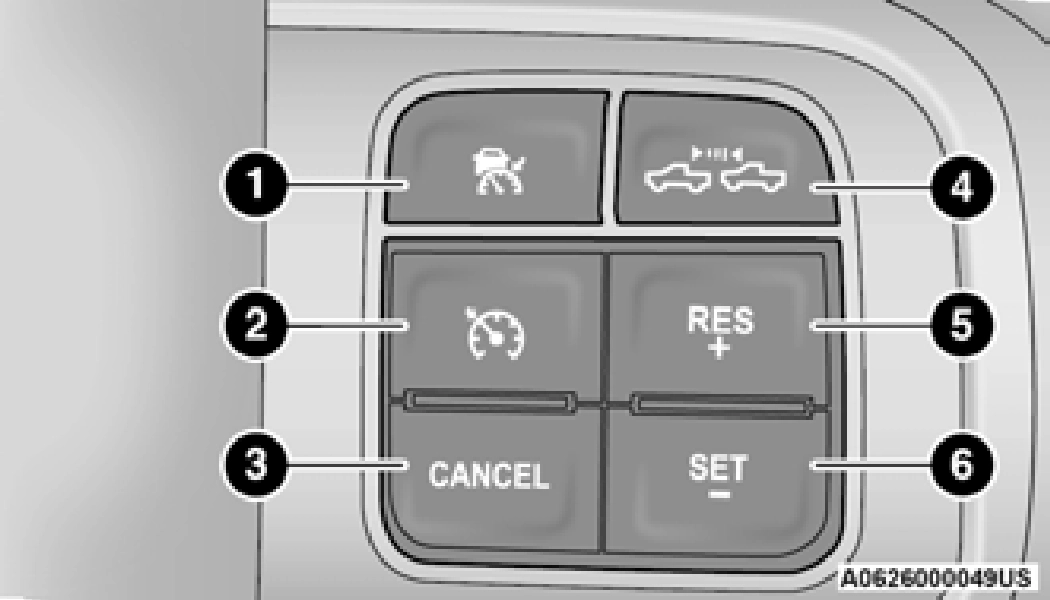
4 — Distance Button 5 — RES (+)
6 — SET (-)
The instrument cluster display will show the current ACC system settings. The information it displays depends on ACC system status.
Push the ACC on/off button until one of the following appears in the instrument cluster display:
When ACC is deactivated, the display will read “Adaptive Cruise Control Off.”
When ACC is activated, but the vehicle speed setting has not been selected, the display will read “Adaptive Cruise Control Ready.”
When the RES (+) or the SET(-) button is pushed, the display will read “ACC SET.”
When ACC is set, the set speed will show in the instrument cluster display.
The ACC screen may display once again if any of the following ACC activity occurs:
The instrument cluster display will return to the last display selected after five seconds of no ACC display activity.
The minimum set speed for the ACC system is 20 mph (32 km/h).
When the system is turned on and in the ready state, the instrument cluster display will read “ACC Ready.”
When the system is off, the instrument cluster display will read “Adaptive Cruise Control (ACC) Off.”
You cannot engage ACC under the following conditions:
again. At this time, the system will turn off and the instrument cluster display will show “Adaptive Cruise Control (ACC) Off.”
Leaving the Adaptive Cruise Control (ACC) system on when not in use is dangerous. You could accidentally set the system or cause it to go faster than you want. You could lose
control and have a collision. Always leave the 4
system off when you are not using it.
minimum speed range
Push and release the Adaptive Cruise Control (ACC) on/off button. The ACC menu in the instrument cluster displays “ACC Ready.”
To turn the system off, push and release the Adaptive Cruise Control (ACC) on/off button
When the vehicle reaches the speed desired, push the SET (-) button and release. The instrument cluster display will show the set speed.
Fixed Speed Cruise Control can be used without an ACC distance set. To change between the different modes, push the ACC on/off button which turns the ACC and the Fixed Speed Cruise Control off. Pushing the Fixed Speed Cruise Control on/off button will result in turning on (changing to) Fixed Speed Cruise Control mode.
If ACC is set when the vehicle speed is below 20 mph (32 km/h), the set speed will default to 20 mph (20 km/h).
Fixed Speed Cruise Control cannot be set below 20 mph (32 km/h).
If either system is set when the vehicle speed is above 20 mph (32 km/h), the set speed shall be the current speed of the vehicle.
The following conditions cancel the ACC or Fixed Speed Cruise Control systems:
The following conditions will only cancel the ACC system:
The system will turn off and clear the set speed in memory if:
If there is a set speed in memory push the RES (+) button and then remove your foot from the accelerator pedal. The instrument cluster display will display the last set speed.
Resume can be used at any speed above 20 mph (32 km/h) when only Fixed Speed Cruise Control is being used.
Resume can be used at any speed above 0 mph (0 km/h) when ACC is active.
After setting a speed, you can increase the set speed by pushing the RES (+) button, or decrease speed by pushing the SET (-) button.
U.S. Speed (mph)
Metric Speed (km/h)
heated). 4
The specified following distance for Adaptive Cruise Control (ACC) can be set by varying the distance setting between four bars (longest), three bars (long), two bars (medium) and one bar (short). Using this distance setting and the vehicle speed, ACC calculates and sets the distance to the vehicle ahead. This distance setting displays in the instrument cluster display.
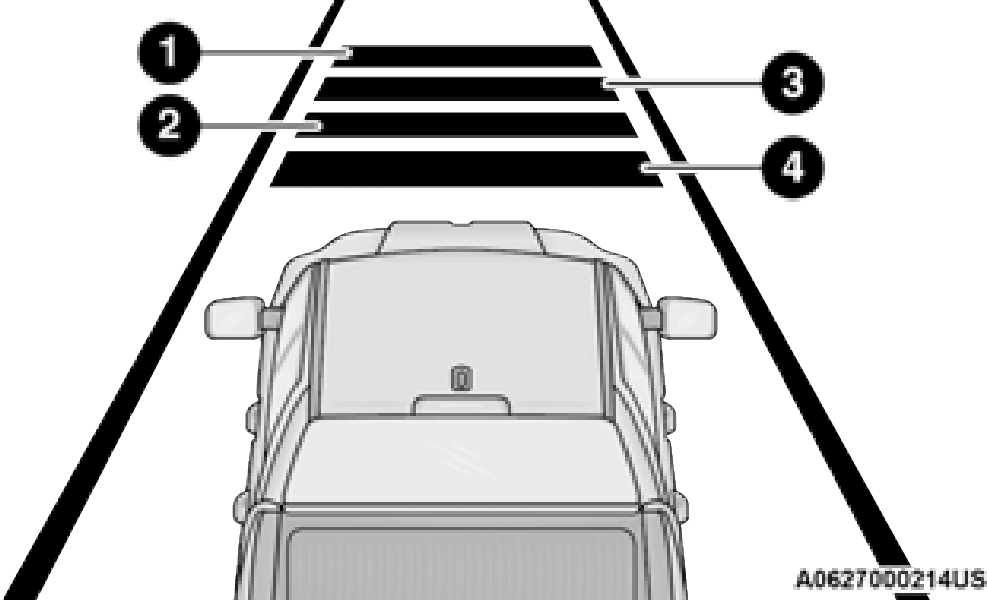
1 — Longest Distance Setting (Four Bars) 2 — Medium Distance Setting (Two Bars) 3 — Long Distance Setting (Three Bars) 4 — Short Distance Setting (One Bar)
To adjust the distance setting, push the Distance button and release. Each time the button is pushed, the distance setting increases by one bar (longer). When the farthest distance is set, pushing the Distance button again will reset to the shortest distance.
If there is no vehicle ahead, the vehicle will maintain the set speed. If a slower moving vehicle is detected in the same lane, the instrument cluster displays the ACC Set With Target Detected Indicator Light, and the system
adjusts vehicle speed automatically to maintain the distance setting, regardless of the set speed.
The vehicle will then maintain the set distance until:
The maximum braking applied by ACC is limited; however, the driver can always apply the brakes manually, if necessary.
The brake lights will illuminate whenever the ACC system applies the brakes.
A Proximity Warning will alert the driver if ACC predicts that its maximum braking level is not sufficient to maintain the set distance. If this occurs, a visual alert “BRAKE” will flash in the instrument cluster display and a chime will sound while ACC continues to apply its maximum braking force.
The “BRAKE!” screen in the instrument cluster display is a warning for the driver to take action and does not necessarily mean that the Forward Collision Warning system is applying the brakes autonomously.
When a trailer is detected, the ACC system automatically defaults to the longest setting (four bars). The setting can be overridden by pushing the Distance button on the steering wheel.
When driving with ACC engaged and following a vehicle, the system will provide an additional acceleration up to the ACC set speed to assist in passing the vehicle. This additional acceleration is triggered when the driver utilizes the left turn signal and will only be active when passing on the left hand side.
If the ACC system brings your vehicle to a standstill while following the vehicle in front, your vehicle will resume motion without any driver intervention if the vehicle in front starts moving within two seconds.
If the vehicle in front does not start moving within two seconds of your vehicle coming to a standstill, the ACC with Stop system will cancel and the brakes will release. A cancel message will display on the instrument cluster display and produce a warning chime. The driver must now manually operate the vehicle's accelerator and brakes.
While ACC is holding your vehicle at a standstill, if the driver seat belt is unbuckled or the driver door is opened, the ACC system will cancel and the brakes will release. Driver intervention will be required at this moment.
“Wipe Front Radar Sensor In Front Of Vehicle” Warning
The “ACC/FCW Unavailable Wipe Front Radar Sensor” warning will display and a chime will sound when conditions temporarily limit system performance.
This most often occurs at times of poor visibility, such as in snow or heavy rain. The ACC system may also become temporarily blinded due to obstructions, such as mud, dirt or ice. In these cases, the instrument cluster display will display “ACC/FCW Unavailable Wipe Front Radar Sensor” and the system will deactivate.
This message can sometimes be displayed while driving in highly reflective areas (i.e. ice and snow, or tunnels with reflective tiles). The ACC system will recover after the vehicle has left these areas. Under rare conditions, when the radar is not tracking any vehicles or objects in its path this warning may temporarily occur.
If the “ACC/FCW Unavailable Wipe Front Radar Sensor” warning is active, Fixed Speed Cruise Control is still available.
If weather conditions are not a factor, the driver should examine the sensor. It may require cleaning or removal of an obstruction. The sensor is located in the camera in the center of the windshield, on the forward side of the rearview mirror.
To keep the ACC system operating properly, it is important to note the following maintenance items:
the windshield.
When the condition that deactivated the system is no longer present, the system will return to the “Adaptive Cruise Control Off” state and will resume function by simply reactivating it.
“Clean Front Windshield” Warning
The “ACC/FCW Limited Functionality Clean Front Windshield” warning will display and a chime will sound when conditions temporarily limit system performance. This most often occurs at times of poor visibility, such as in snow or heavy rain and fog. The ACC system may also become temporarily blinded due to obstructions, such as mud, dirt, or ice on windshield, driving directly into the sun and fog on the inside of glass. In these cases, the instrument cluster display will show “ACC/FCW Limited Functionality Clean Front Windshield” and the system will have degraded performance.
This message can sometimes be displayed while driving in adverse weather conditions. The ACC/FCW system will recover after the vehicle has left these areas. Under rare conditions, when the camera is not tracking any vehicles or objects in its path this warning may temporarily occur.
If weather conditions are not a factor, the driver should examine the windshield and the camera located on the back side of the inside rearview mirror. They may require cleaning or removal of an obstruction.
When the condition that created limited functionality is no longer present, the system will return to full functionality.
If the “ACC/FCW Limited Functionality Clean Front Windshield” message occurs frequently (e.g. more than once on every trip) without any snow, rain, mud, or other obstruction, have the windshield and forward facing camera inspected at your authorized dealer.
Service ACC/FCW Warning
If the system turns off, and the instrument cluster displays “ACC/FCW Unavailable Service Required” or “Cruise/FCW Unavailable Service Required”, there may be an internal system fault or a temporary malfunction that limits ACC functionality. Although the vehicle is still drivable under normal conditions, ACC will be temporarily unavailable. If this occurs, try activating ACC again later, following an ignition cycle. If the problem persists, see an authorized dealer.
In certain driving situations, ACC may have detection issues. In these cases, ACC may brake late or unexpectedly. The driver needs to stay alert and may need to intervene. The following are examples of these types of situations:
Towing A Trailer
ACC while towing a trailer is recommended only with an Integrated Trailer Brake Controller.
Aftermarket trailer brake controllers will not activate the trailer brakes when ACC is braking.
Offset Driving
ACC may not detect a vehicle in the same lane that is offset from your direct line of travel, or a vehicle merging in from a side lane. There may not be sufficient distance to the vehicle ahead. The offset vehicle may move in and out of the line of travel, which can cause your vehicle to brake or accelerate unexpectedly.
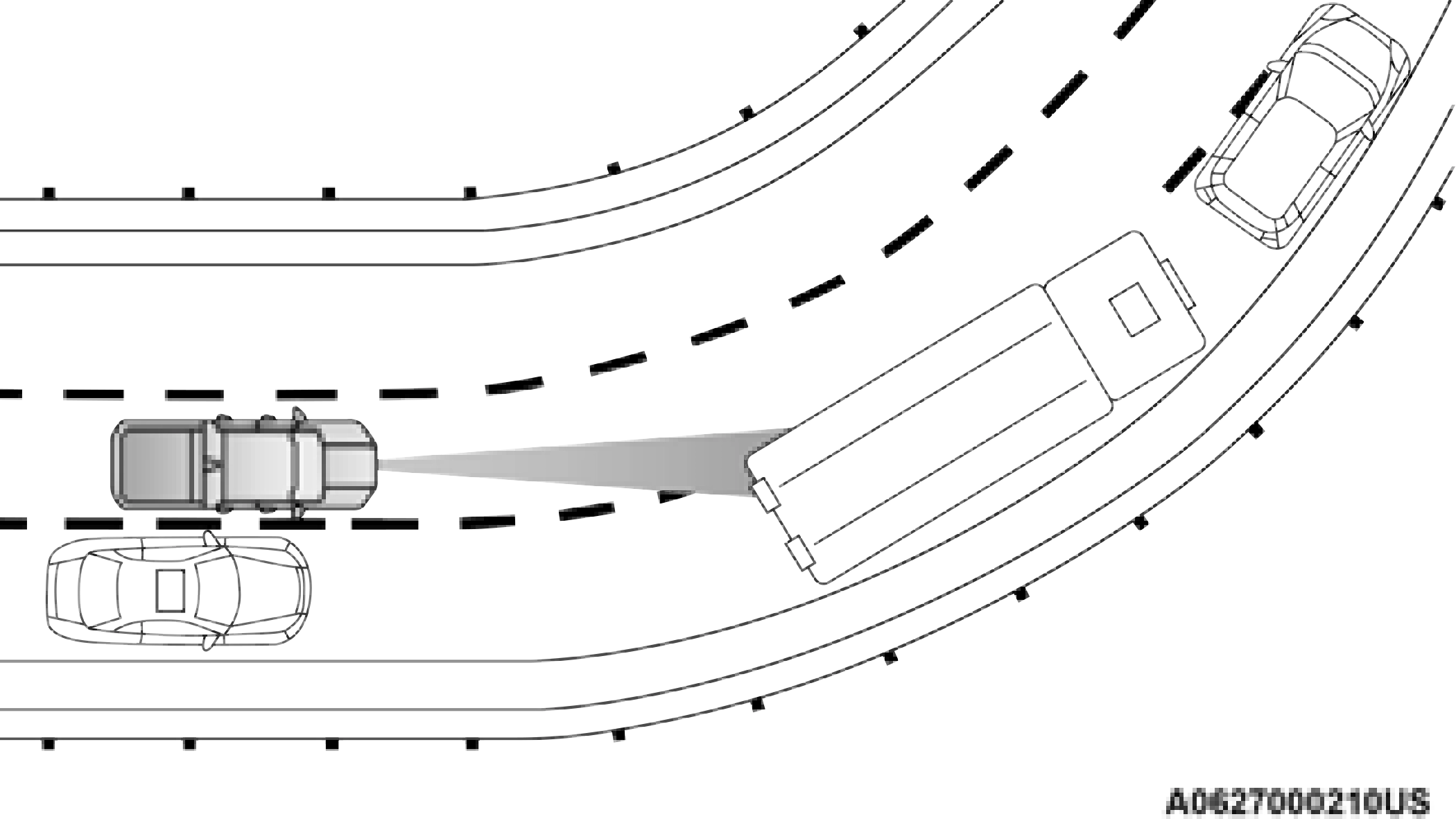
Turns And Bends
When driving on a curve with ACC engaged, the system may decrease the vehicle speed and acceleration for stability reasons, with no target vehicle detected. Once the vehicle is out of the curve the system will resume your original set speed. This is a part of normal ACC system functionality.
On tight turns ACC performance may be limited.
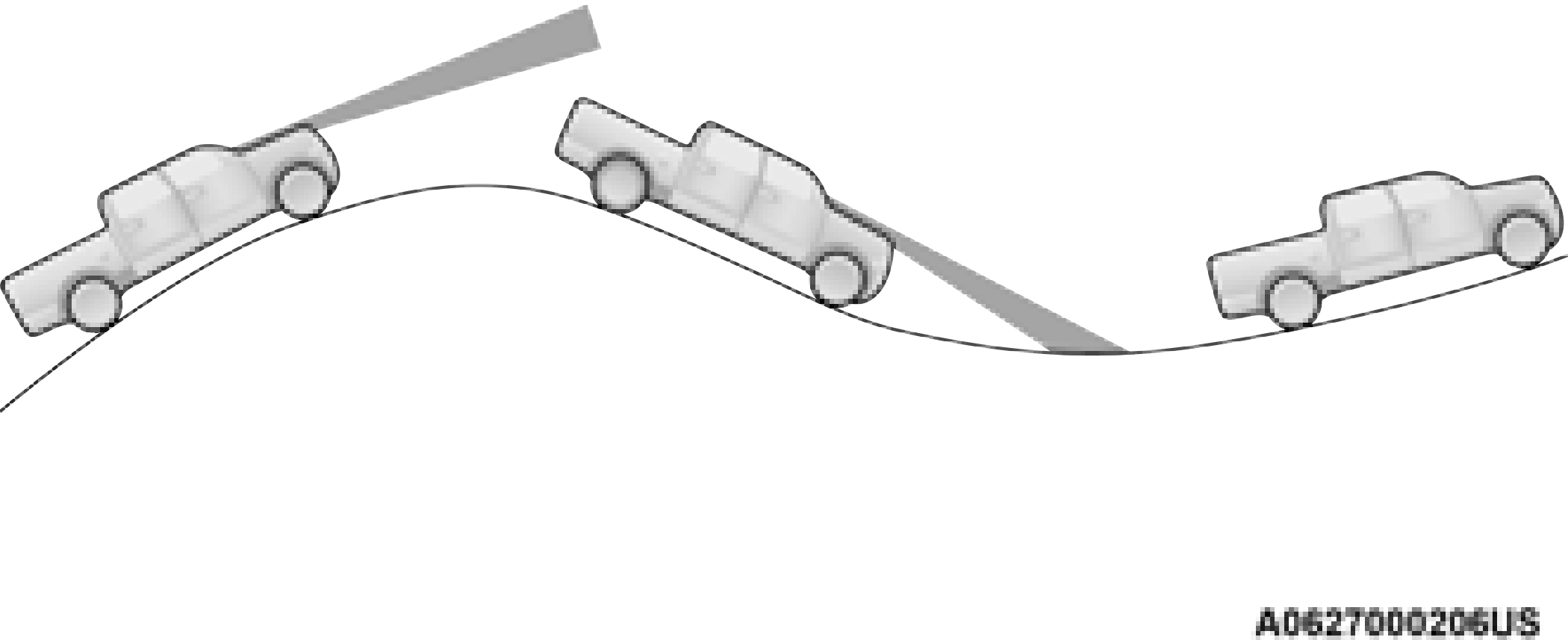
Using ACC On Hills
When driving on hills, ACC may not detect a vehicle in your lane. Depending on the speed, vehicle load, traffic conditions, and the steepness of the hills, ACC performance may be limited.
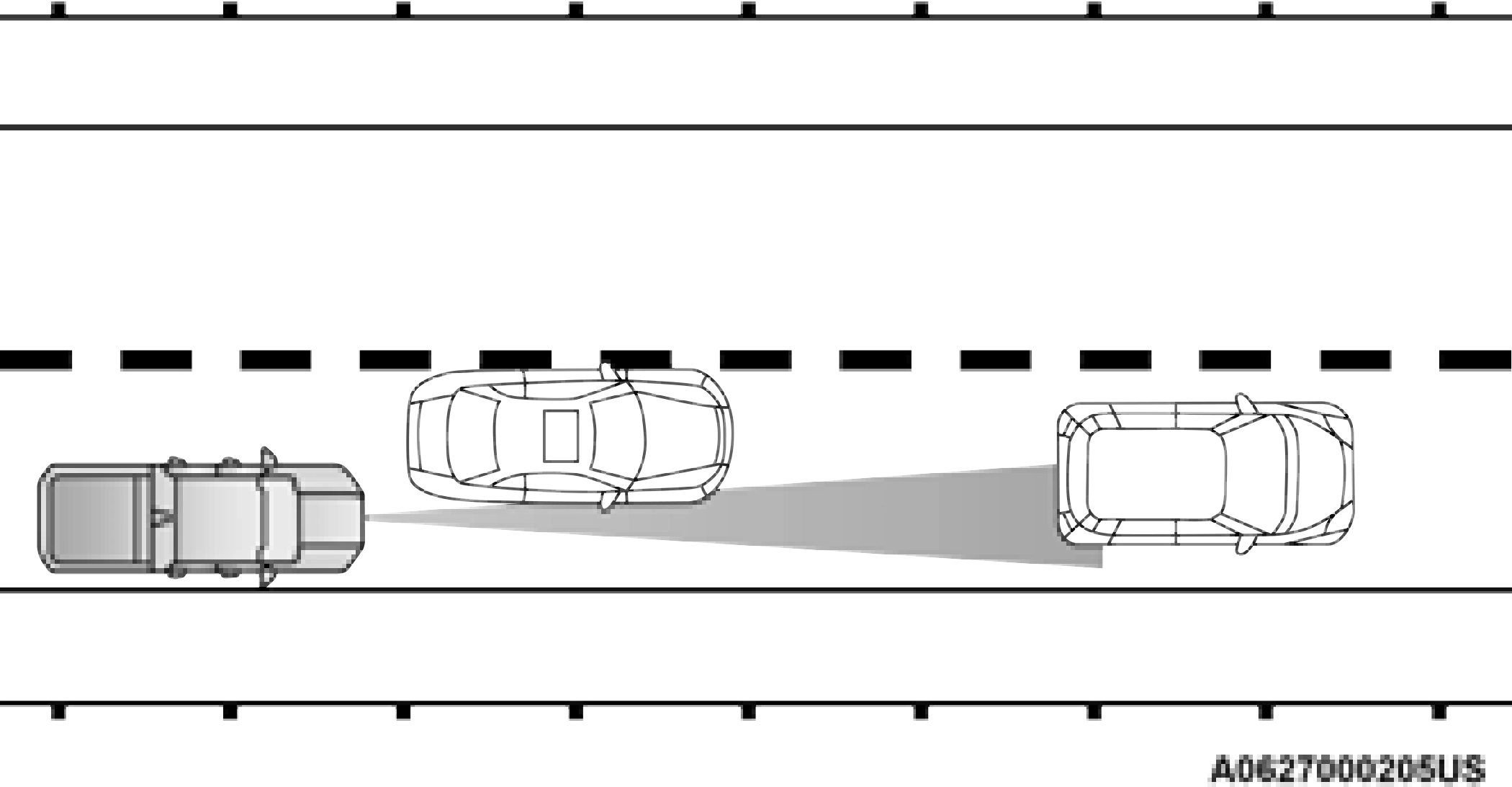
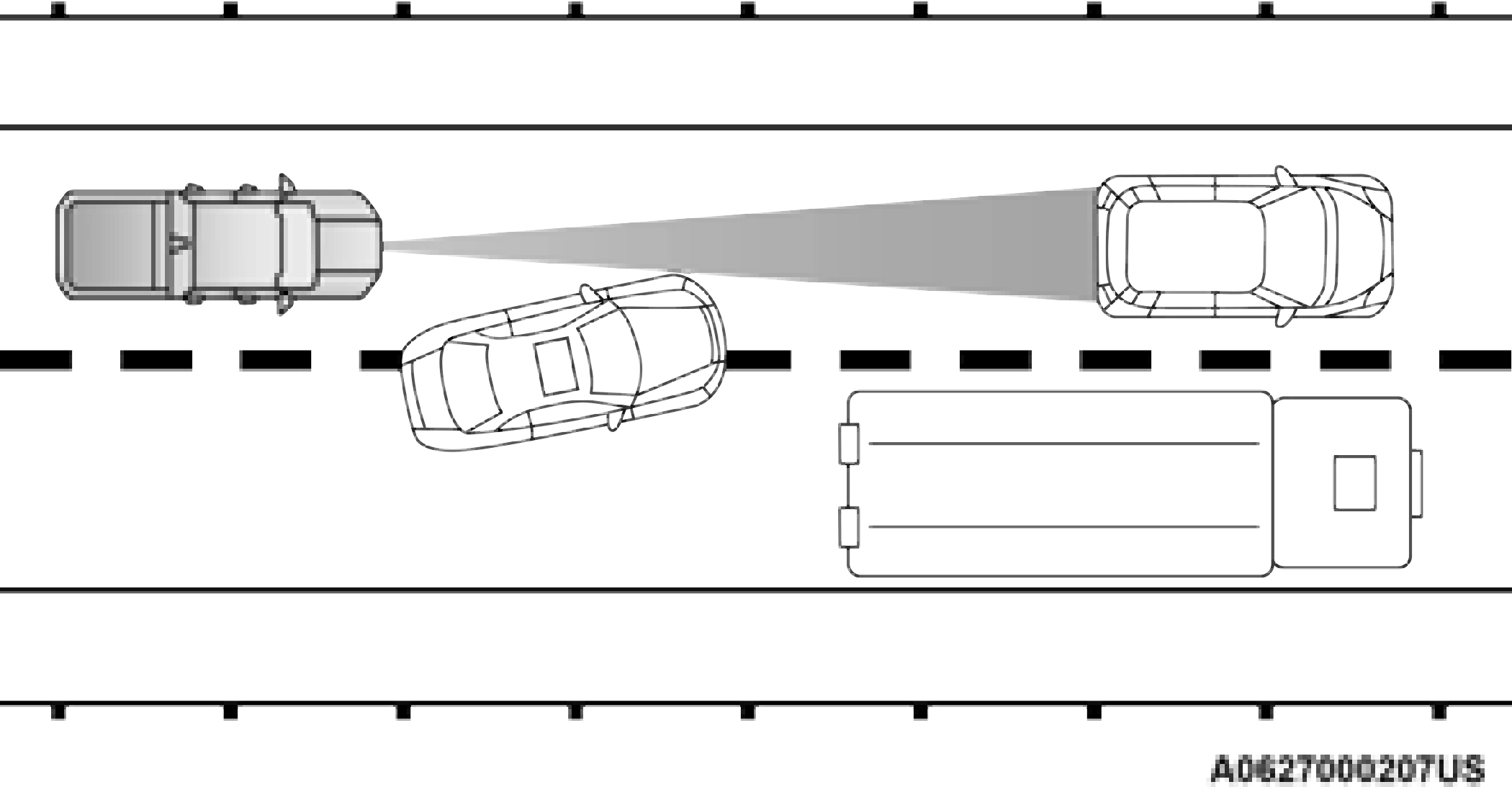
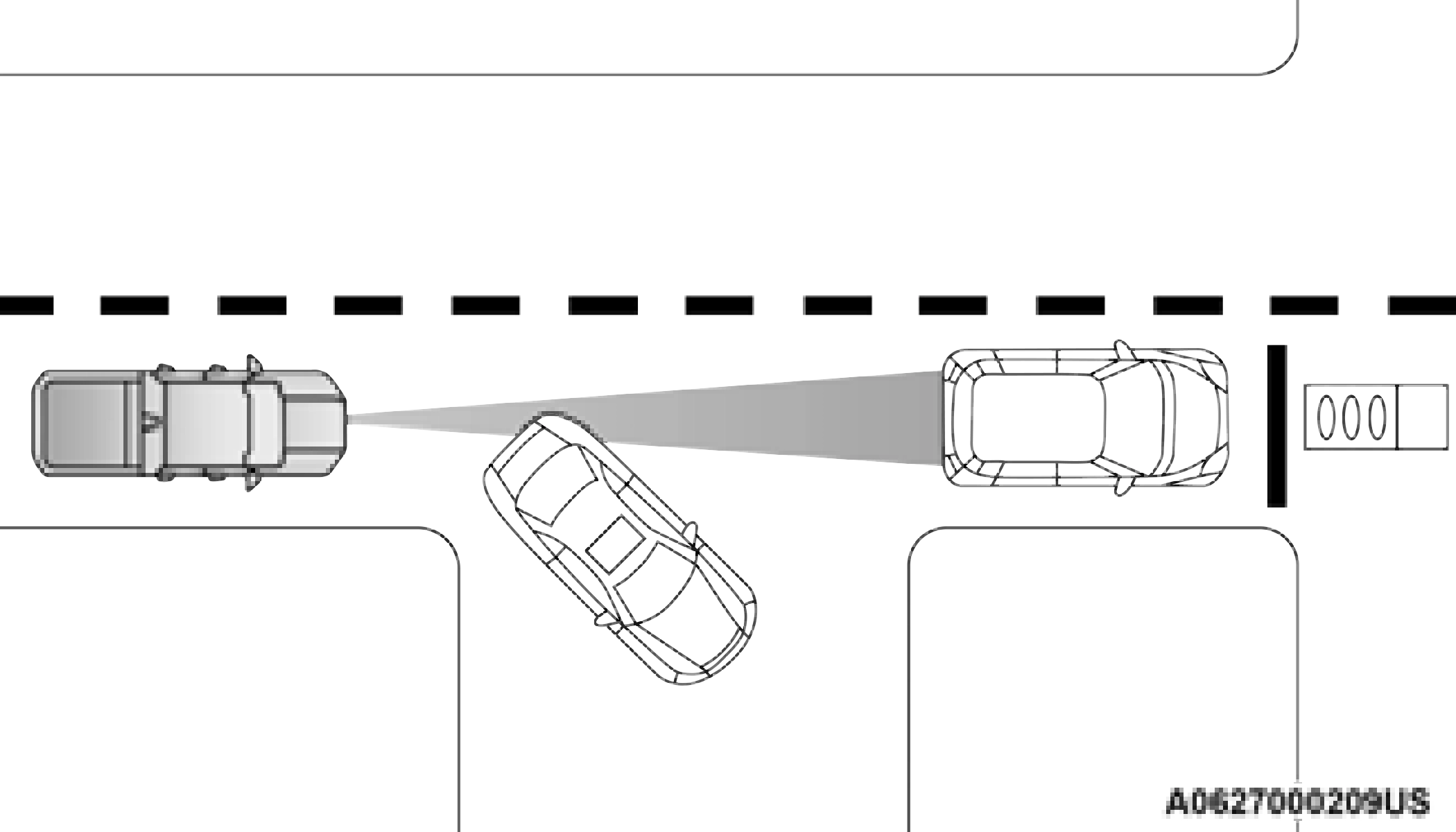
Lane Changing
ACC may not detect a vehicle until it is completely in the lane in which you are traveling. In the illustration shown, ACC has not yet detected the vehicle changing lanes and it may not detect the vehicle until it's too late for the ACC system to take action. ACC may not detect a vehicle until it is completely in the lane. There may not be sufficient distance to the lane-changing vehicle. Always be attentive and ready to apply the brakes if necessary.
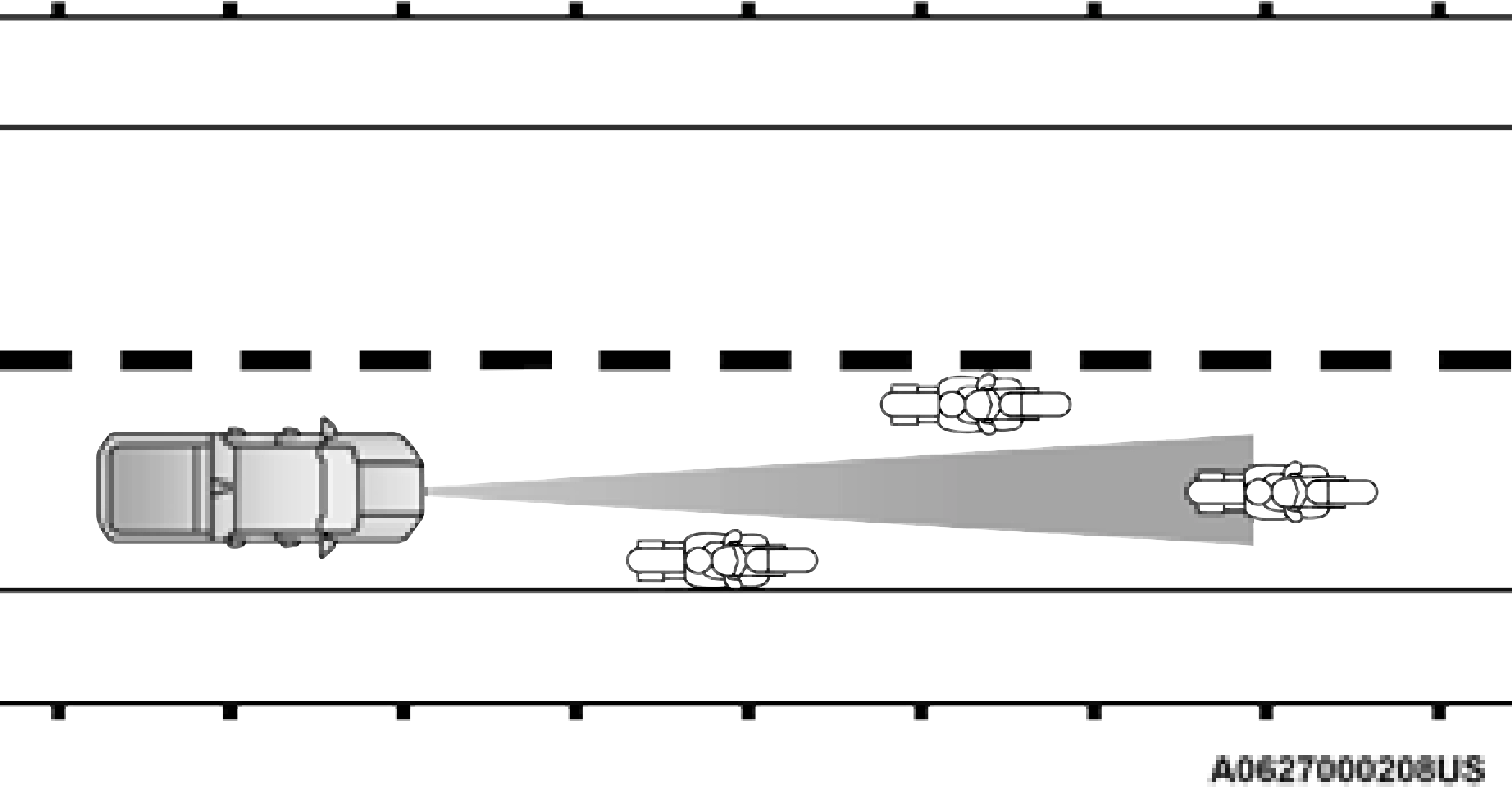
Narrow Vehicles
Some narrow vehicles traveling near the outer edges of the lane or edging into the lane are not detected until they have moved fully into the lane. There may not be sufficient distance to the vehicle ahead.
Stationary Objects And Vehicles
ACC does not react to stationary objects and stationary vehicles. For example, ACC will not react in situations where the vehicle you are following exits your lane and the vehicle ahead is stopped in your lane. Always be attentive and ready to apply the brakes if necessary.
Download Manual