REMOTE START — IF EQUIPPED
All of the following conditions must be met before the engine
will remote start: 2
NOTE:
Back Up Starting Method
The key fob may not be able to be detected by the vehicle keyless-go system if it is located next to a mobile phone, laptop or other electronic device; these devices may block the key fob’s wireless signal and prevent the keyless-go system from starting the vehicle.
NOTE:
Refer to "Starting The Engine," in "Starting And Operating" for further information.
(Continued)
The following messages will display in the instrument cluster display if the vehicle fails to remote start or exits remote start prematurely:
The instrument cluster display message stays active until the ignition is turned to the ON/RUN position.
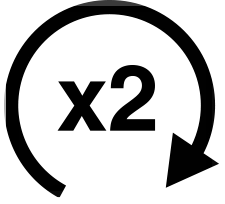 Push and release the Remote Start button on the key fob twice within five seconds. The parking lights will flash, vehicle doors will lock, and the horn will
chirp twice (if programmed). Once the vehicle has started, the engine will run for 15 minutes.
NOTE:
Push and release the remote start button one time or allow
NOTE:
The Remote Start Comfort System can be activated and deac-
tivated through the Uconnect System. Refer to “Uconnect Settings” in “Multimedia” for further information on
the engine to run for the entire 15-minute cycle.
Remote Start Comfort System operation. 2
NOTE:
To avoid unintentional shutdowns, the system will disable with a one time push of the remote start button for two seconds after receiving a valid remote start request.
Before the end of the 15-minute cycle, push and release the unlock button on the key fob to unlock the doors and disarm the vehicle security alarm system (if equipped). Then, prior to the end of the 15-minute cycle, cycle the ignition to the ON/RUN position.
When Remote Start is activated, the heated steering wheel and driver heated seat features will automatically turn on in cold weather. In warm weather, the driver vented seat feature will automatically turn on when the remote start is activated. These features will stay on through the duration of Remote Start or until the ignition switch is placed in the ON/ RUN mode.
The following regulatory statement applies to all radio frequency (RF) devices equipped in this vehicle:
This device complies with Part 15 of the FCC Rules and with Industry Canada license-exempt RSS standard(s). Operation is subject to the following two conditions:
NOTE:
Changes or modifications not expressly approved by the party responsible for compliance could void the user’s authority to operate the equipment.
Download Manual