Steering Wheel
|
|
 WARNING: Do not adjust the steering wheel when your vehicle is moving.
Note: Make sure that you are sitting in the correct position. See Sitting in the Correct Position (page 151).
E261582
Use the control on the side of the steering column to adjust the position.
To adjust:
The steering column sets a stopping position just short of the end of the column position to prevent damage to the steering column. A new stopping position sets if the steering column encounters an object when tilting or telescoping.
To reset the steering column to its normal stopping position:
Note: The steering column may begin to move again.
A new stopping position sets. The next time you tilt or telescope the steering column, it stops just short of the end of the column position.
You can save and recall the steering column position with the memory function. See Memory Function (page 157).
Pressing the adjustment control during a memory recall cancels the operation.
The column moves up when you switch the ignition off. Switch the ignition on to return the system to its previous settings. You can switch this feature on or off in the information display. See Information Displays (page 110).
80
Note: If you press any adjustment or memory button when in easy exit mode, the system cancels the operation.
Note: Depending on your vehicle, the column may move up and in.
|
|
 WARNING: Do not adjust the steering wheel when your vehicle is moving.
Note: Make sure that you are sitting in the correct position. See Sitting in the Correct Position (page 151).
81
E291395 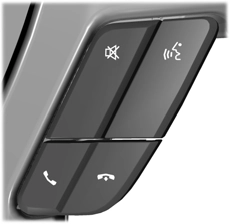
Press - to decrease volume level. Press + to increase volume level.
Press to access the previous media selection.
Press to access the next media selection.
Press repeatedly to scroll through available audio sources.
 Press to access phone mode or to answer a phone call.
Press to end a phone call.
Press to silence the current media
The controls are on the steering wheel.
Press and release to activate voice recognition.
See Switching Cruise Control On and Off (page 242).
(page 243).
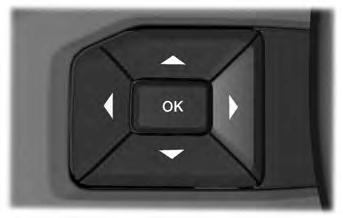
E191336
See Information Displays (page 110).
HEATED STEERING WHEEL (IF EQUIPPED)
Switch the heated steering wheel on and off using the touchscreen.
82
 Touch the button to switch the heated steering wheel on and off.
Note: You can use the heated steering wheel only when the engine is running.
Note: The system uses a sensor and is designed to control the temperature of the steering wheel and to prevent it from overheating.
Note: In warm temperatures, the steering wheel quickly reaches its maximum temperature and the system reduces the current to the heating element. This could cause you to think that the system has stopped working but it has not. This is normal.
Press on the center of the steering wheel near the horn icon to activate the horn.
83
Download Manual