Accessories
For a complete listing of the accessories that are available for your vehicle, please contact your authorized dealer or visit the online store web site:
|
Web Address (United States) |
|
Web Address (Canada) |
We will repair or replace any properly authorized dealer-installed Ford Original Accessory found to be defective in
factory-supplied materials or workmanship during the warranty period, as well as any component damaged by the defective accessories.
We will warrant your Ford Original Accessory through the warranty that provides the greatest benefit:
• 24 months, unlimited mileage.
• The remainder of your new vehicle limited warranty.
Contact an authorized dealer for details and a copy of the warranty.
Ford Licensed Accessories are the accessory manufacturer's designs. The manufacturer develops and therefore warrants Ford Licensed Accessories, and does not design or test these accessories to Ford Motor Company engineering requirements. Contact an authorized Ford dealer for the manufacturer’s limited warranty details, and request a copy of the Ford Licensed Accessories product limited warranty from the accessory manufacturer.
For maximum vehicle performance, keep the following information in mind when adding accessories or equipment to your vehicle:
• When adding accessories, equipment, passengers and luggage to your vehicle, do not exceed the total weight capacity of the vehicle or of the front or rear axle (GVWR or GAWR as indicated on the Safety Compliance Certification label). Ask an authorized dealer for specific weight information.
• The Federal Communications Commission (FCC) and Canadian Radio Telecommunications Commission (CRTC) regulate the use of mobile communications systems that are equipped with radio transmitters, for example two-way radios, telephones and theft alarms. Any such equipment installed in your vehicle should comply with Federal Communications Commission (FCC) and Canadian Radio Telecommunications Commission (CRTC) regulations and should be installed only by an authorized dealer.
• An authorized dealer needs to install mobile communications systems. Improper installation may harm the operation of your vehicle, particularly if the manufacturer did not design the mobile communication system specifically for automotive use.
• If you or an authorized Ford dealer add any non-Ford electrical or electronic accessories or components to your vehicle, you may adversely affect battery performance and durability. In addition, you may also adversely affect the performance of other electrical systems in the vehicle.
558
AUXILIARY SWITCHES (IF EQUIPPED)
For maximum vehicle performance, keep the following information in mind when adding accessories or equipment to your vehicle:
E220728
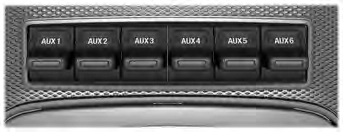
The auxiliary switch option package provides six switches mounted in the overhead console. These switches operate when the vehicle is running or from battery power, depending on the switchable fuse AUXF4's location in the upfitter relay box. We recommend, however, that the engine remain running to maintain battery charge when using the auxiliary switches for extended periods of time or higher current draws.
Note: When your vehicle has a diesel engine, use the auxiliary switches only when the engine is running. The glow plugs also drain battery power when the ignition key is in the on position. Using the auxiliary switches, even for limited amounts of time, can cause your battery to drain quickly and prevent your vehicle from restarting.
When switched on, the auxiliary switches provide electrical battery power for a variety of personal or commercial uses. Switches 1 through 4 provide 25 amps.
Switches 5 and 6 provide 40 amps.
The relay box for the auxiliary switches is in the rear of the engine compartment, near the back wall. See your authorized dealer for service.
The relays are coded as shown:
559
Each switch includes a blunt-cut, sealed wire. The wires are under the instrument panel on the right-hand side of the passenger footwell.
E220729
560
E314958
The power leads are coded as shown:
|
Switch |
Circuit Number |
Wire Color |
Fuse Amp Rating |
|
AUX 1 |
CB117A |
Brown with green trace |
25A |
|
AUX 2 |
CB114A |
Violet with orange trace |
25A |
|
AUX 3 |
CB116A |
Blue with green trace |
25A |
|
AUX 4 |
CB113A |
Gray with brown trace |
25A |
|
AUX 5 |
CB115A |
Brown with blue trace |
40A |
|
AUX 6 |
CB118A |
Gray with orange trace |
40A |
561
The Upfitter Interface Module (UIM) is an electronic control module that operates equipment (such as lift buckets, cranes, motors, salt spreaders and snow plows) with external relays.
If you replace the module, it will require additional programming by the upfitter. Obtain this data directly from the upfitter company. The upfitter contact information is in the vehicle door opening.
For more information on the Upfitter Interface Module and the auxiliary switches, contact your upfitter.
562
Download Manual