Windows and Mirrors
POWER WINDOWS (IF EQUIPPED)
|
that children and pets are not in the proximity of the window openings. |
 WARNING: Do not leave children unattended in your vehicle and do not let them play with the power windows. They may seriously injure themselves.
  WARNING: When closing the power windows, you should verify they are free of obstructions and make sure
E176215
Press the control to open the window. Lift the control to close the window.
Note: You may hear a pulsing noise when just one of the windows is open. Lower the opposite window slightly to reduce this noise.
Press or lift the switch fully and release it. Press or lift it again to stop the window.
Note: The window may disable for up to five minutes if you cycle it up and down repeatedly. This helps prevent damage to the motor. Normal operation will resume once the motor cools.
You may lose the one-touch function if the vehicle battery is low.
To reset the function after the battery recharges:
Note: Perform one-touch up re-calibration with the door closed. Calibrating with the door open will cause the window to continuously bounce back.
Bounce-Back (If Equipped)
The window will automatically stop and reverse some distance if it detects an obstacle while closing.
|
|
 WARNING: When you override the bounce-back feature the window will not reverse if it detects an obstacle. Take care when closing the windows to avoid personal injury or damage to your vehicle.
Pull up the window switch and hold within two seconds of the window reaching the bounce-back position. The window will travel up with no bounce-back protection. The window will stop if you release the switch before the window closes fully.
94
Window Lock (If Equipped)
|
|
 WARNING: Do not adjust the mirrors when your vehicle is moving. This could result in the loss of control of your vehicle, serious personal injury or death.
E176216
Press the control to lock or unlock the rear window controls.
The window switches remain operational for several minutes when you switch the ignition off or until you open either front door.
You can use the remote control to open
E144073
A B C
Left-hand mirror. Adjustment control. Right-hand mirror.
the windows with the ignition off.
Note: To operate this feature, accessory delay must not be active.
You can only open the windows for a short time after you unlock your vehicle with the remote control. After you unlock your vehicle, press and hold the remote control unlock button to open the windows.
Release the button once movement starts. Press the lock or unlock button to stop movement.
To adjust your mirrors, switch your vehicle on, with the ignition in accessory mode or the engine running, and then:
Fold-Away Exterior Mirrors (If Equipped)
Push the mirror toward the door window glass. Make sure that you fully engage the mirror in its support when returning it to its original position.
95
This feature lets you extend the mirror about 3 in (75 mm). It is useful when towing a trailer. You can manually pull out or push in the mirrors to the desired position.
PowerScope™Power Telescoping Mirrors (If Equipped)
Note: Do not stop the mirrors midway through their movement. Wait until the mirrors stop moving and press the control again.
Note: The left-hand and right-hand mirrors move at different rates. For example, one mirror may stop when the other one continues to move. This is normal.
The exterior mirrors automatically fold in toward the glass after you place the transmission into park (P), switch off the vehicle, open and close the driver-side door and lock the vehicle. The exterior mirrors automatically unfold and return to their driving position after you unlock the vehicle. You can switch this feature on and off through the information display. See General Information (page 109).
You can fold the mirrors on demand by pressing the power-folding mirror control on the door. Press the control again to unfold the mirrors.
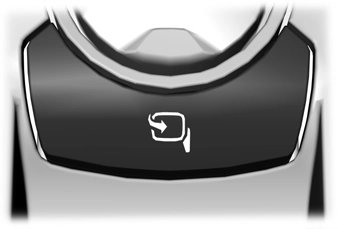
Note: If you use the power-folding control to fold the mirrors on demand and the auto fold feature is switched on through the information display, you must use the power-folding control again to unfold them.
This feature lets you position both mirrors at the same time.
96
E
To adjust your mirrors, press the adjustment control to position the mirrors.
Note: Moving the mirrors 10 or more times within one minute, or repeated folding, unfolding and telescoping of the mirrors when holding the control down during full travel, may disable the system to protect the motors from overheating. Wait approximately three minutes with the vehicle running, and up to 10 minutes with the vehicle off, for the system to reset and for function to return to normal.
If your power-folding mirrors are manually folded, they may not work properly even after you re-position them. You need to reset them if:
To reset the power-fold feature, use the power-folding mirror control to fold and unfold the mirrors. You may hear a loud noise as you reset the power-folding mirrors. This sound is normal. Repeat this process as needed each time the mirrors are manually folded.
Heated Exterior Mirrors (If Equipped) See Heated Exterior Mirrors (page 144). Memory Mirrors (If Equipped)
You can save and recall the mirror positions through the memory function. See Memory Function (page 153).
When the vehicle is running, the
forward-facing portion of the appropriate mirror housing blinks when you switch on the direction indicator.
Puddle Lamps (If Equipped)
The lamps on the bottom part of the mirror housing light when you use your transmitter to unlock the doors or when you open a door.
The lower, outer part of the mirror housings light when you switch the headlamps or parking lamps on.
Spot Lamps (If Equipped)
The area lights are on the forward-facing portion of the mirror housing. You can switch them on and off by using the controls located on the instrument panel. See Lighting (page 86).
Trailer Towing Camera System (If Equipped)
See 360 Degree Camera (page 232).
97
Blind Spot Information System (If Equipped)
(page 248).
|
|
 WARNING: Do not adjust the mirrors when your vehicle is moving. This could result in the loss of control of your vehicle, serious personal injury or death.
Note: Do not clean the mirror housing or glass with harsh abrasives, fuel or other petroleum-based cleaning products.
You can adjust the interior mirror to your preference. Some mirrors also have a second pivot point. This lets you move the mirror hear up or down and from side to side.
Pull the tab below the mirror toward you to reduce the effect of bright light from behind.
Note: Do not block the sensors on the front and back of the mirror. A rear center passenger or raised rear center head restraint may also block light from reaching the sensor.
The mirror dims to reduce glare when bright lights are detected from behind your vehicle. It automatically returns to normal reflection when you shift the transmission into reverse (R) to make sure you have a clear view when backing up.
Power Sliding Back Window (If Equipped)
|
|
 WARNING: When operating the power sliding back window, you must make sure all rear seat occupants and cargo are not in the proximity of the back window.
 WARNING: Do not leave children unattended in your vehicle and do not let them play with the power sliding back window. They may seriously injure themselves.
E176217
The control is on the overhead console.
Press and hold the control to open the window. Pull and hold the control to close the window.
98
Rotate the sun visor toward the side window and extend it rearward for extra shade.
|
|
 WARNING: When closing the moonroof, verify that it is free of obstruction and make sure that children and pets are not in the proximity of the roof opening.
The moonroof controls are on the overhead console and have a one-touch open and close feature. To stop its movement during one-touch operation, press the control a second time.
E162197
Lift the cover to switch the lamp on.
E191272
A B C D E
Moonroof open. Moonroof vent. Sunshade open. Sunshade close. Moonroof close.
MOONROOF (IF EQUIPPED)

Press and release the button to open the moonroof.
Note: The moonroof stops short of the fully opened position to reduce wind noise or rumbling that may happen with the moonroof fully open. Press and release the button again to open the moonroof fully.
99
Press and release the button to vent the moonroof.
Press and release the button to open the sunshade. The sunshade opens with the moonroof. You can also open the sunshade with the moonroof closed.
Note: The sunshade stops short of its fully opened position for the comfort of rear passengers. To open the sunshade fully, press the button again.
Press and release the button to close the sunshade.
Press and release the button to close the moonroof from either the open or vent positions.
Note: The sunshade stops short of the fully closed position. Press and release the button a second time to fully close the shade. The sunshade completely closes only when the moonroof is closed. The moonroof closes with a single press of the close button.
The moonroof reverses some distance if it detects an obstacle when closing.
To override this feature, press and hold the moonroof close button within two seconds after the roof comes to a stop following a bounce-back reversal.
100
Download Manual