Doors and Locks
You can use the power door lock control or the remote control to lock and unlock your doors and tailgate. See Tailgate Lock (page 74).
The power door lock control is on the driver and front passenger door panels.
E138628
Press and hold both the lock and unlock buttons on the remote control for four seconds to disable or enable two-stage unlocking. Disabling two-stage unlocking allows your entire vehicle to unlock with one press of the button.
Intelligent access at the driver door unlocks your entire vehicle when you disable
two-stage unlocking.
Press the button to lock all doors. The direction indicators flash.
Press the button again within three seconds to confirm that all the doors are closed. The doors lock again, the horn sounds and the direction indicators flash if all the doors are closed.
If any door is open, or if the hood is open on vehicles with an anti-theft alarm or
You can use the remote control at any time your vehicle is not running.
remote start, the horn sounds twice and the direction indicators do not flash.
Activating Intelligent Access (If Equipped)
Press the button to unlock the driver door. Press the button again within three seconds to
unlock all doors. The direction indicators flash. The direction indicators flash twice to confirm the change. The unlocking mode applies to the remote control, keyless entry keypad and intelligent access.
You can unlock and lock the vehicle without taking the keys out of your pocket or purse when your intelligent access key is within 3 ft (1 m) of your vehicle.
Intelligent access uses a sensor on the back of the door handle for unlocking and a separate sensor on the face of each door handle for locking.
The system does not function if:
69
Note: The system may not function if the key is close to metal objects or electronic devices, for example keys or a cell phone.
Note: If the system does not function, use the key blade to lock and unlock your vehicle. See Remote Control (page 58).
E248555
With your intelligent access key within 3 ft (1 m) of your vehicle, touch the unlock sensor on the back of the door handle for a brief period and then pull on the door handle to unlock, being careful to not touch the lock sensor at the same time or pulling the door handle too quickly. The intelligent access system requires a brief delay to authenticate your intelligent access key fob.
E248556
With your intelligent access key within 3 ft (1 m) of your vehicle, touch the outer door handle lock sensor for approximately one second to lock, being careful to not touch the unlock sensor on the back of the door handle at the same time. After locking, you can immediately pull on the door handle to confirm locking occurred without inadvertently unlocking.
Note: Do not use the outside door handle as a roof cargo strap.
Press the exterior tailgate release button inside of the tailgate handle. The tailgate unlocks and opens. See Tailgate Lock (page 74).
Smart Unlock (If Equipped)
This feature helps to prevent you from locking your intelligent access key inside your vehicle’s passenger compartment or rear cargo area.
If you leave your key in the ignition, when you open the driver door and lock your vehicle with the power door lock control, the doors lock then unlock.
You can still lock your vehicle with the key in the ignition by:
Smart Unlocks for Intelligent Access Keys (If Equipped)
This feature helps to prevent you from locking your intelligent access key inside your vehicle’s passenger compartment or rear cargo area.
70
When you lock your vehicle using the power door lock control (with the door open, vehicle in park and ignition off), your vehicle searches for an intelligent access key in the passenger compartment after you close the door. If your vehicle finds a key, all of the doors immediately unlock.
In order to override the smart unlock feature and intentionally lock the intelligent access key inside your vehicle, you can lock your vehicle after all doors are closed by using the keyless entry keypad, pressing the lock button on another intelligent access key or touching the locking area on the handle with another intelligent access key in your hand.
When you open one of the front doors and lock your vehicle using the power door lock control, all doors lock then unlock if the ignition is on.
Autolock (If Equipped)
Autolock locks all the doors when:
Autolock repeats when:
Autounlock unlocks all the doors when:
Note: The doors do not autounlock if you electronically lock your vehicle after you switch the ignition off and before you open the driver door.
You can enable or disable the autounlock feature in the information display or an authorized dealer can do it for you. See General Information (page 112).
The interior lamps and select exterior lamps illuminate when you unlock the doors with the remote entry system.
The illuminated entry system turns off the lights if:
The dome lamp does not turn on if the control is set to the off position.
The lights do not turn off if:
The battery saver turns off the interior lamps 10 minutes after you switch the ignition off, or 10 minutes after you exit the vehicle.
71
If you leave the ignition on after leaving your vehicle, it turns off 30 minutes after you close all of the doors.
KEYLESS ENTRY (IF EQUIPPED)
The keypad is near the driver window and illuminates when you touch it.
Note: If you enter your entry code too fast on the keypad, the unlock function may not work. Re-enter your entry code more slowly.
E190936 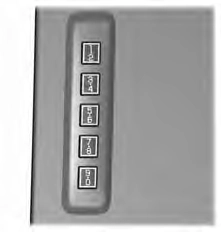
You can use the keypad to:
You can operate the keypad with the factory-set five-digit entry code. The code is located on the owner’s wallet card in the glove box and is available from an authorized dealer. You can also create up to five of your own five-digit personal entry codes.
To create your own personal entry code:
The doors will lock then unlock to confirm that programming was successful.
To Program additional personal entry codes, repeat Steps 1-3, then for Step4:
All personal codes erase and only the factory-set five-digit code will work.
The keypad will go into an anti-scan mode if you enter the wrong code seven times (35 consecutive button presses). This mode disables the keypad for one minute and the keypad lamp will flash.
72
The anti-scan feature will turn off after:
Enter the factory-set five-digit code or your personal code. You must press each number within five seconds of each other. The interior lamps illuminate.
Note: All doors unlock if you disable the two-stage unlocking feature. See General Information (page 112).
Enter the factory-set code or your personal code, then press 3·4 control within five seconds.
Press and hold 7·8 and 9·0 at the same time with the driver door closed. You do not need to enter the keypad code first.
Enter the factory-set code or your personal code, then press 5·6 control within five seconds.
73
Download Manual