Lighting
Exterior front lamps and rear lamps have vents to accommodate normal changes in air pressure.
Condensation can be a natural by-product of this design. When moist air enters the lamp assembly through the vents, there is a possibility that condensation can occur when the temperature is cold. When normal condensation occurs, a fine mist
E142449
can form on the interior of the lens. The fine mist eventually clears and exits through the vents during normal operation.
Clearing time may take as long as 48 hours under dry weather conditions.
Examples of acceptable condensation are:
Examples of unacceptable condensation are:
If you see any unacceptable condensation, have your vehicle checked by an authorized dealer.
E167827
Push the lever away from you to switch the high beam on.
Push the lever forward again or pull the lever toward you to switch the high beams off.
89
E163268
Slightly pull the lever toward you and release it to flash the headlamps.
 AUTOLAMPS (If Equipped)
The system does not relieve you of your responsibility to drive with due care and attention. You may need to
override the system if it does not turn the headlamps on in low visibility conditions, for example daytime fog.
The headlamps remain on for a period of time after you switch the ignition off. Use the information display controls to adjust the period of time that the headlamps remain on.
Note: If you switch the autolamps on, you cannot switch the high beams on until the system turns the low beams on.
When you switch the autolamps on, the headlamps turn on within 10 seconds of switching the wipers on. They turn off approximately 60 seconds after you switch the windshield wipers off.
The headlamps do not turn on with the wipers:
Note: If you switch the autolamps and the autowipers on, the headlamps turn on when the windshield wipers continuously operate.
Note: When disconnecting the battery or when it runs out of charge, the illuminated components turn to the maximum setting.
E142451
When the lighting control is in the autolamps position, the headlamps turn on in low light situations, or when the wipers turn on.
90
DAYTIME RUNNING LAMPS
E231828
Press repeatedly or press and hold until you reach the desired level.
E165366
The daytime running lamps system does not activate the rear lamps and may not provide adequate lighting
 during low visibility driving conditions. Make sure you switch the headlamps on, as appropriate, during all low visibility conditions. Failure to do so may result in a crash.
The daytime running lamps turn on when:
Switch the daytime running lamps on or off using the information display. See Information Displays (page 113).
The daytime running lamps turn on when:
The other lighting control switch positions do not turn on the daytime running lamps.
91
If the daytime running lamps are off in the information display, the lamps stay off in all switch positions.
 CONTROL (If Equipped)
The system does not relieve you of your responsibility to drive with due care and attention. You may need to
override the system if it does not turn the high beams on or off.
The system turns on high beams if it is dark enough and no other traffic is present. If it detects an approaching vehicle’s headlamps or tail lamps, or street lighting ahead, the system turns off high beams before they can distract other road users. Low beams remain on.
Note: The system may not operate properly if the sensor is blocked. Keep the windshield free from obstruction or damage.
Note: The system may not operate properly in cold or inclement conditions. You can switch on the high beams by overriding the system.
Note: If the system detects a blockage, for example bird droppings, bug splatter, snow or ice, the system goes into low beam mode until you clear the blockage. A message may appear in the information display if the camera is blocked.
Note: Using much larger tires or equipping vehicle accessories such as snowplows can modify your vehicle's ride height and degrade automatic high beam control performance.
A camera sensor, centrally mounted behind the windshield of your vehicle, continuously monitors conditions to turn the high beams on and off.
Once the system is active, the high beams turn on if:
The high beams turn off if:
Switch the system on using the information display. See Information Displays (page 113).
E142451
Switch the lighting control to the autolamps position. See Autolamps (page 90).
When you switch on the high beams, pushing or pulling the stalk provides a temporary override to low beam.
92
Automatic High Beam Indicator (If Equipped)
The indicator lamp illuminates to confirm when the system is ready to assist.
E142453
Press the control to switch the fog lamps on or off.
You can switch the fog lamps on when the lighting control is in any position except Off and the high beams are not on.
Note: Tap the lever up or down to make the direction indicators flash three times.
SPOT LAMPS (If Equipped)
The spot lamps are on the forward-facing side of the exterior mirrors. Switch on the spot lamps by pressing the buttons above the lighting control with the parking lamps on.
E176842
When switching on the spot lamps, the area in front of and to the side of your vehicle illuminates.
Adjust the aim of the spot lamps by moving the position of the exterior mirrors.
For manual folding mirrors, adjust the aim of the lamps by folding the exterior mirrors into or away from the windows. For power-folding mirrors, use the switch on the driver-side door.
Note: The spot lamps turn off when you reach a speed of 6 mph (10 km/h).
E163272
93
(If Equipped)
The cargo lamps are in the central high mounted stop lamp, and to either side of the cargo box.
The trailer hookup lamp is on the tailgate next to the handle.
Pressing the button in the lighting control panel or the button in the cargo box near the
lamp turns on both of these lamps.
The lamps turn on under the following conditions:
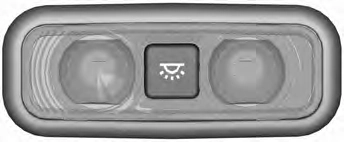
Note: The front interior lamp switches are on the overhead console. The exact location of each button on the overhead console depends upon your vehicle features.
Note: Press the button to switch the door function off when you open any door. When the door function is off and you open a door, the courtesy and door lamps stay off. The indicator lamp lights amber when the door function is off.
Note: Press the button again to switch the door function back on. When the door function is on and you open a door, the courtesy and door lamps turn on. The indicator lamp lights blue when the door function is on.
If you switch on the cargo lamps, the cargo and trailer hitch area illuminate.
Note: The cargo and trailer hookup lamps turn off when you reach a speed of 3 mph (5 km/h). They also turn off after 10 minutes, fading gradually to off.
94
E199032
A.
B.
C.
Door function. All lamps on. Map lamps.
E192153
A.
B.
C.
D.
All lamps on. Door function. All lamps off. Map lamps.
95
Rear Interior Lamps (If Equipped)
Type One
E201073
A.
B.
C.
D.
Map lamp. Door function. All lamps off. Map lamp.
E187343
E187342
A.
B.
All lamps on. Door function.
 E187345
96
Press the button to switch the lamps on or off.
Adjust the ambient lighting using the touchscreen. See your SYNC information.
Press the button in the lighting control panel or in the rear cargo box to switch on the lamps.
The cargo lamps are in the following areas:
Note: The cargo lamps turn off when you reach a speed of 3 mph (5 km/h). They also turn off after 10 minutes, fading gradually to off.
97
Download Manual