SPEED CONTROL — IF EQUIPPED
When engaged, the Speed Control takes over accelerator operations at speeds greater than 25 mph (40 km/h) or 20 mph (32 km/h), depending on engine size and axle ratio.
The Speed Control buttons are located on the right side of the steering wheel.
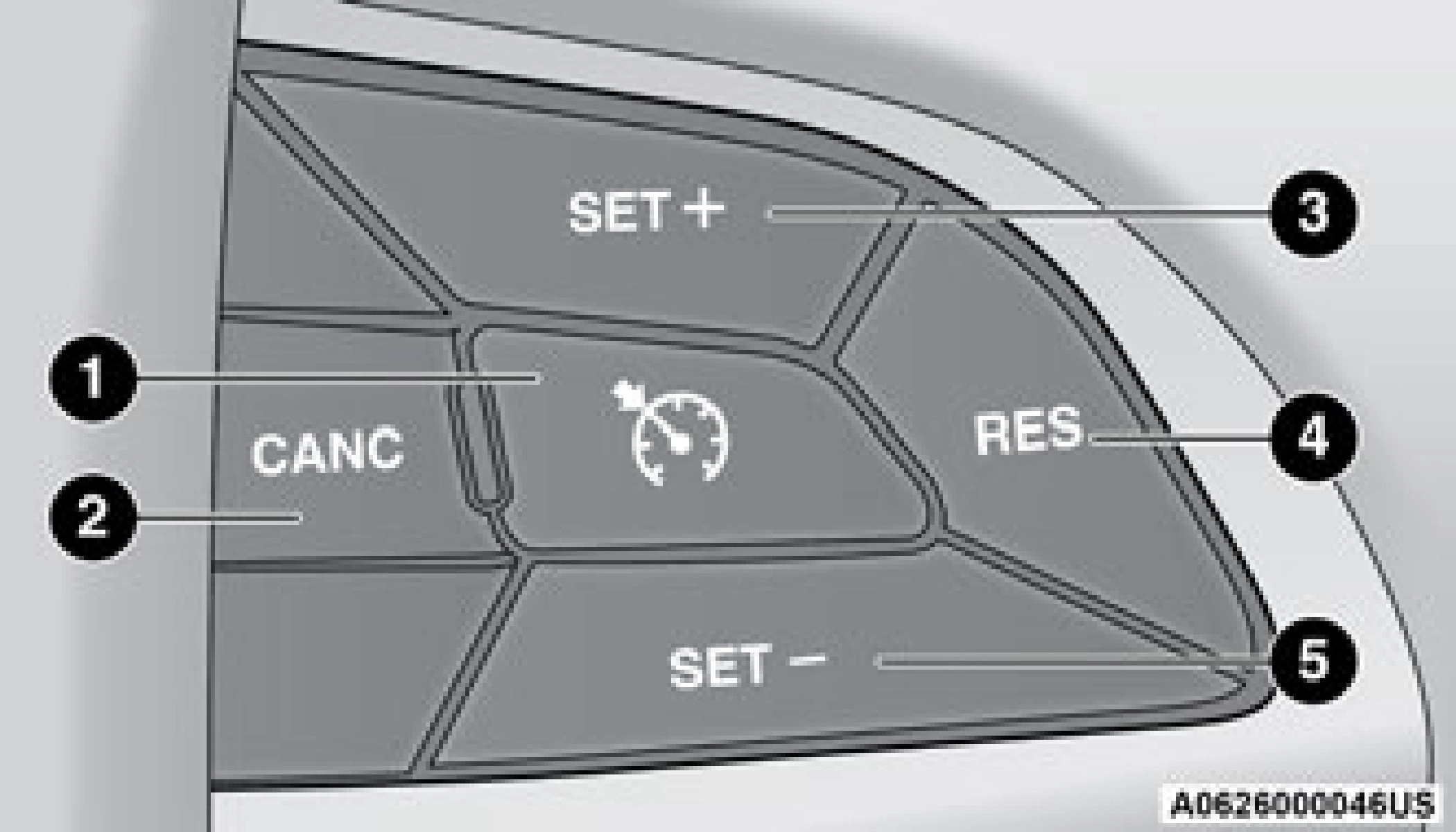
Speed Control Buttons
In order to ensure proper operation, the Speed Control system has been designed to shut down if multiple Speed Control functions are operated at the same time. If this occurs, the Speed Control System can be reactivated by pushing the Speed Control on/off button and resetting the desired vehicle set speed.
Push the on/off button to activate the Speed Control.“CRUISE CONTROL READY” will appear in the instrument cluster display to indicate the Speed Control is on. To turn the system off, push the on/off button a second time.“CRUISE CONTROL OFF” will appear in the instrument cluster display to indicate the Speed Control is off. The system should be turned off when not
in use.
TO SET A DESIRED SPEED
Turn the Speed Control on. When the vehicle has reached the desired speed, push the SET (+) or SET (-) button and release. Release the accelerator and the vehicle will operate at the selected speed. Once a speed has been set, a message“CRUISE CONTROL SET TO MPH
(km/h)” will appear indicating what speed was set. A cruise indicator lamp, along with set speed will also appear and stay on in the instrument cluster when the speed is set.
To Increase Speed
When the Speed Control is set, you can increase speed by pushing the SET (+) button.
The driver's preferred units can be selected through the instrument cluster display. Refer to
“Getting To Know Your Instrument Panel” for more information. The speed increment shown is dependent on the chosen speed unit of U.S. (mph) or Metric (km/h):
U.S. Speed (mph)
Metric Speed (km/h)
When the Speed Control is set, you can decrease speed by pushing the SET (-) button.
The driver's preferred units can be selected through the instrument cluster display. Refer to“Getting To Know Your Instrument Panel” for more information. The speed decrement shown is dependent on the chosen speed unit of U.S. (mph) or Metric (km/h):
U.S. Speed (mph)
Metric Speed (km/h)
Press the accelerator as you would normally. When the pedal is released, the vehicle will return to the set speed.
Using Speed Control On Hills
The transmission may downshift on hills to maintain the vehicle set speed.
The Speed Control system maintains speed up and down hills. A slight speed change on moderate hills is normal.
On steep hills, a greater speed loss or gain may occur so it may be preferable to drive without Speed Control.
TO RESUME SPEED
To resume a previously set speed, push the RES button and release. Resume can be used at any speed above 20 mph (32 km/h).
A soft tap on the brake pedal, pushing the CANC button, or normal brake pressure while slowing the vehicle will deactivate the Speed Control without erasing the set speed from memory.
Pushing the on/off button or placing the ignition in the OFF position erases the set speed from memory.
The following conditions will also deactivate the Speed Control without erasing the set speed from memory:
Download Manual