Auxiliary driving systems
BLIND SPOT MONITORING (BSM) — IF EQUIPPED
The BSM system uses two radar sensors, located inside the rear fascia/bumper, to detect highway licensable vehicles (automobiles, trucks, motorcycles, etc.) that enter the blind spot zones from the rear/front/side of the vehicle.
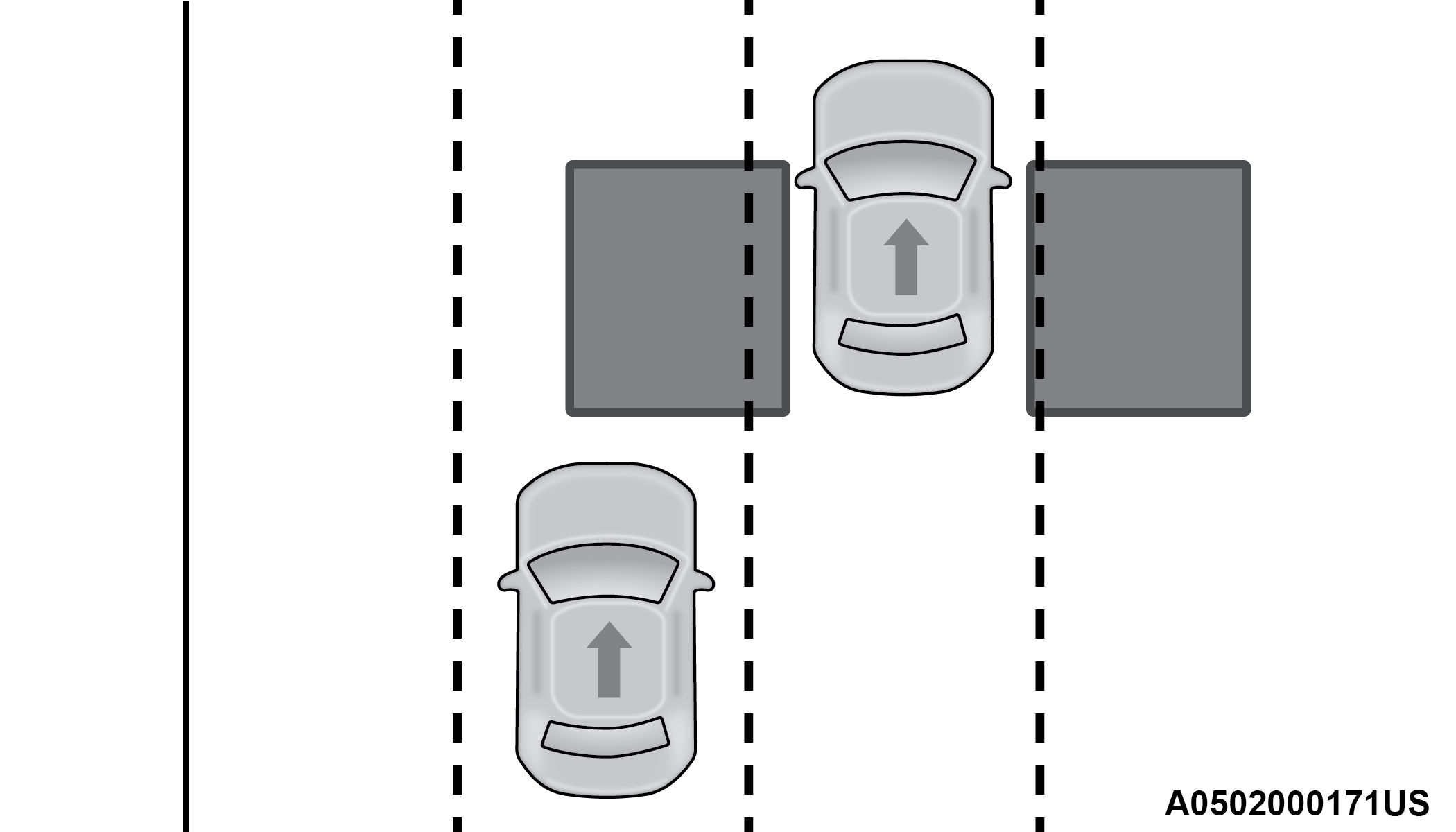
Rear Detection Zones
When the vehicle is started, the BSM Warning Light will momentarily illuminate in both outside rearview mirrors to let the driver know that the system is operational.
The BSM system sensors operate when the vehicle is in any forward gear.
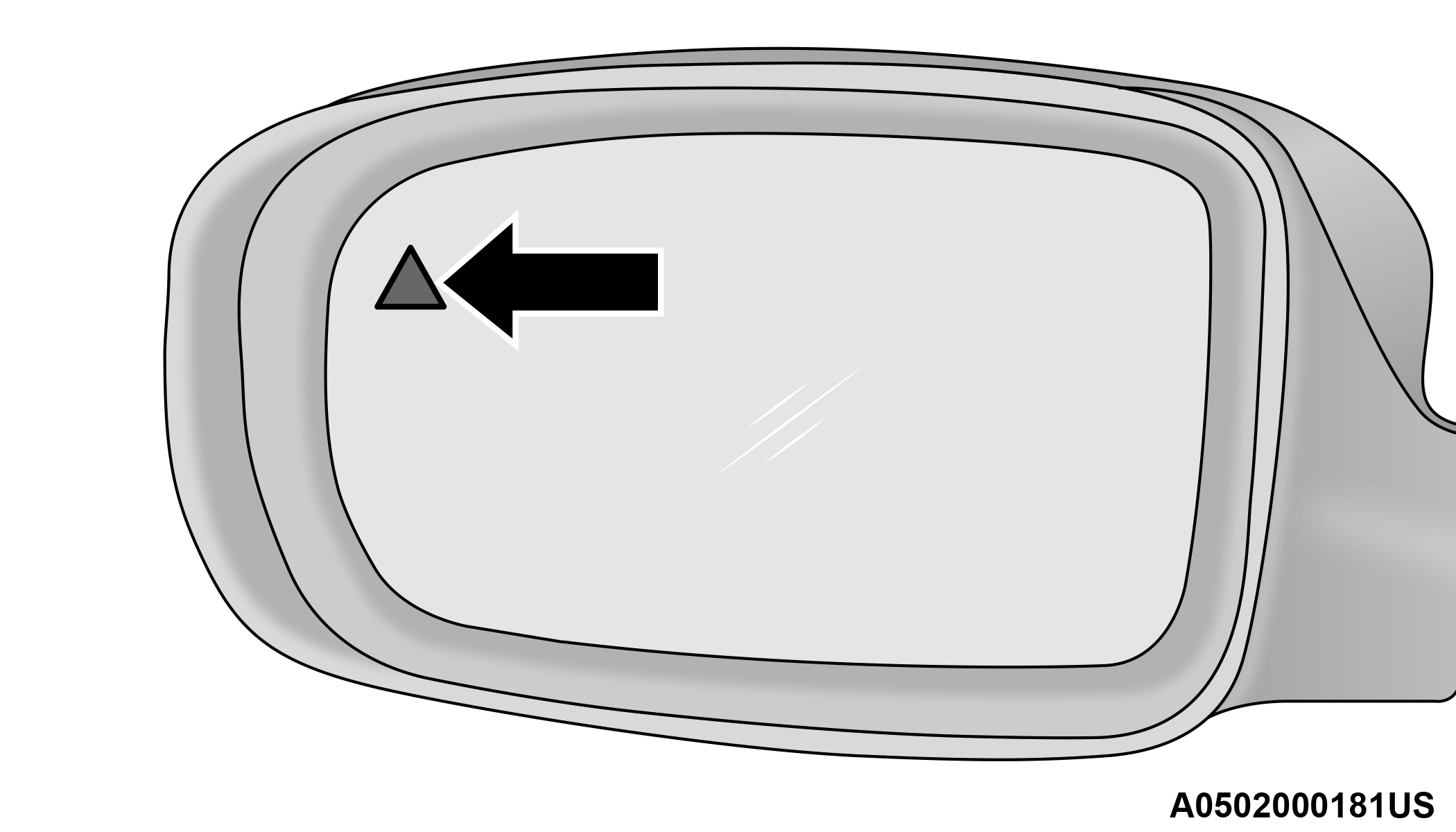
BSM Warning Light
The BSM detection zone covers approximately one lane width on both sides of the vehicle 12 ft (3.8 m). The zone length starts at the outside rearview mirror and extends approximately 10 ft (3 m) beyond the rear fascia/bumper of the vehicle. The BSM system monitors the detection zones on both sides of the vehicle when the vehicle speed reaches approximately 6 mph (10 km/h) or higher and will alert the driver of vehicles in these areas.
Note:
-
The BSM system DOES NOT alert the driver about rapidly approaching vehicles that are outside the detection zones.
-
The BSM system detection zone DOES NOT change if your vehicle is towing a trailer. Therefore, visually verify the adjacent lane is clear for both your vehicle and trailer before making a lane change. If the trailer or other object (i.e., bicycle, sports equipment) extends beyond the side of your vehicle, this may result in the BSM Warning Light remaining illuminated the entire time the vehicle is in a forward gear.
-
The Blind Spot Monitoring (BSM) system may experience drop outs (blinking on and off) of the side mirror warning indicator lamps when a motorcycle or any small object remains at the side of the vehicle for extended periods of time (more than a couple of seconds).
The area on the rear fascia/bumper where the radar sensors are located must remain free of snow, ice, and dirt/road contamination so that the BSM system can function properly. Do not block the area of the rear fascia/bumper where the radar sensors are located with foreign objects (bumper stickers, bicycle racks, etc.).
The BSM system can become blocked if snow, ice, mud, or other road contaminations accumulate on the rear fascia/bumper where the radar sensors are located. The system may also detect blockage if the vehicle is operated in areas with extremely low radar returns such as a desert or parallel to a large elevation drop. If a blockage is detected, a “Blind Spot Temporarily Unavailable, Wipe Rear Corners” message will display in the cluster, both mirror lights will illuminate, and BSM and RCP alerts will not occur. This is normal operation. The system will automatically recover and resume function when the condition clears. To minimize system blockage, do not block the area of the rear fascia/bumper where the radar sensors are located with foreign objects (bumper stickers, bicycle racks, etc.) and keep it clear of road contaminations.
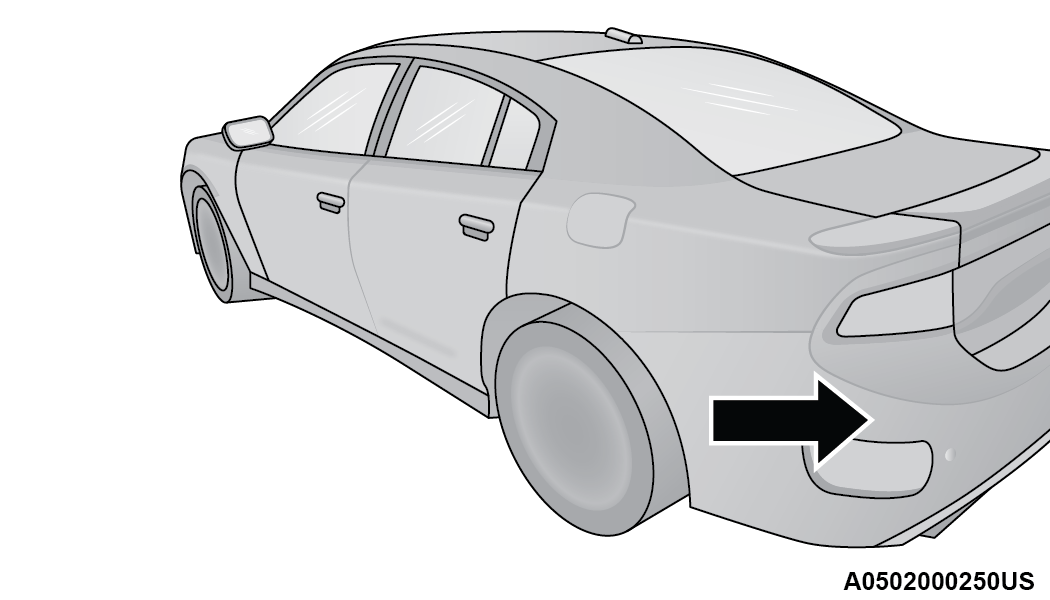
Sensor Location
The BSM system notifies the driver of objects in the detection zones by illuminating the BSM Warning Light located in the outside mirrors in addition to sounding an audible (chime) alert and reducing the radio volume, Blind Spot Modes for further information.
The BSM system monitors the detection zone from three different entry points (side, rear, front) while driving to see if an alert is necessary. The BSM system will issue an alert during these types of zone entries.
Entering From The Side
Vehicles that move into your adjacent lanes from either side of the vehicle.
Side Monitoring
Entering From The Rear
Vehicles that come up from behind your vehicle on either side and enter the rear detection zone with a relative speed of less than 31 mph (50 km/h).
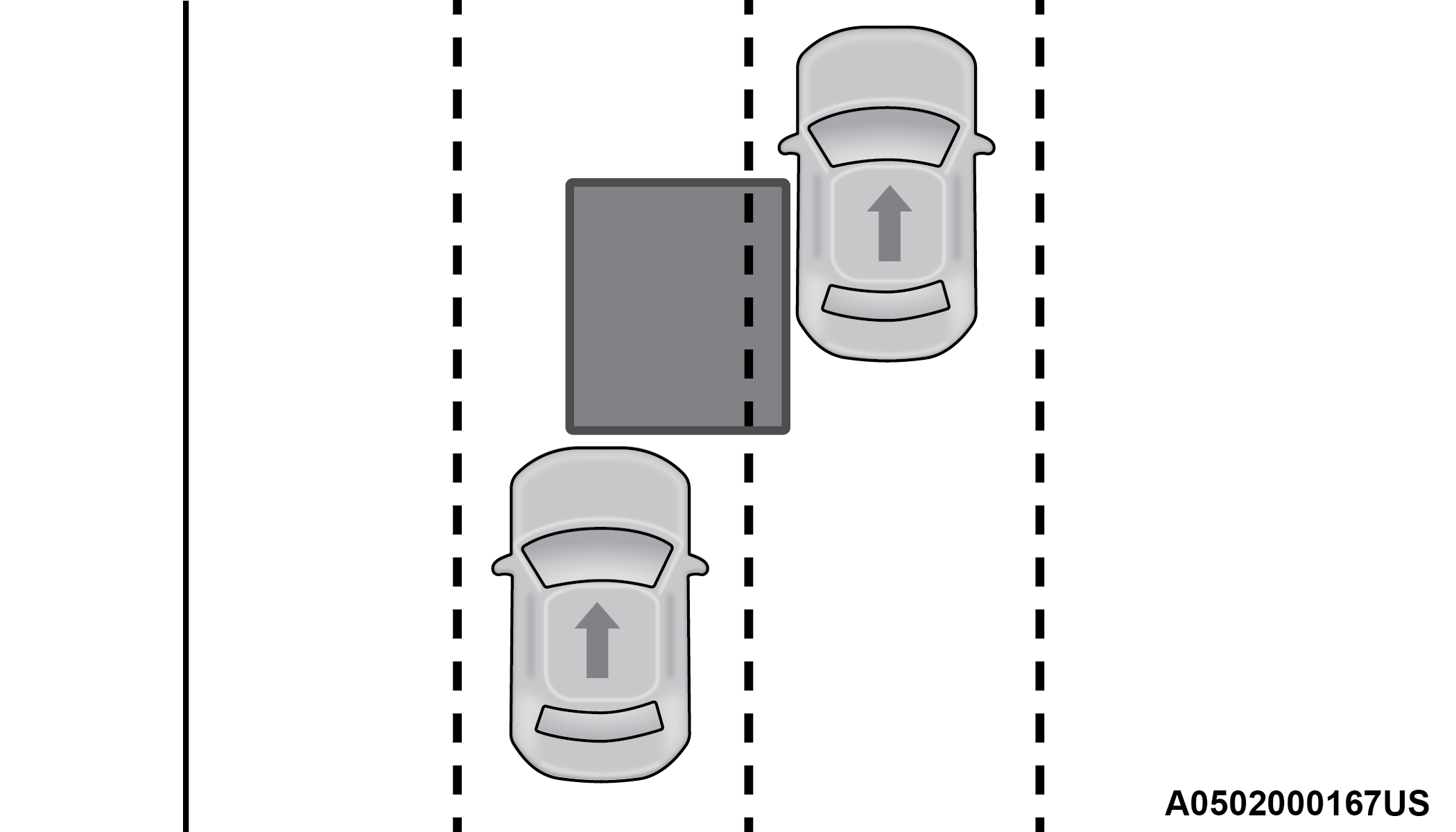
Rear Monitoring
Overtaking Traffic
If you pass another vehicle slowly (with a relative speed of less than 15 mph (24 km/h)) and the vehicle remains in the blind spot for approximately 1.5 seconds, the warning light will be illuminated. If the difference in speed between the two vehicles is greater than 15 mph (24 km/h), the warning light will not illuminate.
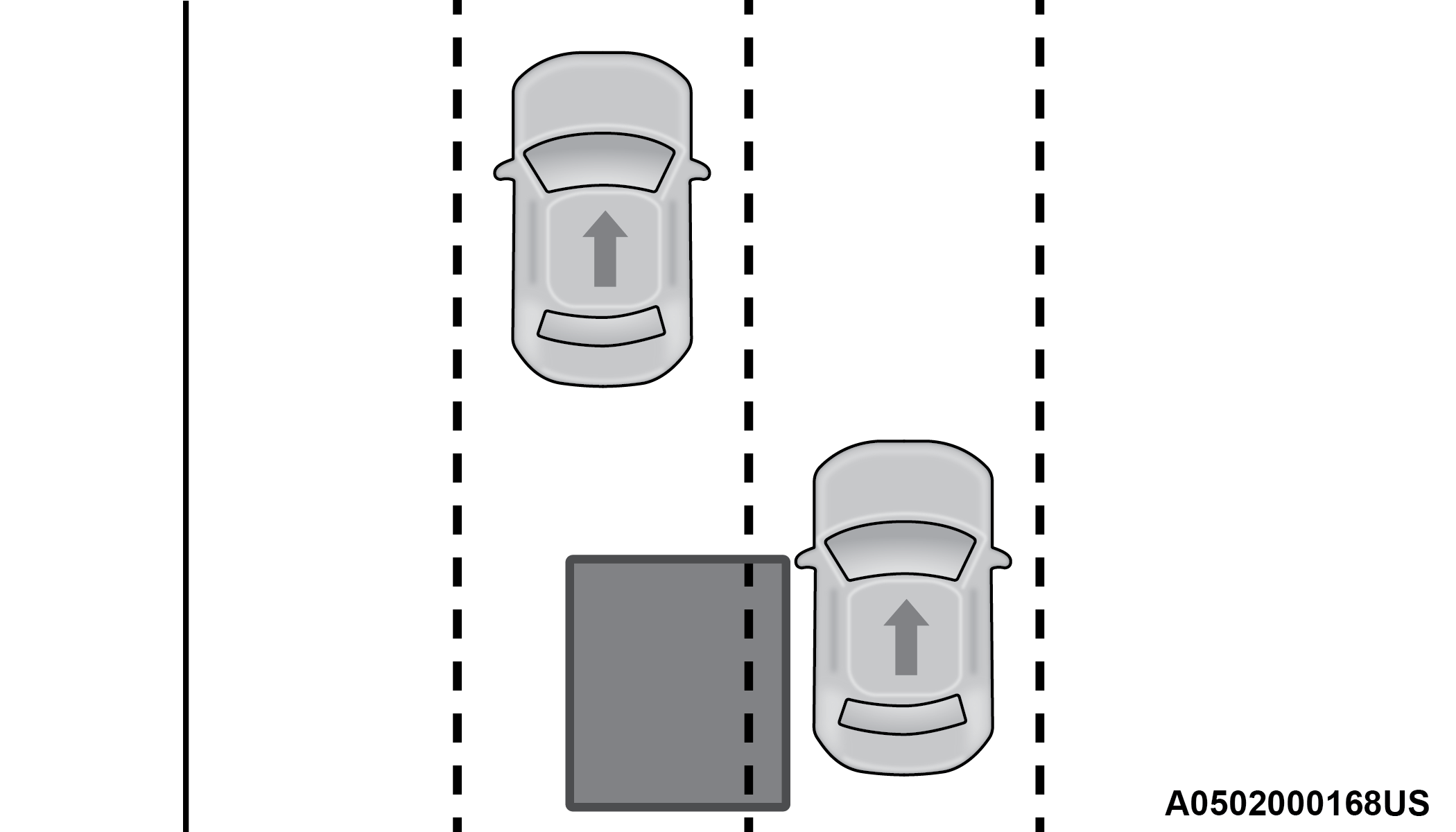
Overtaking/Approaching
The BSM system is designed not to issue an alert on stationary objects such as guardrails, posts, walls, foliage, berms, etc. However, occasionally the system may alert on such objects. This is normal operation and your vehicle does not require service.
Overtaking/Passing
The BSM system will not alert you of objects that are traveling in the opposite direction of the vehicle in adjacent lanes GENERAL INFORMATION.
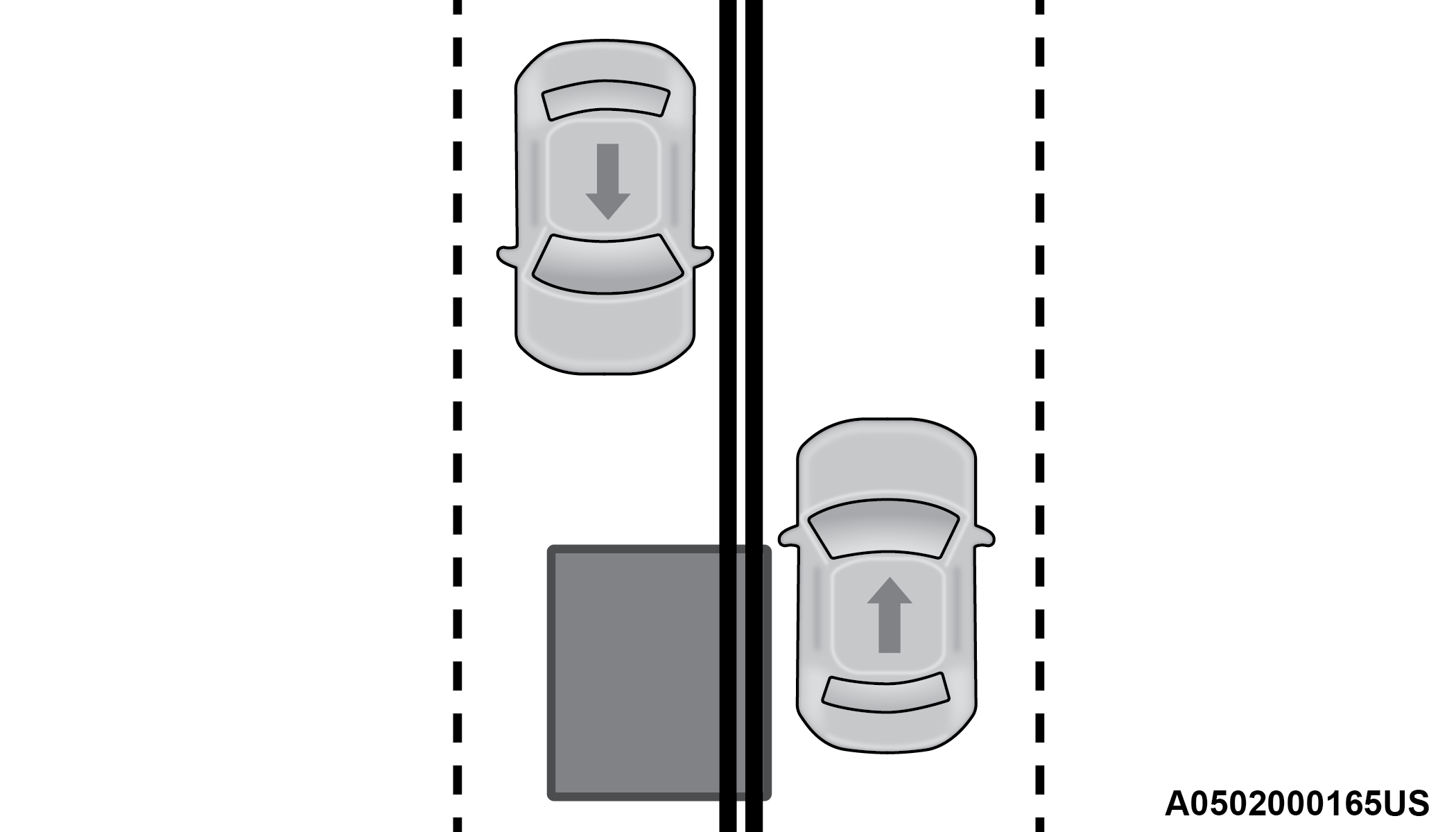
Opposing Traffic
Warning:
The Blind Spot Monitoring system is only an aid to help detect objects in the blind spot zones. The BSM system is not designed to detect pedestrians, bicyclists, or animals. Even if your vehicle is equipped with the BSM system, always check your vehicle’s mirrors, glance over your shoulder, and use your turn signal before changing lanes. Failure to do so can result in serious injury or death.
REAR CROSS PATH (RCP)
RCP is intended to aid the driver when backing out of parking spaces where their vision of oncoming vehicles may be blocked. Proceed slowly and cautiously out of the parking space until the rear end of the vehicle is exposed. The RCP system will then have a clear view of the cross traffic and if an oncoming vehicle is detected, alert the driver.
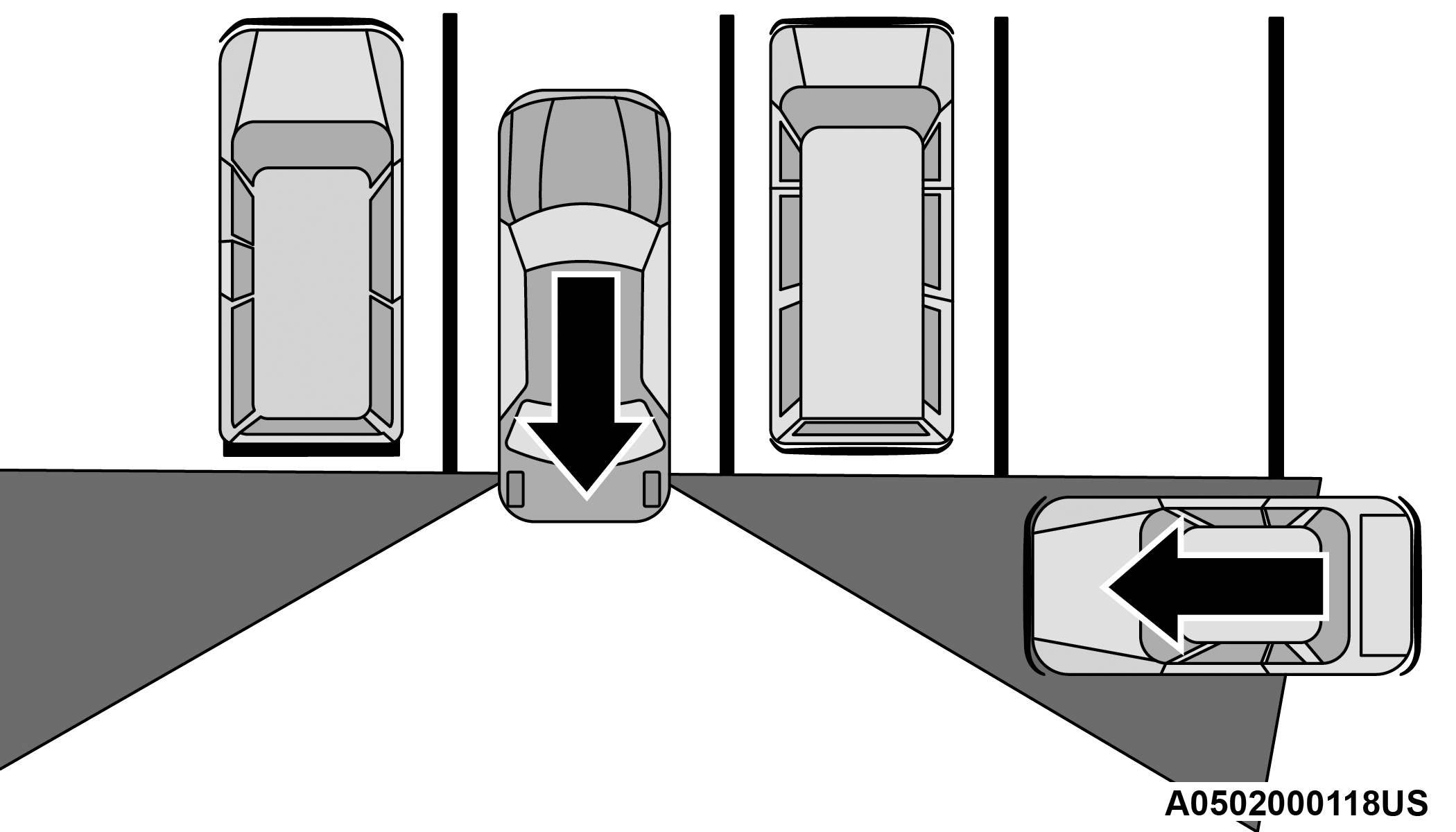
RCP Detection Zones
RCP monitors the rear detection zones on both sides of the vehicle, for objects that are moving toward the side of the vehicle with a minimum speed of approximately 3 mph (5 km/h), to objects moving a maximum of approximately 20 mph (32 km/h), such as in parking lot situations.
When RCP is on and the vehicle is in REVERSE, the driver is alerted using both the visual and audible alarms, including reducing the radio volume.
Note:
In a parking lot situation, oncoming vehicles can be blocked by vehicles parked on either side. If the sensors are blocked by other structures or vehicles, the system will not be able to alert the driver.
Warning:
Rear Cross Path Detection (RCP) is not a back up aid system. It is intended to be used to help a driver detect an oncoming vehicle in a parking lot situation. Drivers must be careful when backing up, even when using RCP. Always check carefully behind your vehicle, look behind you, and be sure to check for pedestrians, animals, other vehicles, obstructions, and blind spots before backing up. Failure to do so can result in serious injury or death.
BLIND SPOT MODES
Blind Spot Alert Lights Only
Blind Spot has three selectable modes of operation that are available in the Uconnect system.
When operating in Blind Spot Alert mode, the BSM system will provide a visual alert in the appropriate side view mirror based on a detected object. However, when the system is operating in Rear Cross Path mode, the system will respond with both visual and audible alerts when a detected object is present. Whenever an audible alert is requested, the radio volume is reduced so that the alert can be better heard.
Blind Spot Alert Lights/Chime
When operating in Blind Spot Alert Lights/Chime mode, the BSM system will provide a visual alert in the appropriate side view mirror based on a detected object. If the turn signal is then activated, and it corresponds to an alert present on that side of the vehicle, an audible chime will also be sounded. Whenever a turn signal and detected object are present on the same side at the same time, both the visual and audio alerts will be issued. In addition to the audible alert the radio (if on) volume will be reduced so that the alert can be better heard.
When the system is in RCP, the system shall respond with both visual and audible alerts when a detected object is present. Whenever an audible alert is requested, the radio volume is reduced so that the alert can be better heard.
Blind Spot Alert Off
When the BSM system is turned off there will be no visual or audible alerts from either the BSM or RCP systems.
Note:
The BSM system will store the current operating mode when the vehicle is shut off. Each time the vehicle is started the previously stored mode will be recalled and used.
FORWARD COLLISION WARNING (FCW) WITH MITIGATION OPERATION
FCW with Mitigation provides the driver with audible warnings, visual warnings (within the instrument cluster display), and may apply haptic warning in the form of a a brake jerk, to warn the driver when it detects a potential frontal collision. The warnings and limited braking are intended to provide the driver with enough time to react, avoid or mitigate the potential collision.
Note:
FCW monitors the information from the forward looking sensors, as well as the Electronic Stability Control (ESC) system, to calculate the probability of a forward collision. When the system determines that a forward collision is probable, the driver will be provided with audible and visual warnings and may provide a brake jerk warning. If the driver does not take action based upon these progressive warnings, then the system will provide a limited level of active braking to help slow the vehicle and mitigate the potential forward collision. If the driver reacts to the warnings by braking and the system determines that the driver intends to avoid the collision by braking but has not applied sufficient brake force, the system will compensate and provide additional brake force as required. If a Forward Collision Warning with Mitigation event begins at a speed below 20 mph (32 km/h), the system may provide the maximum or partial braking to mitigate the potential forward collision. If the Forward Collision Warning with Mitigation event stops the vehicle completely, the system will hold the vehicle at standstill for two seconds and then release the brakes.
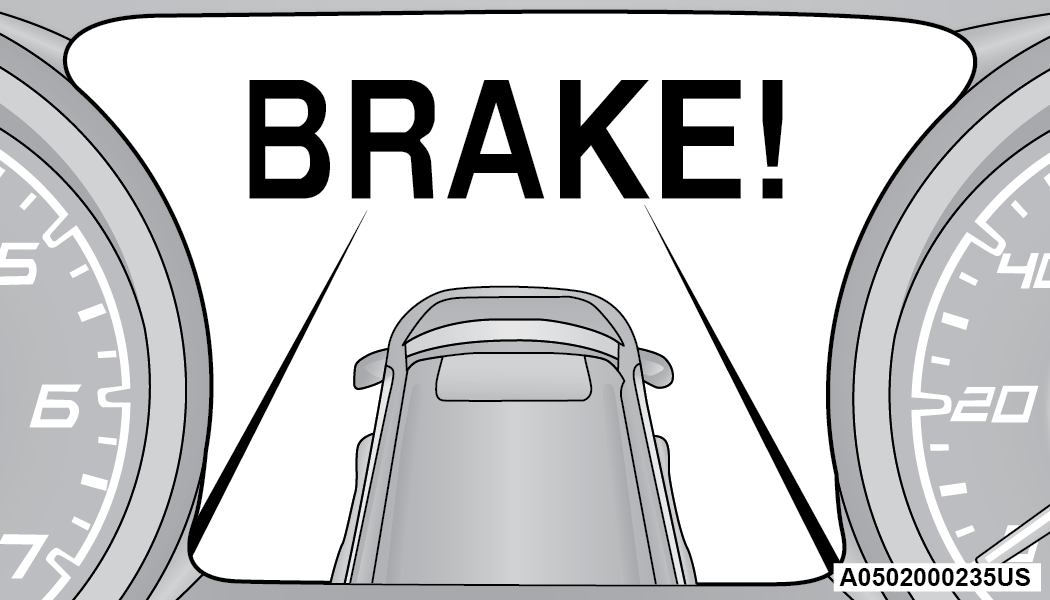
FCW Message
When the system determines a collision with the vehicle in front of you is no longer probable, the warning message will be deactivated GENERAL INFORMATION.
Note:
-
The minimum speed for FCW activation is 1 mph (2 km/h).
-
The FCW alerts may be triggered on objects other than vehicles such as guardrails or sign posts based on the course prediction. This is expected and is a part of normal FCW activation and functionality.
-
It is unsafe to test the FCW system. To prevent such misuse of the system, after four Active Braking events within an ignition cycle, the Active Braking portion of FCW will be deactivated until the next ignition cycle.
-
The FCW system is intended for on-road use only. If the vehicle is taken off-road, the FCW system should be deactivated to prevent unnecessary warnings to the surroundings.
Warning:
Forward Collision Warning (FCW) is not intended to avoid a collision on its own, nor can FCW detect every type of potential collision. The driver has the responsibility to avoid a collision by controlling the vehicle via braking and steering. Failure to follow this warning could lead to serious injury or death.
TURNING FCW ON OR OFF
The FCW button is located on the Uconnect display in the control settings. Forward Collision can be checked or unchecked, see UCONNECT SETTINGS for further information.
When FCW is selected off, there will be an "FCW OFF" icon that appears in the instrument cluster display.
Changing the FCW status to off prevents the system from warning you of a possible collision with the vehicle in front of you.
Note:
The FCW system’s default state is on. The FCW system state is kept in memory from one ignition cycle to the next. If the system is turned off, it will remain off when the vehicle is restarted.
Note:
The FCW system is temporarily turned off when ESC “Full Off” mode is active.
CHANGING FCW AND ACTIVE BRAKING STATUS
The FCW Sensitivity and Active Braking settings are programmable through the Uconnect system. Refer to UCONNECT SETTINGS for further information.
The default status of FCW is the “Far” setting and the Active Braking is set to “on”; this allows the system to warn you of a possible collision with the vehicle in front of you when you are farther away and it applies limited braking. This gives you the most reaction time to avoid a possible collision.
Note:
The “Far” setting may result in a greater number of FCW possible collision warnings experienced.
Changing the FCW status to the “Near” setting, allows the system to warn you of a possible collision with the vehicle in front of you when you are much closer. This setting provides less reaction time than the “Far” setting, which allows for a more dynamic driving experience.
Note:
The “Near” setting may result in a lesser number of FCW possible collision warnings experienced.
Note:
-
The system will retain the last setting selected by the driver after ignition shut down.
-
FCW may not react to irrelevant objects such as overhead objects, ground reflections, objects not in the path of the vehicle, stationary objects that are far away, oncoming traffic, or leading vehicles with the same or higher rate of speed.
-
FCW disables in the same manner as ACC, and will display a screen indicating that the feature is unavailable when it has been disabled.
FCW LIMITED WARNING
If the instrument cluster display reads “ACC/FCW Limited Functionality” or “ACC/FCW Limited Functionality Clean Front Windshield” momentarily, there may be a condition that limits FCW functionality. Although the vehicle is still drivable under normal conditions, the active braking may not be fully available. Once the condition that limited the system performance is no longer present, the system will return to its full performance state. If the problem persists, see an authorized dealer.
SERVICE FCW WARNING
If the system turns off, and the instrument cluster display reads:
-
ACC/FCW Unavailable Service Required
-
Cruise/FCW Unavailable Service Required
This indicates there is an internal system fault. Although the vehicle is still drivable under normal conditions, have the system checked by an authorized dealer.
Download Manual