Using the audio system
|
|

Turn this knob to select radio station bands, tracks and files. Also the knob can be used to select items in the list display.
Press the “” or “” button to seek up or down for a radio station, or to access a desired track or file.
Press to pause or resume playing music.
Press this knob to turn the multimedia system on and off, and turn it to adjust the volume.
Press this button to eject a disc Insert a disc into the disc slot
“Select Audio Source” screen appears (P. 336)
Setting the Sound (P. 339) Pause or resume playing music Select to enable repeat play Select to enable random playback
Selecting the audio source
1 Press the “AUDIO” button.
Select “Source” on the audio control screen or press the “AUDIO” button again.
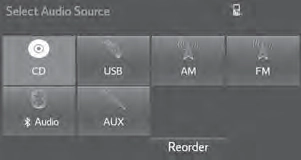 Select the desired audio source.
Select “Reorder”.
Select the desired audio source then  or
or  to reorder. Select “OK”.
List screen operation
: Select to scroll to the next or previous page.
: If appears to the right of titles, the complete titles are too long for the display. Select this button to scroll the title.
Turn the “TUNE·SCROLL” knob to move the cursor box to select a desired item from the list, and press the “TUNE·SCROLL” knob to play it. The track that is being played is highlighted.
To return to the top screen, select “Now Playing” on the list screen.
Press the “” or “” button on “SEEK/TRACK” or turn the “TUNE·SCROLL” knob to select the desired track/file/song number.
To fast-forward or reverse, press and hold the “” or “” button on “SEEK/TRACK”.
Select “Browse” or cover art.
Select the desired track/file/ song.
When an MP3/WMA/AAC disc or USB memory device is being used, the folder can be selected. When a Bluetooth® device or iPod is being used, the album can be selected.
According to the audio device, the following is displayed.
|
Audio source |
List name |
|
Audio CD |
Track |
|
MP3/WMA/AAC disc, USB |
Folder, File |
|
Bluetooth® |
Album, Track |
|
iPod |
Album, Song |
Sound settings
Select “Sound” on the audio control screen to adjust the sound set- tings.
Select “-” or “+” to adjust the treble, mid or bass to a level between -5 and 5.
Select “Front” or “Rear” to adjust the front/rear audio balance.
Select “L” or “R” to adjust the left/right audio balance.
The treble, mid and bass levels can be adjusted for each audio mode sepa- rately.
Download Manual